TikTok safe zones: what you need to know to get a perfect TikTok video from the first try
Are your TikTok captions or CTAs still landing under the caption bar or icons? Zeely’s 2026 safe-zone guide shows exactly how to frame, test, and publish videos that stay fully visible.
What is a TikTok safe zone?
A TikTok safe zone is the clear space inside your 1080×1920 frame where nothing covers what matters. It’s the part of your video that stays visible once TikTok’s interface appears. Basically it is the space where your logo, text, and CTA actually live.
Most creators frame their shots but forget the interface sitting on top. That’s where performance drops. When captions fall under the CTA button or icons overlap a face, the message disappears. Safe-zone awareness keeps every pixel doing its job.
Short-form video still drives the highest ROI for marketers according to HubSpot’s The 2025 State of Marketing Report. The gap between a performing ad and a wasted one can be a few blocked pixels. Protect your TikTok ad safe zones and your conversion rates stay healthy.
Business Insider’s analysts project $6.17B–$8.64B in ad dollars could shift if TikTok’s visibility drops. That’s the scale of what clear framing preserves. Next, you’ll see how the TikTok safe zones actually map on screen and how to design within them with confidence.

Understanding the TikTok frame
Every TikTok video sits beneath a live interface. Picture your 1080×1920 canvas with layers added on top:
- Top band – username and sound label, about 150–200 pixels high
- Right edge – like, comment, and share icons, roughly 120 pixels wide
- Bottom area – caption bar and CTA button, another 250–300 pixels deep
What remains is the center band is your safe zone. Keep text, faces, and logos here, and they stay visible on every device from iPhone SE to Galaxy S24.
Each placement shifts slightly:
- In-Feed Ads raise the CTA as captions expand; keep key text ≈15 percent above the bottom
- Spark Ads surface usernames earlier, pulling focus lower mid-frame
- TopView adds a slim playback bar along the base
- LIVE and Shopping add comments and product tags in the bottom third, you should avoid that space
The goal isn’t to fill the center but to choreograph motion within it. Keep attention where the frame stays clean and your TikTok safe zones perform consistently across placements.
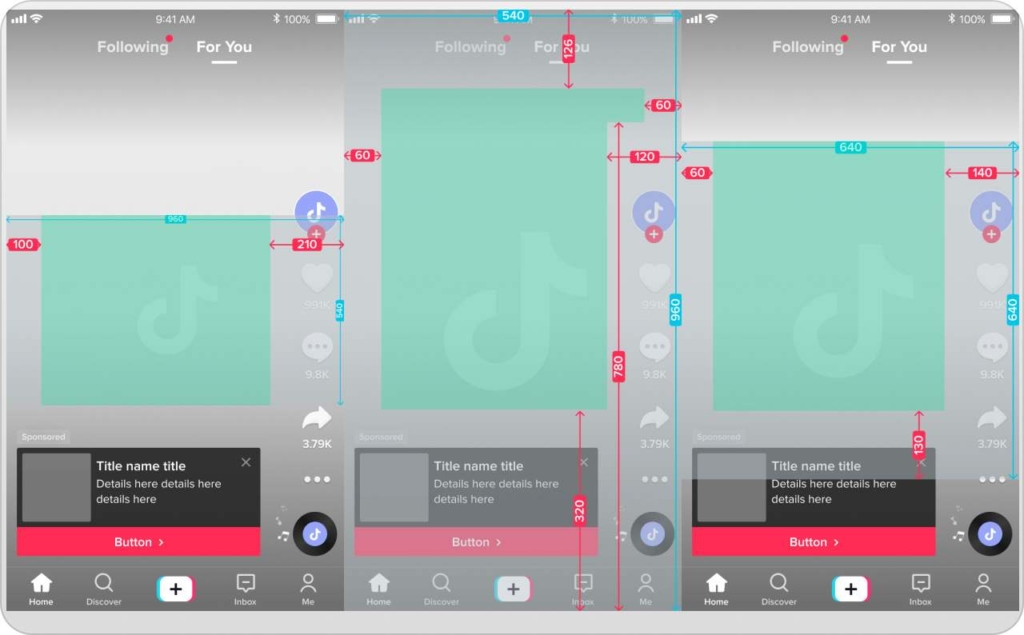
Photo source: TikTok Business Help Center
Why TikTok safe zones matter
Visibility helps your audience trust you and take action. Your ad can look great, but if a caption hides your offer or icons block your logo, people miss what you’re saying. One small overlap can cost you the click. Check also how much do TikTok ads cost.
When your framing stays clean, your story lands immediately. Faces feel centered. Text has room to breathe. Movement looks intentional. People keep watching because nothing fights for their attention. You’ll see it in your data, higher view-through rates, more clicks, and steadier conversions.
You also make your videos easier to follow. High-contrast text and steady subtitles help viewers who watch without sound or in bright light. Captions placed inside the safe band stay in sync and easy to read.
You stay compliant too. TikTok rejects ads that hide system buttons or mislead users about clickable areas. When you stay inside the safe zone, your creative is ready for review and safe for your brand. Read also how to get more followers on TikTok.
How to stay inside TikTok safe zones
Start with your full 1080×1920 frame open in your editor. Picture TikTok’s interface already on top of it.
Keep your key content centered
When text or logos drift too low, the caption bar hides them. It looks like this: your headline disappears under the CTA button, and viewers miss the offer. Slide that same text a little higher, and it reads cleanly. The frame suddenly feels balanced.
Leave space where the interface lives
The like and share icons stack along the right side. When your logo sits too close, it feels cramped. Shift it left by a few percent, and the composition breathes again.

Choose type that survives compression
Thin fonts blur when TikTok compresses video. If you’ve ever watched your crisp subtitle turn gray and soft, that’s why. Switch to a medium or bold weight, keep line spacing around 1.3×, and contrast text against the background. Your captions stay sharp even on small screens.
Preview before publishing
Upload your draft to TikTok Creative Center or Ads Manager. You’ll see exactly where the UI overlaps. If anything touches the handle, icons, or bottom bar, move it now. The live preview saves you from re-edits after approval.
Do a quick pre-flight check
Confirm your brand mark sits inside the center band. Check that captions stay legible from start to finish. Make sure the CTA button area is clean. Then test on two different phones—your layout should feel balanced on both.
When you compare side-by-side, the difference is instant. The wrong frame feels cluttered. The right one feels open, intentional, and ready to perform.
Best practices to boost performance inside TikTok safe zones
Safe zones protect visibility, but great creative still drives the result. These best practices for TikTok safe zones turn a clear layout into measurable performance.
Lead with your hook
The first three seconds decide whether someone stops or scrolls. Open with a visual cue that connects to your audience fast. These can be a reaction, product reveal, or short text hook. Keep motion inside the central band so nothing breaks under the handle or caption.
Mirror your message with on-screen captions
Use captions that echo your voiceover instead of repeating it word for word. When captions sit in the safe band, they reinforce your hook and boost completion rates for silent viewers. Keep phrasing short, high-contrast, and centered; long lines or stacked text slow the eye.
Show your brand early
Place your logo or product mark within the first two seconds. When the logo lives inside the safe zone, it builds recall without blocking movement. Include light motion—like a fade-in or a quick pop to integrate it naturally.
Design for negative space
Leave room for TikTok’s interface to breathe. Empty margins around the caption bar and right-rail icons make your creative look cleaner and help CTAs stand out. Safe-zone-aware layouts also scale better across placements like Spark Ads or TopView.
Use a system, not one-off edits
Create a simple design pack with safe-zone-ready logo lockups, caption styles, and animation presets. This keeps every editor and motion designer working from the same frame map. Add motion blocks that stop at safe-zone borders to avoid collisions during transitions.
Test and refresh
Run small 2×2 tests: caption on/off, CTA top vs. bottom. Track how each setup affects click-through and watch time. Use clear naming conventions and refresh creatives once fatigue hits 20–30% performance drop.
Keep it accessible
Auto-captions help, but manual proofing matters. Fix misheard words, add color contrast, and choose dyslexia-friendly fonts with open counters and even spacing. Accessibility is audience reach.
When your creative respects both safe zones and attention flow, you get more than compliance. You get ads that read instantly, move naturally, and stay watchable long after the first impression.
Placement-specific overlays
Each TikTok placement changes how much space the interface occupies on your video. Understanding those shifts helps you keep every caption, logo, and CTA visible where viewers expect to see them.
In-Feed ads
The caption bar and CTA button expand dynamically as users scroll. Keep all text and logos about 15% above the bottom edge so they never collide with the buttons.
Spark ads
Because Spark Ads use existing posts, the username and caption appear sooner and sit slightly higher. Keep your key message in the middle third of the screen so it stays visible throughout playback.
TopView ads
This placement gives you more open space, but the playback bar still appears near the base. Maintain your usual margins even if the frame looks empty — consistent spacing protects cross-placement performance.
LIVE and Shopping ads
These are the busiest layouts. Comment feeds, reactions, and product tags crowd the lower third, so treat that area as blocked. Keep faces, captions, and CTAs higher and centered for balance.
Once you map these overlays, your creative stops depending on guesswork. Every version of your video keeps its message readable, aligned, and ready to perform.
How to use an AI ad maker to stay safe-zone compliant
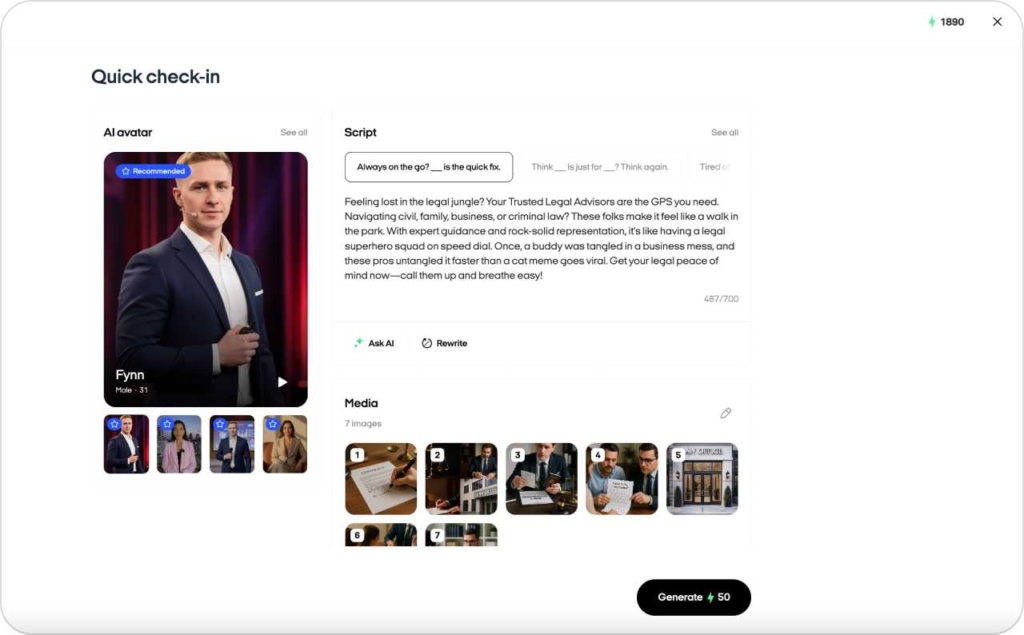
If you’ve ever spent hours trimming text, re-sizing clips, or guessing whether your caption sits too low, Zeely AI solves that. It’s a visual AI ad maker that builds ready-to-publish TikTok videos automatically. You choose your product, tone, and visual style and Zeely writes the script, selects scenes, adds music, and formats everything for TikTok’s 9:16 frame.
The biggest difference: Zeely designs with TikTok safe zones template logic built in. Every layout, subtitle, and call-to-action sits inside the visible frame, so nothing hides under the caption bar or right-rail icons. You get compliant creative by default and not by manual correction.
1. Start your project in Zeely
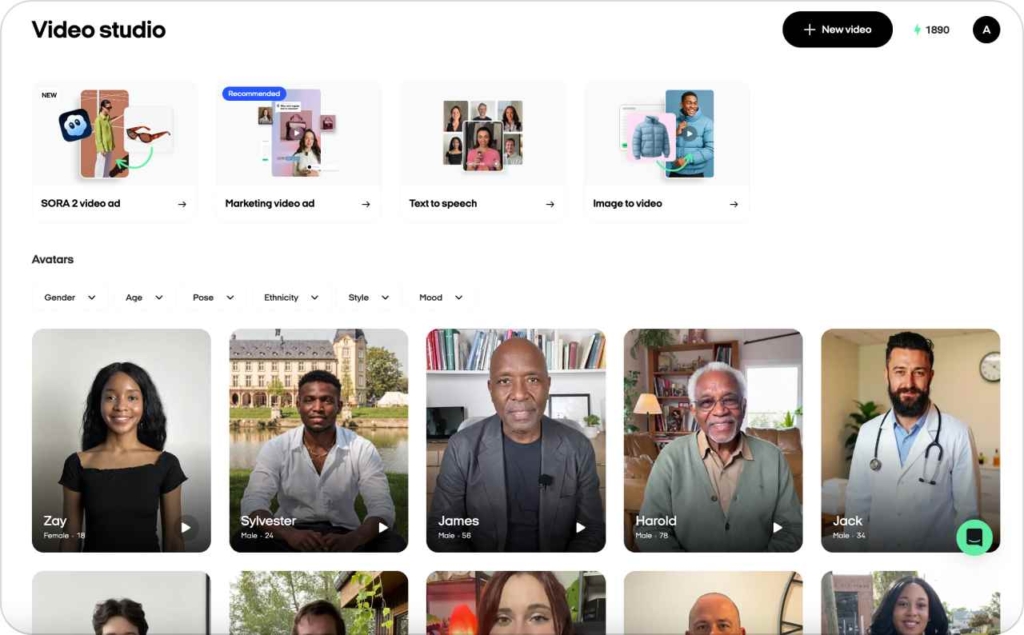
Open Zeely and create a new AI video ad. Select your product, choose an AI avatar or voice, and preview script options. You don’t need editing skills, Zeely automates scene pacing, subtitle placement, and music balance.
Safe-zone move: Plan your hook text for the middle of the frame. Keep a generous space at the bottom where TikTok’s caption bar lives.
2. Let AI build and refine your ad
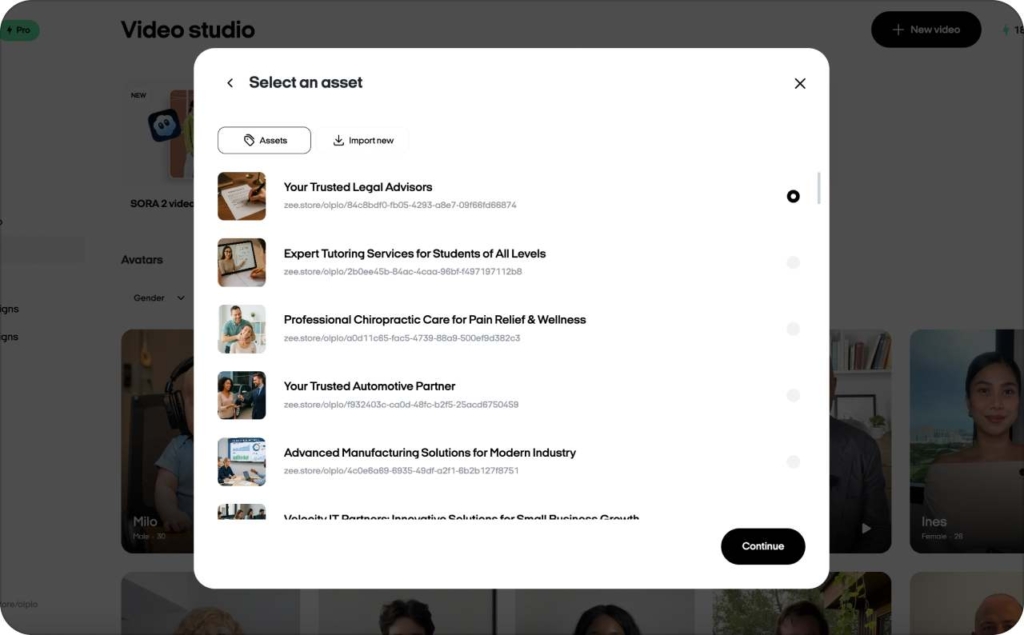
Click “Generate.” Zeely creates your ad within minutes — scenes, captions, motion, and music synced automatically. Watch the preview. If a caption or logo feels tight near the edges, drag it up slightly.
Safe-zone move: Keep captions short and line spacing open (around 1.3×). Avoid thin fonts or long phrases that might wrap into the lower third.
3. Render and preview
Render the final video, then watch the playback once more. Check that:
- Captions sit fully above the bottom bar
- The logo stays clear of right-rail icons
- The CTA button remains centered and legible
Zeely’s preview mirrors TikTok’s actual UI, so what you see is what goes live.
4. Publish to TikTok
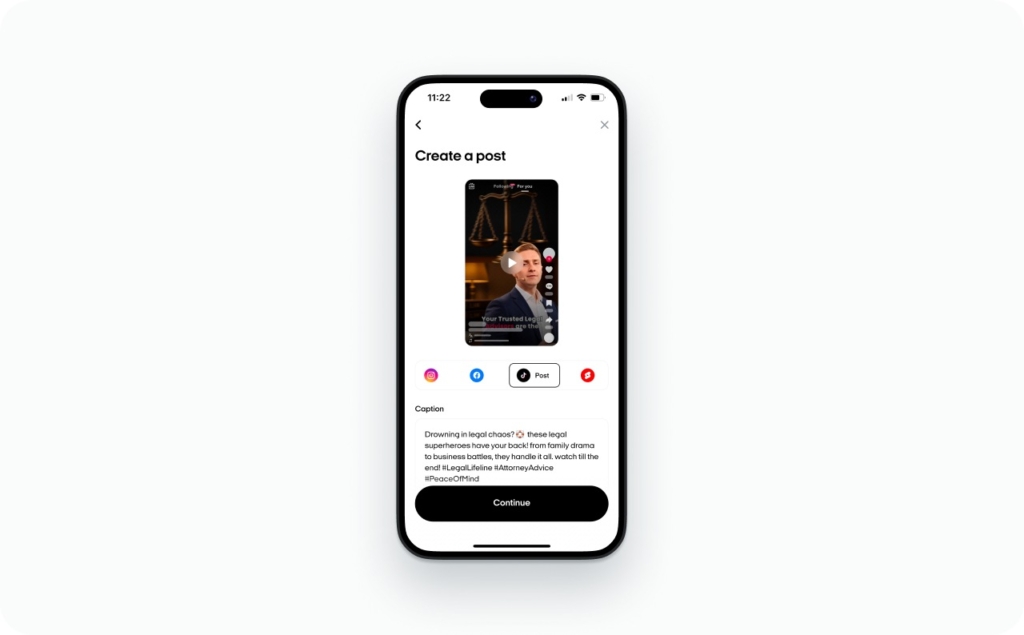
From Zeely, share to TikTok. You will be redirected to the official app to finalize the post. Zeely prepares platform‑optimized captions and hashtags, which you can paste before publishing.
5. Quick QA and A/B testing
Run two versions with minor changes: one with captions, one without; or two CTA placements. Monitor CTR, VTR, and completion. Adjust spacing or contrast where needed, then re-render in Zeely.
Why use Zeely AI for safe-zone compliance
Manual editing means endless re-uploads and guessing. Zeely AI TikTok ad generator automates layout and export, keeping your creative inside TikTok safe zones 2026 standards from the start. You keep the storytelling; Zeely handles the boundaries.
Cross-platform note: TikTok and Instagram safe zones
If you also create for Reels or Shorts, remember each platform’s interface shifts slightly. The center-band logic stays the same, but dimensions, caption stacks, and playback bars differ. You’ll find a complete comparison in our TikTok and Instagram safe zones cheat sheet.

Emma blends product marketing and content to turn complex tools into simple, sales-driven playbooks for AI ad creatives and Facebook/Instagram campaigns. You’ll get checklists, bite-size guides, and real results, pulled from thousands of Zeely entrepreneurs, so you can run AI-powered ads confidently, even as a beginner.
Written by: Emma, AI Growth Adviser, Zeely
Reviewed on: October 1, 2026