How to get paid on Instagram: The real earning guide for creators in 2026
You don’t get paid per view on Instagram, instead you get paid when you use the right tools. I tested every payout path myself so you can stop guessing and start earning.
Let’s clear up the biggest Instagram myth first: you don’t get paid per view.
There’s no secret rate per play or hidden formula behind your Reels. You earn when you use Instagram’s official tools.
I’ll show you how payouts really work, what features matter, and what follower or view numbers actually count. It’s the no-drama roadmap to real income. It is clear, current, and built for creators who want facts, not guesses.

Does Instagram pay for views?
Let’s settle this upfront.
Instagram doesn’t pay you for views.
You get paid only when you use its verified monetization tools.
Those include:
- Badges where people can tip you during Lives
- Gifts where fans send Stars on Reels worth one cent each
- Subscriptions that let followers support you each month
- Branded Content labeled Paid through Instagram
- Invite-only Bonuses that run for a set time
Views can help during specific bonus periods, but there’s no fixed pay rate or automatic payout counter. Instagram explains all official payout rules in its Help Center guide on monetization and payouts.
What Instagram actually pays for and how it works
To receive money from Instagram, you need three things:
- A Professional account set to Creator or Business
- Compliance with Partner Monetization and Content Monetization Policies
- Access in a country where payouts are supported
You can check eligibility inside your Professional Dashboard → Monetization. If you see “Not available,” it means the feature hasn’t reached your region or your account still needs approval. Keep your content original, your policy status clean, and your payout info verified and that’s what unlocks access to the tools below.
At Zeely, we see creators unlock payouts faster when they treat eligibility like onboarding, not a mystery. Five minutes checking your Dashboard now saves months of waiting later.
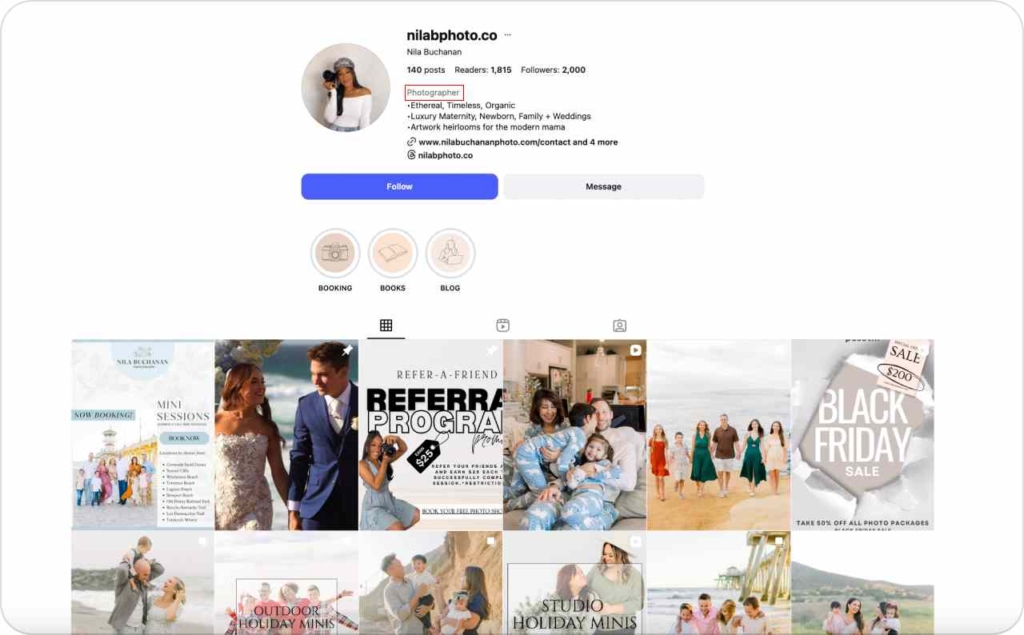
Photo source: @nilabphoto.co on Instagram
Payout rules and timing
Instagram pays on a monthly cycle through Meta Pay once your eligible earnings reach $25 or more.
- Cycle: payments are processed around the 21st of each month
- Threshold: you must earn at least $25 before money moves
- Method: add bank or PayPal inside Professional Dashboard → Payouts
- Deadline: if no payout account is added within six months, your balance is forfeited
Many creators lose earnings simply because they never hit the minimum or never verified their payout details.
From Zeely’s creator base, the fastest to reach their first payout typically post 3–5 Reels per week, host at least one Live with Badges per month, and run a small subscriber campaign near month-end. That combination tends to clear the $25 mark consistently.
Переглянути цей допис в Instagram
The tools that pay you
Badges on Lives
Badges turn live sessions into micro-tipping moments. Viewers buy a Badge that displays next to their name during your stream. You receive the value directly through Meta Pay at the next payout cycle.
Think of each live as a 20-minute community event, not a broadcast. Creators who announce topics in advance, for example, a “five-minute fix” Q&A or behind-the-scenes demo, see 40–60% higher Badge purchases than spontaneous Lives.
Gifts on Reels
Fans can send Stars while watching your Reels. Each Star equals $0.01 to you. That means 2,500 Stars = $25, your first eligible payout. Full details are in Meta’s Business Help page on Gifts.
A common mistake is expecting “ad revenue” logic. Gifts are voluntary support, not a per-view rate. Reels with clear calls like “Tap the star if this helped you” convert 2–3× higher than generic posts.
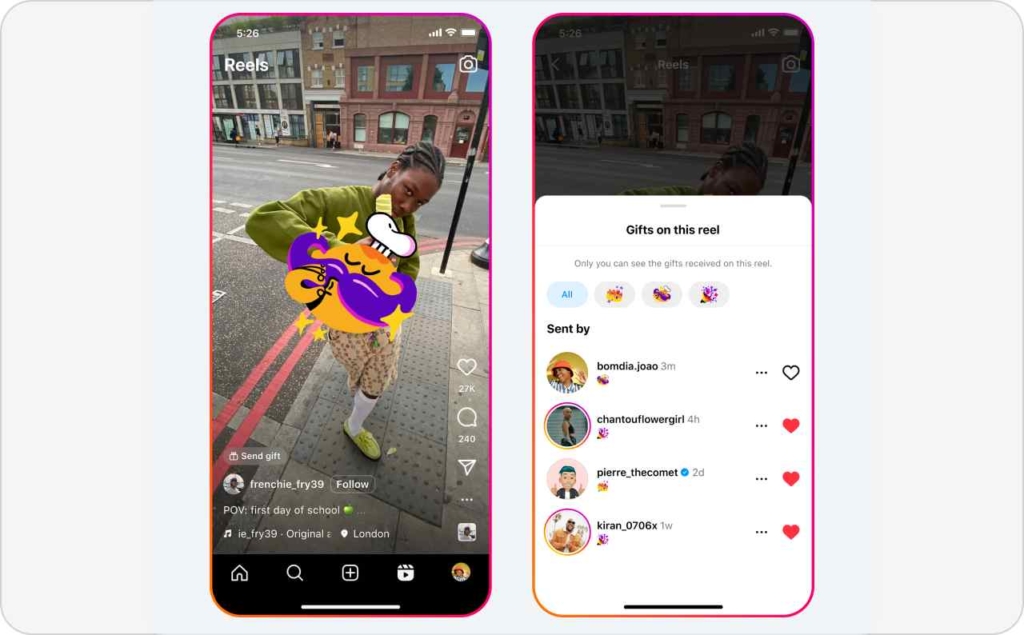
Photo source: Meta
Subscriptions
Subscriptions let followers pay monthly for exclusive content or access. You manage it in your Professional Dashboard, where you can see your subscriber count, active tiers, and expected payout.
Meta’s subscription update confirms rollouts are expanding country by country. Creators who offer tangible perks, like early product drops, private Lives, or downloadable templates, keep 60% more subscribers after month three.
Tip from Zeely’s data: run a short “subscriber week” once a quarter. Small urgency spikes retention and brings in first-time signups.
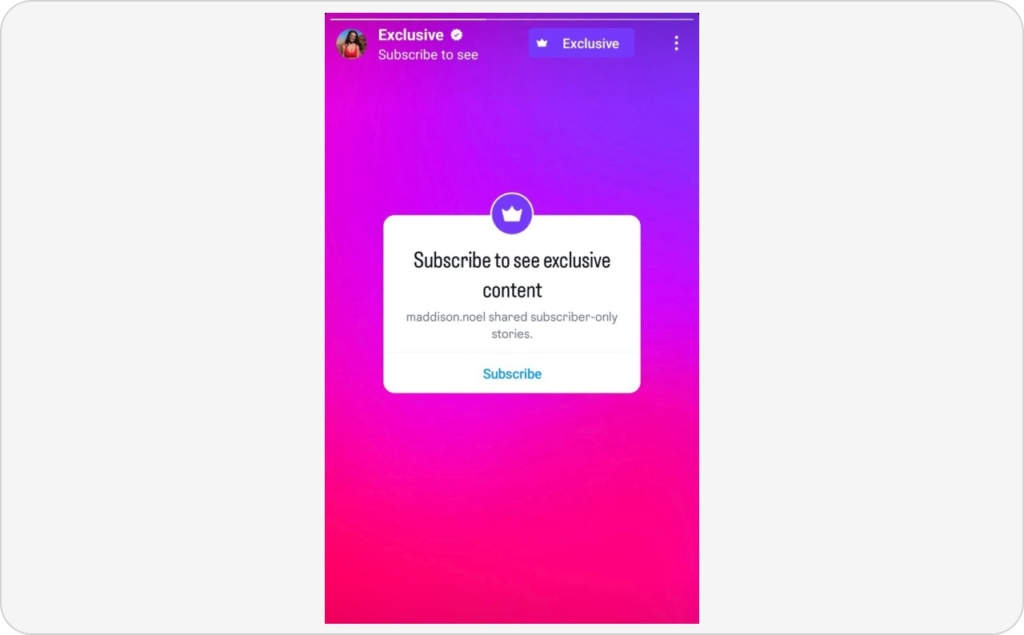
Photo source: @maddison.noel on Instagram
Branded content paid through Instagram
When a brand pays you through the Creator Marketplace, the payment is processed directly in Instagram’s system under the tag Paid through Instagram. This keeps it compliant with Meta’s monetization policies and protects both sides.
Before signing any agreement, confirm:
- Usage duration (how long they can use your content)
- Placement limits (organic vs paid ads)
- Payment terms (Net 30, 50% upfront, etc.)
Forbes recommends keeping whitelisting rights separate from organic use so you don’t give away indefinite ad rights.
Zeely creators who use branded deals as part of their funnel often see the best ROAS when they repurpose the same creative inside Zeely Ads. It multiplies reach without breaching contract limits.

Photo source: @alexandrasaintmleuux on Instagram
Invite-only bonuses
Bonuses are temporary programs where Meta pays you based on performance, for example, total Reels plays over 30 days. You’ll see invitations in your Dashboard with exact goals and deadlines.
Meta’s newsroom explains that these are experimental and time-bound. In early 2025, the “Ads on Profile” payouts ended, confirmed by Business Insider.
Never bank your income on bonus programs. Use them as accelerators, not anchors. Creators who build audience-owned income (email, checkout, or community) bounce back instantly when Meta changes its terms — exactly what Harvard Business Review calls “financial resilience for creators.”
Every dollar you earn through Instagram passes through Meta Pay after meeting two conditions: you’re eligible, and your balance clears $25. Everything else — from Gift campaigns to Subscriptions — is about creating steady inflow before that date hits.
At Zeely, we teach creators to track earned vs expected in their own spreadsheets. The goal is not a viral Reel; it’s a predictable payout cycle. Once you master that, you stop wondering when Instagram pays you — and start deciding how often it should. Read more about how to make money on Instagram.
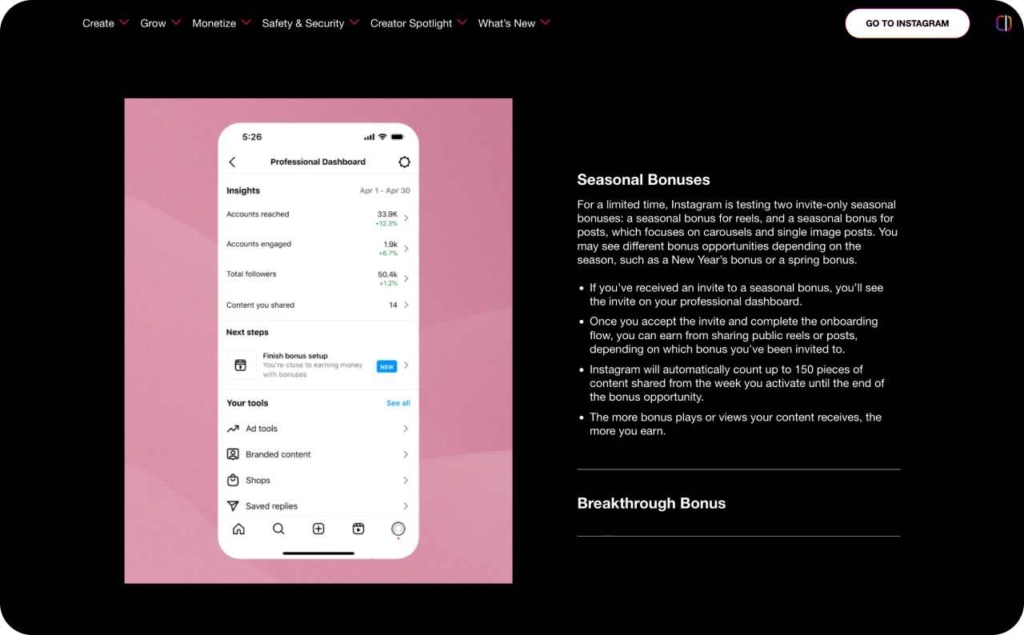
Photo source: Creators
How many followers on Instagram to get paid
Let’s clear this up once and for all: there’s no magic number. Instagram doesn’t unlock payments when you hit 10,000 or 100,000 followers. You get paid when your account is eligible and your audience actually interacts with what you post.
I’ve seen too many creators wait for that “big follower milestone,” thinking it’ll flip a switch. It doesn’t. Payments start when your setup is complete, your payout method is active, and your followers trust you enough to buy, subscribe, or tip.
What actually gets you paid
Brands, not Instagram, are the ones who care about your audience, and what they value most isn’t size, it’s trust.
Here’s what we see across creators and verified data from HubSpot and Forbes:
| Creator type | Typical range | Common deal value per post | Why brands pay |
| Nano | 1K–10K | $50–$250 | Feels authentic, local trust |
| Micro | 10K–100K | $250–$2,000 | Consistent engagement, niche focus |
| Mid-tier | 100K–500K | $2,000–$10,000 | Scale plus proof of conversion |
| Macro | 500K+ | Variable | Mass awareness campaigns |
Notice the range? Some nano creators with 3,000 followers make more than mid-tier influencers because their audience listens and buys.
How to earn faster with a small audience
If you have a few thousand followers, you’re not too small. You’re early, and that’s your edge.
Here’s what works best across creators I worked with:
- Turn on everything you can
Activate Badges for Lives and Gifts for Reels. It’s low-hanging fruit that turns engagement into actual dollars.
- Sell without selling
Use your Reels to teach, show, or solve, and then link to your product, service, or affiliate. That’s what I call “earning because of Instagram.”
- Track your proof
Use analytics or UTM links to see which post drives traffic or checkout. It’s your receipt for brand deals.
- Reinvest your first $25
Boost one of your top Reels with Zeely Ads. That small spend often doubles your reach and attracts your first paid collab.
Expert takeaway
You don’t need to chase a follower goal. You need to activate income paths. Every creator I’ve helped who earns consistently on Instagram does three things:
- Keeps policy compliance clean
- Treats their audience like a community, not a count
- Tracks results, not reach
If you have 3,000 engaged followers, you already have what big accounts spend years trying to rebuild — trust that converts.
How many views to get paid on Instagram?
Short answer: There is no global view-threshold that automatically triggers payouts. You don’t get paid simply because a Reel hits 100K or 1M plays. Money shows up only if one of two things happens:
- You’re part of an invite-only bonus program where views can count
- Those views help you drive Gifts, Subscriptions, Brand deals or your own product sales
Why views alone don’t pay
Many creators equate Instagram with YouTube-style CPM payouts and get frustrated when no check arrives. Reddit threads confirm this pattern: “High plays, zero dollars.”
Here’s the truth: Instagram’s public statements confirm that view-based payouts are only for selected creators in specific programs. So while views matter, they don’t pay by themselves.
When views do lead to money
Bonus programs
Occasionally Instagram invites you into a bonus where views or plays count. But those programs are not permanent, not all creators qualify, and the payout per view is not published. Treat them as a possible windfall, not your income base. Check our Instagram lead generation guide.
Indirect value of views
Even though raw plays don’t pay, they still help you earn in other ways:
- A Reel with high views can earn Gifts (Stars) from fans
- It can convert into Subscriptions if you have that enabled
- It can attract brand deals — brands see view numbers as proof of audience reach. In short, views become currency when they lead to actions
What you should track instead of view counts
Here are better metrics to focus on:
- Gift rate per 1,000 views: How many fans turn a view into a Star?
- Subscriber sign-ups per view: How many viewers convert to paying followers?
- Brand deal conversions: How many views lead to paid partnerships or sales?
- Engagement completion: High views mean little if people stop watching early or don’t interact.
A step-by-step guide to set up payouts correctly only once
Most creators lose their first earnings not because they didn’t qualify, but because they never finished setup. You only need to do this once — and it takes about five minutes.
Here’s how to get it right the first time.
1. Switch to a Professional Account
Go to your profile and tap Settings → Account → Switch to Professional. Choose Creator if you post content and want access to monetization tools, or Business if you sell services or products. You’ll see a new section called Professional Dashboard appear on your profile.
2. Check monetization eligibility
Open Professional Dashboard → Monetization. Tap View Eligibility and accept the Partner and Content Monetization Policies if prompted. If any feature says Not available, it usually means Meta hasn’t rolled it out in your country yet. Keep checking weekly; availability changes frequently.
3. Add your payout details
This part matters most. Tap Set Up Payouts in the Monetization menu. You’ll be asked to connect a bank account or PayPal. Confirm your legal name and tax info exactly as they appear on your bank documents. If you skip this, your balance can expire after six months — Meta warns that unclaimed funds may be forfeited.
4. Turn on earning tools
Enable everything you qualify for:
- Badges for Instagram Lives
- Gifts for Reels
- Subscriptions if available
Each tool lives under Monetization → Tools. Once turned on, you’ll see dashboards for earnings and balance tracking.
5. Post qualified content and track payments
When your balance hits $25, Instagram processes payment around the 21st of each month.
You’ll find your record under Professional Dashboard → Payouts → Invoices or Remittances.
Creators often build small “payout pushes” at month-end — one live stream, one subscriber drive, or a Reels gift challenge — to cross the threshold right before the payout cycle closes. It’s the difference between waiting 30 days or getting paid this month.
Follow the official Instagram payout guide for screenshots and country-specific details.
“Paid by Instagram” vs “Paid because of Instagram”
There’s a difference between money that flows through Instagram and money that starts because of Instagram. Understanding that split helps you plan steady income.
Here’s how every earning path compares.
| Method | Who pays you | Typical prerequisites | What scales earnings | Payout timing |
| Badges (Live) | Instagram via Meta Pay | Creator or Business account; Live feature active; compliance with Partner Policies | Frequent Lives, interactive Q&As, clear value | Around the 21st each month after $25 threshold |
| Gifts (Reels) | Instagram via Meta Pay | Monetization enabled; Gifts available in your country | Callouts during Reels; loyal viewers; creative hooks | Around the 21st each month; $0.01 per Star |
| Subscriptions | Instagram via Meta Pay | Subscription access in Dashboard; policy compliance | Consistent exclusive value; retention offers | Monthly recurring payouts once balance ≥ $25 |
| Branded content (Paid via Instagram) | Brand, processed inside Instagram | Active Creator Marketplace listing; content labeled “Paid through Instagram” | Verified partnerships; strong engagement metrics | Paid directly after campaign completion |
| Invite-only bonuses | Instagram / Meta | Invitation shown in Dashboard; region eligible | Reels engagement, short-term challenges | Varies by program; expires after campaign window |
| Brand deals (External) | Brand or agency directly | Negotiated contract; deliverables + usage terms | Proven conversions; analytics access; content rights clarity | Net-30 or as per contract |
| Affiliate links | Affiliate network or merchant | Approved affiliate account; tracked links | Click-to-sale rate; niche relevance; traffic quality | Usually monthly; often 30-day validation windows |
| Your shop / Digital products | Customers directly | Checkout or payment link; fulfillment system | Strong content funnel; retargeting with UTMs | Immediate or per your store’s gateway |
| Services / UGC packages | Clients directly | Portfolio or samples; pricing clarity | Repeat buyers; reliable turnaround; contracts | On delivery or per invoice terms |
Compliance essentials to not get demonetized
1. Follow the Partner and Content Monetization Policies
Instagram reviews who gets paid through the same standards used across Meta’s apps. You’ll find the full list of rules in Instagram’s official Monetization Policies. Avoid anything that falls into restricted content: misleading health claims, unlicensed giveaways, or reposted videos without transformation. When in doubt, stick to what you’ve created yourself.
2. Use the Paid Partnership tag correctly
When a brand pays you or sends free products, always label your post with the Paid Partnership tag. It helps you stay compliant with Instagram’s systems — and builds trust with your audience. If you’re posting outside the app (like in Stories or Reels remixes), include “#ad” or “#sponsored” clearly in the caption. Never bury disclosures under hashtags.
3. Keep FTC disclosures simple
The U.S. Federal Trade Commission requires transparency about “material connections.” That includes payments, gifts, discounts, or free trips. The safest format is direct: “Ad,” “Paid partnership,” or “I partnered with [Brand] to share this.” You can review the FTC’s full Endorsement Guidelines for exact language examples.
4. Check your originality
Reposting other creators’ videos or editing over TikToks with watermarks can trigger “limited originality” warnings. Those limit your reach and can suspend monetization access. Always upload your own files, keep clean copies, and remix responsibly with commentary or new context.
FAQs: What most creators still get wrong
Instagram pays around the 21st of each month, once your earnings reach $25. If you haven’t added a payout account, your balance just sits there — and expires after six months.
Go to Professional Dashboard → Payouts and connect your bank or PayPal now, not later.
You can confirm thresholds in Meta’s payout FAQ.
These tools roll out by region and eligibility. Check Professional Dashboard → Monetization → View Eligibility to see what’s active. If a feature isn’t live for you yet, don’t wait. Keep building “paid-because-of” revenue — like brand deals or affiliate sales — while you wait for access.
It means your content looks too derivative to qualify for monetization. Reposts, meme compilations, or clips with third-party watermarks can trigger that label. Keep files original, add commentary or a story, and you’ll stay safe.
Yes — and often. Instagram’s pilot payouts (like Ads on Profile) have ended before. Bonus tests come and go depending on Meta’s experiments.
Yes, always. If you’re paid, gifted, or affiliated in any way, you must disclose it.
Use Instagram’s Paid Partnership tag and an explicit caption like “Ad” or “Partnered with [Brand].”
Meta is gradually retiring native checkout in some countries and directing buyers back to brand websites. That means more sales will happen on your own site — a good thing. Tag links with UTMs and use analytics to keep visibility over where your sales come from. More control, better margins.
How Zeely AI helps you earn on Instagram
If you can film a Reel, you can create high-guilidy ads with Zeely AI. That’s the point — no designer, no editor, no guessing.
I use Zeely’s to turn quick clips into ads that sell. The AI writes your script, adds a lifelike AI avatar, and frames your product so it looks pro on Instagram and TikTok.
You can launch straight from Zeely’s dashboard. Your Meta account connects once, and tracks campaigns automatically.
Need results faster? The Booster add-on cuts platform fees and pushes your ads live sooner. Everything — creatives, spend, and conversions — lives in one clean view. If you’re new, start with the Getting Started guide. You’ll go from idea to income in under an hour.

Emma blends product marketing and content to turn complex tools into simple, sales-driven playbooks for AI ad creatives and Facebook/Instagram campaigns. You’ll get checklists, bite-size guides, and real results, pulled from thousands of Zeely entrepreneurs, so you can run AI-powered ads confidently, even as a beginner.
Written by: Emma, AI Growth Adviser, Zeely
Reviewed on: December 14, 2026