Akool AI review for face swap and avatar ads
Akool is strongest when you need face swap, avatar video, and translated clips for creative testing. For ad work, check credits, export quality, consent rules, and how quickly each tool turns product assets into finished ads.
If you’re reading this Akool AI review, you probably want a clear answer before testing another video tool. Akool can help with AI face swap, talking avatars, video translation, and localized creative. The bigger question is whether it fits your ad workflow, budget, and quality bar.
I’m Emma from Zeely, and I’ll review Akool as a marketer would use it. Not as a novelty face swap app. Not as a generic AI video toy. I’ll look at where it helps, where it needs extra checking, and when Zeely may be a better fit for fast ad production.
Akool is a strong option if you need realistic face swap, avatar video, video translation, or live avatar experiences. It is especially useful when your team already has creative direction and wants to transform existing video assets.
Here’s the practical version:
- Best for: face swap tests, translated videos, avatar explainers, localized creative, and API-led video workflows
- Less ideal for: beginners who need the full ad built from a product page, not just a video effect
- Pricing note: Akool pricing uses plans, credits, add-ons, and limits. Check export quality, watermarking, usage rights, and credit burn before scaling
- Ad note: AI face swap for ads needs consent, clear rights, and platform-safe creative. Do not swap in real people, celebrities, customers, or staff without permission
- Zeely fit: Zeely is stronger when you want product-first AI video ads, scripts, captions, creative variants, and Meta or TikTok-ready outputs in one flow
My verdict: Akool is a capable AI video suite, but it works best when you already know what video you want to make. Zeely is better when you need to go from product link to instant ad creative generator.

Akool AI review: what Akool does
Akool is an AI video and visual content platform. Its core tools include face swap, talking avatars, streaming avatars, video translation, image generation, talking photo, and background changes. You can use it to change faces in a clip, make a photo talk, translate a speaker into another language, or create avatar-led video content.
That range makes Akool useful for creative teams, agencies, ecommerce brands, educators, and event marketers. Still, the tool is not built around one narrow job. It gives you many video features, then expects you to decide the campaign structure.
That matters for paid ads.
A small brand does not only need a realistic talking face. It needs a hook, offer, product proof, CTA, caption style, export ratio, and testing plan. Akool can help with parts of that production work. It does not replace your ad brief, positioning, or performance review.
Use Akool when you already have:
- A source video or image you want to adapt
- Consent from the person whose face or likeness appears
- A script or campaign concept ready
- A clear plan for where the video will run
- Time to check credit cost, quality, and export settings
Use Zeely when you want the ad workflow to start from your product, landing page, or offer. In Zeely, the product stays at the center, and the AI avatar supports the sale instead of becoming the whole story.
Akool AI features that matter for ads and content
The main Akool AI features fall into six buckets: face swap, avatar video, talking photo, video translation, image tools, and API access. The best feature depends on what you’re trying to produce.
Face swap for ads and personalized creative
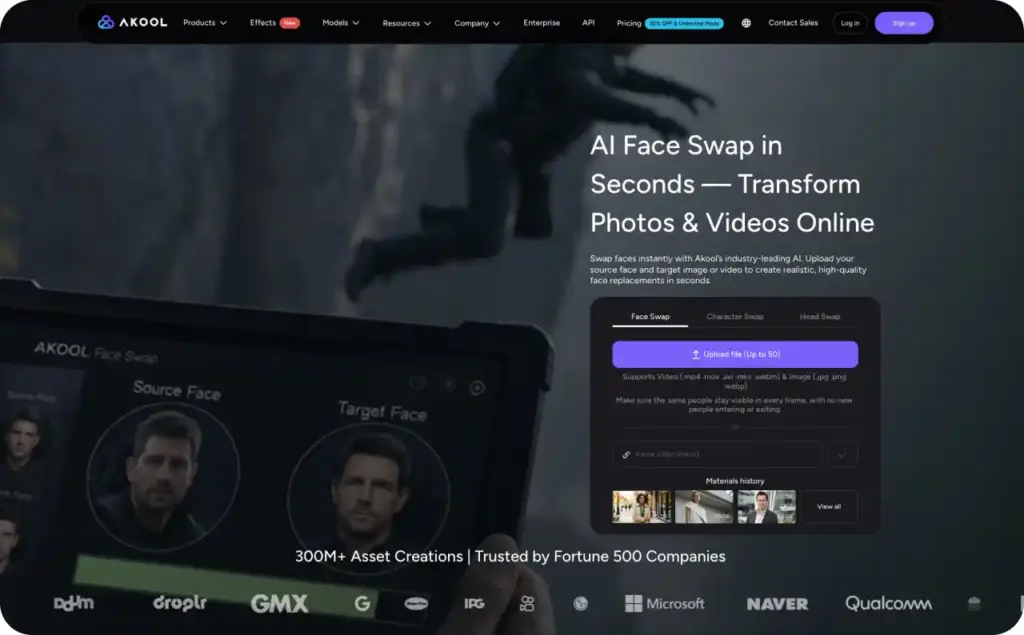
Akool’s face swap tool lets you upload a source face and target image or video. The tool can replace faces while trying to preserve motion, lighting, and expression. That makes it useful for concept tests, character swaps, localized campaigns, entertainment creative, and event activations.
For ads, I’d use face swap carefully.
A good use case: your brand has signed talent releases from several creators. You want to test which presenter style works best across the same script. Akool can help you create fast variants, as long as the rights are clear.
A risky use case: swapping a recognizable person into an ad without consent. That can create policy, legal, and trust problems. Even if the video looks realistic, the creative can feel misleading.
Do this now: create a simple rights checklist before testing face swap.
- Do we own or license the original video?
- Do we have written consent for the face or likeness?
- Does the ad imply a false endorsement?
- Would a viewer feel tricked if they knew the clip was AI-edited?
- Does the platform require an AI label or disclosure?
Expected result: fewer rejected ads, cleaner approvals, and a safer production workflow.
Avatar video and talking photo
Akool also supports avatar-style video creation. You can use a talking avatar or make a photo speak with a voice. This is useful for explainers, product intros, internal training, event videos, and short social content.
The quality depends on the input, script, voice, and output settings. Avatar videos work best when the message is simple. A 20-second product explanation usually works better than a long, emotional sales pitch.
For ad use, keep the avatar’s job narrow. Let it explain the offer, point to a product benefit, or introduce a customer pain point. Do not make the avatar carry every proof point.
A simple ad structure:
- Hook: name the problem in one sentence.
- Product proof: show the product or result quickly.
- Avatar line: explain why it helps.
- CTA: tell the viewer what to do next.
Example script starter:
“Still editing product videos by hand? Here’s a faster way to show your offer, test your hook, and launch fresh creative this week.”
That kind of line works because it sounds useful, not theatrical.
Video translation and lip-sync
Akool’s video translation tool is one of its stronger business features. It can transcribe speech, translate it, generate dubbed audio, and adjust lip movements to match the new language. This helps when you want one video to work across different markets.
For marketers, translation is not just a language task. It is a trust task.
A direct translation can sound flat or awkward. A better workflow is to localize the offer, rewrite the CTA, check cultural references, then proofread captions before export.
Use video translation for:
- Product explainers
- Founder intros
- Training videos
- Webinar clips
- Retargeting ads in multiple languages
- Localized UGC-style scripts
Check this before publishing: does the translated video still sound like a real person selling to that market? If not, rewrite the line before rendering final versions.
Image generation and background tools
Akool also includes image generation, background change, image-to-video, and related visual tools. These can help create quick visual assets for social posts or short video scenes.
For performance ads, I would treat these as supporting features. They can help you make a scene cleaner or more branded. They should not replace product clarity.
If the product disappears behind AI visuals, the ad usually gets weaker. Viewers need to understand what you sell within the first few seconds.
Streaming avatar and API access
Akool offers streaming avatar and API-led workflows for larger teams. These features fit demos, support agents, live experiences, personalized landing pages, and interactive brand activations.
This is where Akool can serve enterprise or developer-led projects better than simple creator tools. Still, API access only matters if your team has the technical resources to use it.
For small businesses, the better question is simpler: can you create, export, and test a usable ad today? If the answer requires too much setup, choose the tool with fewer moving parts.
Akool pricing: credits, limits, and what to check
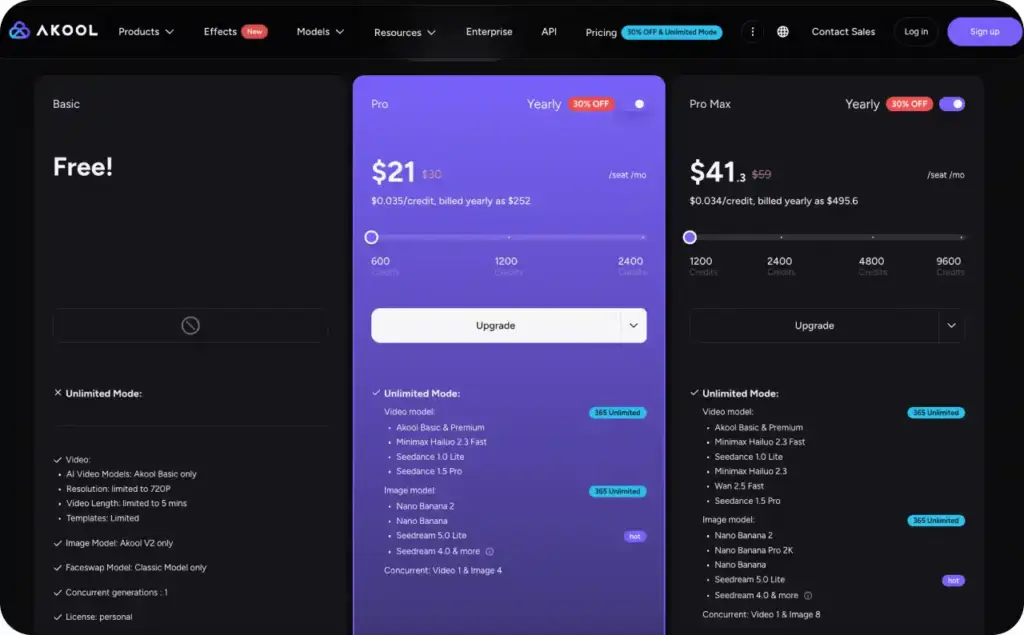
Akool pricing can look simple at first, but you need to check the details before scaling. The current public pricing page lists a free Basic plan and paid creator or team options. It also shows differences in watermarking, resolution, processing speed, storage, video length, concurrency, API access, and credits.
The free plan is useful for testing. It is not always enough for ad-ready output because free tiers often include watermarks, lower resolution, slower processing, or stricter model limits.
Before you buy credits, check these items:
| Pricing item | Why it matters for ads |
| Watermark removal | Paid ads usually need clean exports. |
| Resolution | 720p may be fine for tests, but 1080p or higher is safer for campaigns. |
| Video length | Short ads are fine, but explainers and translated clips may need more time. |
| Credit usage | One “video” can cost more if you use face swap, lip-sync, translation, or high-res output. |
| Processing speed | Slow queues can block weekly creative testing. |
| Commercial rights | Your plan must allow business or client work. |
| Team seats | Extra editors can increase monthly cost. |
| API access | Helpful for automation, but unnecessary for many small teams. |
My rule: calculate cost per finished usable ad, not cost per month.
A plan may look affordable until you create five rejected versions, two language variants, and three exports. Count only the videos you can actually run.
Do this now: make one test ad, one translated version, and one revision. Then check how many credits were used. That will give you a better budget estimate than the pricing table alone.
Export quality and ad use cases in this Akool AI review
The biggest quality question is not “does it look real?” It is “does it sell clearly?”
Akool outputs can look polished, especially when the input is clean. Good lighting, clear audio, a steady face, and simple framing all help. Poor input footage gives AI less to work with. That is when you may see mouth issues, face blur, unnatural expressions, or odd lighting shifts.
For ads, test Akool in these use cases first.
Use case 1: Localized product explainer
Record one clear product explainer in English. Translate it into Spanish, French, or another target language. Then proofread the script before export.
Best for: ecommerce, SaaS, apps, education, and service businesses.
Metric to watch: CTR by language and CPA by market.
Use case 2: Creator face swap variants
Use licensed creator footage and signed permissions. Test different presenter looks or character versions while keeping the same product message.
Best for: agencies with rights-managed creative libraries.
Metric to watch: thumb-stop rate and hold rate in the first three seconds.
Use case 3: Avatar retargeting ad
Create a short avatar video for people who visited a product page but did not buy. Keep it direct and offer-led.
Best for: ecommerce, local services, and simple lead generation.
Metric to watch: CPA and return on ad spend.
Use case 4: Event or brand activation
Let users appear in a branded video experience, with consent and clear terms. This is where face swap can feel exciting instead of gimmicky.
Best for: events, booths, launches, and interactive campaigns.
Metric to watch: submissions, shares, and email capture rate.
Use case 5: Training or onboarding video
Use avatars or translated clips to create repeatable learning content. This is less about paid ads and more about saving production time.
Best for: internal teams, customer education, and franchise training.
Metric to watch: completion rate and support ticket reduction.
My ad-quality checklist is simple:
- Product appears early
- Hook is clear in the first three seconds
- Captions are readable on mobile
- AI face or avatar does not distract from the offer
- CTA matches the landing page
- Export format fits Meta, TikTok, Reels, or Shorts
- Rights and disclosures are documented
If Akool passes those checks, it can be useful. If not, the video may look impressive but fail as an ad.
AI face swap for ads: consent, trust, and platform safety
AI face swap for ads is powerful because faces get attention. It is also risky because faces carry identity, trust, and endorsement.
My advice is firm: only use face swap with permission. Use your own likeness, licensed talent, approved creators, or fictional characters you have the right to use. Avoid public figures, customers, employees, influencers, or competitors unless you have explicit written approval.
Also avoid false proof. Do not make it look like someone used your product if they did not. Do not create fake testimonials. Do not imply a founder, celebrity, doctor, or expert endorsed you when they did not.
For social platforms, check current AI-generated content and advertising rules before launch. Meta and TikTok both have policies around AI-generated or significantly edited realistic content. Those rules can change, especially for political, financial, health, and high-trust categories.
A safe ad note can be simple:
“AI-generated presenter. Product details and offer are real.”
You may not need that exact line on every ad, but the principle matters. The viewer should not feel tricked.
Pros and cons of Akool AI for marketers
Akool has enough depth to be useful, but it is not the simplest path for every business.
Pros
Akool gives marketers a wide set of video tools in one platform. Face swap, avatars, video translation, and image tools can support many content workflows. The quality can be strong when the input is clean and the use case is clear.
It also has business-friendly features, including higher-resolution outputs, workspace options, and API access on advanced setups. That makes it more scalable than basic novelty apps.
Cons
The same breadth can make Akool feel less focused. A beginner may still need help writing the script, choosing the format, creating the ad structure, and judging performance.
Pricing also needs careful review. Credits, export quality, watermarks, seats, API access, and processing speed can affect real cost. You need to test the full workflow before relying on it for weekly campaigns.
The biggest watchout is consent. Face swap is not just another creative effect. It changes someone’s likeness. Treat it like a rights-managed asset.
Final verdict: is Akool AI worth it?
Akool is worth testing if you need realistic face swap, avatar video, video translation, or interactive avatar content. It is strongest for teams that already have creative assets and want to adapt them into new formats or languages.
It is not the tool I would choose first if your main goal is simple: “I have a product and need ads today.” For that, Zeely is more direct because the workflow starts with the product, then builds the ad around it.
Here’s my final call:
Choose Akool if you need video transformation, face swap, translation, API workflows, or live avatar experiences.
Choose Zeely if you need product-led AI ads, scripts, avatar presenters, captions, and fast creative variants for Meta, TikTok, Reels, or Shorts.
FAQ: Akool AI review questions
Akool AI is an AI video and visual content platform. It includes face swap, avatar video, video translation, talking photo, image generation, background tools, streaming avatars, and API options.
Akool can be good for ads when you have a clear script, clean input footage, proper rights, and a plan for testing. It is most useful for face swap variants, translated explainers, avatar retargeting, and localized creative.
The main Akool AI features include face swap, talking avatars, streaming avatars, video translation with lip-sync, talking photo, image generation, background change, and API access.
Akool pricing uses plans, credits, and feature limits. Check watermarking, resolution, video length, processing speed, storage, team seats, API access, and commercial rights before scaling.
Akool’s pricing page lists a free Basic plan. It is best for testing because free plans often have limits like watermarks, lower resolution, slower processing, or restricted models.
You can use face swap in ads only when you have the right permissions and the creative does not mislead viewers. Get consent for every real face or likeness. Avoid fake endorsements and check platform AI disclosure rules.
It depends on your goal. Akool vs Zeely is not a simple quality comparison. Akool is stronger for face swap, translation, and creative transformation. Zeely is stronger for product-first AI video ads and fast campaign-ready creative.
Akool is best for realistic face swap, avatar video, translated clips, live avatar experiences, and API-based content workflows. It fits teams that already know what they want to create.
Check credit use, export resolution, watermark removal, commercial rights, processing speed, storage, video length, team-seat costs, and API needs. Create one full test ad before buying a larger plan.
Start with a short product video or avatar script. Add one clear hook, show the product early, keep captions readable, and create two to three versions. Then measure CTR, CPA, and ROAS before making more variants.

Emma blends product marketing and content to turn complex tools into simple, sales-driven playbooks for AI ad creatives and Facebook/Instagram campaigns. You’ll get checklists, bite-size guides, and real results, pulled from thousands of Zeely entrepreneurs, so you can run AI-powered ads confidently, even as a beginner.
Written by: Emma, AI Growth Adviser, Zeely
Reviewed on: June 15, 2026