All Zeely AI Features Explained
Which Zeely AI features actually help you get more sales instead of just giving you “nice” creatives to look at? In this guide I walk you through how I use Zeely AI features in real product setups, from videos and images to copy and campaigns, so every step is tied to revenue.
Zeely AI features are the tools inside the Zeely app that help you turn what you already have, like product photos and links, into ads that can actually sell. Instead of jumping between editors, design apps, and ad managers, you stay in one place and let AI handle videos, images, copy, and campaigns for you. In this guide I walk you through the main Zeely AI features, from Video Studio to Booster, and show you how to use these Zeely AI app features to grow from 2–10 sales a day to steady, repeatable orders. Before we start, make sure to read how Zeely works to fully understand the process and unlock the platform’s full potential. It’ll only take eleven minutes, but it’ll save you hours.
How Zeely AI feature stack is organized
I like to think of the Zeely AI features as one stack, not a pile of tools. The Zeely AI sales growth app features sit across web and mobile and center on two things: AI creatives and campaigns. Every Zeely AI feature you see ties back to those two.
At a high level, the Zeely AI app features look like this:
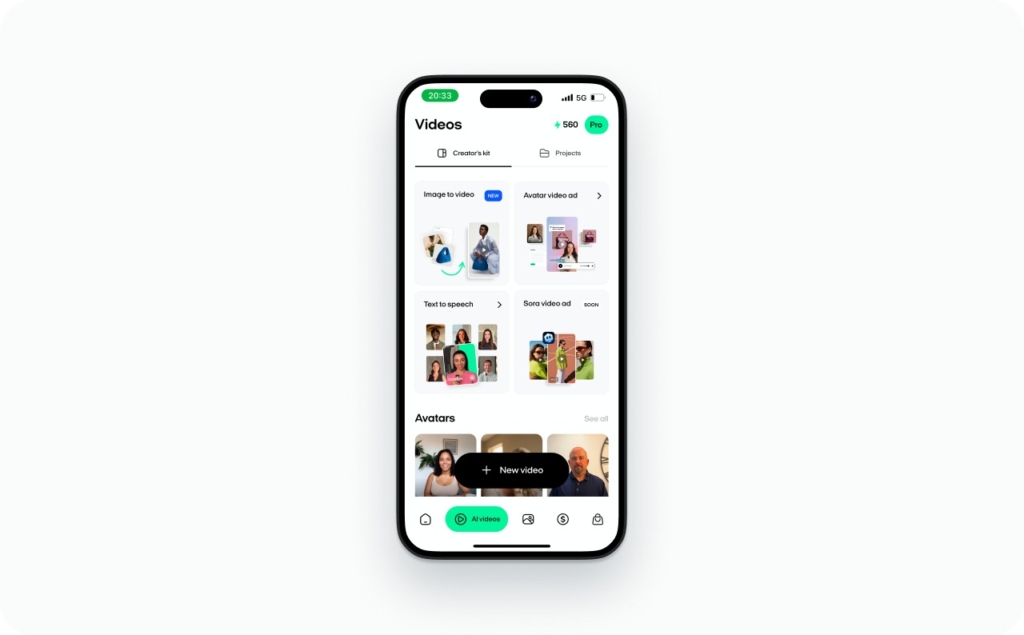
- AI Videos / Video Studio – AI avatars, talking-head videos, and image-to-video clips
- Image / Static Studio – Prompt-based static ads, brand-inspired remixes, and batch images
- AI copy and prompts – Script generation, polishing, and a global prompt guide
- Product data import via URL – Generate from Link on web and mobile
- Campaigns (viral + paid) – Instagram Reels scheduling and Meta ads with AI creatives
- Booster & AI infrastructure – Faster AI, more credits, and support for heavy users
Web vs mobile: Same AI engine, different entry points
The same Zeely AI features run under the hood on both platforms. The difference is how you enter the flow.
On mobile, you live inside:
- Generation from Link for fast product import from a URL while you sit in your store or on the go
- The AI Videos tab to create AI avatar videos in a few taps
- Viral campaigns to push those videos as scheduled Instagram Reels
On web, you see more studio-style tools:
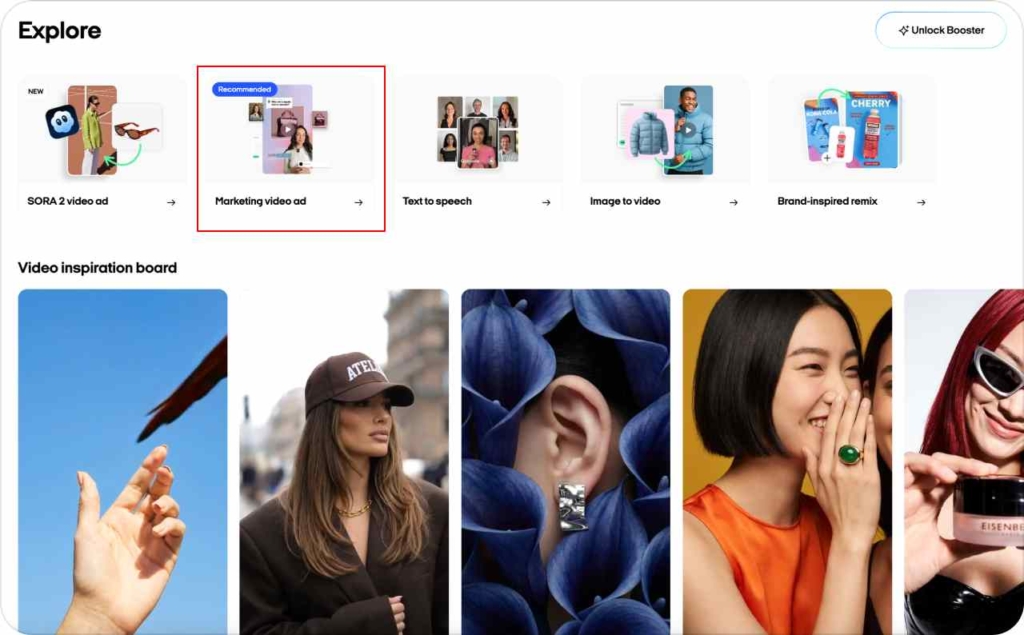
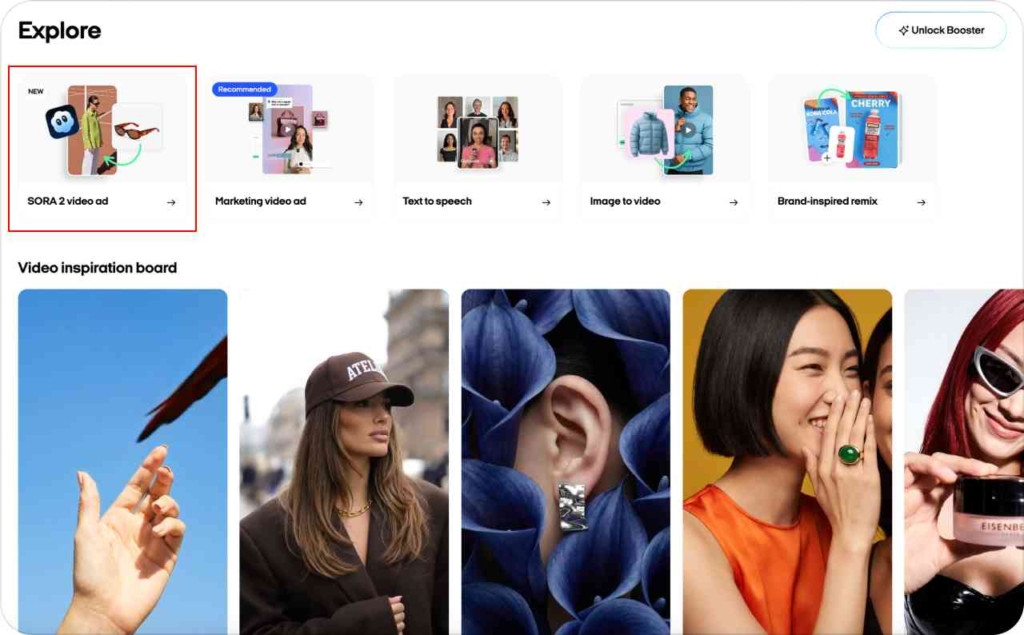
- Video Studio for Marketing video ads, Text-to-speech, Image-to-video, and Sora 2 video ads
- Image Studio for Prompt-to-Ad, Brand-Inspired Remix, and Batch static ads
- Generate from Link plus paid campaign setup for Meta
If you run a small shop, I expect you’ll bounce between phone and laptop. The Zeely AI sales growth app features follow you either way.
10 core Zeely AI features that drive sales growth
This is the Zeely AI features 10 snapshot – the core Zeely AI features you’ll touch most.
1. AI video ad for mobile
What it is:
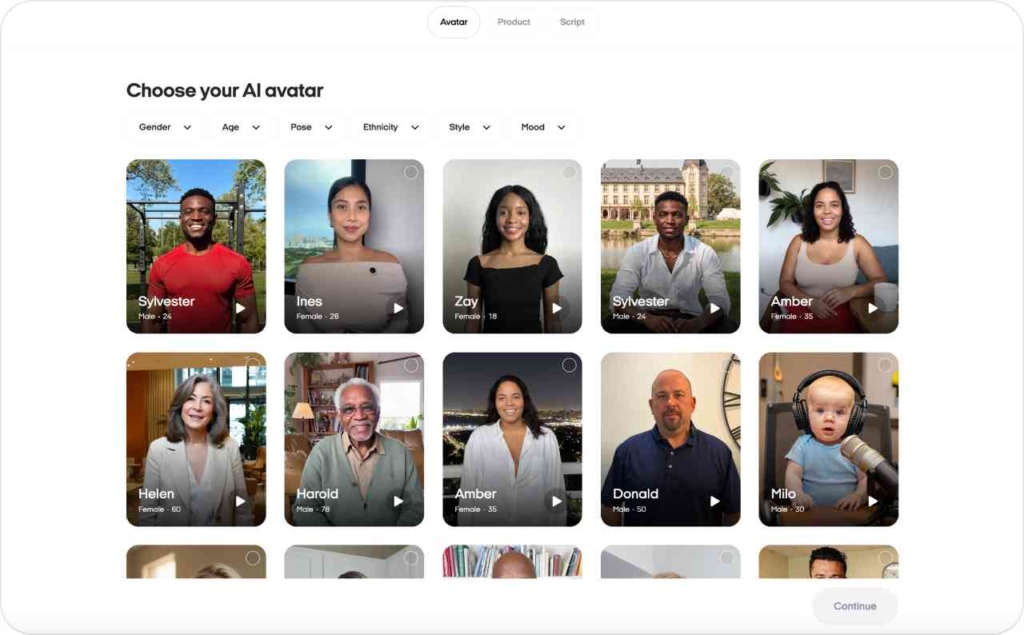
AI video ad on mobile is your quickest path from product to sales-ready video. You choose a product or images in the AI Videos tab, pick an AI avatar, then either write a script or let AI generate and polish it. Zeely renders a complete ad video with synced speech and avatar motion.
When to use it:
Use this Zeely AI feature when you want a UGC-style, vertical video you can test today, without filming yourself. For many users AI video ad is the first contact with Zeely AI app features because it delivers something you can publish in 15 minutes.
2. Marketing video ad in web Video Studio
What it is:
Marketing video ad in Video Studio focuses on a product presentation style. An AI avatar presents your product while your product photos appear in the background. Inside the “creative room” you get:
- Recommended AI avatar suggestions that match your brand
- Ready-made scripts plus script polishing with AI
- AI create {N} images to auto-generate missing product photos for the story
When to use it:
This Zeely AI feature is ideal when you want something a bit more polished than a raw UGC look. It fits catalog brands, digital services, and any business that wants a reliable “explainer” ad without hiring actors or editors.
3. Text-to-speech video ad on web
What it is:
Text-to-speech video ad lets you bring any text to life as an avatar-led video. You paste or write text, choose an AI avatar, then Zeely converts your text into speech and syncs it to the avatar. You can polish the script with AI before rendering.
When to use it:
Use text-to-speech Zeely AI feature when you have a strong script or long explanation but no video talent. It suits founder letters, policy announcements, or multi-language variants where you just need reliable conversion from text to video.
4. Image-to-video and AI video from your image
What it is:
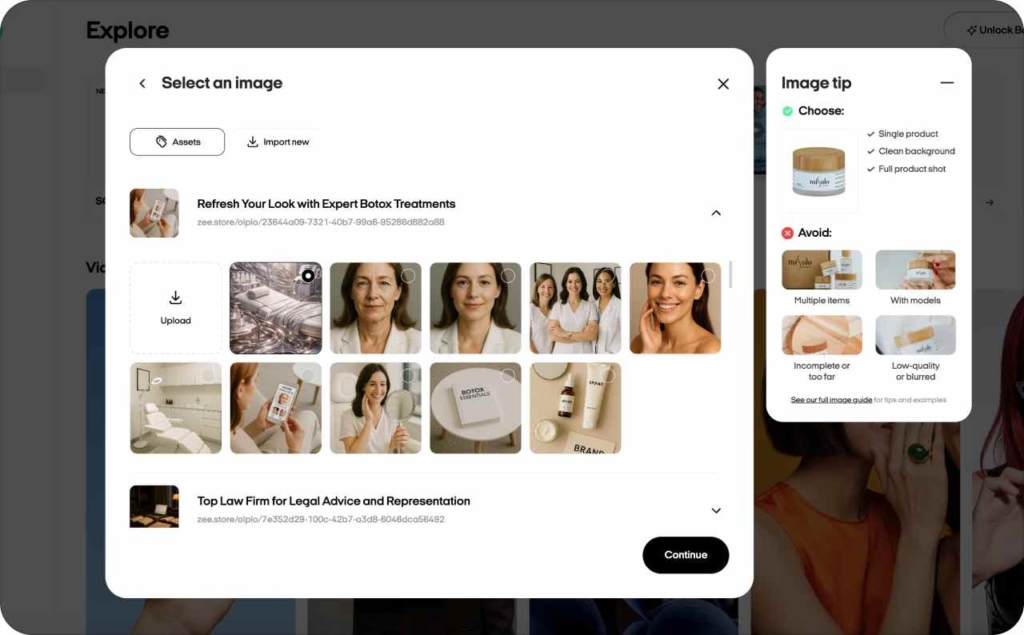
Image-to-video starts from one product photo. You upload the image, choose a reference and a prompt, and the AI model creates an intermediate image and then a moving video clip.
When to use it:
This fits sellers who only have one good shot of the product, maybe from a phone. Instead of staying stuck with a static photo, you can use this Zeely AI app feature to create dynamic clips for Reels, TikTok, and short ads without a full shoot.
5. Record avatar video on mobile
What it is:
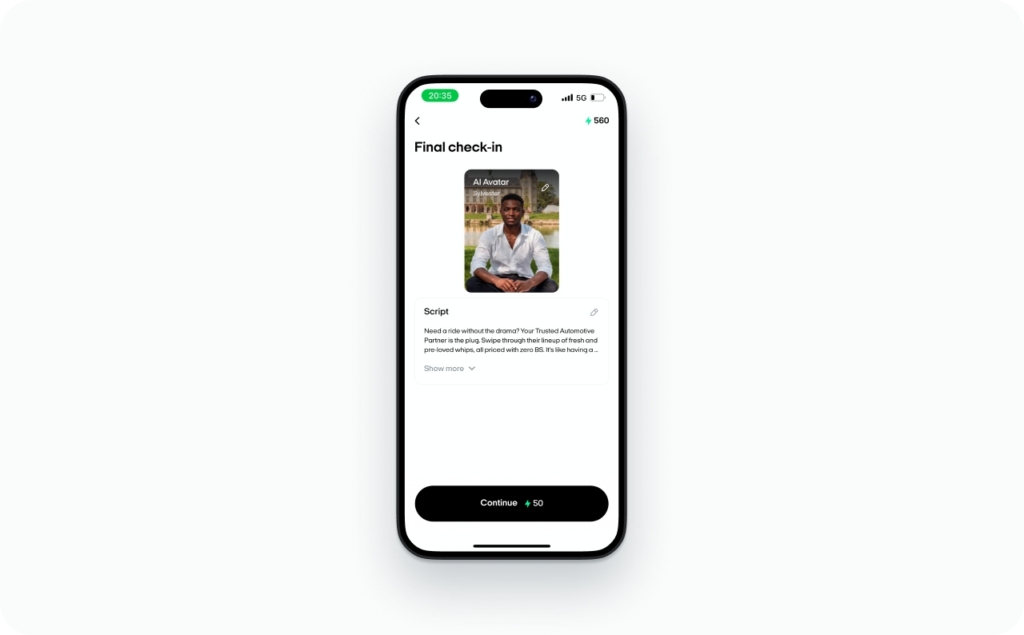
Record avatar video in the mobile AI Videos tab creates a clip with only an AI avatar in frame. You choose an avatar, write or generate text, polish it, and Zeely outputs a “digital presenter” that talks for you.
When to use it:
Use this for evergreen intros, FAQs, onboarding sequences, and simple promotional messages. It becomes your reusable “brand face” if you want consistent communication but do not enjoy filming yourself every week.
6. Sora 2 video ad from an image
What it is:
The Sora 2 video ad feature lets you upload an image, write a detailed prompt, and send it to the Sora 2 model. Zeely returns a cinematic-style video ad generated from that input. There is a linked prompt guide to help you understand how Sora 2 responds to your instructions.
When to use it:
Use this when you want more cinematic, story-driven clips from a static visual. It is especially useful when you need eye-catching top-of-funnel videos that feel closer to professional brand campaigns.
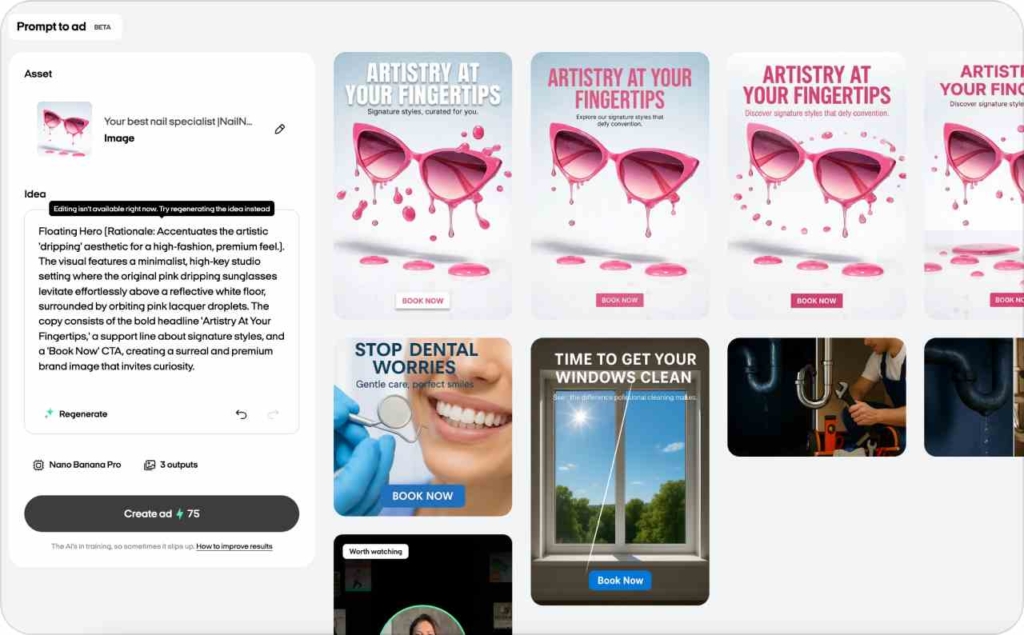
7. Prompt-to-Ad static creatives
What it is:
Prompt-to-Ad in Image Studio starts from a product image. Zeely analyzes your image, builds its own internal prompt and idea, then generates 1–3 static ads. It chooses composition, text, buttons, and logos while sticking to your brand style.
When to use it:
This Zeely AI feature is the “day zero” creative engine. The first time you import a product, use Prompt-to-Ad to get a baseline set of ads that you can refine later.
8. Brand-Inspired Remix
What it is:
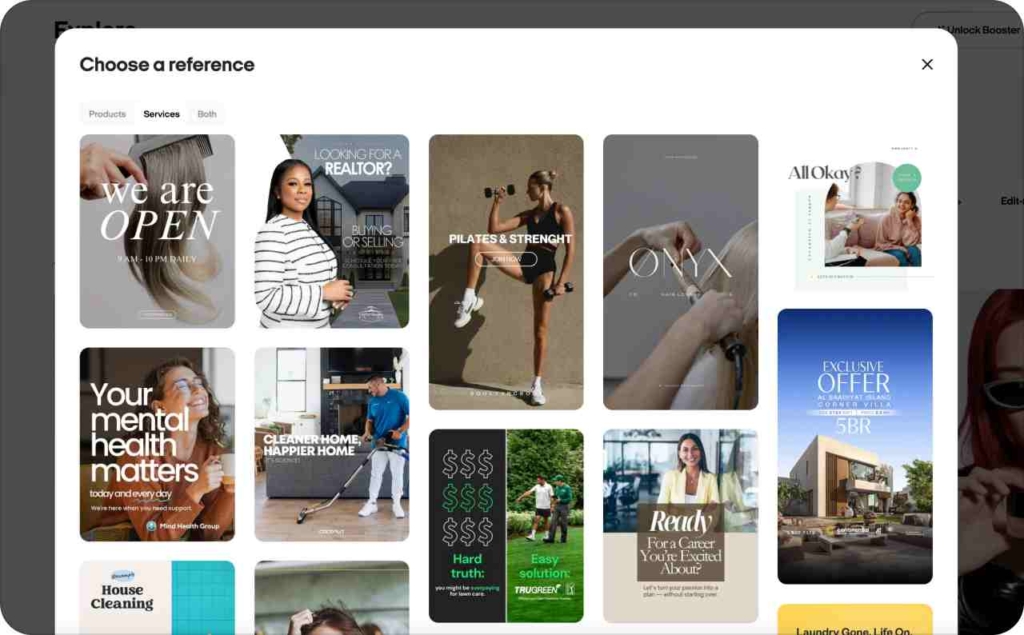
Brand-Inspired Remix lets you piggyback on proven layouts. You pick a reference ad from top brands, upload your product image, and AI models like Nano Banana, Nano Banana Pro, and ChatGPT generate up to three variants “in the spirit of” that brand.
In the mobile app, Instant Brand-Inspired Remix lets you choose a reference by niche, upload a photo, and watch render progress.
When to use it:
Use this Zeely AI feature when you know the vibe you want – for example, “clean tech”, “beauty brand”, or “streetwear” – but do not have a designer. You keep your product, but borrow the feel.
9. Generate from Link
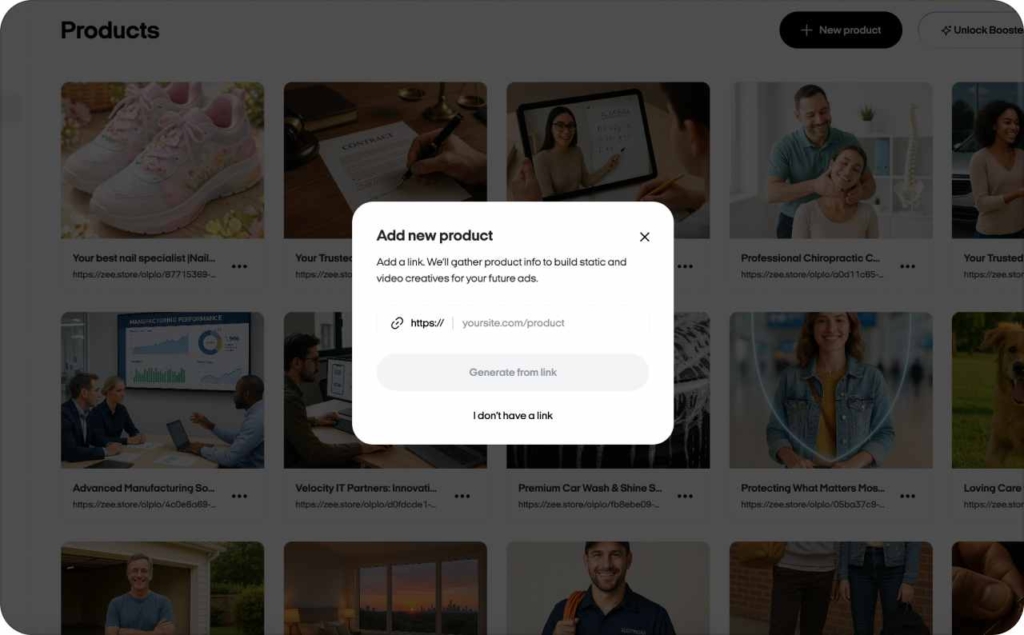
What it is:
Generate from Link pulls product data from your existing website. You paste a product page URL, and Zeely AI extracts the title, images, price, and description. You then confirm product type and CTA.
The marketing site clearly states that Zeely AI “extracts key product data” when you use Generate from Link, so you know it is an AI-backed import.
When to use it:
Use this Zeely AI app feature when you already have an online catalog. It removes manual data entry and gets you ready for creative generation faster, especially if you manage dozens of SKUs.
10. Viral and paid campaigns powered by AI creatives
What it is:
Zeely links AI creatives directly to two campaign types:
- Viral campaigns – schedule AI videos as Instagram Reels from web or mobile
- Paid Meta campaigns – launch ads on Facebook and Instagram using your AI creatives
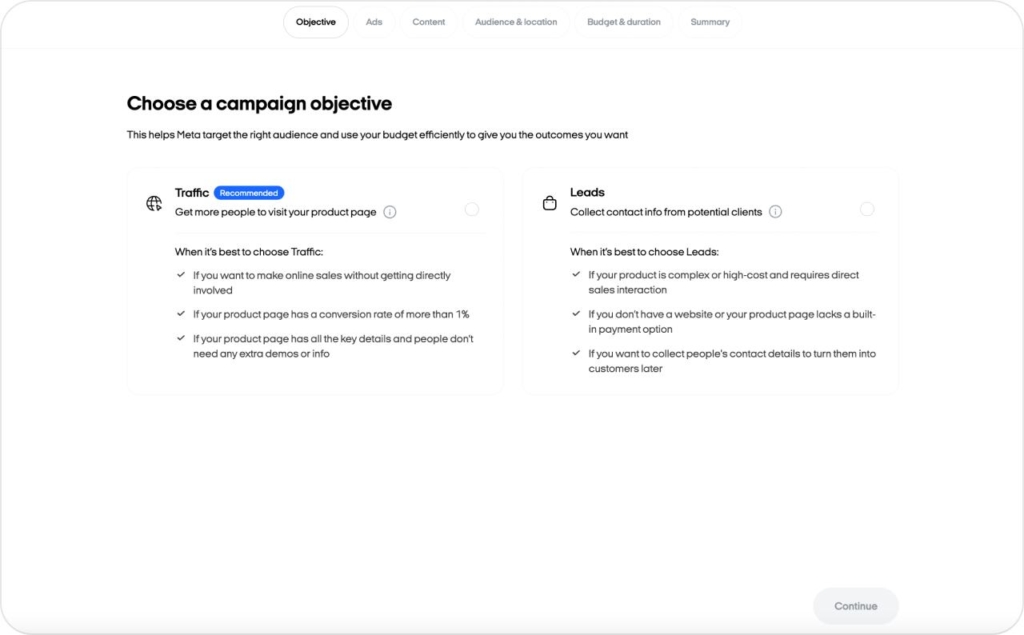
For paid campaigns, you set your goal (Traffic or Leads) and desired visitors or leads. Zeely calculates an “optimal” budget and campaign duration, then shows a creative library so you can pick several videos and static ads for A/B tests.
When to use it:
This is where Zeely AI sales growth app features shine. If you have a small base of daily sales, turning AI creatives into organic Reels plus paid Meta campaigns is what starts moving your numbers.
Deep dive into Zeely AI video features
When to choose AI video ad vs Marketing video ad vs Text-to-speech
You have several Zeely AI video features. Here is how I recommend choosing.
| Goal | Best feature | Why it fits |
| Fast, scrappy sales video | AI video ad (mobile) | Quick script + avatar, 1 credit per render |
| Product showcase plus presenter | Marketing video ad | Avatar talk + product photos in background |
| Have text, need voice and avatar | Text-to-speech video | Converts script to speech and syncs to avatar |
- Pick AI video ad when you want something that feels like a person talking about your product with simple cuts
- Pick Marketing video ad when you want more control over how your photos appear and how the avatar frames your offer
- Pick Text-to-speech when you already wrote a blog post, email, or script and just need an AI presenter
These Zeely AI features together make sure you never feel blocked by equipment, talent, or editing.
Editing and regenerating AI videos
You do not have to treat your first video as final.
On web:
- Use Edit as new in Video Studio
- Change product, template, AI avatar, or script
- Zeely regenerates the full video with new text, lip-sync, and actor
On mobile:
- Make quick edits for small changes
- Order a full remake by re-running the video through the AI generator
This is one of my favorite Zeely AI features because it replaces reshoots. Instead of filming everything again, you iterate on the same base idea and test many creative angles.
Managing finished AI videos (projects, download, sharing)
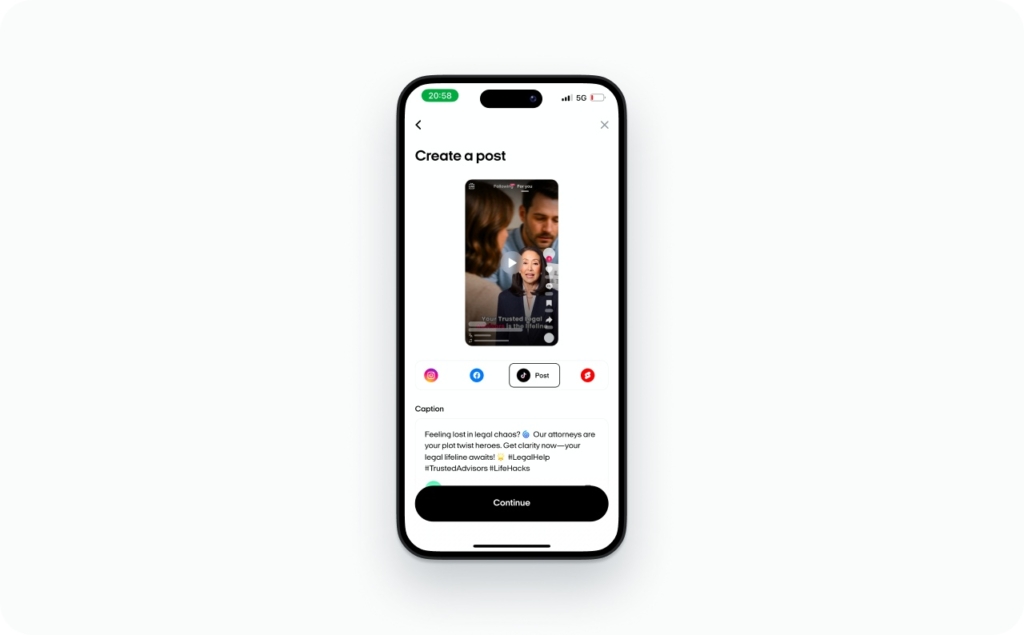
All completed videos live in AI Videos / Projects. Each one is labeled as AI-generated so you can keep track of what came from the Zeely AI features versus external uploads. From here you can:
- Download the files
- Share them to your channels
- Publish them on social media or plug them into Viral campaigns
Treat this as your performance vault – the place you pull from when you create new Reels, ads, and retargeting sequences.
Getting the most from AI avatars and lip-sync
AI avatars and lip-sync work best when you feed them natural speech. The Zeely team wrote a guide on:
- Switching to another avatar if movement feels stiff
- Adjusting the script to match natural pacing and simple phrases
- Avoiding tongue-twisters and overly complex sentences
If an avatar video looks slightly “off,” you usually fix it by changing the avatar or rewriting the script rather than giving up on the feature. That is part of how Zeely AI features turn into assets instead of experiments that sit unused.
Zeely AI static creatives: Image/static studio
Batch mode: generate up to 20 static ads in one shot
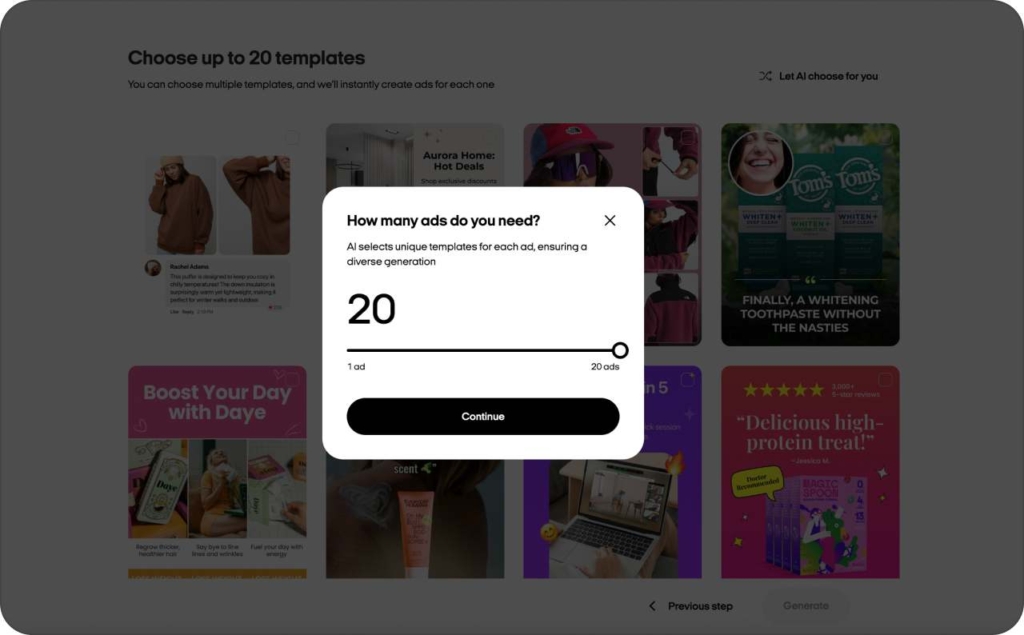
Batch mode in Image Studio is about volume. You:
- Pick a product and a set of templates, or let AI select templates
- Generate up to 20 static ads in one run
- Use the built-in editor to tweak designs manually or via AI edits
The AI edits can adjust colors, copy tone, mood, and even swap the product. For performance marketing, this is where Zeely AI features really pays off – you get enough variations for real A/B tests instead of guessing with two creatives.
Edit-ready templates and AI scenarios
Edit-ready templates are prebuilt designs that you can open and extend. Inside the editor you’ll see AI scenarios with options like:
- Lifestyle
- Studio scene
- On-model
- Unboxing
- Floating hero
- Position shift
You drop in your product, choose a scenario, and Zeely rebuilds the visual around it. These Zeely AI features cover use cases from social posts and catalog updates to retargeting banners.
AI Image Enhancer across your workflow
AI Image Enhancer is accessible from:
- Edit-ready templates
- Batch static ads
- The video creation flow
It focuses on subtle retouching and targeted creative changes. You choose a scenario, click AI create, and let it refine lighting, clarity, and context. It is not a full editor – it is a one-click upgrade to make existing shots look store-ready.
Auto-generation of missing images with AI create {N} images
Whenever you do not have enough frames – especially in Marketing video ad and similar flows – Zeely offers AI create {N} images. This fills gaps with AI-generated visuals that match your existing shots.
You keep the storyboard coherent instead of mixing random stock images. That consistency is a quiet but important part of how Zeely AI features improve performance.
What images work best for AI generation and which to avoid
From the Zeely guides, here is the short checklist:
- Full product view, not cropped edges
- Single object per frame when possible
- Neutral background without clutter
- High-resolution images, not pixelated screenshots
- Detailed text description to help the model
Avoid tiny products in the corner, busy backgrounds, and dark, blurry photos. The better the input, the more realistic and useful the AI output from these Zeely AI app features.
AI copywriting and prompt intelligence inside Zeely
Every avatar-based Zeely AI feature supports the same script helpers:
- AI video ad
- Marketing video ad
- Text-to-speech video ad
- Record avatar video
In each mode you can:
- Choose a ready-made style
- Ask Zeely to generate a script
- Use the button to polish your text
That means you never face a blank page. You can start with AI, then edit with your own voice.
Headlines and promo text in static ads
Prompt-to-Ad and Brand-Inspired Remix do not just layout objects. They also write:
- Headlines
- Taglines
- Short promo text
Automatic prompt building from an image
Prompt-to-Ad’s first creative is effectively a suggested prompt generated by Zeely. You can take that structure, tweak key parts (like audience, benefit, tone), and reuse it.
That is how Zeely AI features help you become better at prompts without theory lessons.
Global “How to prompt AI” framework
The global prompt guide inside Zeely repeats a few rules:
- Give clear product context
- Avoid wordy fluff – focus on concrete details
- Use positive instructions (“show the product on a clean table”) instead of “do not” phrases
- Assign roles like “Act as a performance marketer for Facebook ads.”
- Always pair images with small text descriptions
You can apply that same skeleton across videos and images. Over time, your prompts get more consistent, and the Zeely AI app features feel more predictable.
Campaigns and automation built on Zeely AI creatives
Viral campaigns: AI videos to scheduled Instagram Reels
Viral campaigns use your AI videos as Instagram Reels.
On both web and mobile, you:
- Connect your Instagram Business or Creator account
- Choose a product and how many Reels you want
- Pick dates and specific videos
- Let Zeely schedule and publish
If you do not have enough clips, Zeely suggests generating more. This turns AI video ad and other Zeely AI features into a steady organic presence instead of one noisy burst.
Launching paid campaigns on Meta with AI creatives
Paid campaigns in the Zeely AI app features follow a guided flow:
- Pick a goal: Traffic or Leads
- Enter how many visitors or leads you want
- Zeely calculates an “optimal” budget and campaign length
- You tweak numbers if needed
- You select videos and static ads from your AI creative library
With such Zeely AI sales growth app features you get guardrails on budget and duration instead of guessing.
Using the AI creative library for A/B testing
When you set up a campaign, Zeely prompts you to choose multiple creatives. That encourages actual A/B testing instead of running one ad forever.
- If you already used Batch mode and Video Studio, you have plenty of options
- If not, the app nudges you to generate more variants
This makes A/B testing part of the default workflow, not an advanced trick reserved for big teams. Across the guides, Zeely recommends pairing:
- Video hooks – often from Text-to-speech or AI video ad
- Static reminders – built in Prompt-to-Ad, Brand-Inspired Remix, or Batch mode
You use both formats in Viral campaigns and in Meta ads across Facebook, Instagram, and TikTok. Video catches attention, static ads close with clearer offers and retargeting. This mix is one of the most practical uses of Zeely AI features for consistent sales growth.
Booster and AI infrastructure for heavy ad buyers
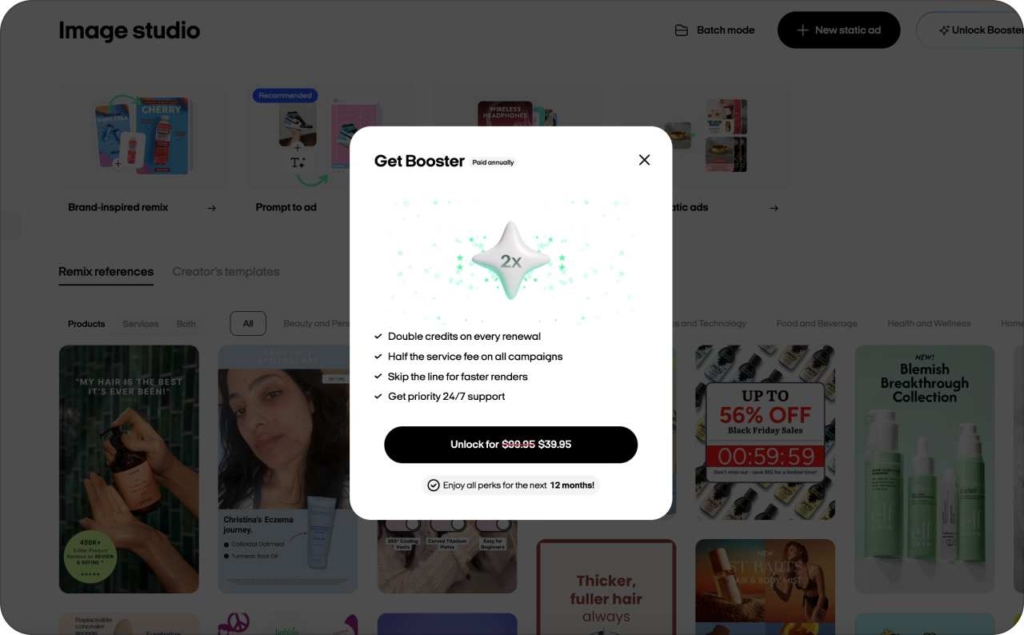
Booster is a paid add-on that upgrades several Zeely AI features at once:
- Faster AI video generation
- Faster ad moderation
- Doubled AI credits
- Lower service fee
- Priority support
If you are running a lot of campaigns, Booster is what keeps rendering and moderation from slowing you down.
How Booster changes your daily workflow
With Booster, your day looks a bit different:
- Videos render faster, so you can iterate more in the same time window
- Moderation moves quicker, so ads start serving sooner
- Extra credits let you test more AI videos and static ads before deciding what to scale
For anyone already pushing zeely ai app features hard, Booster acts like a throughput multiplier.
Practical playbooks: How to combine Zeely AI features
Here is a simple playbook for a store using core Zeely AI features end to end:
- Generate from Link – paste your product URL and let Zeely import details
- Create an AI video ad on mobile plus a Text-to-speech variant on web
- Generate static ads with Prompt-to-Ad and Brand-Inspired Remix
- Launch a Viral campaign with several of those videos as Reels
- Launch a Meta campaign with multiple creatives and Zeely’s budget recommendations
You now actively use zeely ai sales growth app features 0–10 instead of treating them as a demo. It is a real funnel. If you only have one good product photo:
- Start with Image-to-video / AI video from your image to get a moving clip
- Use AI create {N} images to fill missing frames for your storyboard
- Generate static ads via Batch mode and enhance them with AI Image Enhancer
- Run Brand-Inspired Remix for on-trend versions
You go from “just a picture” to a full stack: video, static ads, and multiple visual styles – all through Zeely AI features.
Building a reusable AI avatar brand spokesperson
To create a long-term “face” for your brand:
- Record multiple Record avatar videos with different scripts: FAQs, offers, onboarding
- Reuse and tweak those scripts in AI video ad and Text-to-speech formats
- Pull lines from those scripts into static ad copy in Prompt-to-Ad and Brand-Inspired Remix
This lets your audience see and hear the same core messages across channels, powered by the same Zeely AI app features.
FAQ about Zeely AI features
Start with AI video ad on mobile and Prompt-to-Ad in Image Studio. These two Zeely AI features give you a sales-ready video and a set of static ads in one session. Then plug them into Viral campaigns and a simple Meta campaign.
AI video ad focuses on fast, UGC-style videos with an avatar and product visuals, usually created in the mobile app. Marketing video ad in Video Studio adds a more structured “creative room,” with specific avatar recommendations, scripts, and AI create {N} images to fill missing frames, which gives more control over the final look.
Yes. With Image-to-video, AI video from your image, AI Image Enhancer, and AI create {N} images, you can turn a single good photo into multiple clips and static creatives. Those Zeely AI app features exist exactly for sellers who do not have full photoshoot assets.
Generate from Link uses AI to scan your product page URL and extract key data like title, description, images, and sometimes price. You then confirm and tweak that information inside Zeely before you start using other Zeely AI features.
You can use all core Zeely AI features without Booster. Booster becomes useful when you run many videos and campaigns and want faster generation, quicker moderation, extra credits, and priority support. For brands scaling past the first 0–10 daily sales, it often pays off in time saved and extra tests you can run.
Conclusion
As you lean into Zeely AI features across Video Studio, Image Studio, prompts, Generate from Link, campaigns, and Booster, you move from random posts to a repeatable system. The Zeely AI features set and the broader Zeely AI app features should help you produce more creative tests, stabilize your 0–10 daily sales, and then scale what works with clearer numbers and less manual work.

Emma blends product marketing and content to turn complex tools into simple, sales-driven playbooks for AI ad creatives and Facebook/Instagram campaigns. You’ll get checklists, bite-size guides, and real results, pulled from thousands of Zeely entrepreneurs, so you can run AI-powered ads confidently, even as a beginner.
Written by: Emma, AI Growth Adviser, Zeely
Reviewed on: February 5, 2026