How can you cancel your Zeely subscription in 2026
How do you cancel Zeely subscription without breaking your ad workflow or losing access too soon? This 2026 guide is written with Zeely’s product and support teams, using the real in-app flows and billing rules you see when you cancel a subscription.
You can cancel your Zeely subscription either in the Zeely app or from your account at https://app.zeely.ai/.
In the app, open your current plan from the home screen, go to Manage Subscription, choose Change Plan, scroll to Cancel subscription, pick a reason, then confirm.
On the web, log in, open your account menu, go to Subscription, choose Change plan, click Manage subscription, select Cancel subscription, choose a reason, and confirm. Your plan stays active until the shown expiration date, and you can resubscribe any time.
Your plan does not stop immediately. It stays active until the expiration date shown on screen, and you can resubscribe any time. I’ll also explain what happens to your access, billing, and ads after cancellation, plus when it makes more sense to fix results instead of canceling.
How to cancel Zeely subscription in the mobile app (iOS & Android)
You can cancel directly inside the Zeely app without contacting support.
Here’s the exact flow you’ll see on screen:
- Tap the green button with your current plan at the top-right of the home screen
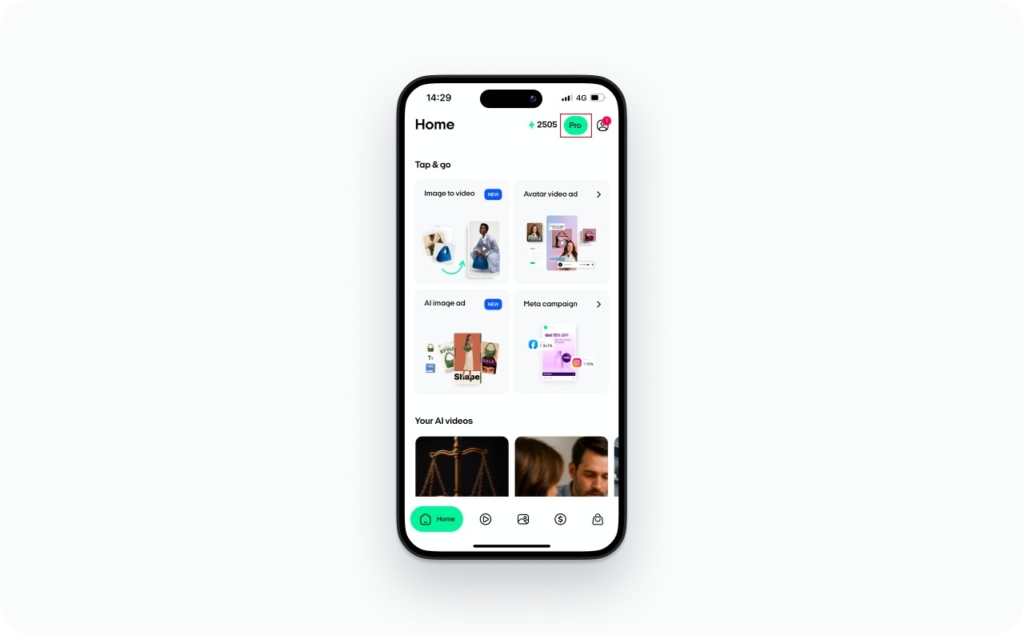
2. Select Manage Subscription
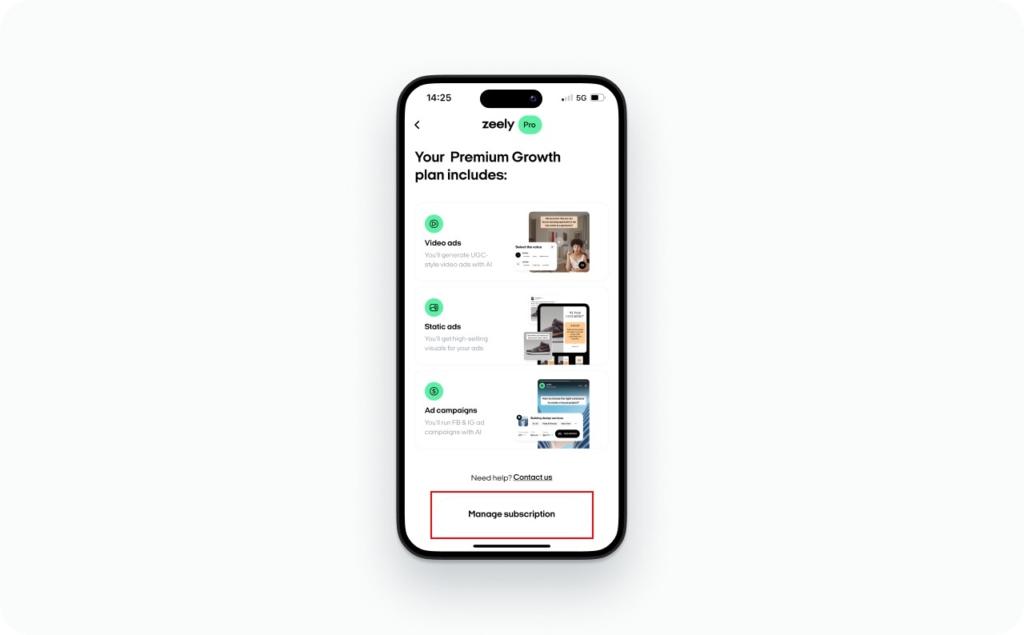
3. Scroll down and tap Change Plan
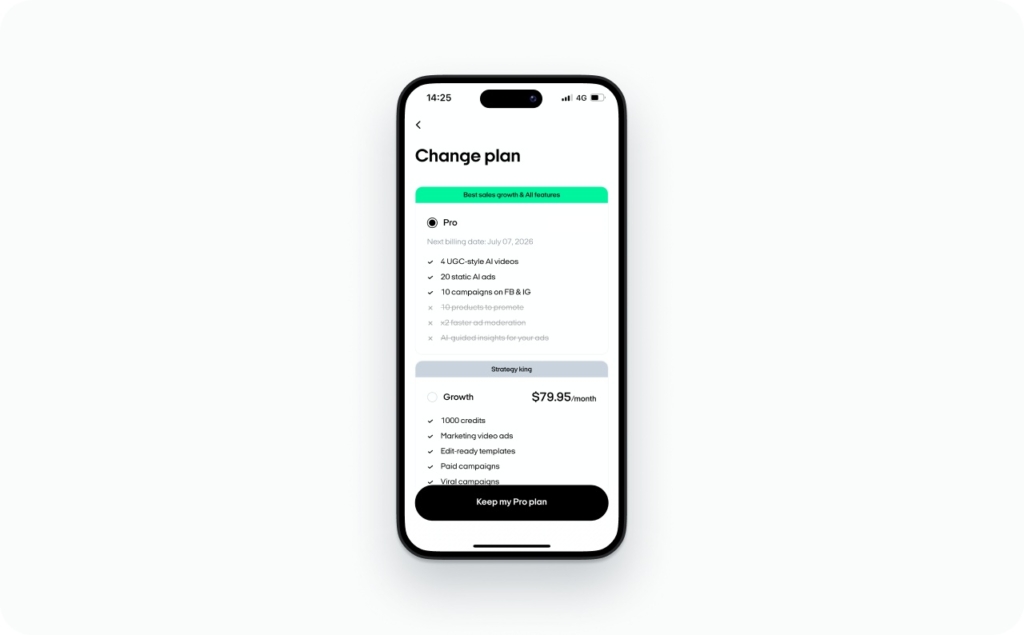
4. Keep scrolling until you see Cancel subscription, then tap it
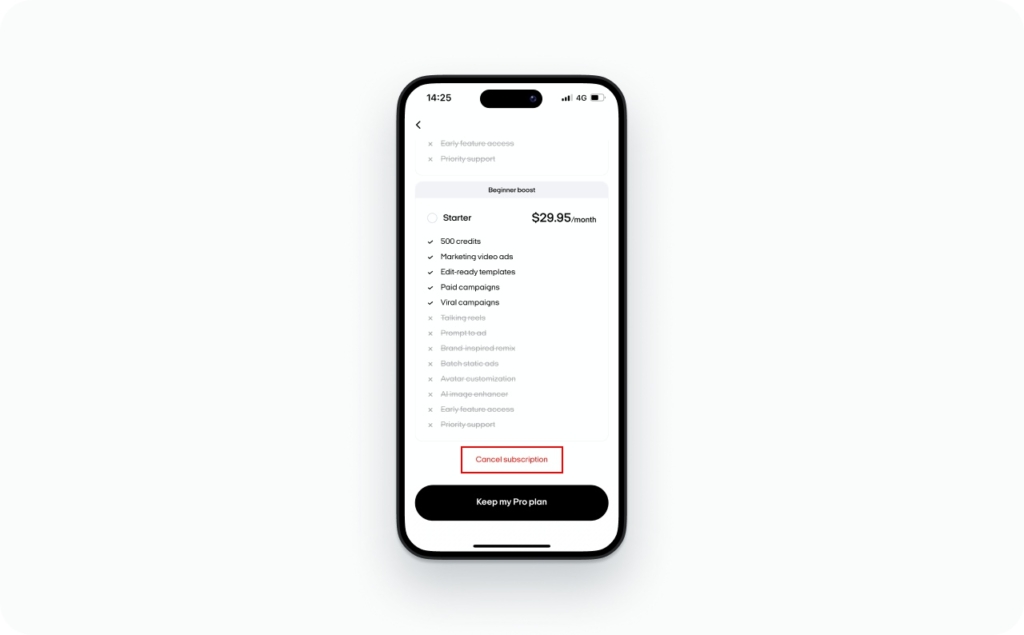
Before you leave, we may suggest a free talk in the chat to look at your results together. You can book it if you’d like, or just tap Skip. This step is optional. It’s there to help you understand performance, not to block cancellation.
- Choose your reason for cancellation and tap Continue
- Finally, confirm by choosing Downgrade. That’s it
This flow applies to both iOS and Android as long as your app layout matches the current Zeely interface. After you confirm, you’ll see your plan name and a clear confirmation message showing when your subscription ends and the expiration date you keep access through.
How to cancel Zeely subscription from your browser account
Cancelling Zeely subscription online is best if you prefer a desktop or you’re already working in the web app.
Follow these exact steps in your browser:
- Log in to Zeely
- Click your account icon in the top right
- Select your email
- Open Subscription → Change plan
- Click Manage subscription under your current plan
- Choose Downgrade → You can read here the detailed guide on how to upgrade or downgrade your Zeely plan.
- Pick a reason and confirm
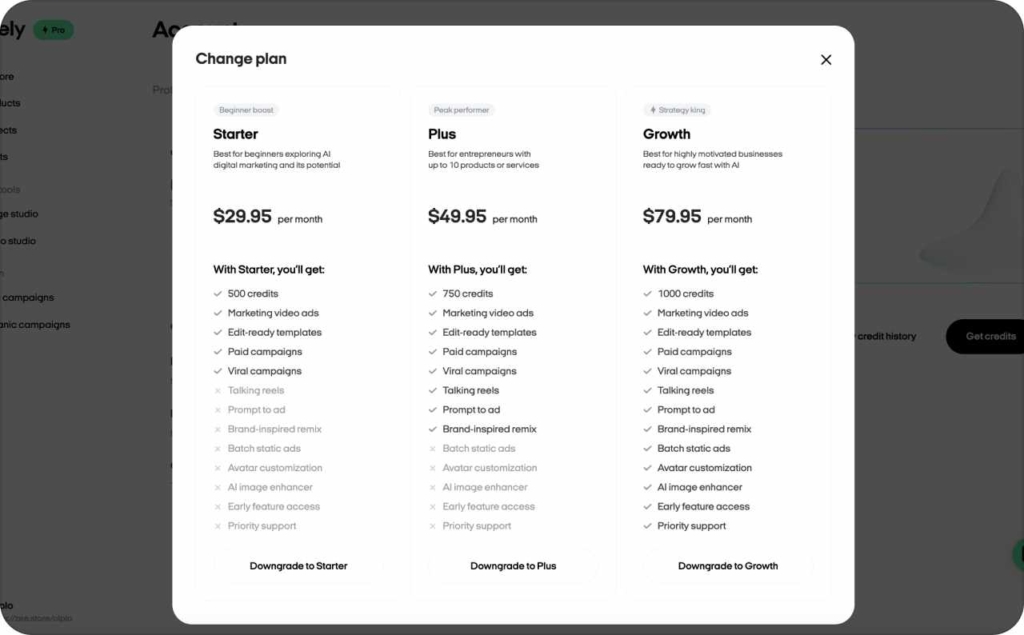
Once completed, your subscription will be cancelled. You’ll see the expiration date of your current plan, and until then you’ll still have access to all premium features. Changed your mind? Just click Resubscribe to keep going.
This works from any browser, including Chrome, Safari, and Firefox, as long as you log in with the same Zeely account. Treat the expiration date you see as the last day of premium access. If you want a clean handoff, plan what you’ll save before that date.
What happens after you cancel Zeely subscription?
When you cancel in Zeely, your subscription does not end instantly. It’s set to end on the expiration date shown on screen. Until that date, you keep access to all premium features.
In plain terms, you’re stopping the next renewal. You should not expect new subscription charges after the current billing period ends, as long as you don’t resubscribe. While your plan is still active, you can still open Zeely, review results, and capture what you need for your next steps.
Before the expiration date, I recommend doing three things:
- Save your key creatives and text so you can reuse them later
- Write down your best-performing campaigns and audiences
- Decide if and when you might want to come back
If you change your mind, you can return to the same screens and use the Resubscribe option to continue. You might be curious to learn why Zeely is truly worth it and what exclusive features are included with your subscription. Discover the unique tools and benefits that can help you get the most value and results from your plan.
Before you cancel Zeely: check your results and talk to support
Many users cancel when they feel “it’s not working,” even when campaigns haven’t had enough time or budget to settle. Ads need data before performance stabilizes, especially with a new creative or a new audience.
That’s why you may see this in the app: “Before you leave, we may suggest a free talk in the chat to look at your results together. You can book it if you’d like, or just tap Skip.” The talk is optional, but it can stop “accidental” churn when ads are starting to improve.
Use this quick 3-point check before you cancel:
- Check the last 7–30 days: CTR, CPC, and purchases or leads
- Confirm your budget and audience match your real business goal
- Ask support what the numbers mean and what to fix next
For context, Forbes describes 2025 as a “subscription-fatigued” world where people cut, rotate, or cancel tools that don’t feel worth it. That’s exactly why a fast value check matters before you drop something that might be close to working.
If the issue is related to your payment method, you can easily switch to another option in your account settings, we support multiple payment methods to make the process simple and convenient for you.
How canceling Zeely affects your 2026 ad budget and ROI
Zeely subscription cost vs ad results is a budgeting question, not a feelings question. Canceling Zeely frees subscription spend, but it can raise your manual costs: more time creating ads, setting up campaigns, and testing variations.
I like to frame it as a simple trade:
- Your monthly Zeely cost versus incremental leads or revenue it helps produce
- The time you save versus the time you’ll spend doing it manually
- Your alternatives, like agencies or freelancers, which often add management fees
Paid media costs also keep climbing, so efficiency matters. WordStream’s 2025 benchmarks analyze over 16,000 campaigns from April 2024 through March 2025, and they note search advertising costs have been increasing year over year, with many industries seeing CPC increases. Read this article now to discover how much Zeely costs in 2026 and explore the different pricing options available. By understanding the full breakdown of our plans, you’ll be able to compare Zeely’s cost with your manual expenses and see the real value it delivers. You might be surprised at how much time, effort, and money you can save by keeping a smarter, automated solution.
Here’s a quick comparison example you can copy and fill in:
| Item | Keep Zeely | Cancel Zeely |
| Monthly tool cost | $___ | $0 |
| Weekly time on creatives + setup | ___ hrs | ___ hrs |
| Last 30 days CTR | ___% | ___% |
| Last 30 days ROAS | ___ | ___ |
| Next step | Improve 1 variable | Pick new workflow |
Comparing Zeely to agencies and DIY ads after cancellation
After canceling, most small businesses land in one of three paths.
DIY ads using native Facebook or Google tools can work, but you pay in time. You’ll live in Meta Ads Manager or Google Ads, and you’ll be the creative team plus the analyst.
Hiring an agency or freelancer can save time, but it often adds fixed fees and process overhead.
The third path is pausing ads fully. That cuts spend fast, but it can also shut off lead flow. If you choose this, set a restart date on your calendar and keep your top creatives saved.
How Zeely uses cancellations and feedback to improve the product
Zeely cancellation feedback matters because it tells us what broke down for you. When you choose a cancellation reason and optionally talk to support, it creates a pattern we can learn from.
Most SaaS products use churn signals to improve onboarding, templates, and recommendations. If many users cancel after the same step, that step needs clearer guidance. If users cancel because results are unclear, we need better reporting cues and better next-step prompts.
That’s also why cancellation includes a brief reason step. It’s not about “saving” every account at all costs. It’s about understanding what’s not clicking, then making the product easier, clearer, and more predictable for the next person.
FAQ: canceling Zeely subscription in 2026
You can cancel from the app or web account using the steps above. Your plan stays active until the expiration date shown.
You keep premium access until the expiration date you see during cancellation.
This guide covers only the documented in-app and web cancellation flows. If you need a pause or a special billing case, contact Zeely Support.
From the same screens, use the option that says: “Just click Resubscribe to keep going.”
Canceling stops renewal. Account deletion is a separate request in most subscription products. If you want deletion, contact Support for the exact process.
Your Zeely plan stays active until the expiration date shown. For ad delivery status, use your ad platform’s controls and review your active campaigns.
Save your top creatives, best-performing copy, and a short note of what audiences worked.

Emma blends product marketing and content to turn complex tools into simple, sales-driven playbooks for AI ad creatives and Facebook/Instagram campaigns. You’ll get checklists, bite-size guides, and real results, pulled from thousands of Zeely entrepreneurs, so you can run AI-powered ads confidently, even as a beginner.
Written by: Emma, AI Growth Adviser, Zeely
Reviewed on: February 17, 2026