How long can Instagram Reels be: 2026 limits explained
How long can Instagram Reels be in 2026 depends on the creation method and your account’s feature access. I break down the exact max and minimum Reel lengths, explain why limits differ between recording and uploading, and give you a checklist to publish without length errors.
In 2026, Instagram Reels can be as short as 3 seconds and up to 20 minutes, depending on how you create them. Accounts with the newest Reels camera can upload or record longer videos, while others are limited to 60–90 seconds or 3 minutes.
The biggest factor is whether you record inside Instagram or upload a video file. If Instagram rejects your Reel for length, trim the clip, split it into a series, or post it as another video format.
Current Instagram Reel length limits in 2026
Right now, Reels run from 3 seconds up to 20 minutes, but the real limit depends on how you create the Reel and what features your account has.
That difference is what trips people up. Instagram applies different time limits to the Reels camera versus upload from camera roll, and not all accounts get updates at the same time. Before we start you might be interested to read also how to post a Reel on Instagram.
Reel length limits by creation method
| Length | Can you do it? | Where it works |
| 3–90 seconds | Yes | Record in Reels camera |
| 3 minutes | Sometimes | Reels camera (newer accounts) |
| 5 minutes | Yes | Upload from camera roll |
| 10 minutes | Yes | Upload from camera roll |
| 20 minutes | Yes | Reels camera or upload (feature rollout varies by account/app version) |
If Instagram blocks your Reel, it’s usually because you’re recording in-app instead of uploading.
What’s the maximum length of an Instagram Reel right now?
The maximum length of an Instagram Reel in 2026 is 20 minutes, but that’s the upper ceiling, not the default. Most accounts hit shorter limits when using the Reels camera. Recording inside Instagram often caps you at 90 seconds or 3 minutes, even though longer Reels exist.
Uploading a video from your camera roll unlocks longer durations. Instagram rolls features out gradually, so two accounts can see different limits on the same day. Same app. Different rules.
What’s the minimum length of a Reel?
The minimum length is 3 seconds. Technically valid, but practically weak. Ultra-short Reels often struggle to send a strong engagement signal unless the hook is instant.
Can Reels be 90 seconds, 3 minutes, 5, 10, or 20?
- 90 seconds: Yes. Common limit in the Reels camera
- 3 minutes: Yes, if your account has the update
- 5 minutes: Yes, but you must upload the video
- 10 minutes: Yes, upload only
- 20 minutes: Yes, upload only, newest rollout
What you see in-app is not always what’s possible. Instagram’s own UI lags behind its capabilities.
According to Wyzowl’s current summary, Instagram Reels now support videos up to 20 minutes, with earlier limits still visible on many accounts. That’s the state of play in 2026.
Why your account shows different Reel length options
If you’re asking why some accounts can post longer Reels while yours is stuck at 60 or 90 seconds, you’re not missing a setting. Instagram applies Reel length limits unevenly, and the UI doesn’t always reflect the real maximum. When people ask if Instagram changes the Reel length limit, the honest answer is yes, but not all at once.
There are three reasons this happens. Rollouts are gradual, creation methods have different caps, and the app interface often lags behind what’s technically allowed.
- Update the Instagram app
- Try uploading a video from your camera roll instead of recording
- Save a longer Reel as a draft and see where it gets blocked
Those three steps usually explain the mismatch.
Old vs new Reel limits and what has changed
Reel limits didn’t jump overnight. They stretched over time.
- Early Reels were capped at under a minute
- 90 seconds became common
- 3-minute recording rolled out to newer accounts
- Uploads quietly expanded beyond that
- By late 2025, some accounts could upload Reels up to 20 minutes
That’s why some of you still ask why I only see 60 or 90 seconds. Older limits haven’t disappeared. They just coexist with newer ones.
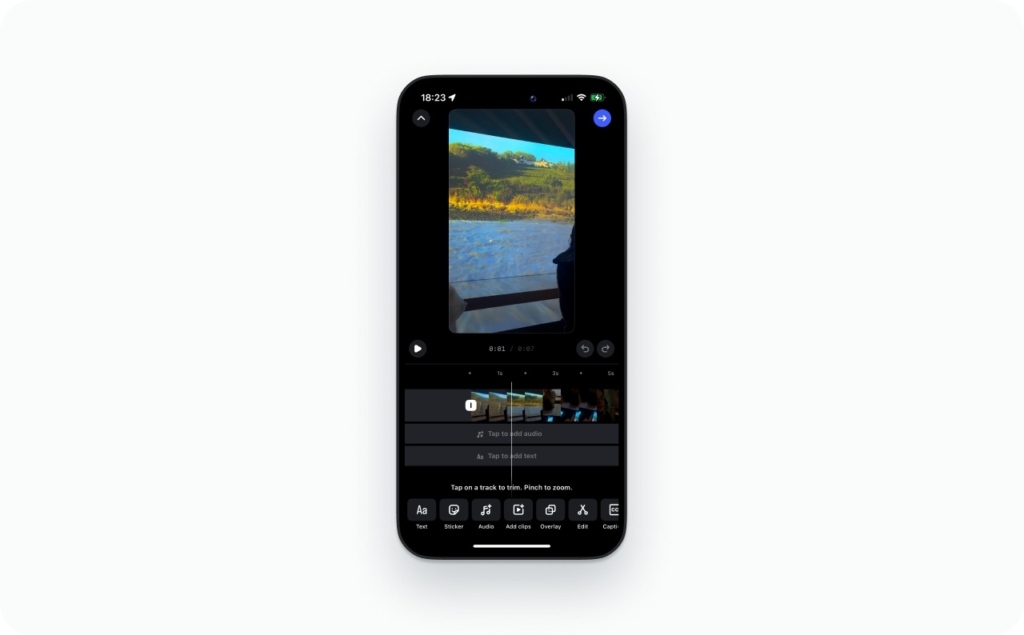
Recording vs uploading and why the cap can look different
Instagram treats these as two different paths.
- Recording in the Reels camera uses conservative limits. It’s designed for quick creation, so the time limit is lower.
- Uploading from your camera roll allows longer video duration, even when the Reels camera does not.
Important detail: the buttons you see in the UI are not the global maximum. They’re guardrails for that specific creation path.
Is it different by country or account type?
Usually, no. It’s rarely about business vs personal or your location. Differences almost always come from rollout timing or app version, not account “status.”
Metricool confirms that Reels can now reach 20 minutes, with limits rolling out unevenly and a recommended cadence of 4–7 Reels per week. It means longer Reels exist, but posting more doesn’t mean posting longer every time.
Once you know why the limits differ, you stop fighting the app and start working with it.
How to upload longer Reels
Most “video too long” errors happen because you’re using the wrong creation path. The Reels camera often has stricter caps, while upload from camera roll usually lets you post longer videos. Instagram’s newer rollout also supports longer Reels built from one continuous clip or multiple clips that add up to the limit.
Record longer Reels in-app
Use this when you see longer time options inside the Reels camera.
iOS steps
- Open Instagram and tap +
- Tap Reel (or swipe to Reel in the camera)
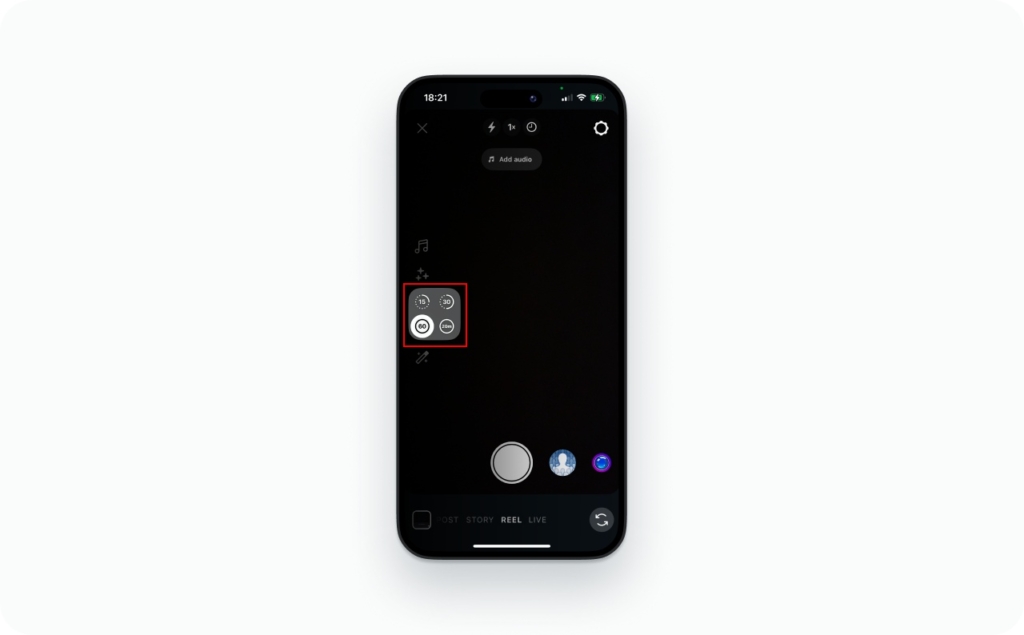
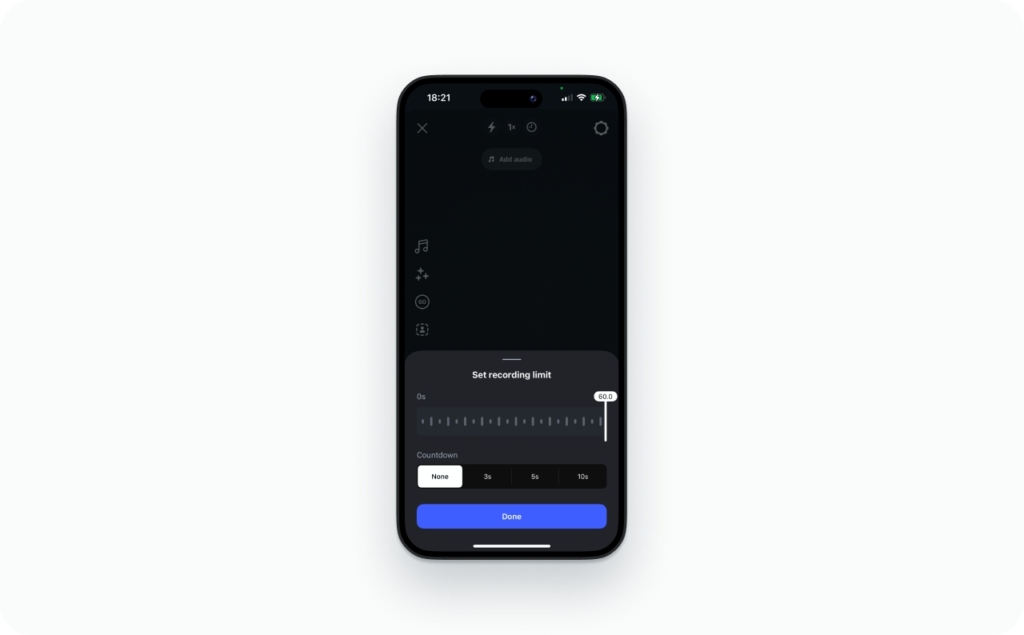
- Tap the Length selector (where you see 15s, 30s, 60s, 20:00)
- Pick the longest option you see
- Record a single clip or use multi-clip recording until you hit the time limit
- Tap Next, add text or captions, then Share
Android steps
- Tap + and choose Reel
- Tap Length and select the longest option available
- Record in multiple clips if needed, then tap Next and Share
If your Length option is missing, skip to the fixes section below.
Upload longer from camera roll
This is the most reliable path for longer Reels.
iOS + Android steps
- Tap + and select Reel
- Tap the Gallery icon (bottom-left) to upload from camera roll
- Select your video
- If you see “video too long,” trim inside Instagram or upload a shorter export
- Tap Next, add captions, then Share
Before you export: keep one clean file, avoid weird frame rates, and don’t re-encode five times. That’s where audio drift and upload failures come from.
If you only see 60/90/180 seconds, try these fixes
- Update Instagram in the App Store or Google Play
- Force close and reopen the app
- Android: Settings > Apps > Instagram > Storage > Clear cache
- Try the other composer: open Reels tab, then tap the camera icon
- Create a draft test: upload a 5-minute video and see where it fails
Can I combine clips to reach the max length?
Yes. The limit is the total duration, not the number of clips. Record or upload multiple segments until you hit your account’s time limit, then publish as one Reel.
What happens if your video is longer than the Reel limit
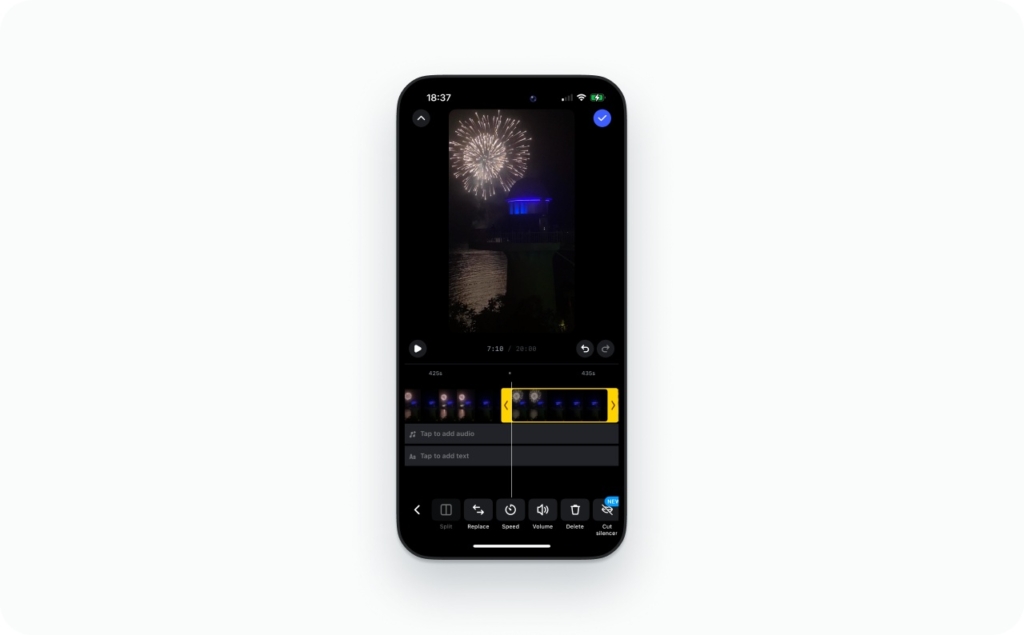
When a Reel is getting cut off or won’t upload, Instagram is reacting to the time limit, not your content. There are two different situations, and they lead to different fixes.
Decision tree
- Trim → Post. Shorten the clip to fit the visible limit and publish
- Split into Part 1 / Part 2 → Link them. Post a series and pin a comment that points to the next part
- Publish as another format. Use a feed video when the message needs more time
Why it gets cut off vs why it won’t upload
- Gets cut off: You accepted a trim prompt or missed it
- Won’t upload: The file exceeds the limit for that creation path
Those are not the same errors.
Common error messages and what they really mean
- “Video too long” – switch to upload from camera roll or trim
- “Your Reel was trimmed” – Instagram auto-cut after confirmation
- “Length option missing” – your Reels camera has a lower cap
- Upload stuck at processing – export settings or duration mismatch
Does Instagram auto-trim or force you to edit?
Instagram usually asks before trimming. If you tap through quickly, it may feel automatic. Silent cuts are rare, but they can happen when a clip barely exceeds the limit and you proceed without reviewing the preview.
Best alternatives when you must go long
If the story needs time, post a two-part Reel series. Keep each part under the limit and pin a comment linking to the next one. Expect slightly lower reach per video, but higher completion from viewers who care.
SocialPilot’s 2026 format breakdown confirms that Reel limits vary by format and upload method, which is why Instagram blocks or trims instead of publishing as-is.
Best Instagram Reel length by goal
There’s no single answer to what Reel length performs best. Length works when it matches the job the Reel needs to do. Instagram rewards watch time, replays, and completion, so the best Reel length for engagement depends on the goal, not a trend.
Think in ranges, not magic numbers.
Pacing templates that work
- 7–15 seconds: hook, then payoff
- 30–45 seconds: hook, two to three beats, then a clear CTA
- 60–90 seconds: teach, add proof, then CTA
- 3 minutes or more: chapters with retention resets every 10–15 seconds
Meta has confirmed that Reels are now a core consumption surface with a $50B annual run rate, driven by AI recommendations and watch behavior. That’s why retention-first lengths win in 2026.
Best length for reach
If growth is the goal, shorter usually wins. For cold audiences, the best Reel length for growth in 2026 is often 7–15 seconds. These clips are easy to finish, easy to replay, and easy for Instagram to test on new viewers. Read also how AI Reel maker can automate Reels creation so they meet your needs.
The key is the loop. Open strong, resolve fast, and let the ending naturally restart the video. When people watch twice without realizing it, reach follows.
Are shorter Reels better? For discovery, yes. High completion beats everything else.
Best length for sales
Sales Reels need more room, but not much. Thirty to forty-five seconds works for most products and services. You have time to show proof, answer one objection, and tell people exactly what to do next.
Structure matters more than duration. Show the result early. Add one credibility signal. End with a direct CTA.
Best length for education and tutorials
For teaching, sixty to ninety seconds is the sweet spot. Long enough to explain, short enough to hold attention. Use chapters, even if you never label them. Reset attention every ten to fifteen seconds with a new example, visual, or point.
Longer tutorials can work, but only for warm audiences.
Best length for storytelling
Stories need space to land. Forty-five to ninety seconds works for most narratives. Open a loop early, build tension, then deliver a clear payoff. Zeely AI offers 500+ ultra-realistic AI avatars that are perfect for storytelling videos.
This is where pacing matters more than speed.
When long Reels make sense
Long Reels work for tutorials, evergreen content, and warm audiences. They are not for discovery. They are for depth.
The rule is simple. Earn every second, or cut it.
Instagram Reels video specs table
If a Reel looks cropped, blurry, or muted after upload, it’s usually a spec issue, not the algorithm. Instagram is strict about format, even when it doesn’t say so clearly. These are the Instagram Reels video specs that work reliably in 2026. AI Instagram Reels creator can take care of it, instantly creating Reels with the right specs.
Instagram Reels video specs
| Spec | Recommended | Acceptable |
| Aspect ratio | 9:16 | 4:5 (cropped in feed) |
| Resolution | 1080 × 1920 | 720 × 1280 |
| FPS | 30 fps | 24–60 fps |
| Video codec | H.264 | H.265 |
| Audio codec | AAC | AAC |
| File type | MP4 | MOV |
| Max file size | ~4 GB | Varies by device |
Riverside’s 2026 formatting guide confirms that 9:16, MP4 or MOV, and 1080p are the practical standards for Reels.
Best aspect ratio and safe zone rules
The best aspect ratio for Instagram Reels is 9:16, full vertical. This fills the screen and avoids cropping in full-screen playback. Read now about Instagram Reels dimension and Aspect ratio.
One catch: feed previews are cropped. A Reel that looks perfect full-screen can lose text in the grid or feed view. Keep important text centered vertically and avoid placing anything critical in the top or bottom UI zones. If it feels slightly too safe, it’s probably right.
Best resolution and why 1080p is the practical ceiling
1080p is the sweet spot. It’s sharp, lightweight, and uploads cleanly. Higher resolutions don’t give you better reach. They just increase file size and processing time.
If you export at 4K, Instagram will compress it anyway. You’re better off controlling the export and sticking to 1080 × 1920.
File types, FPS, and audio quick export checklist
- File type: MP4 is the safest choice. MOV also works
- FPS: 30 fps is the baseline. Match your source footage to avoid jitter
- Audio: AAC, stereo, clean levels. Avoid clipping
Export presets that work
- CapCut: 9:16, 1080p, 30 fps, MP4
- Premiere Pro: Vertical sequence, 1080 × 1920, H.264, high quality
- Phone default: Shoot vertical, don’t upscale, avoid extra filters
If your Reel uploads without warnings, you’ve nailed the specs.
TikTok vs Reels vs YouTube Shorts: which supports longer video?
If length matters, platforms aren’t equal. Here’s the short version.
| Platform | Max length |
| Instagram Reels | Up to 20 minutes |
| TikTok | 10 minutes recorded, up to 60 minutes uploaded |
| YouTube Shorts | Up to 3 minutes |
TikTok’s Help Center confirms it supports the longest uploads by far – videos recorded in TikTok can be up to 10 minutes. That’s the flexibility leader.
What to post where
- YouTube Shorts: punchy ideas and quick wins. One point, fast payoff
- Instagram Reels: discovery, community, and series content. Great for education and brand building
- TikTok: flexible formats and longer storytelling. Best when you need time
If you’re choosing based on length alone, TikTok wins. If you’re choosing based on audience depth and repeat views, Reels still pull weight.
Length is a tool. Platform choice decides how sharp it stays.
More about Instagram Reels
Instagram Reels are one of the most powerful tools for reaching new audiences and increasing engagement. With short-form video continuing to dominate social media, understanding how Reels work from posting strategy to performance insights can help you maximize visibility and grow faster on the platform.
Now that you know the basics, you might also be curious about other Instagram Reels features that can help you improve your content strategy and better understand your audience.
- Best time to post Reels
Discover the optimal posting times to boost reach, engagement, and visibility on Instagram. - How to pause Instagram Reels
Learn simple ways to pause, replay, or control Reel playback for a better viewing experience. - How to see who views your Reels
Understand what insights Instagram provides about Reel views and how to track engagement effectively.
FAQ
Stories are capped at 15 seconds per card. Reels are a separate format with much longer limits, up to 20 minutes on some accounts. Stories are meant for quick updates. Reels are built for discovery and replay.
Feed videos support longer uploads more consistently. Reels allow long videos too, but limits vary by account and creation path. If length is non-negotiable, feed video is the safer option.
Sometimes. If the video fits your account’s Reel time limit and specs, Instagram may publish it as a Reel. If it’s too long, it stays a feed video or gets blocked.
Post as a Reel if discovery matters. Post as a feed video if completion matters more than reach. Carousels work better for step-by-step or skimmable content.
No. Music doesn’t change the Reel length limit. The video duration sets the cap, not the audio track.
Audio can run the full length of the Reel. If your Reel is 90 seconds or 10 minutes, the audio can match it.
Usually no. Most trending sounds are short. On longer Reels, Instagram may limit music options or loop the audio instead.
Yes. Templates are built with fixed durations. If you need full control over length, don’t use a template.
There’s no hard limit, but more text doesn’t mean better retention. Keep captions readable and avoid placing text in UI-covered areas.
For reach, often yes. Short Reels finish more easily. For education or trust-building, longer Reels can outperform.
Seven to fifteen seconds works well for cold audiences. Thirty to ninety seconds works better once people know you. Retention matters more than length.
Instagram decides based on format, aspect ratio, and length. If it fits Reel specs, it may convert it automatically. If not, it stays a feed video.
No. Length limits are tied to rollout version and creation method, not popularity.
Around 4 GB is the practical ceiling. Larger files often fail during processing.
Vertical works best. Landscape can upload, but it performs worse and may be cropped.
Cover photos display for the full Reel duration. They’re static thumbnails, not timed frames.

Emma blends product marketing and content to turn complex tools into simple, sales-driven playbooks for AI ad creatives and Facebook/Instagram campaigns. You’ll get checklists, bite-size guides, and real results, pulled from thousands of Zeely entrepreneurs, so you can run AI-powered ads confidently, even as a beginner.
Written by: Emma, AI Growth Adviser, Zeely
Reviewed on: February 24, 2026