How much should I spend on Facebook ads? A clear budget guide
How do you know if your Facebook ad budget is too low to work — or too high to be efficient? Zeely AI analyzed thousands of campaigns to present a clear, data-driven guide that helps you set the perfect Facebook ad budget.
Every small business hits the same wall: you launch a few Facebook ads, spend a few hundred dollars, and wonder if any of it actually worked. According to Gartner nearly 62% of small advertisers say they don’t know if their Facebook ads are profitable.
That uncertainty usually comes from one missing piece: a clear Facebook ad budget. Without it, you’re just guessing “how much should I spend on Facebook ads?” and every guess costs money.
This guide gives you a number you can start with today. You’ll learn how Facebook ad spend works, how much to allocate, and what a healthy daily budget looks like, whether you’re testing, scaling, or protecting your spend.
The goal isn’t to spend more, it’s to spend smarter.
What is Facebook ad spend and how it works
Facebook ad spend is the total amount you pay to run ads on Meta’s platforms: Facebook, Instagram, Messenger, and Audience Network. It includes every dollar that goes toward impressions, clicks, and conversions. Inside Meta Ads Manager, this spend updates in real time as your campaigns deliver results.
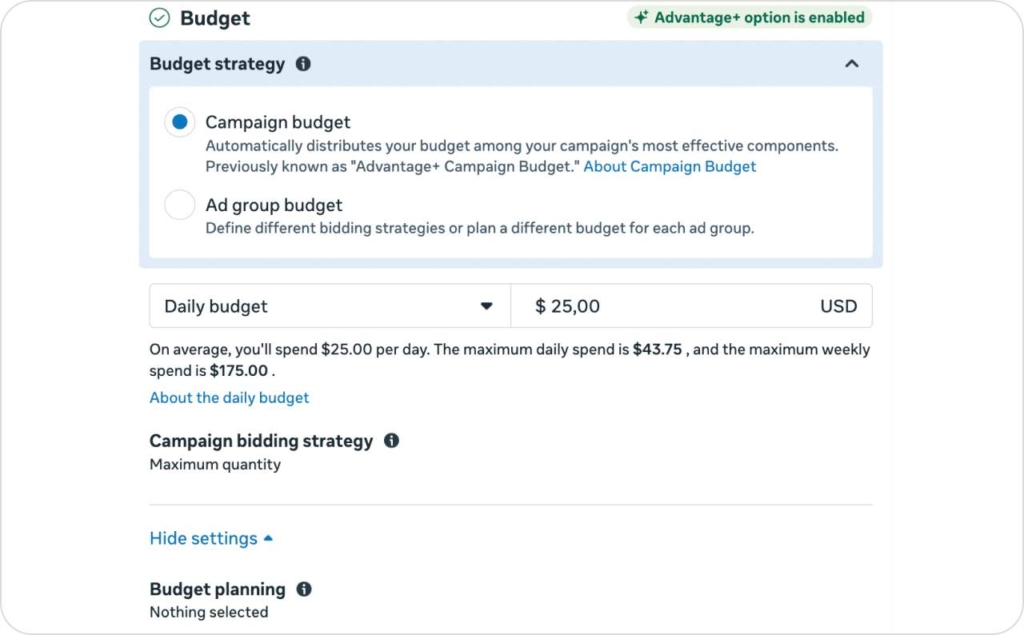
From a technical standpoint, Facebook charges based on your bidding model (Cost per Click, Cost per Mille, or Cost per Action). Your spend is distributed across your campaigns, ad sets, and ads according to how you set budgets — either daily (a consistent limit every 24 hours) or lifetime (a total cap across the campaign’s duration). The billing cycle typically closes once your account reaches its billing threshold (e.g., $25, $250, or $500) or at the end of each month.
What matters most is how that spend ties into return on investment. Facebook ad spend directly affects three key metrics:
- Cost per Result (CPR) — how much you pay for a click, lead, or sale
- Return on Ad Spend (ROAS) — how much revenue your ads bring back
- Customer Acquisition Cost (CAC) — what it costs to acquire one new customer
When tracked together, these metrics tell you not just what you spent, but what you earned from it. They connect financial performance with ad delivery so you can adjust your Facebook ad budget confidently.
Why should you have a Facebook ad spending strategy?
A clear Facebook ad spending strategy keeps your campaigns from drifting into guesswork. It gives you structure for every dollar, helps you set performance benchmarks, and keeps your ROI measurable instead of mysterious.
By WordStream’s 2025 data, Facebook Lead Ads average a $27.66 cost per lead across industries. That number can be half for local services and nearly double for ecommerce brands with longer purchase cycles. Without a spending framework, you risk overspending on audiences that don’t convert — or pausing campaigns right before they break through.
When you know your Customer Acquisition Cost ceiling and Return on Ad Spend target, your budget becomes strategic instead of reactive. You decide where the money goes and what it should bring back.
Take Willow & Co. Boutique, a small apparel brand that started with a $600 test budget. After defining their CAC ceiling at $25 and targeting a 3× ROAS, they adjusted ad sets weekly instead of chasing random wins. Within six weeks, their average cost per purchase dropped to $21, and their ad spend paid back within 19 days.
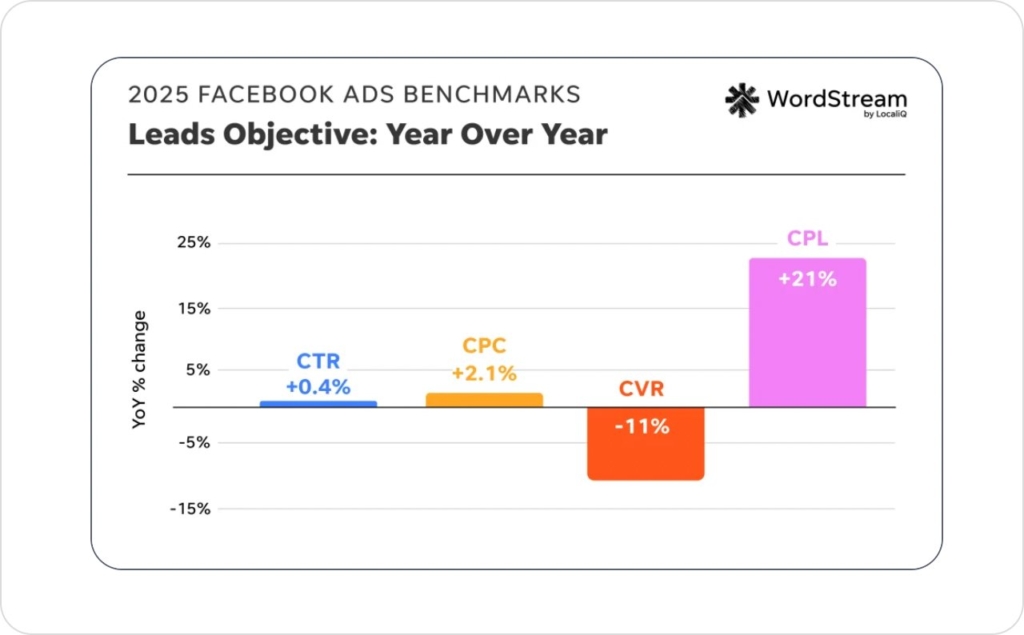
Photo source: WordSteam
How much should I spend on Facebook ads?
If you’re asking how much should I spend on Facebook ads, you’re really asking how much proof you can afford to buy. The goal isn’t to spend a lot, it’s to spend enough to learn, then scale what works.
There’s no single number that fits every business, but you can anchor your Facebook ad budget around a few clear formulas.
Formula 1: CPA-based budget
If your average Cost per Acquisition (CPA) is $20, multiply that by 50 to 100 to test properly.
Budget = Target CPA × 50–100
That range gives Facebook enough conversion data to confirm whether your ad spend is profitable and helps the algorithm exit the learning phase efficiently.
Example: BrightLeaf Landscaping launched local lead-gen campaigns with a $15 target CPA. They began with a $900 test budget ($15 × 60). Within two weeks, Facebook delivered 58 leads at $14.80 each. Once the data stabilized, they scaled up by 25% weekly without losing efficiency. Read examples of lead generation.
When this might not apply: B2B and high-ticket services often need longer attribution windows and higher budgets per conversion. For those, track Cost per Qualified Lead instead of simple CPA.
Formula 2: MER-based budget
If you already run ads, use your Marketing Efficiency Ratio (MER) to anchor spend.
Budget = Revenue ÷ MER target
Example: Willow & Co. Boutique targeted a 4× MER. For $8,000 in monthly revenue, they planned $2,000 in ad spend — a sustainable 25% cost ratio.
When this might not apply: Seasonal retailers or subscription brands with recurring revenue should track MER over a full quarter to account for delayed conversions or upsells.
Quick rule of thumb: Set your daily budget at 3–5× your target CPA. That pace gives Facebook roughly 50 conversions in 2–3 weeks, enough to exit the learning phase and stabilize delivery.
These formulas make how much to spend on Facebook ads a decision, not a guess. They also keep your Facebook advertising budget tied to real numbers instead of wishful thinking.
Step 1: Define your campaign goals
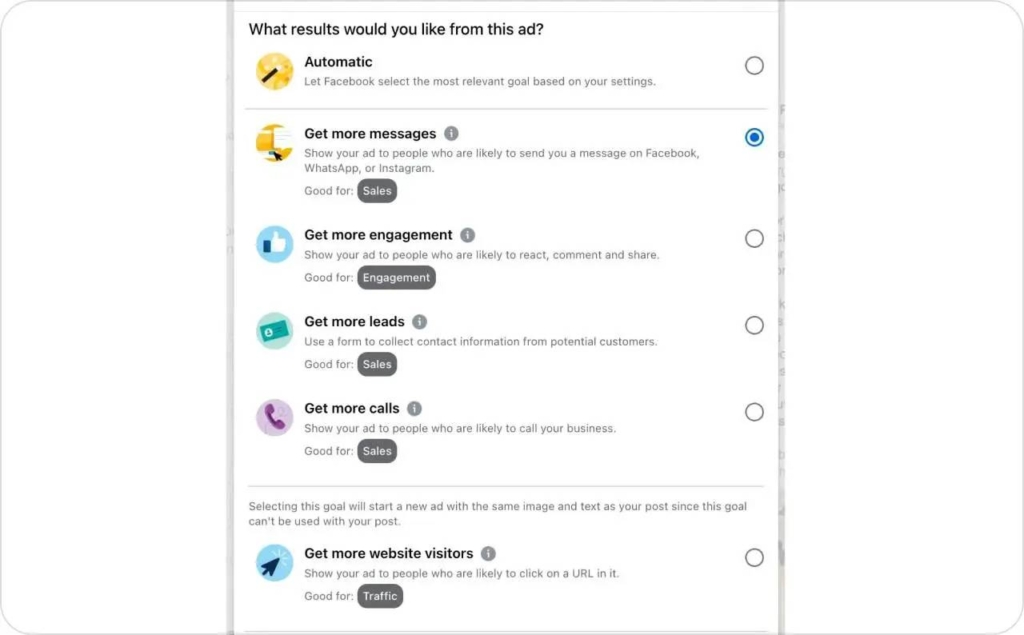
Before you decide how much should I spend on Facebook ads, define what “success” means for your campaign. Every clear budget starts with a clear goal.
Pick one primary event per campaign like a lead or a purchase and one north-star metric to guide decisions. Then:
- Set your CAC ceiling and minimum ROAS. Know the most you can pay to acquire a customer and the least return you’ll accept
- Choose an attribution window for consistent budgeting. Keep it stable so performance comparisons stay fair
- Clarify the offer before scaling budget. Ads can’t fix a weak value proposition; only clarity can
This step is where your Facebook ad budget becomes connected to outcomes instead of guesses. It grounds your Facebook ad spend in measurable numbers, not intuition. When you start with intent and defined limits, you’ll always know how much to spend on fb ads and when it’s time to push further.
Step 2: Start small and test the waters
You don’t need a big spend to learn what works. The smartest move is to start with a small Facebook ad budget that lets you gather data without burning cash.
Begin with one campaign, two audiences, and three to five creatives. Run it for about a week to see which combination drives results. A good starting point is a testing budget equal to 20–30 × your target CPA per ad set for the first 7–10 days.
Don’t spread $5–$10 across many ad sets; concentrate on the budget so Facebook can learn faster.
This early testing phase helps you understand how much should I spend on Facebook ads before scaling. It keeps your Facebook ad spend purposeful and efficient, showing you how much to spend on fb ads for real results, not random guesses.
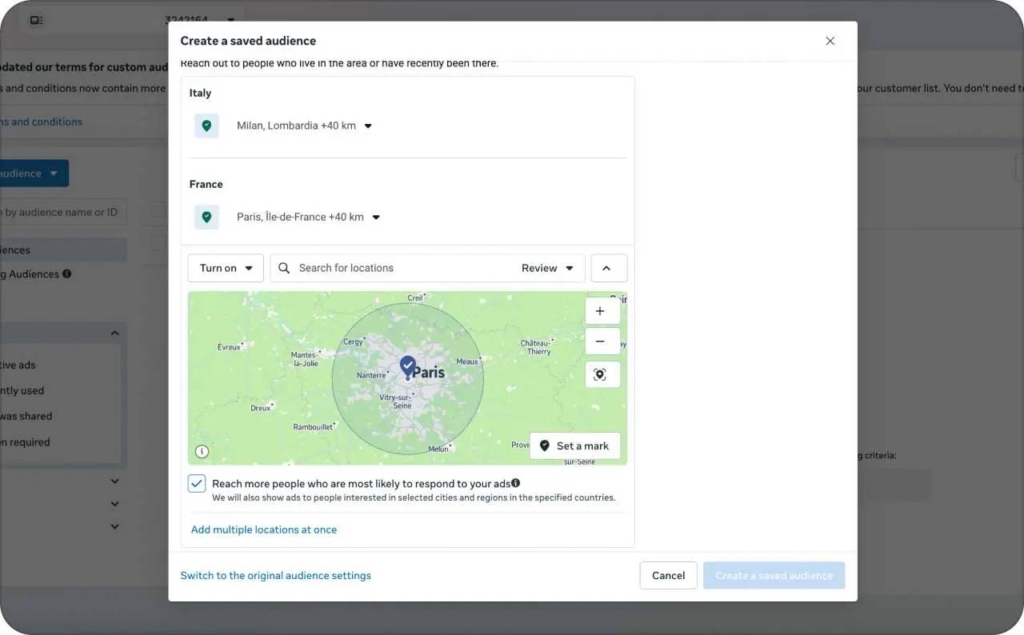
Step 3: Base your budget on audience size
Your Facebook ad budget should grow with the size of your audience. A smaller group doesn’t need much to learn from, you’ll see patterns fast. A larger one takes more spend to reach enough people to matter.
Think of it like lighting a fire: a few logs catch easily, but a big stack needs more spark. The same goes for your Facebook ad spend. The wider your reach, the more fuel you’ll need to see real traction.
Keep an eye on reach and frequency inside Ads Manager. If the same people see your ad more than twice a day, refresh your creative or expand your audience. That’s how you stay efficient and avoid wasting impressions.
This balance helps you understand how much should I spend on Facebook ads at every stage: enough to test, learn, and keep your message in front of fresh eyes without burning your budget.
Step 4: Adjust your budget as you scale
Once your campaigns start performing, don’t rush to double your Facebook ad budget overnight. Scaling works best when it’s steady, not sudden.
Increase spend by 20–30% at a time. This gives Facebook’s algorithm space to adapt without breaking the learning phase. If you grow too fast, results often dip before they rise again.
Use both vertical and horizontal scaling. Vertical means raising the budget on winning ad sets. Horizontal means cloning what works into new audiences or creatives. Doing both keeps your Facebook ad spend stable while still growing reach.
When you move with intention, scaling stops feeling risky. You’ll know how much to spend on Fb ads and when to push further without losing control of performance.
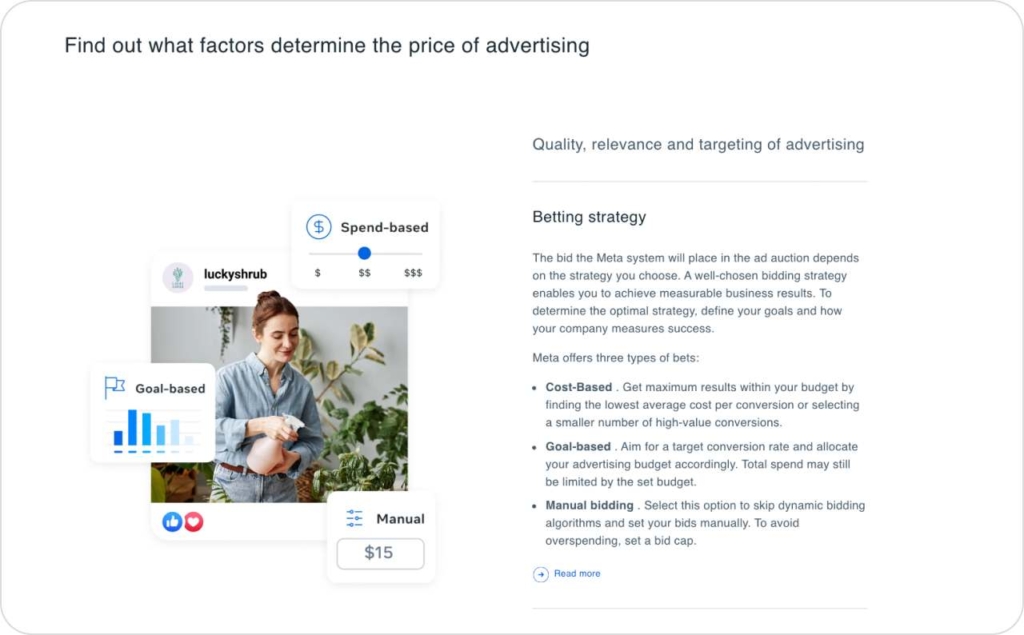
Photo source: Meta
Step 5: Balance your funnel and offers
A healthy Facebook ad budget spreads across the whole funnel, not just the top. You want a steady rhythm between finding new people and nudging the ones who already showed interest.
Put most of your Facebook ad spend toward prospecting. That’s where you reach new audiences and test what truly catches attention. Keep a smaller share for retargeting, the group that clicked, browsed, or added to cart but didn’t finish. That’s where gentle reminders pay off.
Rotate your creatives often to avoid ad fatigue. When the same ad runs too long, results flatten. Fresh visuals and updated offers keep your reach alive. And remember seasonality, costs rise during big sales periods, so leave a small seasonality buffer in your plan.
With this balance, you’ll always know how much should I spend on Facebook ads at each step: enough to attract, enough to convert, and never more than what keeps your results strong and sustainable.
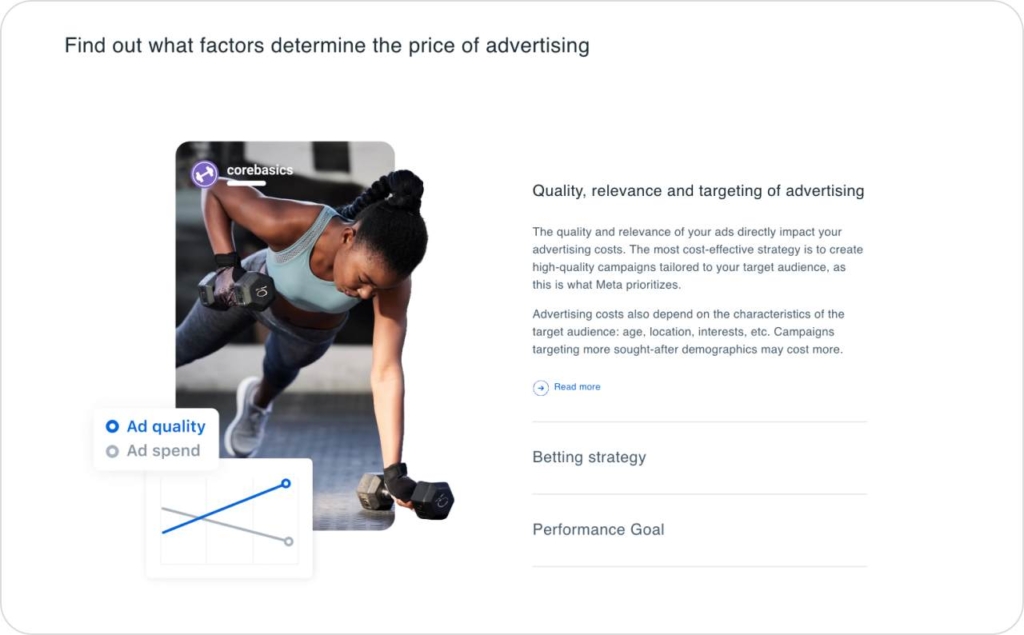
Photo source: Meta
What is a good daily budget for Facebook ads?
A good daily budget for Facebook ads depends on what you’re trying to achieve and how fast you want to learn. Think of your spend as a speed dial: higher budgets help Facebook collect data faster, smaller ones give slower but steadier feedback. According to Social Media Examiner, 46% of marketers in 2025 say video is their top content type, so it makes sense to set your daily budget based on your goal, whether that’s video views, leads, or sales.
Here’s a simple starting range by campaign goal:
- Awareness: $10–$30 per day is enough to stay visible and gather reach data
- Leads: $20–$75 per day usually delivers consistent form fills or messages
- Purchases: $50–$150 per day helps the algorithm optimize for conversions
As a rule of thumb, set your daily Facebook ad budget at 3–5× your target CPA. That pace gives Facebook roughly 50 conversions in 2–3 weeks, the sweet spot for getting out of the learning phase.
If you’re still asking how much should I spend on Facebook ads, start on the lower end of these ranges, then scale slowly as results stabilize. The key is to protect your Facebook ad spend while letting Facebook learn.
How can I increase the effectiveness of my investment in Facebook ads?
Once you know how much should I spend on Facebook ads, the next question is how to make every dollar work harder. Effectiveness isn’t just about raising your Facebook ad budget, it’s about tightening the system around it.
Start with the basics:
- Set up the pixel and Conversions API. They help Facebook track results accurately and send better signals back to the algorithm
- Add UTMs to every ad link so you can see where sales come from inside Google Analytics or your CRM
- Use value-based lookalikes to find people most similar to your best customers, not just anyone who clicks
- Exclude recent purchasers so you’re not wasting spend showing the same ad to someone who already bought
- Check your landing page speed, slow pages quietly kill conversions no matter how good your ad is
These small, technical details compound fast. Together, they help your Facebook ad spend go further and tell you how much to spend on Fb ads with confidence, knowing every step from click to checkout is built for efficiency.
Troubleshooting and optimizing my Facebook ad budget
Budgets drift. That’s part of the process. What matters is catching the signs early and knowing how to steady them.
When you’re spending too little
If your ads barely spend or conversions trickle in, Facebook doesn’t have enough data to learn. Try combining similar ad sets or raising the budget a bit — about 25% is plenty. You’ll see steadier delivery within a few days.
BrightLeaf Landscaping learned this the simple way: they merged three $10/day tests into one $40/day campaign and their leads nearly doubled.
When you’re spending too much
If costs rise fast or the same people see your ad again and again, slow down.
Pull back 15–20%, refresh your creative, or test a new audience. Scaling works best when it feels calm, not forced.
When the numbers don’t add up
Big swings in data often mean your tracking isn’t catching everything. Check your pixel and Conversion API, then open Event Manager to make sure each event fires correctly. Clean data builds confidence — every number means something again.
When results vary by market
A good CPM in one region can be high in another. E-commerce in the U.S. might pay $12–$20 CPM; local services in Southeast Asia often see $3–$6. Look at your own averages and judge progress from there.
Small adjustments compound fast. When you know what each number is saying, your budget stops feeling like a bet and starts feeling like control.
Recommended tool: Zeely — the AI ad generator that makes every dollar work harder
Most small businesses know what they want to say, but not how to say it fast. Creating Facebook ads that look good, convert well, and stay within your Facebook ad budget often takes more time and money than it should. Zeely changes that with Facebook Ads Creator.
Zeely is an AI ad creator built for small businesses, marketers, and e-commerce brands who want to grow without hiring agencies or juggling five different tools. It’s your all-in-one AI ad tool and business growth app, designed to help you launch high-performing ads in minutes.
Why small businesses choose Zeely
- No time? AI reduces ad creation from hours to minutes static and video ads ready in one tap
- Low budget? Zeely optimizes every campaign to make your Facebook ad spend go further
- No design or editing skills? 100+ proven templates and 500+ realistic AI avatars make every ad look professional
- Complex setup? AI handles targeting, copy, and creative testing, just set your goal and launch
- Low conversions? Built-in hooks, scripts, and dynamic templates improve CTR, ROAS, and sales. Read more about the average CTR for Facebook ads.
- Scaling problems? Generate bulk ads or full campaigns in minutes, perfect for A/B testing and fast growth
- Wasted budget? Smart AI tracking prevents overspending and keeps your campaigns efficient
- Need support? Real humans are available 24/7 with answers that go beyond tech help, they guide your marketing too
With Zeely, you stop wondering how much should I spend on Facebook ads or how much to spend on Fb ads, because your ads get smarter every time you run them.
Zeely removes the hardest parts of advertising: design, copy, targeting, and scaling, and gives you a faster, cheaper way to grow. Simple setup, proven templates, and measurable results mean your next great ad can be ready in under ten minutes.
Conclusion
A good Facebook ad budget isn’t about spending more, it’s about knowing why you’re spending at all. When you define your numbers, track what works, and scale with purpose, every dollar starts pulling its weight. That’s how you stop wondering how much should I spend on Facebook ads and start building predictable growth through data, not luck.
If you want to save hours and make your Facebook ad spend work harder, try creating your next ad with Zeely.