Master Instagram safe zones before you post again
What if your captions or logos vanish under Instagram’s UI layers or grid crops? We in Zeely, composed a complete guide to align with Instagram safe zones, ensuring every Story, Reel, and grid stays clear, compliant, and conversion-ready.
Instagram safe zones are the protected areas of a Story, Reel, or feed asset where text, logos, subtitles, and CTAs remain visible across device sizes, UI overlays, and grid previews. These invisible edges are what separate clean, professional visuals from ones that look accidentally cropped.
This guide breaks down the specs, ratios, and performance signals behind effective Instagram safe zones. You’ll see how smart framing keeps your brand consistent, your CTAs clickable, and every visual perfectly aligned with the way audiences actually view your content in 2026.
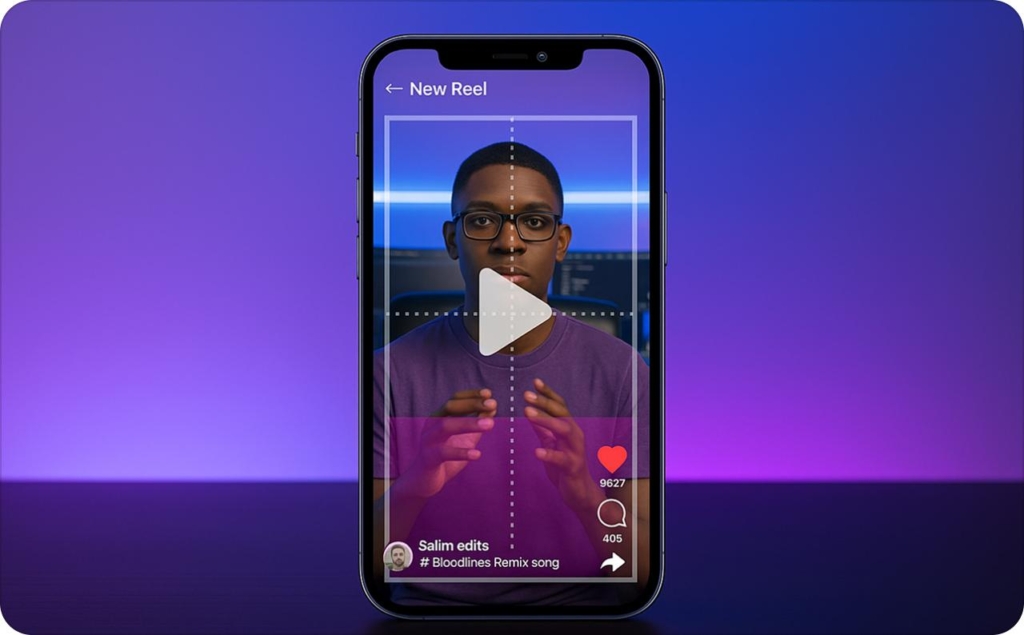
Instagram safe zones: exact sizes and ratios
When creators talk about instagram safe zones, they mean the space where every piece of text, logo, and call-to-action stays visible and no overlays cutting through your message, no captions hiding your offers. It’s the foundation of every professional-looking Story, Reel, and feed post.
According to HubSpot’s 2025 Social Media Image Size Guide, the core canvases still hold: 1080×1920 (9:16) for Stories and Reels, 1080×1350 (4:5) for portrait feed posts, 1080×1440 (3:4) for grid-aligned designs, and 1080×1080 (1:1) for square content. These ratios look similar at first glance but behave differently once Instagram’s UI overlays and previews come into play.
Use the title-safe rule, which is to keep critical text and visuals within the central 70–80% of the frame, leaving the top and bottom 10–15 percent free for buttons, usernames, and captions. Export files in MP4 (H.264 video + AAC audio) with a bitrate between 10–20 Mbps for crisp 1080p delivery, and skip filters that create color noise near text edges.
If you’re working inside editor, check the safe-zone overlay option to see your real-time boundaries. It’s a simple safeguard that helps every creative stay clear, readable, and conversion-ready and properly aligned instagram safe zones.
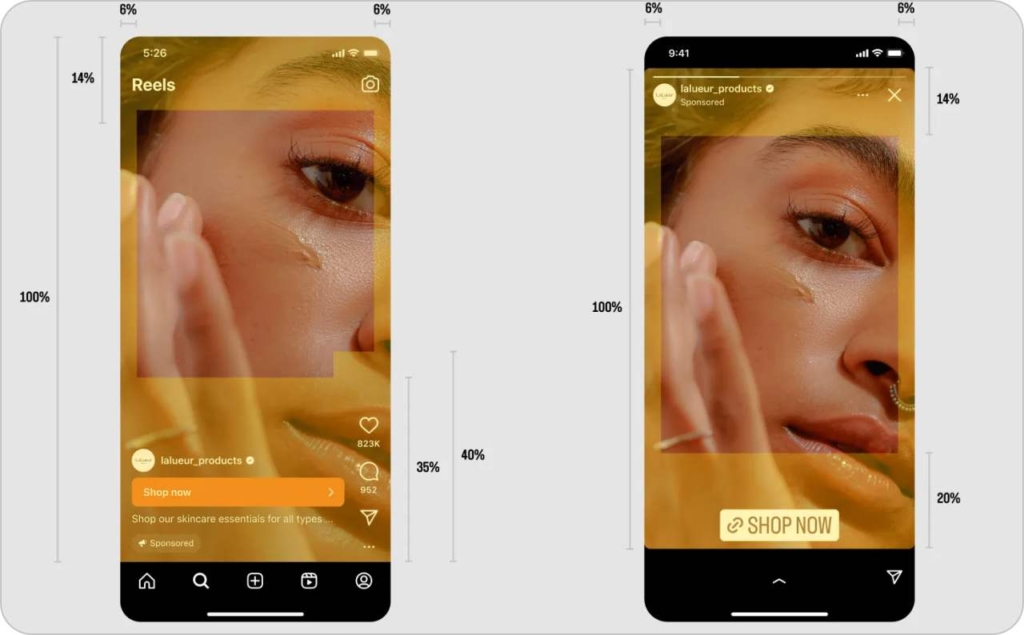
Photo source: Meta Help Center for Business
Canvas & aspect ratios: 9:16, 4:5, 3:4 — when to use each
Use 9:16 for vertical storytelling: Stories, Reels, and mobile-first ads. 4:5 works best for feed posts that need more screen height without cropping in the grid. 3:4 has become the smart middle ground; it matches the modern grid preview ratio, keeping your thumbnails centered and clean. Square 1:1 remains useful for carousels or product-centric posts, especially when consistency beats novelty.
Title-safe vs. action-safe: spacing for clarity
The title-safe area is where key visuals live. The action-safe area adds an extra buffer for captions, subtitles, or stickers, roughly another 5–10% inside your frame. Leave breathing room for the app’s elements to move as the UI updates. It’s a subtle habit that keeps your message sharp across new formats and device heights.
Export & compression checklist
- Codec: H.264 + AAC
- Bitrate: 10–20 Mbps (1080p)
- Frame rate: match source footage (24–30 fps ideal)
- Avoid: heavy LUTs, animated borders, or text hugging edges
- Final test: preview with overlays enabled to confirm alignment
These small steps keep resolution crisp and guarantee your next upload stays inside the safe zone. They are visually clean, algorithm-friendly, and ready to perform.
Instagram story safe zones: protect text from interface
Stories still dominate short-form engagement, and instagram story safe zones decide whether your message actually lands. In 2025, Instagram remained one of the most-used platforms among U.S. teens and young adults. Pew Research confirms it’s still a daily habit for more than half of them. That reach makes every pixel count, especially when the app’s interface hides more than it shows.
Here’s what most brands miss: usernames, reply bars, and stickers eat into your frame. Keep text, pricing, or coupon codes inside the central band of your 1080×1920 canvas, leaving roughly 310 pixels clear at both top and bottom. For accessibility, burn captions at 42 px or larger, keep line lengths under 30 characters, and use 1.3× line spacing for smoother reading. Always maintain a contrast ratio above 4.5:1, so words stay visible even on motion backgrounds. Avoid edge-anchored stickers that drift into unsafe zones.
Before you publish, storyboard 3–5 frames with your safe-zone overlay toggled on. You’ll see instantly whether CTAs, faces, or subtitles stay centered once the interface loads. Respecting the instagram story safe zones is about control. The clearer the view, the stronger the watch-through rate, and the easier it is for your Story to earn a full swipe instead of a skip.
Make stickers follow your story, not block it
Treat polls, mentions, and link stickers as supporting elements. Keep them below your main headline, not floating over it. That simple move keeps your message readable and flow intact. The viewer’s eyes move top to center naturally. Place your hook there, and let stickers invite action after.
Choose typography that survives motion
Stories move fast, so your text has to hold up under compression. Use bold or semi-bold weights, add a 2-point stroke or soft shadow for separation, and keep lines short and even. Good type should feel invisible until it fails.
Keep attention in the heat zone
The central third of your frame is where viewers focus first. That’s where faces, products, and key lines belong. Before you post, preview your Story with the UI on; if the balance still feels right once overlays appear, you’re safely inside the Instagram Story safe zones.
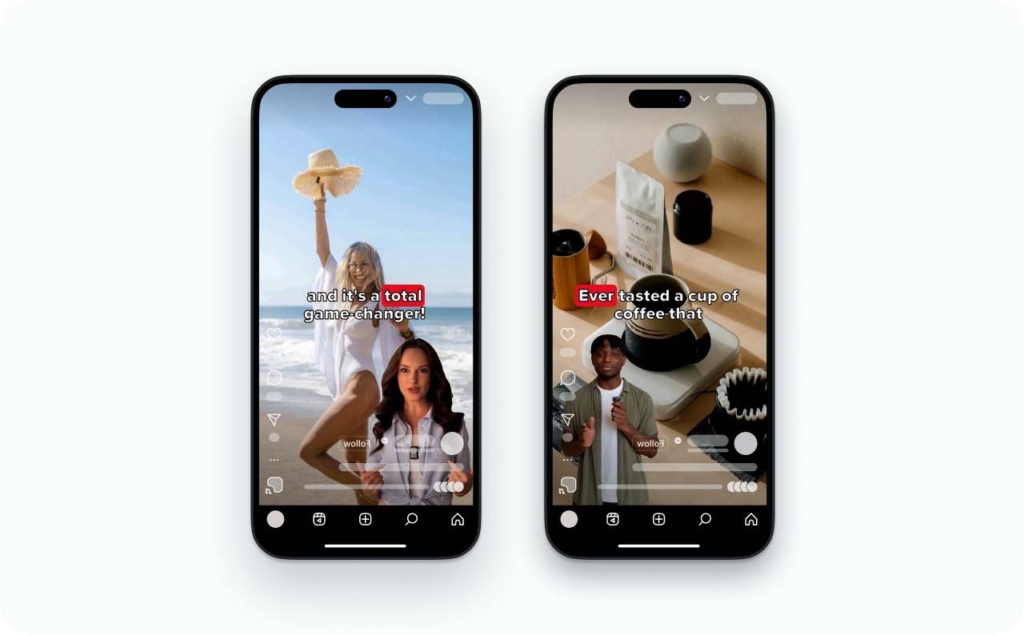
Instagram reel safe zones: captions, hooks, and 3-minute pacing
Reels now run up to three full minutes, and that change reshapes how creators should use instagram reel safe zones. Longer runtime means your lower-thirds, captions, and CTAs stay visible longer. If they’re outside the safe area, the distraction compounds over time.
As TechCrunch confirms, Reels gained new playback speeds and extended limits in 2025. That makes design endurance a performance factor. Keep persistent elements like subtitles or brand marks inside the title-safe region — the central 70–80% of your 1080×1920 frame — and refresh CTA cards every 20–30 seconds to reset attention. Avoid placing text in the bottom 10–15%, where captions and buttons overlap. For legibility, your subtitle height should equal about 1.3× your font size, with two lines max per beat.
Close each Reel with a 2–3-second end screen. Center your call-to-action, and size tappable targets to at least 44×44 pixels so they’re easy to hit on mobile. A well-balanced layout keeps your story moving and your message visible from start to finish. When your design stays inside the instagram reels safe zones, it feels effortless — clear framing, confident pacing, and no lost words under the interface.
Start strong: hook design in the first two seconds
The opening two seconds decide whether viewers stay or swipe. Keep your headline fully inside the safe area and free from top-edge crops. Use contrast, quick motion, or eye contact to hold attention before the algorithm decides visibility.
Make subtitles built to last
Compressed video can destroy fine text. Increase tracking by +2 to +4, avoid thin fonts, and test at 1080p before exporting. Strong readability signals professionalism. It’s the easiest trust cue on screen.
Match your cover to your first frame
Your cover and opening scene should tell the same story. If the promise on your cover doesn’t match the first three seconds, drop-off spikes. Consistency between the visual hook and intro builds watch-through and keeps your Reels aligned with your Instagram reel safe zones from start to end.
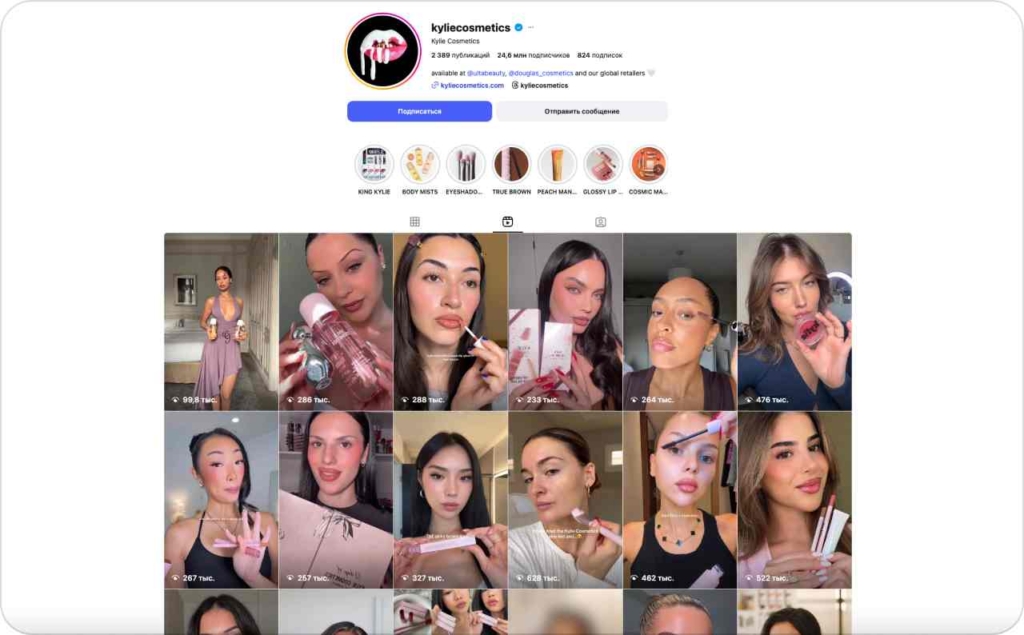
Photo source: @kyliecosmetics on Instagram
3:4 grid previews: design Reels covers and feed posts that won’t crop
The classic square grid is giving way to taller previews. The Verge reports that Instagram’s new 3:4 layout is reshaping how Reels covers and feed posts display inside your profile. It’s subtle, but it changes how every frame should be composed.
When you design a Reel or vertical asset on a 1080×1920 canvas, visualize a 3:4 window at the center. That’s what will appear on your grid. Keep your main subject fully within that crop. For Reels covers, export a 1080×1920 image with a visible 3:4 guide and test the “Profile grid” preview before posting. A one-minute check can save an entire campaign from awkward cropping.
For feed content, use 3:4 or 4:5 ratios to dominate screen space without forcing auto-crops. The central 3:4 zone must stay legible as a thumbnail: text should remain centered and minimal, while visuals feel balanced. When your layout respects the safe zones instagram logic, your grid looks designed, not accidental.
Compose for balance, not chance
Center eyes, logos, and products along the 3:4 axes. Keep space above and below so nothing feels squeezed. A balanced cover draws the viewer in before they even tap.
Test, measure, adjust
Create two or three Reels covers, publish one, and monitor click-throughs for 24 hours. If CTR dips, swap in the next design. Iteration beats guesswork every time.
Hedge your feed with carousels
Lead with a 3:4 hero image to protect the grid crop. Follow it with a 4:5 frame for maximum feed real estate. This blend makes your posts look consistent while optimizing both engagement and layout.
Measure safe-zone impact: the KPIs that actually move
Great visuals mean little if they don’t perform. The best instagram safe zones directly influence retention, watch time, and conversions. As Forbes points out, the creators who scale fastest are the ones who monitor engagement signals, not just aesthetics.
Start with measurable KPIs: hook retention (3-second view rate), average watch time, completion rate, and tap-through CTR on Story or Reel CTAs. Add saves and shares as indicators of creative resonance. If your captions or logos land outside the safe zone, expect a drop within the first 2–4 seconds of playback. Those early exits usually map to where text or faces are hidden by UI overlays — your built-in diagnostic for layout problems.
To prove the difference, run 2×2 tests: tight vs. loose safe-zone margins, each with and without captions. Track how each version shifts view-through and click-through. You’ll often see a 10–15% retention lift when elements stay within title-safe space.
In short, clean framing isn’t just design polish — it’s measurable performance logic. The clearer your visuals inside the instagram safe zones, the stronger your story converts.
Segment analytics by placement
Break down results for Stories, Reels, and feed posts separately to ensure better lead generation. Each surface has different UI overlays and attention curves. The more granular your view, the faster you’ll spot where visibility losses occur.
Tune captions for performance
Small type kills completion rates. Test font sizes and contrast levels, then match them against watch time. Clear, stable subtitles keep mobile viewers watching longer — especially in noisy environments.
Systemize your creative ops
Use a shared template library and pre-flight checklist to enforce safe-zone boundaries. When every designer starts from the same frame, your brand visuals stay consistent, and testing data stays reliable.
How to use an AI ad maker to stay safe‑zone compliant
The quickest path is to build ads in a tool that sizes and scripts creatives for Instagram by default. Zeely’s AI ad maker generates platform‑ready video and static ads, then lets you publish with a few taps.
What you need
- A Zeely account and a product page or media folder
- An Instagram Business or Creator account connected
Time
10–15 minutes for a first ad. Variant testing takes longer but pays off. Check our guide on how to create Instagram reels with Zeely AI.
Step‑by‑step
- Log in
Go to https://app.zeely.ai/ and sign in. - Open Viral campaigns
In your web dashboard, go to Promotions → Viral campaigns and click + Create organic campaign. - Connect Instagram (first-time only)
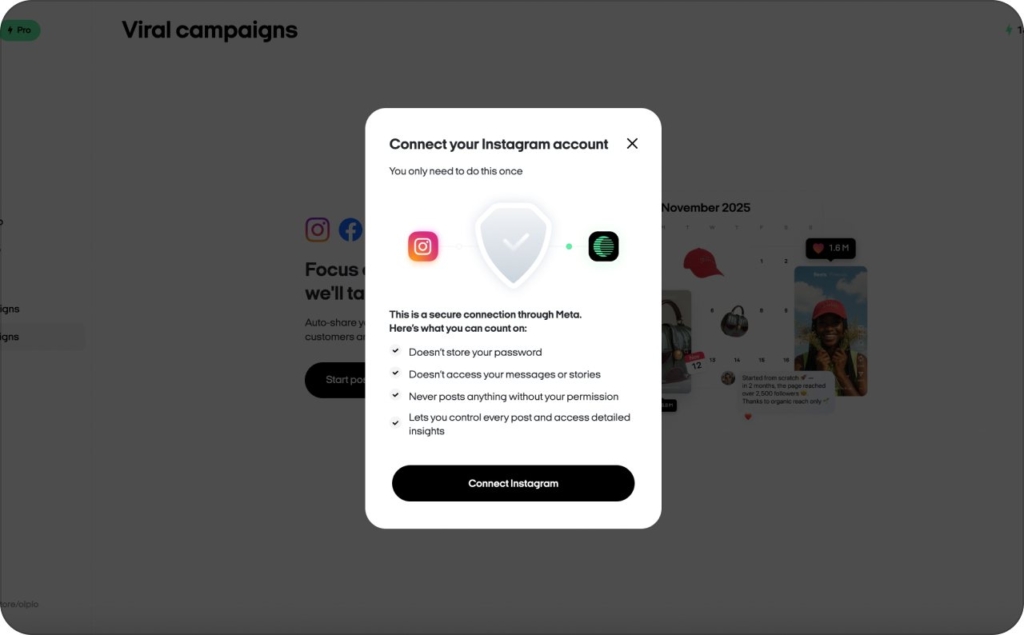
If this is your first campaign, Zeely will prompt you to connect Instagram.
Important: Viral campaigns work only with Instagram Business or Creator accounts (personal accounts can’t be connected). Follow Instagram’s on-screen steps and grant permissions so Zeely can post Reels for you.
4. Pick the product
Choose the product from your store you want to promote, then click Continue.
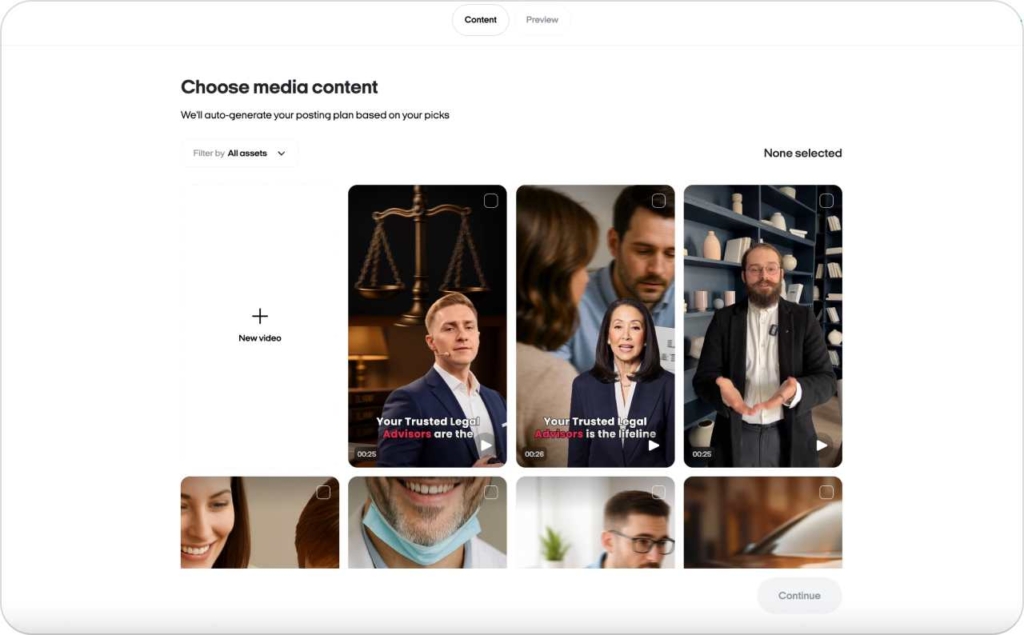
5. Set campaign details
- Publish date & time: when each Reel should go live
- Campaign duration: how long the campaign runs
- Number of videos: how many Reels to include
Click Continue when ready.
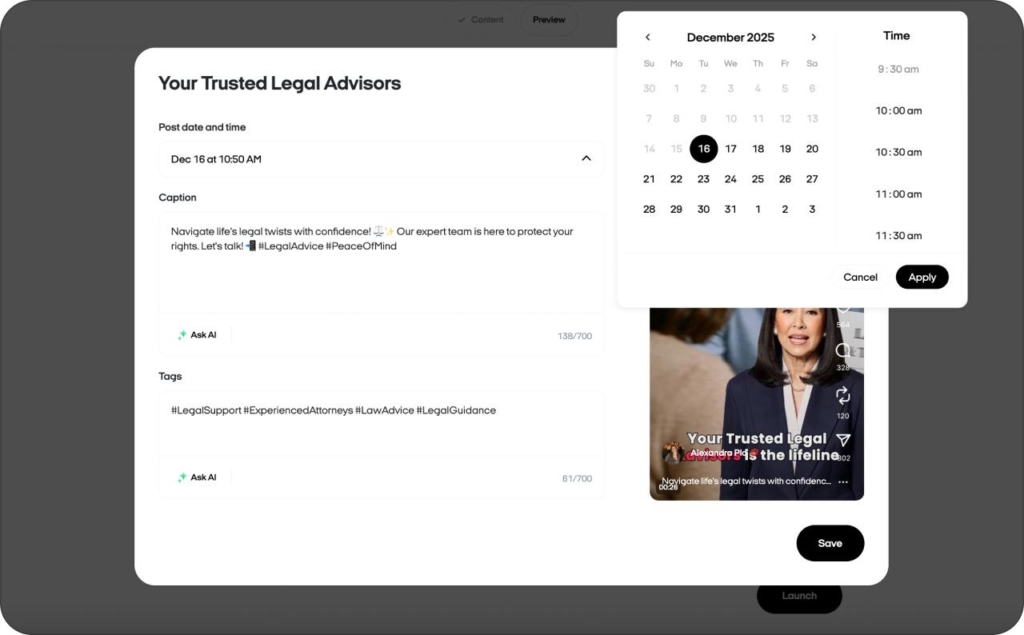
- Choose the videos
Select the product videos you want to post as Reels. - Launch
Hit Launch campaign. Zeely will schedule and publish your Reels automatically.
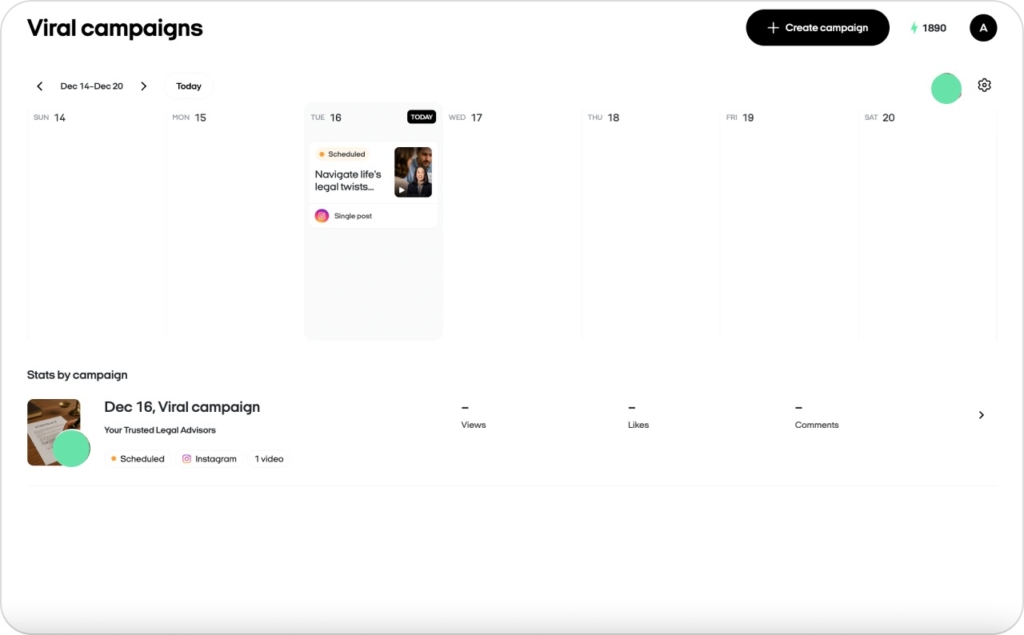
Manage & tweak
- After setup, you’ll see all scheduled Reels with their dates and times.
- Need to change something before launch? Click Edit to adjust the video, caption, or timing.
- Use tags to help discovery.
- Switch to Calendar view to see all planned publications in one place.
That’s it — let the campaign run and bring in new fans with Instagram ads creator. If you get stuck, our Support team’s ready to help.