All methods of how to save Stories on Instagram in 2026
Want to save an Instagram Story before it disappears or gets compressed? We have tested the 2026 in-app paths, Archive flows, and safe backups so you can save Stories cleanly, keep audio when possible, and avoid sketchy downloader traps.
To save your own Story, use the download icon before posting, or open your live Story and tap three dots then Save. Turn on auto-save so every Story is stored in your Archive and optionally your camera roll.
For older Stories, download from Archive or keep Highlights for long-term access. Saving other people’s Stories is not built-in, so use screenshots/screen recording only when you have permission and a real need, and avoid tools that ask you to log in.
Stories are quick, disposable, and easy to lose. This guide shows the fastest ways to save your own Stories, recover old ones from Archive/Highlights, keep sound when it matters, and handle other people’s Stories with privacy and safety in mind.
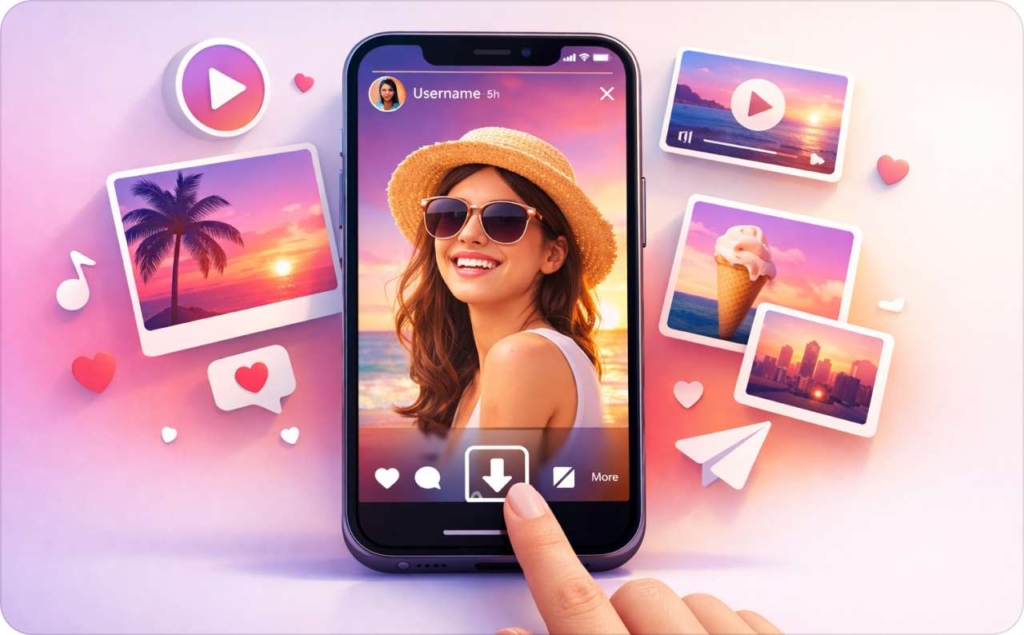
How to save stories on Instagram to your phone
Saving stories on Instagram usually means one of three things: saving before you post, saving while it’s live, or saving after it expires. All three work, but the cleanest file comes from saving early.
Here’s the quick menu map:
- Before posting: save from the Story editor.
- While live: open your Story, tap the three dots, save.
- After it expires: open Archive, then save from there.
How do I save an Instagram Story before posting it?
I build my Story, then save it before I publish. In the Story editor, I tap the download icon, it can look like a down arrow or a save icon depending on your app version. Confirm it appears in Photos (iPhone) or Gallery (Android). This is the easiest way to save Stories on Instagram without extra compression. You may also like to read an article on how to post a Story on Instagram.
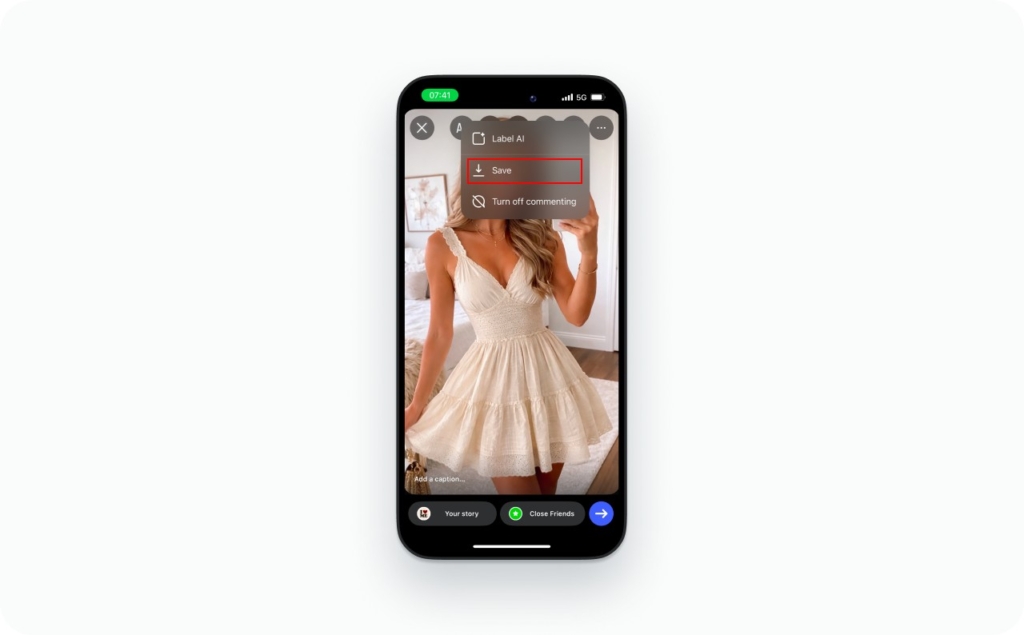
How do I save my Instagram Story after posting?
Open my active Story from my profile ring. I tap three dots, then choose Save. If Instagram offers options, pick Save Photo or Save Video for that slide. Do this while the Story is still live so you can retry if the save fails.
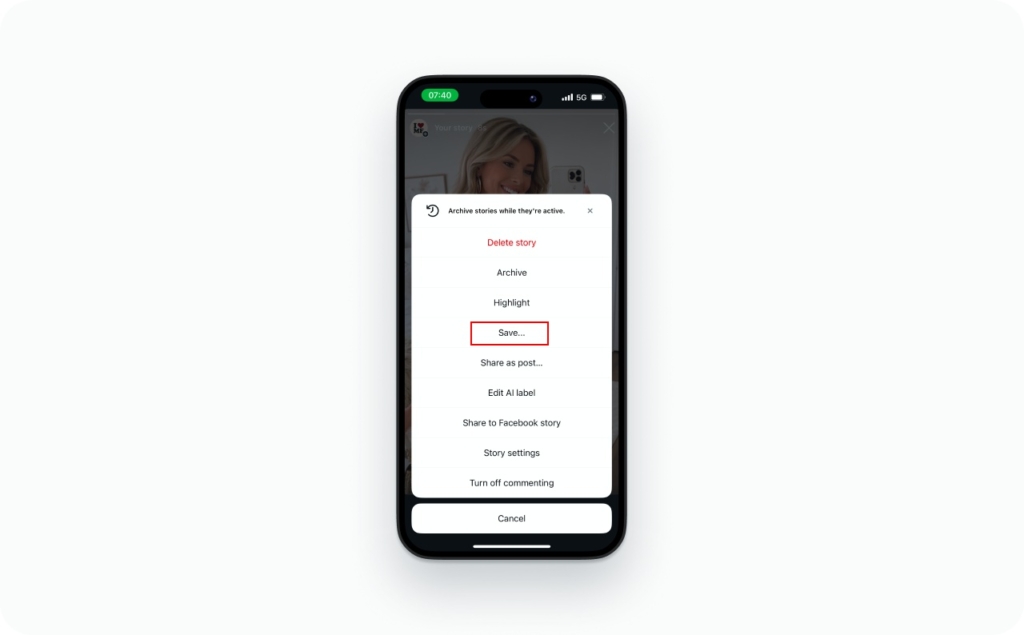
How to see saved stories on Instagram?
If you can’t save it, find it first. Instagram stores past Stories in Archive and Highlights, and they behave differently for a reason.
- Archive: your private Story history
- Highlights: Story collections you pin on your profile
Stories are designed to disappear, which is why Archive exists in the first place. Sprout Social’s Instagram Stories guide describes Stories as temporary content that disappears after a day unless saved. Read now how long Instagram stories last.
Where is the Story Archive in the Instagram app?
Go to your profile, tap the menu icon, then open Archive. At the top, switch the archive type to Stories if needed. Tap any date to view your saved Story slides, then use the menu on a slide to save it again.
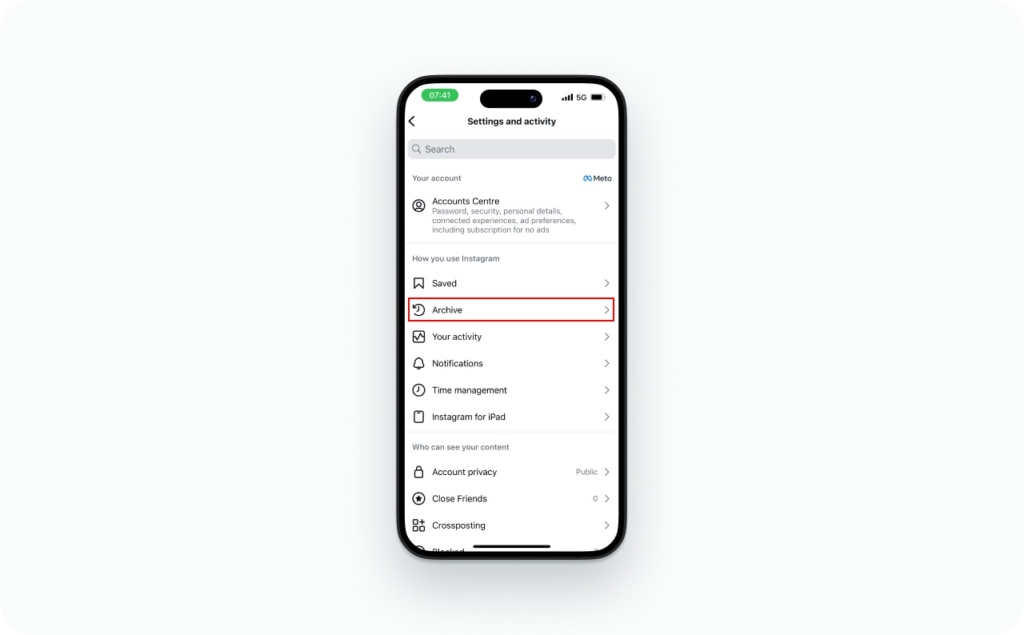
What’s the difference between Archive and Highlights?
Archive is your private storage by date. Highlights are curated Story folders that show on your profile and can help new people view insta stories you want to keep around. Archive is for recovery. Highlights are for presentation.
How to save a single slide from your Story?
Sometimes you only want one frame, like a testimonial slide or a product clip. The easiest method is to open the Story in Archive, swipe to the slide you want, and save that slide if Instagram shows a Save Photo/Save Video option.
If Instagram only saves the full sequence, screen recording is the backup. Apple’s iPhone screen recording feature saves what’s on-screen as a video, and you can enable microphone audio too.
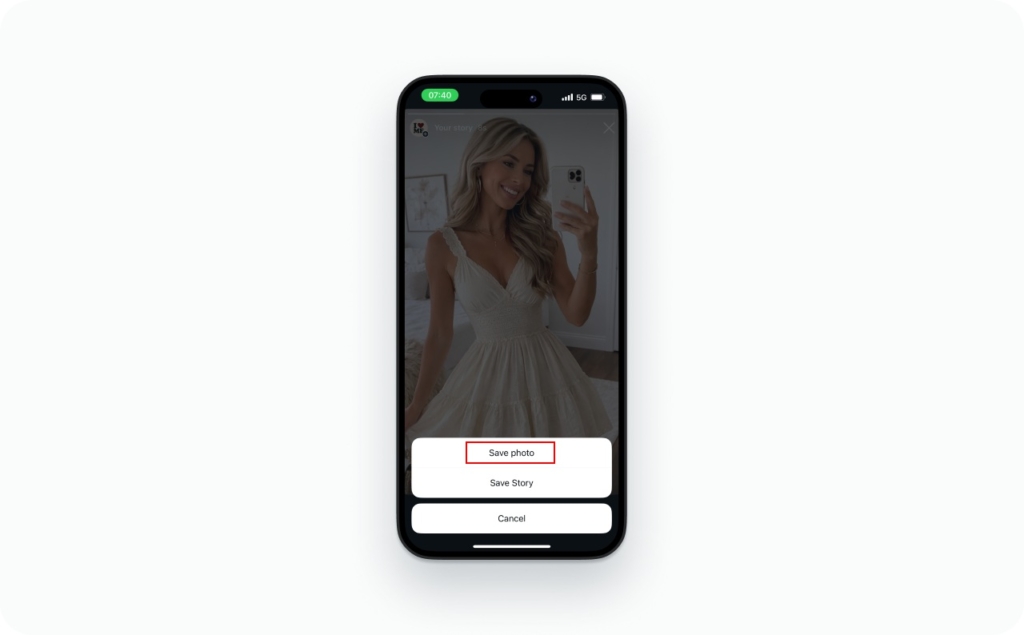
How do I save one Story photo or video from Archive?
Open Archive, tap the Story, then swipe to the exact slide you need. Tap the slide menu and choose Save Photo or Save Video if available. If it’s not available, screen record that slide, then trim it in Photos or your Gallery editor. Read also a detailed guide on how to find old Instagram stories.
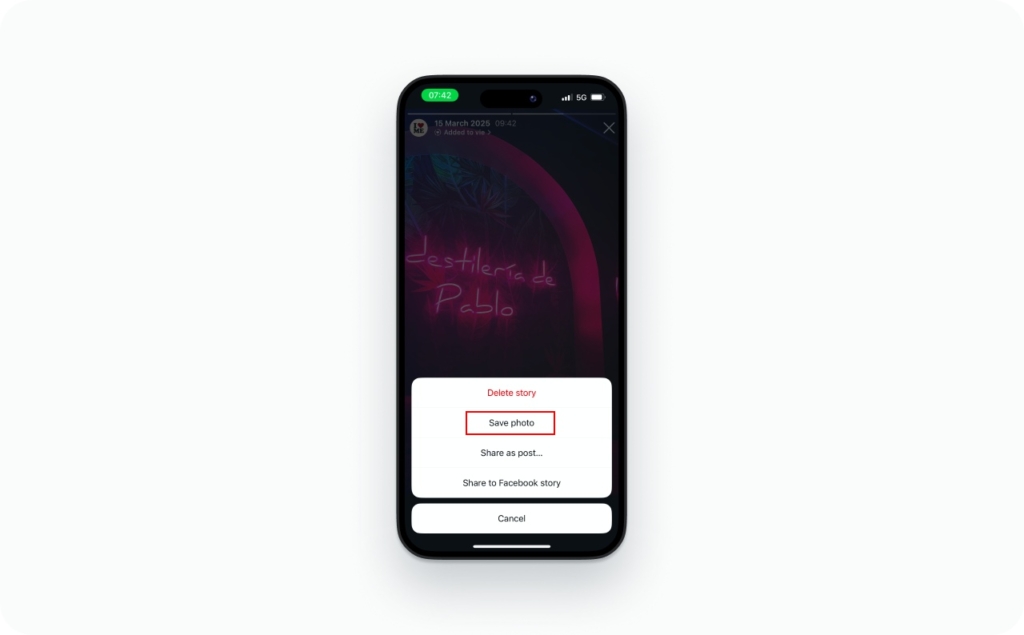
How to save videos from stories on Instagram with sound and why audio disappears?
If you’re trying to figure out how to save videos from stories on Instagram with sound, the annoying truth is that audio depends on how the Story was built and how you saved it.
A simple audio truth table helps:
- Saved from Instagram: most reliable for keeping audio
- Screen recording: can save muted audio depending on device rules
- Music sticker audio: can behave differently from original camera audio
On Android, audio capture is controlled by the OS and app-level restrictions. Android Developers explains that screen capture uses a MediaProjection token and audio playback can be restricted, which is one reason screen recordings sometimes save muted.
Quick fixes that usually work:
- Update Instagram, then retry saving from Archive
- Turn off Low Power Mode (iPhone) or Battery Saver (Android), then retry
- If screen recording is muted, check your recorder settings and device audio routing
How do I save an Instagram Story that has music on it?
First, I save using Instagram’s own Save option on the posted Story or from Archive. If the saved file is muted, the music license may not export cleanly, even when the video saves. If you need audio guaranteed, keep a copy of the original video before adding music, then add music again later. You may also like to read an article about how to add music to an Instagram story.
How to save old Stories and back up everything?
Old Stories are where content goes to die, unless you save them right. The order I use is:
- Check Archive and save the Story slide you need
- If it’s a best-of Story you still want public, add it to Highlights
- If you’re managing content for work, do periodic account backups so Stories don’t disappear with a phone upgrade
Meta has been pushing originality in recommendations, and saving your originals helps you reuse them without downloading re-uploads. In Meta’s January 2026 post, it says Instagram increased the prevalence of original content in the US by 10 percentage points in Q4, with 75% of recommendations coming from original posts.
How do I save Instagram Story Highlights to my phone?
Open the Highlight on your profile and navigate to the slide you want. If Instagram offers a save option, use it. If it doesn’t, screen record the segment and trim it. If it’s for a client portfolio, get written permission before reposting their Story content.
Can you save someone else’s Instagram Story, and will they know?
Instagram doesn’t give a built-in “download their Story” button. That’s by design. Your options are basically: ask for the original file, or capture what you’re allowed to capture.
Two common questions show up here:
- Will they know if I screenshot or screen record?
- Is it OK to reuse what I saved?
Read this article to find out if Instagram shows screenshots of your Stories.
Even if Instagram doesn’t alert them, that doesn’t make it yours to reuse. For anything public-facing like a brand post, paid ad, or portfolio example, ask for permission and keep the yes in writing.
How do I save Stories from a private Instagram account?
Anonymous private Story downloaders are trouble. Ask for the file, or ask to repost. If you’re posting it as a brand, save the permission screenshot. Read an article now about how to repost a story on Instagram.
Story saver tools and desktop downloads
Most “Story saver” tools have one job: get you to click ads or hand over credentials. My rule is strict: never enter your Instagram password into a downloader.
Google has been tightening Android protections against risky apps. The Verge covered Google’s move to automatically revoke permissions from apps identified as potentially harmful, limiting access to photos, storage, and camera.
If you’re thinking about a Story saver site or extension, run this checklist first:
- It asks you to log in with Instagram
- It asks you to disable security or “verify” with weird steps
- It’s packed with fake download buttons and popups
- It has no clear company info or privacy policy
Is it safe to use Instagram Story downloader websites?
Some can work for public accounts, but treat them as high risk. If it asks you to sign in, close it. If you must use one, do it without logging in and avoid installing extensions that can read your browsing data.
Troubleshooting: why can’t I save my Instagram Stories?
When the Save option disappears or saving fails, it’s usually one of three things: app version issues, permissions, or storage.
Try this ladder, in order:
- Update Instagram
- Check your phone storage
- Check Instagram permissions for Photos (iPhone) or Storage (Android)
- Toggle auto-save off, then on
- Log out and log back in
- Reinstall Instagram as a last resort
Google’s Android Help has step-by-step instructions for changing app permissions, which is exactly what you need when Instagram can’t write to your Gallery.
Why is my saved Story muted or blurry?
- Muted saves usually come from screen recording rules or music behavior, not your volume.
- Blurry saves usually come from screenshots or saving the same file multiple times. Save directly from Instagram, keep that first saved copy, and avoid re-uploading a downloaded version.
FAQ
Save it to your phone, not just inside Instagram. Use the Story Save option or save before posting, then confirm the file is in Photos or Gallery. Offline viewing works when it’s stored locally.
Saved effects live in your camera’s effects tray. Open the Story camera, browse effects, then pick your saved effect. It applies while you record or capture, not after you post.
Filters are part of the capture flow. Swipe through filters in the Story camera, or open the effect browser to find saved ones. If a filter is missing, it may have been removed by the creator.
Saved audio is a shortcut in the music picker, not a downloaded file. Tap Music, open saved tracks, select the track, then choose the clip segment. If a song is missing, it may be region or account-type restricted.
Open Instagram, swipe right to the Story camera, capture or upload, add text or stickers, then tap Your Story. Save first if you want the clean file. Read a dedicated article on how to add a Story on Instagram.
If someone mentions you, you can add their Story to yours from the message prompt. If you aren’t mentioned, ask for permission and a repostable asset instead of ripping it from a downloader.

Emma blends product marketing and content to turn complex tools into simple, sales-driven playbooks for AI ad creatives and Facebook/Instagram campaigns. You’ll get checklists, bite-size guides, and real results, pulled from thousands of Zeely entrepreneurs, so you can run AI-powered ads confidently, even as a beginner.
Written by: Emma, AI Growth Adviser, Zeely
Reviewed on: March 18, 2026