Best time to post Reels in 2026
Posting Reels but reach is inconsistent? You may be missing your audience’s best engagement window. At Zeely, we work with sellers who post consistently, so this guide shares timing benchmarks you can use today and refine with Instagram Insights.
There’s no single “magic” time, but strong benchmarks for Instagram Reels are weekday mornings to midday, then refined by your audience’s timezone and your own Insights. Start with proven windows, post when your followers are most active. Track plays, reach, saves, shares, and 3-second/average watch time, then lock the best slot into a consistent schedule.
Best time to post Reels is really two questions: what usually works and what works for you. This outline gives both, starting with 2026 data-backed windows. If you need to post today, you’ll also get a quick pick method.
Best time to post Reels on Instagram quick table
If your Reels performance feels random, start with a proven engagement window. Weekdays usually give you more consistent audience activity than weekends, especially mornings and midday. Use the tables below as a baseline, then adjust for your followers’ time zone (EST, PST, or UTC).
| Best days | Best posting windows |
| Tue–Thu | 7–9 AM, 11 AM–1 PM |
| Mon/Fri | 11 AM–1 PM, 3–5 PM |
| Sun | 10 AM–12 PM |
Day-by-day mini table
| Day | Option A | Option B | Option C |
| Mon | 8–9 AM | 11 AM–1 PM | 5–6 PM |
| Tue | 7–9 AM | 11 AM–1 PM | 4–6 PM |
| Wed | 7–9 AM | 11 AM–1 PM | 4–6 PM |
| Thu | 7–9 AM | 11 AM–1 PM | 4–6 PM |
| Fri | 8–10 AM | 11 AM–1 PM | 3–5 PM |
| Sat | 10 AM–12 PM | 1–3 PM | 6–8 PM |
| Sun | 10 AM–12 PM | 2–4 PM | 6–8 PM |
Use these as a starting point. Then, validate inside Instagram.
The table gives you common benchmarks. Instagram Insights tells you your actual audience activity.
How to verify:
- Open Instagram → Profile → Professional dashboard → Insights → Total followers → Most active times (you’ll see Days and Hours charts)
- Look for your top 2 days and top 2 hours (the tallest bars)
- Pick the table option that matches those bars. Post 30 minutes before the peak hour so your Reel lands inside the engagement window
Example: if Insights shows your followers peak on Wed at 12 PM, choose the 11 AM–1 PM window and post around 11:30 AM. If your top locations are split (EST/PST/UTC), convert the peak hour to the audience’s local time before you lock a posting schedule.
Best days to post Reels
If you can only be consistent on certain days, pick the days that give you the best “engagement window” and stop fighting the calendar.
Sprout Social’s 2025 Instagram data consistently points to mid-week strength, which are from Tuesday till Thursday, with Saturday often weaker overall even if people are online.
Screenshot-style heatmap: best vs worst days
Legend: ██ strongest, ▓ good, ░ okay, · weak
Times are in your audience’s local time.
| Day | 7–10 AM | 10 AM–1 PM | 1–4 PM | 4–7 PM | 7–9 PM |
| Mon | ▓ | ▓ | ░ | ▓ | ░ |
| Tue | ▓ | ██ | ██ | ██ | ▓ |
| Wed | ▓ | ██ | ██ | ██ | ▓ |
| Thu | ▓ | ██ | ██ | ██ | ▓ |
| Fri | ░ | ▓ | ▓ | ▓ | ░ |
| Sat | ░ | ░ | ░ | ░ | ░ |
| Sun | · | ░ | ▓ | ▓ | ░ |
This isn’t telling you “never post on Saturday.” It’s telling you where the easiest early traction usually lives.
Best days vs worst days and what to prioritize
If you want the easiest engagement window, build your posting schedule around weekdays first.
- Prioritize Tuesdays–Thursdays. These days usually give you the steadiest early traction because people scroll in repeatable routines
- Use Monday and Friday as backups. They can still work well, especially around lunch and late afternoon
- Treat Saturday as optional. If you only post on weekends, you’re making it harder than it needs to be
Why weekends can underperform: audience activity is often spread out and less predictable. People open Instagram in short bursts between errands, travel, and plans. On weekdays, the same viewers tend to show up at the same times. That consistency helps your Reel get quick early engagement.
Best times by industry
Use these as a baseline. Your job is to make the content type match the moment someone is most likely to watch and save.
| Industry | Best days/times to start | What to post idea |
| Ecommerce / retail | Tue–Thu, 11 AM–1 PM | quick try-on, before/after, “3 ways to use it” |
| Food & beverage | Tue–Thu, 10 AM–1 PM | lunch item, behind-the-scenes prep, “today’s special” |
| Education | Tue–Thu, 11 AM–2 PM | 30–60s lesson, checklist, “common mistake + fix” |
| Travel & hospitality | Wed–Fri, 12–3 PM | itinerary, pricing breakdown, “save this spot” |
| Finance | Wed–Thu, 11 AM–2 PM | one myth + one action, simple numbers example |
| Healthcare | Mon–Thu, 11 AM–1 PM | myth-busting, quick tips, appointment reminder |
| Nonprofits | Tue–Thu, 12–4 PM | one story + one clear ask to share or donate |
Time zones: post in their morning, not yours
This is where timing gets real.
Big datasets usually report times in a normalized way (so “morning” means morning for the audience, not one global clock). That’s helpful for benchmarks, but your account still wins by localizing: post when your followers are awake and scrolling.
A simple way to think about it:
- If most of your buyers are in the U.S., pick a primary timezone (often EST), then adjust if you skew PST
- If you sell globally, your “best time” is usually two best times
If your audience remembers you in two regions
If your audience is split (example: U.S. + EMEA), don’t force one slot to do everything. Use a 2-slot schedule and test.
Option 1: AM Americas + PM EMEA
- Slot A: 9–11 AM EST (captures East Coast morning, West Coast early)
- Slot B: 6–8 PM CET (captures after-work in Europe)
Option 2: Lunch U.S. + Evening U.S.
- Slot A: 11 AM–1 PM EST
- Slot B: 4–6 PM PST (after-work on the West Coast)
Option 3: One post, alternate by day
- Mon/Wed/Fri: 11 AM–1 PM EST
- Tue/Thu/Sun: 6–8 PM CET
Run each slot for 7 days (so you’re not judging one weird day), then keep the winner.
SEO note you actually care about: this is the fastest way to build a multi-timezone schedule without guessing.
If your audience is local
If you’re a local business, your best timing is usually tied to three real-life scroll moments:
- Commute scroll: 7–9 AM
- Lunch break scroll: 11 AM–1 PM
- After work: 4–7 PM
Example: if you’re a salon in Austin, don’t post based on your own routine. Post based on when clients can realistically book, share, or message you.
Does posting time really matter for Reels?
You’ve probably seen the Reddit version of this: “I post at active times and my Reels still flop.” That’s a real experience, and the answer is both yes and no.
Timing helps with distribution at launch, because it increases the odds of early engagement. But content signals decide longevity.
Here’s the simple model I use:
- Timing (launch): did the Reel get early viewers fast?
- Retention (engine): did they keep watching?
- Shares + saves (fuel): did people send it or save it for later?
If you get #2 and #3 right, Instagram can keep pushing the Reel for days.
Why active follower time can still fail
Posting at peak audience activity helps, but it doesn’t guarantee distribution. The first viewers still decide if the Reel deserves more reach. Here are the usual failure points and the quick fix.
- Your hook is late
Fix: show the outcome in the first 1–2 seconds. Then explain how.
- Your niche isn’t clear
Fix: name the person it’s for right away. “For Etsy candle sellers” beats “small business tips.”
- Retention drops early
Fix: cut the first 3 seconds, tighten pauses, and remove any setup that isn’t needed. Retention is simply how long people keep watching.
- You’re not earning sends, saves, or shares
Fix: add one save-worthy moment: a checklist, price breakdown, 3 steps, or a template. Watch your share rate and saves per reach.
- Your posting is inconsistent
Fix: pick 3 days and one engagement window. Repeat it for a few weeks so your audience learns your rhythm.
What to do in the first 30–60 minutes after posting
The first hour is when you can help the Reel get early engagement. Don’t overdo it. Just do the basics fast.
First-hour checklist
- Reply to comments quickly to boost comment velocity
- Pin 1 comment that adds value (a tip, a link direction, or the next step)
- Share the Reel to Stories with one clear prompt: “Save this” or “Send this to a friend who needs it”. Read also how to repost a story on Instagram.
- Track your early KPIs: plays, reach, saves, shares, average watch time
Check this:
- If saves and sends are low, the content needs a clearer takeaway
- If watch time is low, the hook needs to get to the point faster
Instagram Reels maximum length in 2026
As of 2025, Instagram Reels can be up to 3 minutes (180 seconds) according to TechCrunch.
What changes with timing: longer Reels need a larger active window. A 12-second Reel can win in a small burst. A 2–3 minute tutorial usually needs people who can actually sit and watch. You may also like to read about Instagram reels dimensions and aspect ratio.
Three use cases that map cleanly:
- 15–30s: fast hook, one idea, one payoff
- 30–60s: educational, quick steps, before/after
- 60–180s: tutorial/demo, pricing breakdown, full mini-walkthrough
Timing by Reel length
| Reel length | Best window logic | KPI to watch |
| 15–30s | Smaller windows are fine | 3-second view rate + completion rate |
| 30–60s | Post when people have a “pause” | average watch time |
| 60–180s | Post when they can settle in | average watch time + saves |
Cross-posting to Facebook Reels and why your schedule may change
In 2025, Meta announced a major shift for Facebook video: all videos will be shared as Reels as this rolls out, which changes how creators think about format and distribution.
Practical scheduling tip:
- Post on Instagram at your best slot
- Repost to Facebook at the next strongest slot for that audience (often later in the day)
This is how you get two chances at early traction without making twice the content.
When to prioritize IG-first vs FB-first
Use these decision checks:
- Your audience platform mix: where do comments and DMs actually happen?
- Conversion intent: where do people click to buy or message you?
- Content fit: does your niche skew older (often stronger on Facebook) or creator-driven (often stronger on Instagram)?
If you sell locally, Facebook can be surprisingly strong for reach in community-heavy areas. If you sell trend-driven products, IG-first usually wins.
Put it on autopilot with Zeely: schedule Reels via Viral Campaigns
If you want consistency without living on your phone, this is what Viral Campaigns are for: turn product videos into Instagram Reels and schedule the publishing time from a campaign calendar. Read now how to create Instagram Reels with AI.
Here’s the setup flow to schedule Reels via Viral Campaigns:
- Log in to your Zeely account
- In your Zeely web dashboard, go to Promotions and choose Viral campaigns
- Click + Create organic campaign
- If it’s your first time, connect your Instagram account
- Important limit: Viral Campaigns work only with Instagram Business or Creator accounts. Personal accounts can’t be connected
- Select the product from your store you want to promote, then click Continue
- Set your campaign details:
- Publish date and time
- Campaign duration
- Number of videos
- Choose the videos you want to post or create it with AI reel maker
- Click Launch campaign
- After setup, you’ll see all scheduled Reels with dates and times, plus a calendar view
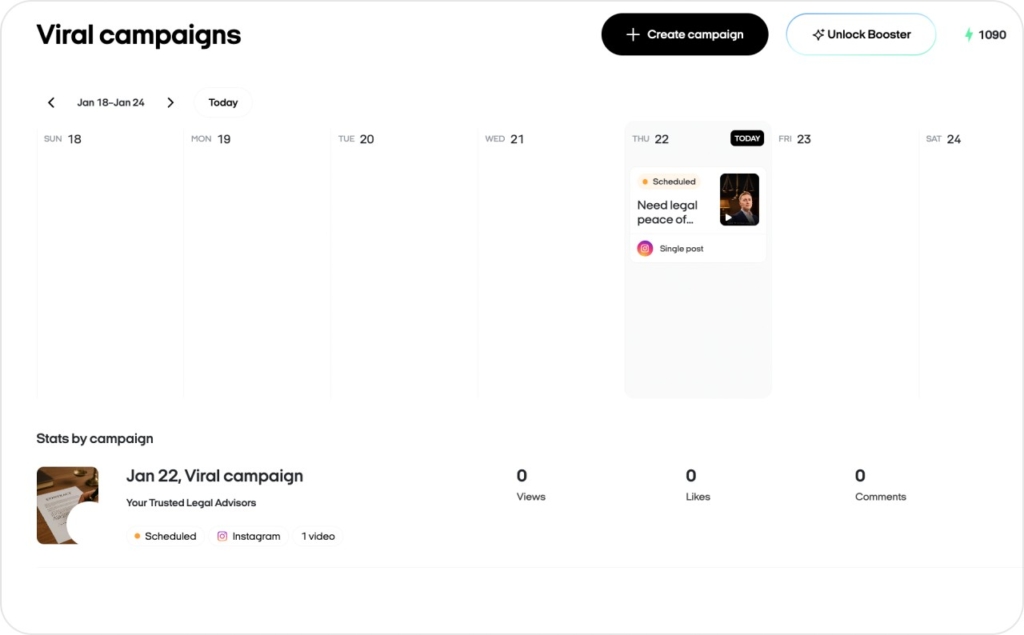
And if you want your campaign to perform better, Zeely also recommends doing more than one post and refining captions/tags and timing before it goes live. Read now about Instagram caption ideas.

Emma blends product marketing and content to turn complex tools into simple, sales-driven playbooks for AI ad creatives and Facebook/Instagram campaigns. You’ll get checklists, bite-size guides, and real results, pulled from thousands of Zeely entrepreneurs, so you can run AI-powered ads confidently, even as a beginner.
Written by: Emma, AI Growth Adviser, Zeely
Reviewed on: January 22, 2026