Meta Advantage+ Catalog Ads for Ecommerce: Setup, Retargeting, and Feed Fixes
Facebook Dynamic Ads are now called Meta Advantage+ Catalog Ads, but the rename is only part of the story. The bigger shift is how Meta uses catalogs, Pixel, CAPI, product data, and automation to match the right ecommerce products with the right shoppers.
Meta Advantage+ Catalog Ads are the current name for what many advertisers still call Facebook Dynamic Ads, dynamic ads, or Meta dynamic ads. Meta says these ads automatically show relevant products from your catalog using signals from your Meta Pixel, app SDK, and Meta’s own on-platform activity.
Use them when you want product-level retargeting, broad product discovery, cross-sells, upsells, and automated catalog creative. But do not treat them like a magic campaign type. They need a clean catalog, working Pixel, Conversions API, correct event mapping, fresh product data, and stable item IDs.

Facebook Dynamic Ads vs Meta Advantage+ Catalog Ads: what actually changed
If you learned ecommerce ads through Facebook Dynamic Ads, you are not wrong to use that term. Many advertisers still say DPA, dynamic product ads, facebook dynamic ads, or catalog ads facebook when they mean the same core ad unit.
Meta’s current name is Meta Advantage+ Catalog Ads. Meta’s own help pages describe them as the ad format previously known as dynamic ads. They can show items from a catalog through single image, carousel, or collection formats, with product recommendations picked dynamically for each person.
So yes, the old and new names overlap. But the story is bigger than a label change.
Old-school Facebook Dynamic Ads were usually discussed as product retargeting. Someone viewed a dress, abandoned a cart, or checked a sneaker page, then saw that product again on Facebook or Instagram. That still exists. But the current Meta system leans harder on automation, broader signals, catalog-level personalization, and fewer manual audience switches.
Meta now frames these ads inside the Advantage+ naming system. That does not mean every catalog ad is the same as an Advantage+ Shopping Campaign. It means the catalog ad format uses more automated delivery logic than the older DPA setup most advertisers remember.
A helpful way to think about it:
| Old wording | Current wording | What it means for ecommerce |
| Facebook Dynamic Ads | Meta Advantage+ Catalog Ads | Product ads built from your catalog |
| Dynamic Product Ads, DPA | Advantage+ catalog ads | Same practical family of ads |
| Product feed ads | Catalog ads | Ads pull image, title, price, and availability from your feed |
| Manual retargeting focus | Automated product matching | Meta uses website, app, and platform signals |
Meta says Advantage+ catalog ads use events data from your Pixel or app SDK, plus Meta on-platform signals, to display products dynamically. That matters because delivery quality depends on both your campaign settings and your data quality.
Competitor guides also treat this as an evolution, not a totally separate ad invention. Accelerated Digital Media says there is not a real practical difference between Dynamic Product Ads and Catalog Ads, while Ghantees explains that the old Dynamic Product Ads term was rebranded into Advantage+ Catalog Ads.
Here is the calm version I use with ecommerce teams:
Facebook Dynamic Ads are not “gone” in the way an old feature disappears. The name changed, the automation layer grew, and the setup now depends more heavily on clean catalog and event data. Read now about AI for Facebook ads optimization.
That is why a simple “DPA equals Advantage+ Catalog Ads” note is too thin. If your product feed is stale, your Pixel sends broken IDs, or your CAPI events duplicate purchases, the renamed system will still struggle.
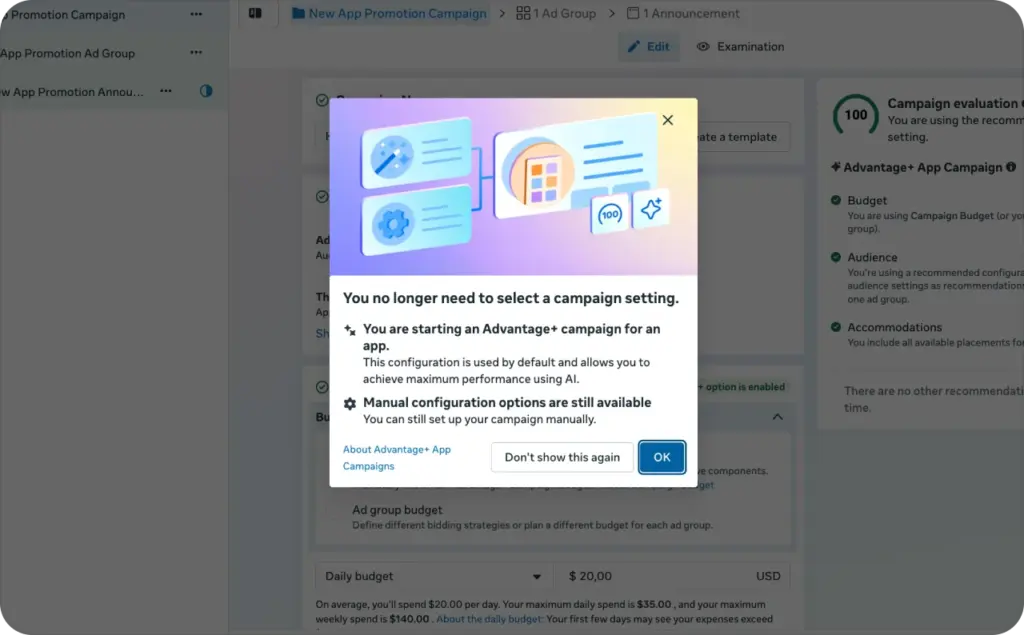
Sales objective, catalog, Pixel, CAPI, and event mapping before you launch
Before you build advantage+ catalog ads, treat setup like a store inspection. You are not only making an ad. You are connecting your product shelf, website behavior, customer signals, and purchase goal.
Meta says the sales objective is for finding people likely to buy your product or service. Meta also says Advantage+ catalog ads need a catalog and can drive sales on your website or app.
The launch flow should look like this.
First, choose the sales objective in Meta Ads Manager. This tells Meta you care about purchases, not only clicks or page visits.
Next, connect your catalog. Your catalog is the product database Meta uses to pull images, names, prices, availability, and links into ads. Without it, you are not running true catalog ads, Facebook shoppers can see product by product.
Then, install Meta Pixel. Meta says you need to create and install a Meta Pixel, add required standard events and parameters, create a catalog, add items, and connect the Pixel to the catalog for Advantage+ catalog ads.
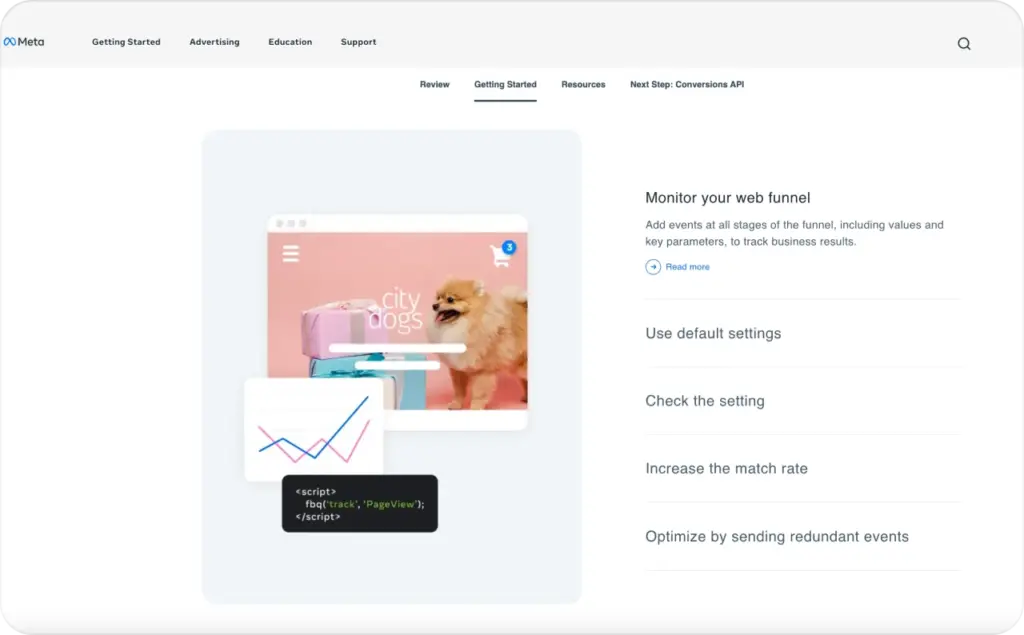
After that, add Conversions API. CAPI sends server-side event data to Meta. Meta’s developer docs explain that website events shared through Conversions API require fields such as client_user_agent, action_source, and event_source_url.
Now check event mapping. For ecommerce, these events usually matter most:
- ViewContent for product page views
- AddToCart for cart intent
- InitiateCheckout for checkout intent
- Purchase for completed orders
- Search if site search behavior matters
- AddToWishlist if wishlist behavior is a buying signal
The hidden setup detail is item matching. Meta says the content ID in your Pixel or SDK code must exactly match the content ID or group ID for the same item in your catalog. This is what tells Meta that the viewed product on your site is the same product inside your catalog.
Here is the pre-launch checklist I would use.
Campaign and account checklist
- Sales objective selected
- Correct ad account and Pixel connected
- Correct catalog selected
- Domain verified
- Events prioritized where needed
- Purchase event firing on thank-you page or server event
Catalog checklist
- Product IDs are stable
- Titles are readable
- Prices match the product page
- Availability is current
- Product URLs open correctly
- Images are clean and high quality
- Sale price fields are accurate
- Variants are not mixed by accident
Pixel and CAPI checklist
- ViewContent fires on product pages
- AddToCart fires once per cart action
- Purchase fires once per completed order
- CAPI and Pixel use event IDs for deduplication
- Content IDs match catalog IDs
- Currency and value are passed correctly
- Event Match Quality is not weak
Shopify’s Pixel setup guide also recommends using Meta Pixel Helper to verify that the Pixel ID matches Events Manager and to catch implementation errors.
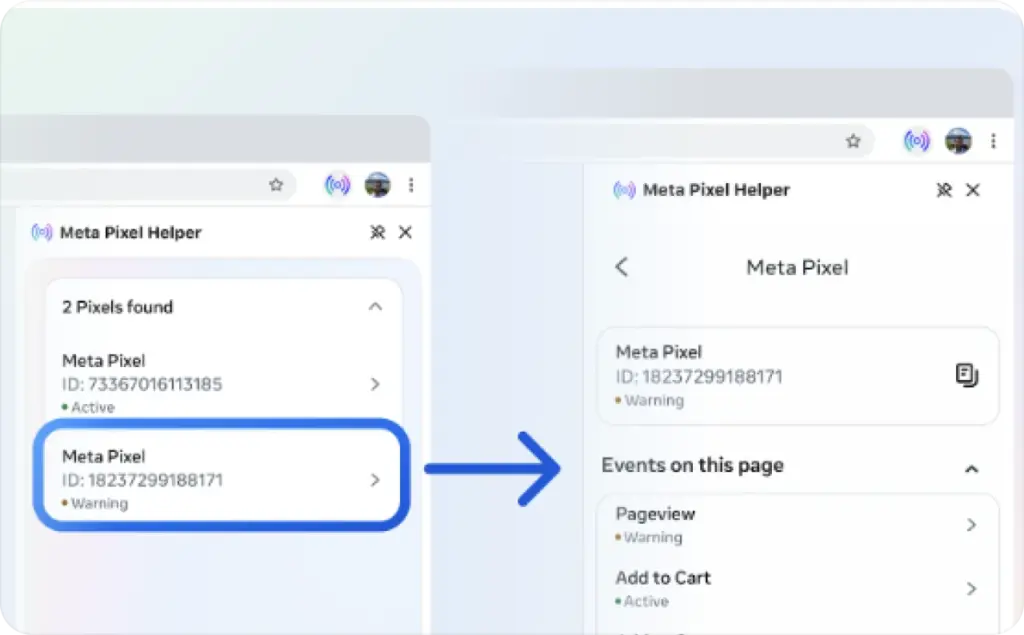
Photo source: Meta
Expected result: when someone views a product, Meta can read the event, match the product ID to your catalog, and decide whether that product belongs in a future ad.
If that chain breaks, your meta dynamic ads may still spend. They just will not learn from the right product behavior.
Retargeting, broad audiences, cross-sells, upsells, and catalog custom audiences
The old DPA playbook was simple. Retarget product viewers, cart abandoners, and checkout abandoners. That still works, but the current Meta system has fewer places where you manually force every audience type. Read now more about which Facebook placements work best: mutual or automatic.
Advantage+ catalog ads automatically deliver product recommendations based on people’s interests, intent, and actions. That means your role is less about building tiny ad sets and more about giving Meta clean signals, useful product groups, and clear customer intent.
Start with three jobs for Advantage+ catalog ads.
- The first job is retargeting. You can show people products they viewed, added to cart, or nearly bought. This is where Facebook dynamic ads became famous because shoppers saw the exact item they had already considered.
- The second job is broader product discovery. Meta can use catalog and behavior signals to introduce products to people who have not visited your store yet. This is where broad audiences and audience suggestions matter.
- The third job is post-purchase growth. Meta has official guidance for cross-sell and upsell campaigns using Advantage+ catalog ads. It describes using product categories to increase average order value or lifetime value from existing customers.



Here is how I would structure it for ecommerce.
Retargeting product viewers
Use this for people who viewed product pages but did not add to cart. Keep the product set broad enough for Meta to find close alternatives. A shopper may not want the exact black boot, but they may buy another boot in the same price range.
Retargeting cart abandoners
Use this for people who added items to cart but did not purchase. This audience usually has stronger intent, so your catalog creative should reduce friction. Use price, discount, shipping, returns, or urgency only when the feed data supports it.
Checkout abandoners
Use this for people who started checkout but did not finish. Check your checkout experience before blaming ads. A broken payment method, surprise shipping cost, or slow mobile checkout can make the ad look weak.
Cross-sells
Use this after purchase. If someone bought a camera, show accessories. If someone bought a dress, show shoes, bags, or jewelry. Meta’s cross-sell setup is built around showing complementary categories to existing customers.
Upsells
Use this when shoppers viewed or bought entry-level items. Show premium versions, bundles, larger packs, or higher-margin product sets.
Broad catalog delivery
Use this when you have enough clean purchase and product behavior data. Meta can use catalog signals, creative, and conversion goal to find likely buyers. This works best when your feed is not messy and your product images are strong.
The audience part has changed. Current Meta buying often uses broader delivery and audience suggestions instead of strict audience walls. This means custom audiences still matter, but they often guide the system rather than lock it down.
Use catalog custom audiences for:
- Product viewers in the last 7, 14, or 30 days
- Add-to-cart shoppers who did not purchase
- Purchasers from the last 30, 90, or 180 days
- High-value purchasers
- Category viewers
- Sale shoppers
- Customers who bought one category but not another
Do this now: name audiences by behavior and window, not by vague labels.
Better names:
- Viewed Product, No Cart, 14 Days
- Added Cart, No Purchase, 7 Days
- Purchased Shoes, 180 Days
- High AOV Buyers, 365 Days
Weak names:
- Retargeting 1
- DPA audience
- Warm
- Test 2
Clear naming keeps your setup readable when performance drops.
Feed hygiene, dynamic overlays, product sets, and creative rules that affect delivery
This is where many ecommerce teams can beat larger competitors.
Most brands check the campaign first. I check the feed first. Your Meta Advantage+ Catalog Ads can only be as clear as the product data they pull.
Meta lets catalog ads dynamically show product information from your catalog, including product names and prices by default, with options to add more product information in ad copy. Social Media Today also covered Meta’s dynamic overlay update, where advertisers can show catalog information such as prices or discounts as label-style elements on ad media.
That means your feed is not only a backend file. It becomes part of your ad creative.
A weak feed creates weak ads:
- Long titles get cut off
- Prices do not match landing pages
- Sale labels show the wrong discount
- Out-of-stock items keep showing
- Product images look cluttered
- Variants show the wrong color
- Bestsellers get mixed with low-margin leftovers
A strong feed helps Meta and the shopper:
- Titles explain the product quickly
- Prices and sale prices are accurate
- Availability updates often
- Images are clean and mobile-friendly
- Product sets group items by business value
- Custom labels help you sort winners
- Exclusions keep bad items out of ads
Product sets deserve special care. Meta says product sets are groups of items you can use to feature certain catalog items in ads or shops.
Create product sets for:
- Bestsellers
- New arrivals
- Sale items
- High-margin products
- Full-price products
- Seasonal items
- Products above a target AOV
- Products with strong reviews
- Products with enough inventory
- Products you want to exclude


Custom labels are your quiet control layer. Use them to tag products by margin, season, stock depth, price tier, hero SKU status, or promo group.
For example:
- margin_high
- bestseller
- spring_sale
- clearance_exclude
- low_stock
- giftable
- bundle_ready
You can then build product sets from those labels and avoid pushing products that look profitable in Ads Manager but do not help the store.
Now check image quality.
Catalog ads often use plain product photos. That can work for retargeting, but it may feel thin for broad discovery. If your competitors use branded frames, offer labels, UGC-style images, and clean overlays, your plain white-background product card can blend into the feed.
Confect’s guide notes that frames and overlays can add branded information to catalog ads, while Social Media Today highlights Meta’s dynamic overlays for prices and discounts.
Use overlays carefully. A discount label can help when the price is real. A messy badge can hurt when it covers the product.
My rule is simple: add one reason to click, not five.
Good overlay ideas:
- Sale price
- Percentage off
- Free shipping threshold
- New arrival
- Bestseller
- Limited stock, only when true
- Review score, only if supported
Avoid:
- Tiny text
- Fake urgency
- Too many badges
- Low-contrast labels
- Claims the product page does not support
- Sale overlays when sale price data is inconsistent
Creative rules should protect delivery quality. Do not let every product enter every ad.
Exclude:
- Out-of-stock products
- Products with broken URLs
- Products under your minimum margin
- Products with poor images
- Products with missing prices
- Products with compliance risk
- Products that get clicks but no purchases
Expected result: Meta gets a clean shelf to sell from, and shoppers see products that are available, clear, and worth clicking.
Low EMQ, broken IDs, stale feeds, and other problems that kill catalog performance
When dynamic ads underperform, most teams change the budget or audience first. I would rather start with diagnostics.
Here are the buckets that usually kill Meta Advantage+ Catalog Ads performance.
Low Event Match Quality
Event Match Quality, often called EMQ, tells you how well Meta can match your website events to Meta accounts using customer information. CustomerLabs describes EMQ as a measure of how accurately Meta can match events like purchases or leads with real users using identifiers such as email, phone number, and external ID.
Low EMQ can make Meta’s learning weaker. You may see unstable CPA, poor retargeting, or fewer matched purchase signals.
Check this:
- Are email and phone sent where allowed?
- Is external ID passed consistently?
- Are first name, last name, city, state, and ZIP included when available?
- Are parameters hashed correctly when needed?
- Is CAPI sending cleaner data than Pixel alone?
Broken item IDs
This is one of the biggest Facebook catalog ad problems.
Meta says content IDs in Pixel or SDK code must exactly match catalog content IDs or group IDs. If they do not match, Meta cannot confidently connect a website product event with the catalog item.
FeedOptimise gives a practical example: use product_group when you pass parent IDs that should match item_group_id, and use product when variant IDs should match item IDs in the feed.
Check this:
- Does product page ViewContent send the same ID as the catalog?
- Are variant IDs and parent IDs mixed?
- Are IDs changing after feed refreshes?
- Are Shopify, WooCommerce, or custom IDs formatted differently?
- Are product IDs case-sensitive or altered by plugins?
A single missing prefix can break thousands of matches.
Duplicate or missing events
If AddToCart fires twice, Meta may overread intent. If Purchase fires twice, ROAS can look better than reality. If ViewContent does not fire, retargeting loses product-level data.
Check this:
- One ViewContent per product page view
- One AddToCart per actual cart action
- One Purchase per completed order
- No duplicate thank-you page fires after refresh
- No old tags left in Google Tag Manager
- No duplicate Pixel app and manual code firing together
Feed freshness problems
A stale feed is an ad trust problem.
If a shopper clicks a product at $39 and lands on $49, trust drops. If they click an available item and land on out-of-stock, spend gets wasted. If a sale ended yesterday but the overlay still shows a discount, the ad can mislead buyers.
Check this:
- How often does the feed update?
- Are sale prices cleared after promos?
- Do out-of-stock products leave active product sets?
- Are broken URLs removed?
- Are rejected items reviewed?
- Are image changes synced?
CAPI deduplication issues
If you send browser and server events, Meta needs to know when both represent the same customer action. Meta’s CAPI docs explain the parameters needed for web events, and deduplication setups commonly rely on matching event names and event IDs across browser and server events.
Check this:
- Pixel and CAPI use the same event name
- Pixel and CAPI share the same event ID for the same action
- Purchase is not counted twice
- Test Events shows clean browser and server activity
- Server events are not delayed too long
Weak product set logic
Sometimes the tracking works, but the product set is wrong.
You may be asking Meta to sell products that are cheap, low-margin, out of season, low-stock, or not visually strong. The campaign looks broken, but the real problem is product selection.
Check this:
- Are bestsellers separated?
- Are low-margin products excluded?
- Are sale products grouped?
- Are giftable items grouped?
- Are products with bad images removed?
- Are seasonal products updated monthly?
Poor ad template and copy
Catalog ads can look automatic in a bad way. A carousel of plain product cards may work for warm shoppers, but cold buyers often need more context. Try Zeely AI Facebook ad creator, pick the template, and let it create the best copy for your product in a minute.
Use the primary text to explain the buying reason:
- “Fresh spring pieces under $50.”
- “Restock your skincare shelf before the weekend.”
- “The shoes customers keep coming back for.”
- “Bundle your favorites and save on shipping.”
Then let the catalog do the product matching.
Do not write copy that only says “Shop now.” That gives Meta no selling angle and gives the shopper no reason to care. Try creating stunning creatives with Zeely today and let it help you build Meta dynamic ads that sell.

Emma blends product marketing and content to turn complex tools into simple, sales-driven playbooks for AI ad creatives and Facebook/Instagram campaigns. You’ll get checklists, bite-size guides, and real results, pulled from thousands of Zeely entrepreneurs, so you can run AI-powered ads confidently, even as a beginner.
Written by: Emma, AI Growth Adviser, Zeely
Reviewed on: May 22, 2026