How to Hide Followers on Instagram in 2026
Want to know how to hide followers on Instagram without wrecking your account visibility? I reviewed current Meta/Instagram privacy mechanics and 2026 digital usage data to map what’s possible, what’s not, and the safest alternatives.
How to hide followers on Instagram in 2026 means limiting who can see your followers and following lists by using Instagram’s privacy controls, mainly switching your profile from Public to Private. If you do it the right way, you can protect your privacy without breaking your reach or your day-to-day posting flow.
Instagram still does not offer a universal “hide followers/following” toggle. The only reliable way to hide your followers list from strangers is switching to a Private account so only approved followers can see your followers and following.
If you need to hide followers from one person, you usually have to remove them or block them. Restrict, Close Friends, and Hide Story From reduce interaction or content visibility, but they do not hide your follower list.
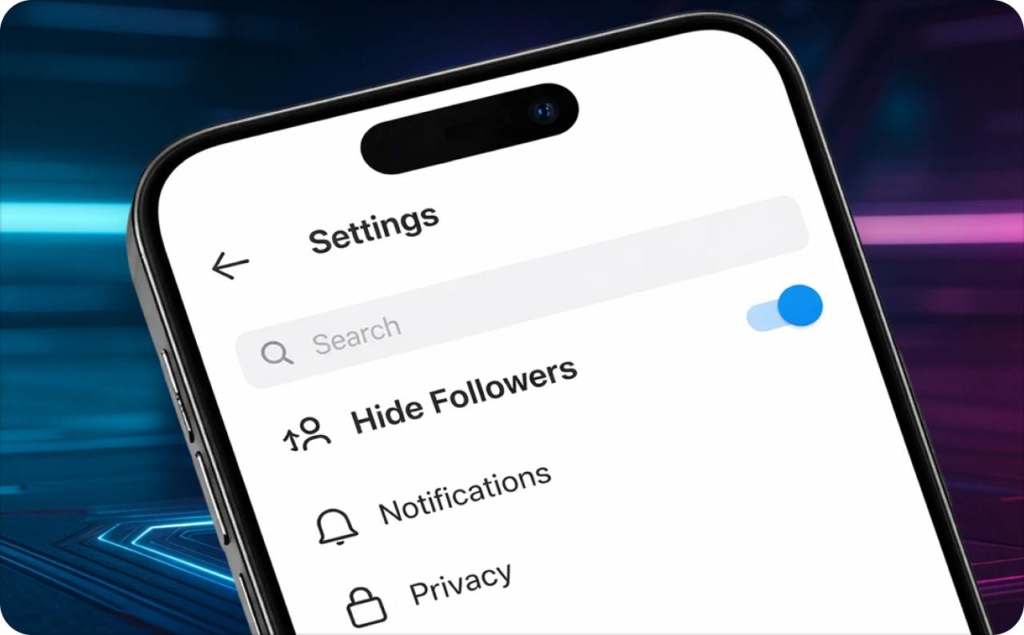
Can you hide followers on Instagram in 2026?
No, not completely. Yes, from non-followers by going private.
Here are the terms people mix up:
- Followers list: the people who follow you
- Following list: the people you follow
- Follower count: the number shown on your profile header
The rule is still simple:
- Public account: your followers and following lists are visible
- Private account: your lists are visible to approved followers
- There is no setting to hide your followers list from one specific approved follower
What you can do instead:
- Go Private to hide lists from non-followers
- Remove someone (works best when private)
- Block someone (works on public or private)
The 3 most common myths
Myth 1: Restrict hides followers
Restrict changes how someone can interact with you. It does not hide your followers/following lists.
Myth 2: Close Friends hides followers
Close Friends only changes who sees your Stories, not your profile lists.
Myth 3: Third-party apps can hide it
They cannot change Instagram’s follower-list visibility rules. Many are also phishing traps that try to steal logins.
How follower visibility actually works
Follower privacy matters because your profile is part of a real economy. In the U.S., social media ad spend hit $96.7B and influencer ad spend hit $6.24B according to We Are Social. When money follows attention, people get curious, and follower lists become a map of your relationships.
Here’s the simple matrix most articles skip.
| Viewer type | If you’re Public | If you’re Private |
| Non-follower | Can see followers/following lists | Cannot see your posts or lists |
| Approved follower | Can see followers/following lists | Can see your posts and lists |
| Removed follower | Can see lists again (because you’re public) | Cannot see your posts or lists |
| Blocked user | Cannot access your profile normally | Cannot access your profile normally |
| Restricted user | Can still see what any accessible viewer can see | Can still see lists if they are an approved follower |
Three direct answers:
- Can non-followers see my followers/following? Yes, if you are public. No, if you are private
- If I’m private, who can see my followers? People you approved
- Can someone see followers through mutuals? They may see “Followed by” hints and shared connections, but your full list visibility still depends on public vs private
Private account rules
A private account is a gate, not an invisibility cloak. Even when private, parts of your profile can still be visible, like your profile photo, username, bio, and counts on the header depending on how Instagram is rendering your profile page. The big change is that your posts and lists are for approved followers only.
Block vs restrict vs mute vs remove
These sound similar. They are not.
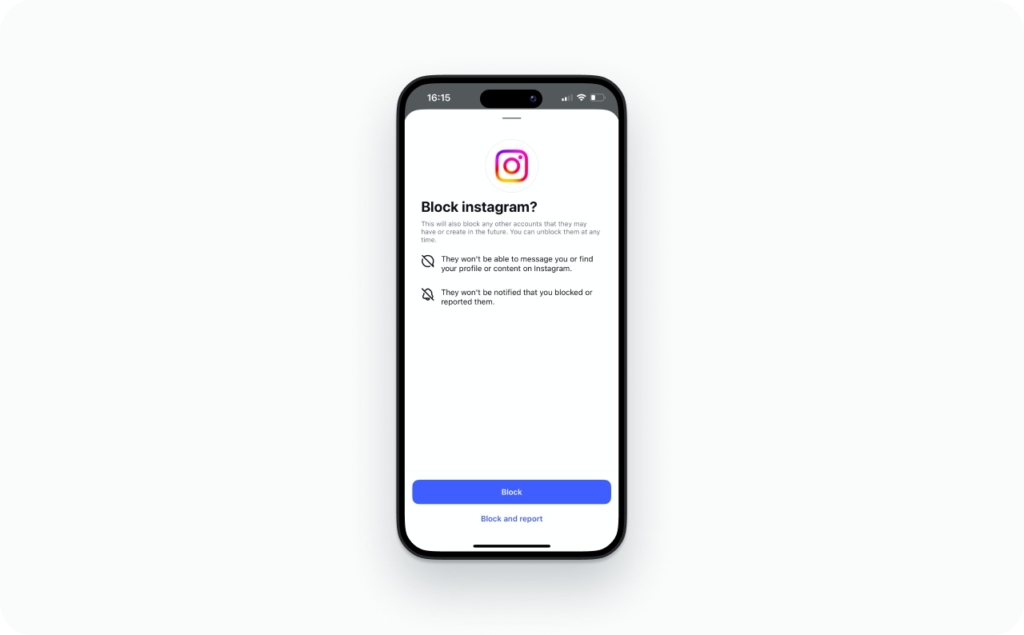
- Block: stops profile access and contact in the ways Instagram allows. Use this when you need a hard stop
- Restrict: limits interaction. Their comments get held for approval, and they see less of your activity signals. Use this when you want quiet friction, not a full cut-off
- Mute: hides their posts/Stories from your feed. It does not change what they can see
- Remove follower: kicks them out of your followers list. Instagram says they are not informed. This is strongest when your account is private
Key line to remember: Restrict reduces interaction. It does not hide your follower list.
How to hide followers on Instagram via iPhone and Android
This is the only native path that reliably hides your followers list from strangers.
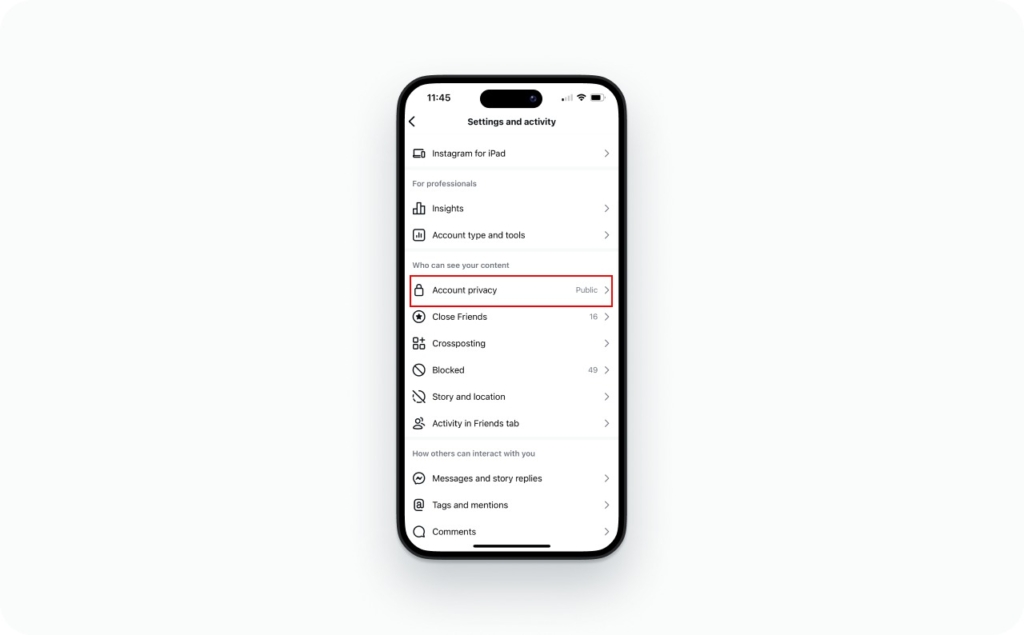
Profile → Menu (≡) → Settings and privacy → Account privacy → Private account (toggle on)
What changes immediately:
- Non-followers stop seeing your posts and your full lists
- People must request to follow you to see content
What does not change automatically:
- Your current approved followers still see your posts and lists
- Anyone you already approved still has access until you remove them
Before you flip private, do this quick cleanup:
- Review tagged photos and old mentions
- Tighten Story replies and message requests
- Turn on Hidden Words if you get spammy comments
iPhone step-by-step instructions
- Open Instagram and go to your Profile (bottom right)
- Tap the Menu (≡) (top right)
- Tap Settings and privacy
- Tap Account privacy
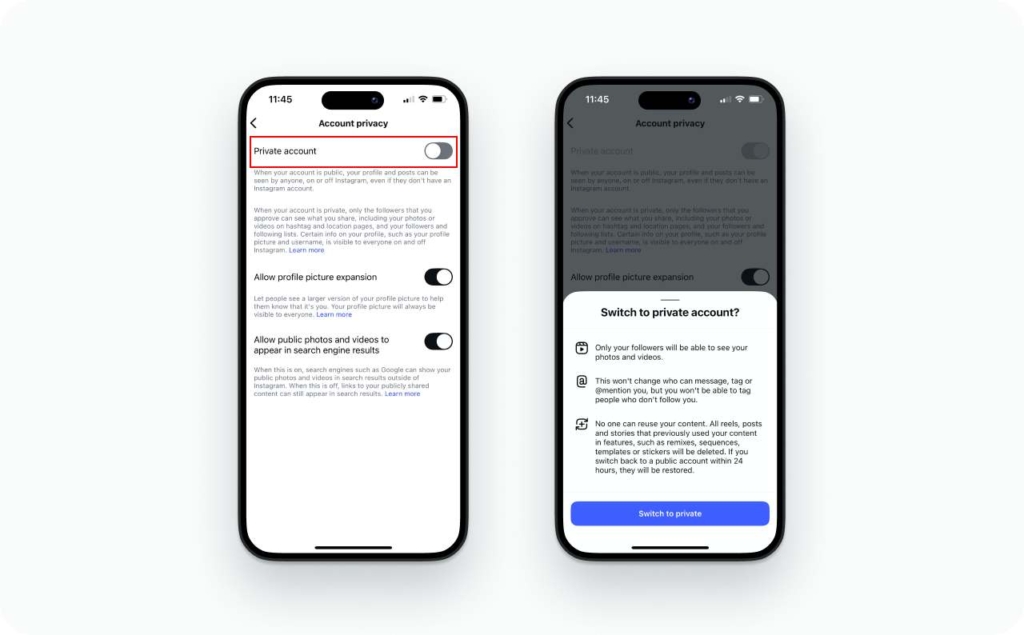
- Toggle Private account on
Your grid appears “locked” to non-followers. New people hit a Follow request flow instead of instantly seeing content
Android step-by-step instructions
Android usually follows the same flow, but labels can move a little by version.
- Profile → Menu (≡)
- Settings and privacy → Account privacy
- Toggle Private account on
If you do not see “Account privacy,” use the search bar inside Settings and type privacy.
What happens after you go private in Instagram
Now do the part most people skip: clean your current followers list.
- Go to your Profile
- Tap Followers
- Tap Remove next to anyone you do not want inside the gate. Instagram says they are not notified
This is also where you fix the classic “I went private but they can still see my followers” problem. They can still see your lists because you previously approved them.
How to hide followers on Instagram via web/desktop
Desktop is useful when you want to work faster with less tapping.
Go to Instagram.com → Profile → Settings → Account privacy → Private account (toggle on)
What’s easier on web:
- Bulk scanning followers and cleaning up in a calmer, bigger view
What’s easier in the app:
- Day-to-day tools like Limits and comment controls
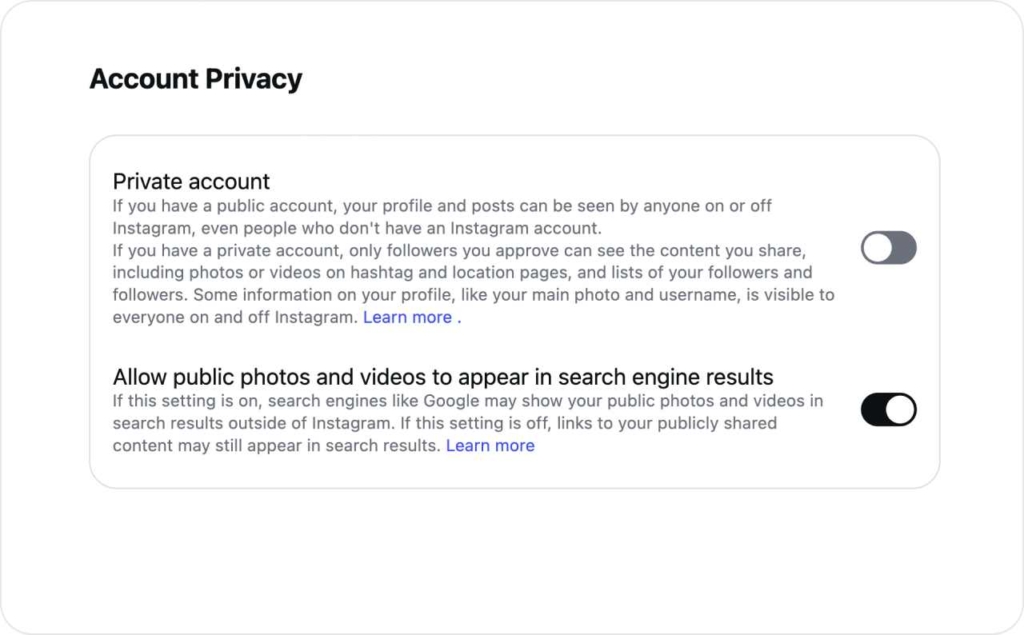
Desktop troubleshooting
If you cannot find the privacy toggle:
- Confirm you’re logged into the correct Instagram account in the browser
- Try a hard refresh, or log out and back in
- Clear cookies for Instagram if the Settings column is missing
- Check Accounts Center if you manage multiple Meta profiles. Privacy controls can be routed through that menu for connected accounts
How to hide followers from one person without blocking
Here’s the hard truth: you cannot selectively hide your followers list from a specific approved follower. You have to change the relationship (remove or block) or change visibility (go private).
Use this decision tree:
- If your account is private:
Remove them. They lose access. They can request again, and you can deny
- If your account is public:
Removing does not stop them from seeing your lists because your profile is still open. Blocking is the only reliable way to stop profile access
Meta’s own Help ties “remove follower” to private accounts.
Remove vs block vs restrict
Scenario 1: Your ex who keeps checking your connections
- Go Private and Remove them
- If they keep coming back, Block
Scenario 2: A coworker you do not want browsing your network
- Go Private, then Remove
- Also tighten mentions and Story audience
Scenario 3: Random harassment account
- Block first
- Turn on Limits for up to four weeks if you get waves of new spam
Instagram does not send a “you were removed” alert. People can still figure it out when they lose access or see your Follow button again. Restrict is silent too, but again, it does not hide your lists.
How to hide followers in Instagram without private account options
You cannot hide your followers list on Instagram without a private account. If your profile is public, your lists are part of what you are choosing to publish.
What you can do instead:
- Block the person
- Limit exposure of your content
- Split accounts
Keep a public “business” profile for reach, and a private personal profile for real life. This is the cleanest option for a lot of small business owners.
Paying does not buy follower-list privacy. ApNews state that Meta Verified pricing has been widely reported as $11.99/month on web or $14.99/month on mobile, and the benefits center on verification, protection, and support access, not hiding your lists.
Restrict can quietly limit comments, read receipts, and message visibility, but it doesn’t hide your follower list if someone can still access your profile.
Privacy controls users confuse with “hide followers”
People often search “hide followers” and end up toggling the wrong settings. These tools are still worth using, but they solve a different problem: they reduce exposure, not follower-list visibility.
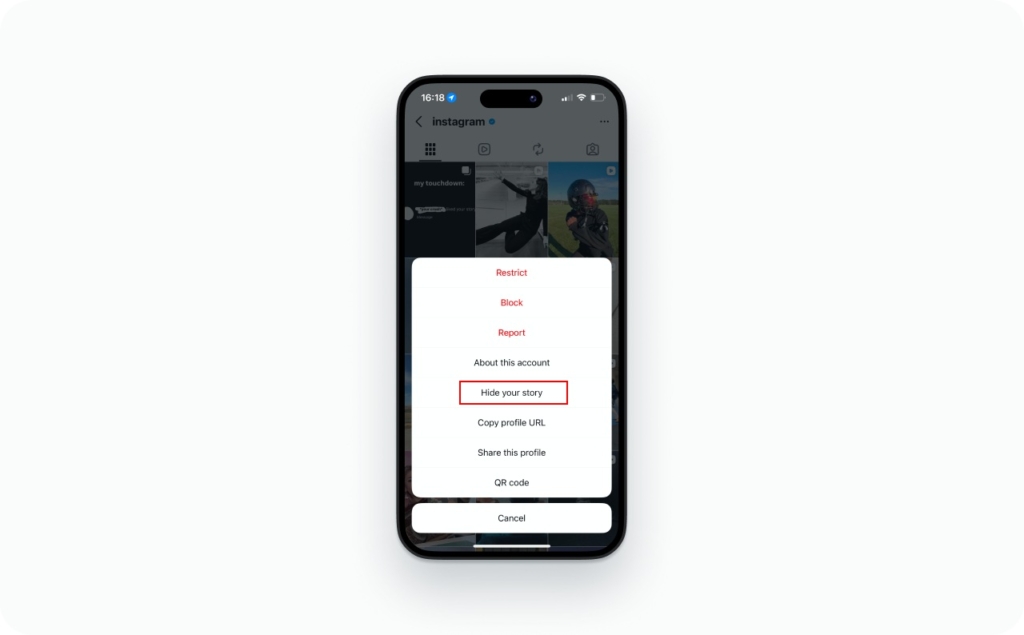
Hide Story From and Close Friends control who sees your Stories, which is perfect for personal updates or behind-the-scenes posts, but your followers and following lists stay the same. Hiding like counts or view counts only changes how engagement looks on a post, not who can view your profile lists. Turning off Activity Status helps you feel less watched in real time, but it won’t hide your followers.
You can also tighten mentions, tags, comments, and DMs to reduce spam and unwanted contact. And during harassment spikes, Limits can temporarily reduce contact from non-followers or recent followers for up to four weeks.
It changes who can see your Stories and sometimes related surfaces like story-style resharing. It does not change who can view your profile lists.
Hiding likes changes how your post looks to others. Your follower list is still controlled by public vs private.
Why people can still see your followers
Use this quick diagnostic flow.
- Are you still public?
If yes, lists are visible. Fix: go private. - Is the viewer an approved follower?
If yes, they can still see your lists. Fix: remove them. - Are you mixing up Restrict with Block?
Restrict changes interaction, not access. Fix: block if you need a hard stop. - Is it an app cache or version issue?
Fix: update Instagram, then log out and back in. - Are you seeing “no users found” or partial lists?
Sometimes you are hitting temporary platform limits or loading glitches. Give it time, then retry on web.
If you are stuck in an account-access mess, Meta says it is rolling out a centralized support hub inside Facebook and Instagram apps, plus more account security tooling aimed at hacking and phishing.
If an app asks for your Instagram password to “hide followers,” treat it like a fake lock salesman asking for your house keys. Use official settings, use Accounts Center when needed, and turn on 2FA.
Instagram features can be tricky, but luckily I’m here to help you find answers to the most common questions. Whether you’re a content creator, business owner, or just want to up your Insta game, mastering these features can boost your presence and save you time. Below are some quick guides to help you navigate popular Instagram functionalities:
- Can you schedule Instagram stories
Learn whether it’s possible to plan and automate story uploads using native tools or third-party apps. - How to post a reel on Instagram
A step-by-step on uploading reels, adding music, and optimizing for reach. - How to change background color on Instagram story
Quick tips to customize your story background for better visual appeal. - How to see who unfollowed you on Instagram
Explore tools and tricks to track unfollowers and manage your follower list. - How to see old stories on Instagram
Access your archived stories and learn how to reshare or highlight them. - How to repost a story on Instagram
Simple ways to share someone else’s story, whether you’re tagged or not.
FAQ
Yes. Muting only hides their posts and Stories from your feed. It does not change who can view your follower or following lists. To limit that visibility, switch to Private, remove them, or block them.
If your account is public, you cannot reliably stop one person from viewing your profile without blocking. The closest option is going private, then removing them as a follower and denying new requests. Restrict and Mute do not hide profiles.
They can see your followers if they are an approved follower, if you accepted them in the past, or if you switched to Private but never removed them. Go to Followers, remove them, and review pending requests.
Instagram sorts follower lists dynamically. You may see mutuals, shared connections, or suggested relevance instead of a strict timeline. Treat the order as non-meaningful. Use Search inside Followers to find someone reliably.
Visibility is still driven by Public versus Private. If you cannot find the Private toggle, switch your account type to Personal, then enable Private, then review followers.

Emma blends product marketing and content to turn complex tools into simple, sales-driven playbooks for AI ad creatives and Facebook/Instagram campaigns. You’ll get checklists, bite-size guides, and real results, pulled from thousands of Zeely entrepreneurs, so you can run AI-powered ads confidently, even as a beginner.
Written by: Emma, AI Growth Adviser, Zeely
Reviewed on: February 11, 2026