How to make dropshipping video ads people don’t scroll past
Want to make your dropshipping video ads impossible to scroll past? Zeely AI explored the most effective techniques in ad creation and now shares expert insights to help your brand shine online.
Nobody’s dropshipping ad went viral because of the color grading. The ones that actually sell tend to nail something much more boring: the right person sees their own frustration in the first two seconds, the product shows up as the answer, there’s some reason to believe it works, and then they’re told exactly where to get it. That whole arc happens before the thumb has a chance to keep scrolling.
Key takeaways
- Every dropshipping video ad follows the same sequence: hook, demo, benefit, CTA
- The hook has roughly two seconds to stop the scroll. Everything after it is irrelevant if those two seconds fail
- Zeely builds video ads from a product URL and supplier photos using AI avatars. No product sample needed
- Test three hooks against the same ad body and offer. Change one variable per test
- Shoot 9:16 for TikTok, Reels, and Shorts. Use 4:5 for Facebook and Instagram Feed. Always add captions
I think about it like this. Every second of video should be doing one job. Earning attention, demonstrating something, answering a doubt, pushing toward the sale. A second that sits there looking pretty but not doing any of those? That’s your ad budget evaporating.
What follows is my full process for building dropshipping video ads, start to finish. I walk through it in Zeely because that’s where the whole workflow lives for me, from product import through launching Meta campaigns, but the approach translates to whatever you’re using.
How to make dropshipping video ads
I’m walking through each step in Zeely because it handles the full workflow from product import to campaign launch. The thinking behind each step applies no matter what tool you’re in.
1. Start with the product, not a blank screen
Biggest mistake I see is people opening up a video tool with nothing loaded. No product data, no photos, no context. Then they wonder why the output feels generic.
In Zeely you just paste the URL. Whatever platform the product lives on, Shopify, Etsy, Amazon, an Instagram shop page, Zeely scrapes the public listing and grabs the title, images, description, price. No API setup. No connecting your store. Nothing to install.
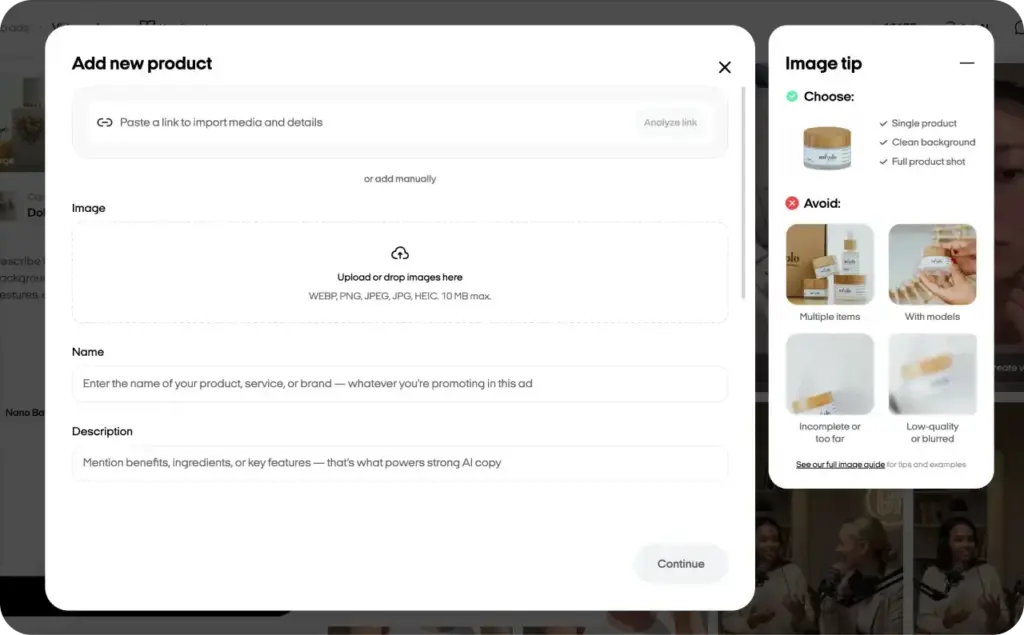
If there’s no product page yet, type the info in and upload photos yourself.
Here’s the part most people skip. Zeely also builds out something called Market Intelligence for whatever product you loaded. It covers the niche, the core value prop, who the target buyer is, their pain points, what makes them actually pull out a credit card, and social proof angles. All of it is editable. I’d spend five minutes going through those fields before you generate anything, because the AI writes its scripts and picks its angles based on what’s sitting in those boxes. Bad inputs produce bland ads. Every time.
No product in hand? Join the club. I can’t name a single dropshipper I’ve worked with who had the product on their desk when they made their first ad. The AI doesn’t care. Zeely pulls everything it needs from the URL and the supplier photos, then uses avatars for the on-screen talent. No camera, no crew, no product sample required.
2. Choose one angle and one format
Before you even open the format picker, figure out the single reason a stranger scrolling at 11pm should care about this product. “Saves me twenty minutes every morning.” “Fixes the thing that’s been annoying me for months.” “Works like the $200 version but costs $30.” Pick one. I have watched so many dropshipping ads try to cram three selling points into fifteen seconds. They end up saying nothing.
Then match the format to your product and whatever source material you’ve got:
| Format | What it looks like | Best for |
| UGC-style / talking-head | AI avatar presents the product directly to camera | Products that need trust or explanation |
| Product demo | Close-up product shots with motion, captions, text overlays | Visually striking or satisfying products |
| Problem → solution | Opens with frustration, then shows the product fixing it | Gadgets, home, kitchen, beauty tools |
| Before / after | Side-by-side or sequential comparison | Products with a visible result |
Inside Zeely, the Video Ad builder handles avatar-led formats. Playground is where you experiment more freely. Image-to-video covers the rest.
3. Write or generate the script
I’ve read probably a thousand dropshipping scripts at this point, and the ones that actually sell follow a pretty strict sequence. Hook hits first. Main benefit second. Then you need a credibility beat, some kind of proof. Then the CTA. You can mess with what happens inside each of those four moments, but reshuffling the order or cutting one? Performance drops almost every time I’ve seen it tested.
You can write this yourself or hand it off to Zeely. It’ll draft a script from your product data using whatever framework fits best, AIDA, PAS, Before-After-Bridge, 4U, FAB. The decades-old copywriting playbooks. Got a specific angle already? Drop it in the custom prompt box and the AI will structure around that instead of improvising.
Hooks and script templates are further down the page. For a much bigger library of opening lines, the UGC hooks guide for video ads covers more than I could fit here.
4. Pick an AI avatar
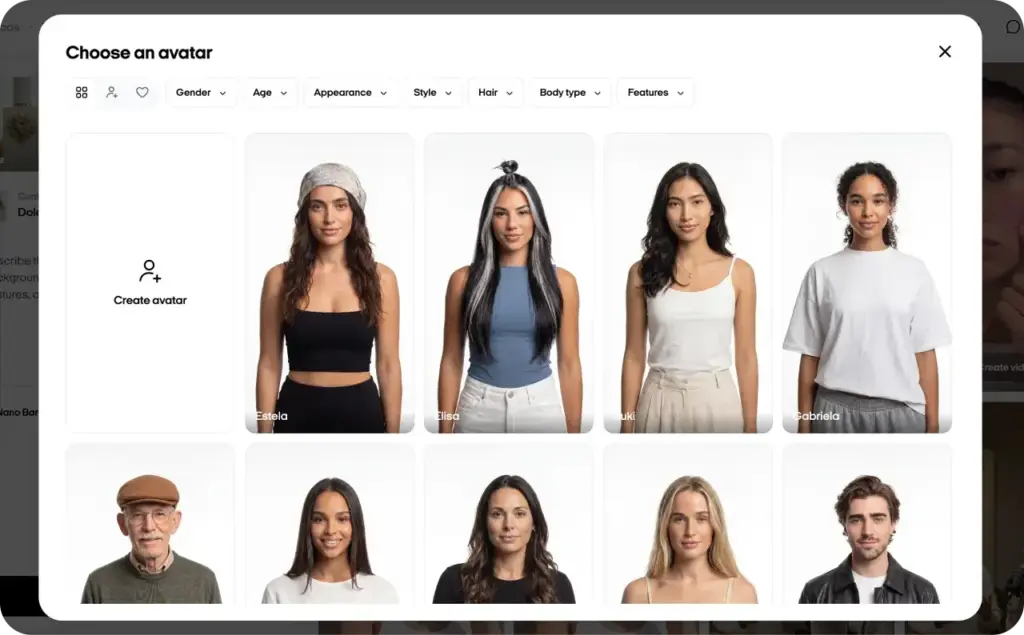
Talking-head ad? UGC style? Then the avatar choice deserves more than a random click. Zeely has 1,200+ AI avatars, filterable by age, gender, ethnicity, or you can upload a photo and build a custom one.
Here’s why this step matters so much. An avatar that actually resembles your target buyer makes the whole video feel organic, like someone sharing a genuine find. Pick one that’s clearly off, say a 22-year-old fitness model selling arthritis gloves, and the viewer clocks it as a paid ad instantly. On social platforms, that recognition kills watch time faster than almost anything else.
5. Generate, review, and adjust
The Zeely workflow goes like this:
- Load up your product details and pick a photo
- Choose a reference and an AI avatar. That reference is doing more than you’d think: it controls the scene composition, what the avatar is wearing, the backdrop, the pose
- Optional: type a custom prompt to steer the start image. Maybe you want different lighting, a moodier tone, a wardrobe change. Or skip this entirely and let the AI make those calls
- Hit Create Start Image, check the result
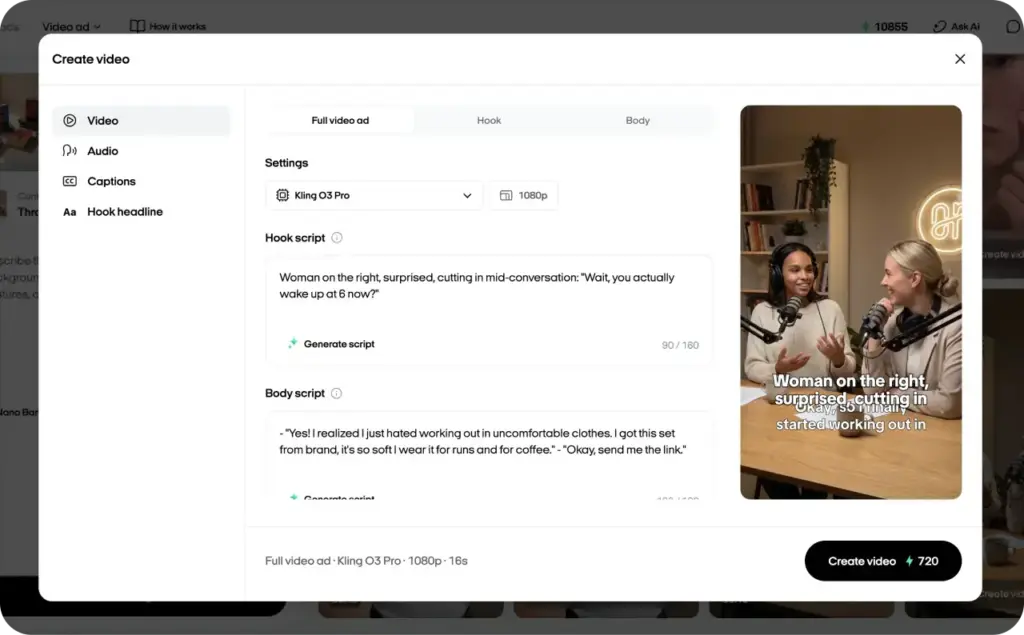
- Pick your video type: Full video ad, Hook only, or Body only
- Choose the AI model. Kling O3 Pro or Seedance 2.0. Set the resolution
- Add or generate the script. Full video ads need both a hook script and a body script
- Adjust voice settings, set up captions, add a hook headline if you want one
- Hit Create Video
Rendering usually takes a few minutes. You download the result as MP4.
Want to go deeper? Playground gives you access to more AI models, Kling 3.0, Seedance 2.0, Seedance 2.5. You can push videos up to 30 seconds, render up to 4K, and do video-to-video generation where you feed in a clip you like and the AI treats it as a motion reference. That last feature is underrated.
6. Test variations, not guesses
Three hooks, one body, one offer. That’s your starting test. Zeely lets you specify exactly what differs between versions. Maybe the copy changes but the visuals stay locked. Maybe you swap the audience targeting. The discipline here is only moving one lever at a time so when something wins, you actually understand why. Watch CTR and watch time, then put budget behind the winner.
Meta campaigns can run directly out of Zeely. Connect your ad account, or if you haven’t set one up yet, Zeely AI Marketplace gives you access through managed accounts. Either path gets you a performance dashboard with spend, clicks, CTR, CPA, and creative-level breakdowns so you can see which specific ad is pulling weight. Full walkthrough is in the guide to creating AI video ads with Zeely.

Structure your dropshipping video ad
After tearing apart a few hundred winning dropshipping ads, I started noticing a pattern in the pacing. Not an exact formula, more like a rhythm that the good ones share. Here’s what that timing usually looks like.
| Seconds | Job | What happens |
| 0 to 3 | Hook | Name the problem or show the “wow” moment. The viewer decides to stay or scroll |
| 3 to 10 | Demo | Show the product working. Close-up, real lighting, clear action |
| 10 to 20 | Benefit + proof | One or two benefits the viewer can picture, supported by a demo, review, or result |
| Last 3 to 5 | CTA | Tell them what to do next. “Shop now,” “See the colors,” “Get yours today” |
Before anything goes live I run a stupid simple test. I mute the video and watch it cold. If I can’t tell what the product does within three seconds of silent playback, the opening visual is the problem. No voiceover fix is going to save a confusing first shot.
For cold audiences, 15 to 30 seconds tends to be the sweet spot. Under 15 and you can’t really make a persuasive case. Over 30 and watch-through drops off a cliff. One trick I use a lot: pull out just the hook as a standalone 5 to 10 second clip and test whether it actually earns a pause before investing in the full edit.
Format stuff: 9:16 vertical at 1080 × 1920 px covers TikTok, Reels, Stories, YouTube Shorts. Facebook and Instagram Feed wants 4:5 at 1080 × 1350 px, that’s Meta’s own recommendation. And please, captions on every single video. It’s 2026 and I still review accounts where half the ads have no text on screen.
Write the hook and script
Hooks get written first, always. I don’t touch the rest of the script until I’ve got at least three hook options down.
Three hook types that work for dropshipping
- Problem callout. Say the frustration out loud. “Hotel iron again?” “Tired of tangled cables?” If the viewer has the problem, they’ll stick around to see if you’ve got a fix
- Pattern interrupt. Open with something that doesn’t belong in a feed. Coffee spilling in slow motion, a gross close-up of a stained carpet, two images side by side that look wrong together. The viewer stops because their brain needs a second to process what it’s looking at. That confusion is the opening. You don’t need the hook to make sense right away. You need it to buy you the next three seconds
- Quick result first. Skip the explanation entirely and throw the end result into frame one. Sparkling clean floor. Perfectly organized drawer. Whatever the product’s best moment looks like, that goes first. Then you reverse into the how. This works absurdly well for anything with a visible transformation. People see the result, wonder how it happened, and watch to find out
Whichever type you go with, draft three versions and pit them against the same ad body. One controlled experiment like that will teach you more about your audience than a week of theorizing ever could.
Two script templates you can adapt
Don’t copy these word for word. Adapt the bones to whatever you’re selling. Before/after product? Open on the ugly “before” shot, hard cut to the clean result, squeeze in a quick demo clip, then close out with the CTA.
- Template A: Problem → Solution → Proof Open with: “This is the easiest way to fix [problem].” Then show the frustration fast, no more than two or three seconds. Cut to the product doing its thing in two or three short clips. Flash three benefits on screen as text. Layer in one testimonial quote or a review screenshot. End with: “Tap to get yours today”
- Template B: UGC talk-to-camera Start with: “Okay, I finally tried this and…” Cut to the avatar using the product while narrating. Hit the benefits conversationally: “Here’s what I love…” and rattle off three points quickly. Wrap it up casual: “I put the link here, go check it out”
You can paste either of these into Zeely’s custom prompt field and the AI builds around that structure. The guide to writing ad scripts that convert goes much deeper on frameworks, how to edit generated scripts, and checking claims before they go live.
CTAs that earn clicks
“Buy now” is wallpaper. People scroll past it reflexively. A CTA needs to give the viewer a specific reason to tap right now.
- “Tap to see colors and pricing.”
- “Grab yours while it’s in stock.”
- “Get yours, shipping is fast.” Only say this if it’s actually true.
- “Check it out, this one’s worth it.”
Best dropshipping video ads
Every time I dissect a dropshipping ad that’s genuinely printing money, the same thing turns out to be true. The viewer understood the product in under five seconds and the CTA told them to do exactly one thing. Below are three formats I’d build for a dropshipping store in Zeely, and what specifically makes each one pay for itself.
Product showcase with AI avatar
What makes it sell: It’s camouflage. The format looks like organic content that someone posted because they genuinely liked a product, not like something a brand paid for. That distinction matters more than most advertisers appreciate. The avatar mentions the main benefit within the first couple seconds, touches on one or two secondary points with the product visible on screen, then wraps with a direct CTA. The reason the conversion numbers tend to be strong is that people process this format as a peer recommendation. Even knowing the avatar is AI, it still registers more like a person than a logo.
Problem → solution ad
Why it holds attention: You’re qualifying your audience in the opening frame without them knowing it. Anybody who has the problem being shown will keep watching because they want the resolution. That curiosity is what drives watch time up. But you have to keep the problem segment short, three seconds at most, then get the product visible. Spend too long on the frustration and you end up with a rant, not an advertisement.
Hook-only ad, short-form
The logic: These run 5 to 10 seconds and they don’t pretend to sell anything. One provocative claim, one unexpected visual, or one question that nags at the viewer. The entire purpose is scroll-stopping. You retarget anyone who watched with a longer ad afterward. And since they’re so quick to produce, you can churn out five variations in the time it would take to build a single full video.
Mistakes that weaken dropshipping video ads
I keep running into the same five problems when I audit underperforming dropshipping ad accounts.
- Recycling the same supplier footage as everyone else. I can spot these immediately and so can your customers. When 50 stores are running identical clips, CPMs climb and trust craters. At minimum, add your own captions and branded overlays. But really, the move is using AI to generate entirely new visuals from those same supplier photos. Same inputs, different output
- Misleading claims. Inflated discounts, exaggerated results, fake “testimonials” dressed up as genuine reviews. It violates FTC rules, it violates Meta’s ad policies, and even if you dodge enforcement in the short run, your refund rate is going to tell on you eventually
- Testing one ad and giving up. Almost every first creative loses. I’d worry if it didn’t, honestly, because that usually means the tracking is broken. The first round exists to collect data, not to print money. Build several variations with different hooks, read the results, and use those lessons to build round two. Round two is where the real performance shows up. But most people never get there because they interpreted the first loss as proof the product doesn’t work
- Landing page mismatch. I almost didn’t include this one because it seems so obvious, but then I looked at my notes from the last ten accounts I reviewed and it showed up in six of them. The ad promises free shipping, checkout charges $7. The ad shows a blue version, the landing page defaults to grey. Every gap between what the ad says and what the page shows bleeds money through refunds and bounces
- Pretending you have the product. You probably don’t own it. That’s how dropshipping works. But running nothing except the raw supplier video with zero creative work on top makes your store look like a copy of a copy. AI tools were literally built to solve this problem. Same starting photos, totally different finished video
Test and scale
Find whatever ad is performing best and duplicate it. Change a single variable, maybe the first three seconds, maybe the CTA wording, maybe the total length. When one version outperforms the other, you’ll know exactly what made the difference. Keep your eye on hook rate, watch time, CTR, conversion rate, CPA. A beautiful video that doesn’t move the product is just an expensive screensaver.
Once something hits your CPA target, push harder. Increase the daily budget, expand to new interest groups and lookalike audiences, cross-post the winning creative to Reels, TikTok, Shorts.
Fair warning though: creative fatigue in dropshipping is vicious. It sets in way faster than in other verticals. The second you see CTR dipping or cost per click trending up, that’s the signal to rotate the hook or test a fresh offer angle. The advantage of AI tools here is speed. Generating new variations from the same product data takes minutes, so you’re never stuck riding a dying ad while you wait for someone to film something new.
FAQ
Zeely starts at $29.95/month for 2,500 credits. A single video uses a small fraction of that. Compare it to a freelance editor at $50–150 per video or a UGC creator at $150–500 per deliverable. The real savings are in speed though. Five hook variations in twenty minutes versus emailing someone and waiting until Thursday.
Nope. Zeely has 1,200+ AI avatars, just pick one that looks like your buyer. If you don’t want a face at all, product demos with motion and captions work great in plenty of niches. Some of the best dropshipping ads I’ve analyzed had no human in them whatsoever.
TikTok or Instagram Reels if you’re selling impulse-buy products under $50. Facebook Feed still works for higher price points and older audiences. YouTube Shorts is growing but purchase intent isn’t strong there yet. My move: prove the creative on TikTok or Reels first, then recut for everywhere else.