Best LinkedIn ad sizes for every format in 2026
Trying to find the right LinkedIn ad sizes without bouncing between five spec pages? I pulled this together from LinkedIn’s live ad specs to build sharper ads faster and avoid preventable crop, file, and approval mistakes.
If you search LinkedIn ad image sizes or LinkedIn video ad sizes, you usually need two things at once. First, the exact specs. Second, a quick answer on which format actually fits your goal. That’s how I built this guide. I wanted one page that helps you design the asset, pick the placement, and avoid the kind of mistakes that waste review time inside Campaign Manager.
LinkedIn ad sizes quick chart for 2026
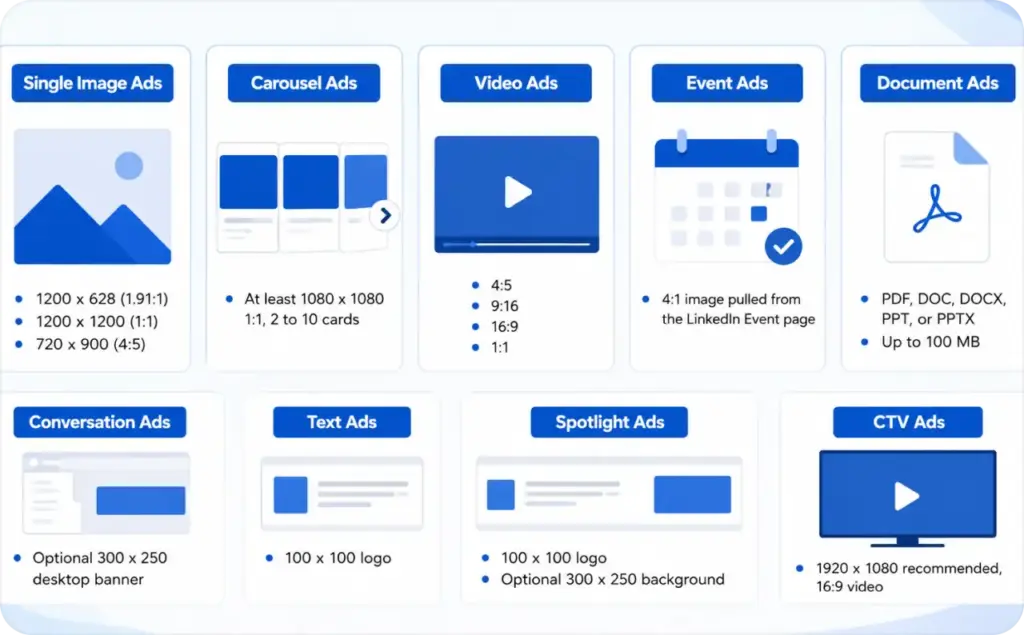
Here’s the fast answer. These are the ad sizes for LinkedIn that matter most in real campaign work.
- Single image ads: 1200 x 628 for 1.91:1, 1200 x 1200 for 1:1, 720 x 900 for 4:5
- Carousel ads: at least 1080 x 1080, 1:1, 2 to 10 cards
- Video ads: 4:5, 9:16, 16:9, or 1:1
- Event ads: 4:1 image pulled from the LinkedIn Event page
- Document ads: PDF, DOC, DOCX, PPT, or PPTX up to 100 MB
- Conversation ads: optional 300 x 250 desktop banner
- Text ads: 100 x 100 logo
- Spotlight ads: 100 x 100 logo, optional 300 x 250 background
- CTV ads: 1920 x 1080 recommended, 16:9 video
LinkedIn’s own ads guide frames the platform around objective-fit, not one universal canvas. That matters because advertising on LinkedIn works across feed, messaging, right rail, and streaming placements, and each one asks for different creative behavior. LinkedIn’s Ads Guide is the best place to verify the current family of formats before launch.
LinkedIn image ad sizes that fit the feed cleanly
For standard feed creative, LinkedIn image ad sizes are more flexible than many people expect. LinkedIn accepts landscape, square, and vertical image ads, but they do not behave the same way across devices.
Best LinkedIn ad size for single image ads
If you want the safest cross-device option, use 1200 x 1200. LinkedIn says square is recommended for delivery across both desktop and mobile. If you want a classic landscape format, 1200 x 628 is still the recommended 1.91:1 size. If you want mobile-first vertical creative, LinkedIn recommends 4:5, with 720 x 900 as the cleanest choice. Vertical image ads do not deliver to desktop, so they work best when your campaign is built around mobile feed behavior.
Single image ads accept JPG, PNG, or GIF files up to 5 MB. For copy, LinkedIn currently lists 70 characters for the headline, 150 for intro text, and 70 for the LAN description when you use LinkedIn Audience Network. That means your creative handoff should include both image size and copy cap, not just the file itself. LinkedIn Single Image Ads specs spell this out clearly.
What size should LinkedIn carousel ads be?
Use 1:1 cards at 1080 x 1080 or larger. Carousel ads support 2 to 10 cards, use JPG or PNG, and cap each file at 10 MB. This is the right format when you need sequence, comparison, product sets, or a step-by-step story. I’d use carousel when one image can’t do the job without cramming too much into the frame.
The card copy matters too. LinkedIn lists 45 characters for each card headline and 255 characters for intro text. That tight headline limit is one reason carousel often fails in review rounds. The design is fine, but the copy gets too long and starts working against the visual. Carousel Ad specs are simple, but easy to misread when teams only scan the image section.
What are the image specs for LinkedIn event ads?
Event ads are a little different. The ad image is not a separate creative upload in the usual sense. LinkedIn pulls a 4:1 image from the Event page, so the event asset has to be right before you launch the campaign. Intro text can run up to 600 characters. That means event creative planning starts at the event-page level, not inside ad setup.
LinkedIn video ad sizes that stay sharp on mobile and desktop
If you’re weighing LinkedIn video ads against static creative, start with one simple rule. Pick the ratio based on where attention has to be won.
Recommended LinkedIn video ad dimensions and aspect ratios
LinkedIn currently supports four main recommended video shapes:
- 4:5: 360 x 450 to 1080 x 1350
- 9:16: 360 x 640 to 1080 x 1920
- 16:9: 640 x 360 to 1920 x 1080
- 1:1: 360 x 360 to 1920 x 1920
For most B2B feed campaigns, I’d start with 1:1 or 4:5. Those shapes hold attention better in a scroll environment and give your text, product, or face more room on screen. I’d use 16:9 when the asset needs to travel across more placements, or when the footage was originally shot for broader reuse. LinkedIn allows an aspect ratio tolerance of 5%, which gives you some room, but not enough to fix sloppy exports. LinkedIn Video Ads specs are worth checking before every new template pack.
Maximum video file size and thumbnail rules for LinkedIn ads
Video files can be 75 KB to 500 MB, with durations from 3 seconds to 30 minutes. Captions are optional. Thumbnails use JPG or PNG, max out at 2 MB, and should match the video’s aspect ratio. That means the thumbnail is not a throwaway export. It needs the same framing discipline as the video itself.
If your video looks soft after upload, the problem is often the export choice, not the raw footage. Use a clean master, keep the ratio exact, and avoid resizing the same file over and over. That’s still one of the fastest ways to lose sharpness.
LinkedIn document ad sizes and native content formats people skip
This is one of the most useful parts of the LinkedIn ad sizes specs puzzle because document-led and native-content-led formats behave differently from standard image uploads.
What size should a LinkedIn document ad cover image be?
LinkedIn’s document ad spec focuses on the uploaded file itself, not a separate cover-image upload. Document ads accept PDF, DOC, DOCX, PPT, and PPTX files up to 100 MB, with up to 300 pages or 1 million words. LinkedIn also recommends keeping documents under 10 pages for design purposes, even though the hard cap is much higher.
So here’s the practical answer: treat the first page as the cover. That first page becomes the visual hook readers judge in-feed. If it looks like page seven of a deck, performance usually suffers before the reader ever taps.
Are document ads better for whitepapers, reports, or case studies?
Usually, yes. Document ads are built for previewing research, guides, whitepapers, and case studies directly in the feed. LinkedIn’s ads guide positions them for thought leadership, research, and downloadable assets, which makes them a strong fit for mid-funnel B2B content.
If the asset itself is the product, document ads often beat sending cold traffic to a landing page too early.
What is the difference between LinkedIn post image sizes and LinkedIn ad sizes?
This is where people get mixed up. Some paid formats use dedicated ad specs, while others promote native LinkedIn content. Thought Leader Ads can promote text, image, video, newsletter, or article posts from verified people. Article and Newsletter Ads are also native-content-driven formats, not just image ads with a different label.
Microsoft Learn also notes that images uploaded through the Images API can be reused across single image ads, carousel ads, and spotlight ads, which helps creative teams avoid duplicate uploads and keep asset management cleaner.
LinkedIn display ad sizes for message, text, and dynamic ads
This is the section many guides barely cover, even though paid teams need it all the time.
What size banner image do LinkedIn message ads and conversation ads use?
For Conversation Ads, the optional banner uses JPG or PNG, with a 300 x 250 max size, 2 MB max file size, and desktop-only viewability. LinkedIn also allows 8,000 characters for message text, 20,000 for the custom footer, and 25 characters for the CTA.
What image size do LinkedIn text ads require?
Text ads use a 100 x 100 logo in JPG or PNG up to 2 MB. Copy is tight: 25 characters for the headline and 75 for the description. This is a small right-rail unit, so clarity matters more than decoration. If the logo is weak or the message is vague, there’s nowhere to hide.
What logo and image sizes do LinkedIn dynamic ads use?
For Spotlight Ads, use a 100 x 100 company logo in JPG or PNG up to 2 MB. You can also add an optional 300 x 250 background image, also capped at 2 MB. LinkedIn lists 50 characters for the headline, 70 for the description, 25 for the company name, and 18 for the CTA.
LinkedIn ad copy limits, file types, and approval details that trip teams up
Once the visual is right, the next failure point is usually production detail.
Which file types does LinkedIn accept for each ad format?
Here’s the short version:
- Single image ads: JPG, PNG, GIF
- Carousel ads: JPG, PNG
- Video ads: MP4
- Document ads: PDF, DOC, DOCX, PPT, PPTX
- Conversation banner: JPG, PNG
- Text ad logo: JPG, PNG
- Spotlight logo/background: JPG, PNG
What is the maximum file size for each LinkedIn ad format?
Here are the limits you’ll actually check most often:
- Single image ads: 5 MB
- Carousel card: 10 MB
- Video ads: 500 MB max
- Document ads: 100 MB
- Conversation banner: 2 MB
- Text ad logo: 2 MB
- Spotlight logo/background: 2 MB
- CTV video: 500 MB
What are the current character limits for LinkedIn ad copy?
The most useful ones to remember are:
- Single image ad headline: 70
- Single image intro text: 150
- Carousel card headline: 45
- Carousel intro text: 255
- Text ad headline: 25
- Text ad description: 75
- Spotlight headline: 50
- Conversation CTA: 25
- Lead Gen Form CTA: 20
LinkedIn also recommends 3 to 4 form fields as best practice for Lead Gen Forms, with 12 fields max. That’s one of those small details that changes results fast. Shorter forms usually support cleaner creative and better completion rates.
Which LinkedIn ad format should you choose by goal?
- For awareness, I like single image, video, and thought-leader-led formats because they make the message easy to see in-feed.
- For lead generation, single image, video, document ads, and Lead Gen Forms usually make the strongest mix.
- If you’re promoting a whitepaper, benchmark report, or case study, document ads deserve a serious look because the asset itself is the conversion driver.
- LinkedIn’s own ads guide frames formats by use case like awareness, leads, content promotion, and engagement, which matches how media teams actually make decisions.
- Pick single image when the promise is clear in one frame.
- Pick carousel when the story needs sequence, proof, or multiple products.
- Pick video when motion genuinely helps explain the value or creates a stronger first stop in the feed.
- On mobile, square and 4:5 usually give you the safest result.
- Landscape still works, but it can feel smaller in the scroll.
- Vertical can work very well, but only if you know the campaign is meant for mobile delivery. LinkedIn’s own image spec notes that vertical image ads do not deliver to desktop, which is a huge detail if your audience splits device use across work and commute hours.
How I’d use Zeely to build LinkedIn-ready creative faster
Zeely is strongest here as the creative production layer, not as a replacement for LinkedIn Campaign Manager. Batch mode helps you build multiple static ad creatives for one product, and Template ad lets you start from a ready-made design, swap visuals, polish the caption, and resize or reposition the image inside the layout. Try Zeely today and create your first LinkedIn ad.
Learn more about sizes and safe zones for social media
Now that you know the correct sizes for LinkedIn, it’s time to explore dimensions and specs for other popular social media platforms so your content always looks clean, professional, and optimized.
- Instagram story sizes A quick guide to the correct dimensions and safe zones for creating full-screen, high-performing Stories.
- Instagram safe zones. Learn how to position key elements within Instagram’s safe zones to ensure your content remains fully visible and visually effective across Stories, Reels, and posts.
- TikTok safe zones. Discover how to design videos using TikTok safe zones so important visuals and text aren’t hidden behind captions, buttons, or UI overlays.
- Reels dimensions and aspect ratio. Learn the ideal video formats, ratios, and technical requirements for Instagram Reels.
- Snapchat safe zones. Understand where to place key elements so they aren’t blocked by UI overlays in Snapchat ads and content.

Emma blends product marketing and content to turn complex tools into simple, sales-driven playbooks for AI ad creatives and Facebook/Instagram campaigns. You’ll get checklists, bite-size guides, and real results, pulled from thousands of Zeely entrepreneurs, so you can run AI-powered ads confidently, even as a beginner.
Written by: Emma, AI Growth Adviser, Zeely
Reviewed on: May 7 2026