What does forward mean on Instagram Stories?
Did someone just skip your Story, or were they just scanning fast? I'll break down what Forward means in Instagram Insights, how it compares to the other navigation metrics, and what different Forward patterns tell you about your content.

Key takeaways
- Forward means a viewer tapped to your next Story slide. They stayed inside your sequence. They did not leave for another account
- A high Forward count does not mean your content failed. You need Back, Next Story, and Exits to read the full picture
- Next Story = they left for another account. Exits = they left Stories entirely. Both are stronger negative signals than Forward
- Back usually means interest. The viewer wanted to re-read something
- Instagram renamed Impressions to Views in April 2025. Use Views or Reach when calculating a Forward rate
What does Forward mean on Instagram Stories, and did people just skip you? I wrote this using real Instagram navigation patterns so you can read Story insights like a marketer, not a mind reader.
On Instagram Stories, Forward means someone tapped to your next slide. Not to another account, not out of Instagram. You get a total count in Story Insights under Navigation, but no names, no reasons. A big number looks alarming until you realize most Story browsing is fast by default.
What Forward means on Instagram Stories
Forward means a viewer tapped the right side of the screen to advance to your next Story slide. Same Story. Next frame. Think of it like flipping to the next card in your own deck.
Plenty of people tap fast on purpose. Stories reward it. DataReportal’s Digital 2026 United States report lists 417 million cellular mobile connections , about 120% of the population. Fast taps are normal mobile behavior.
What is a forward tap in Instagram Story insights?
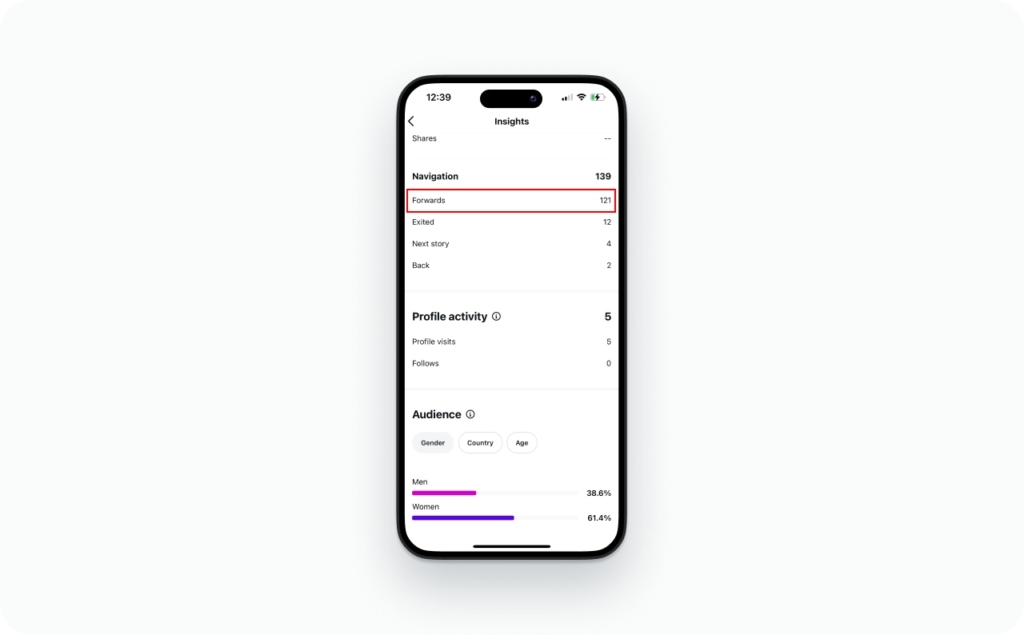
In Story Insights, Instagram logs it under Navigation as “taps forward,” right next to Back, Next Story, and Exited.
Under the hood, Meta’s API labels these as TAP_FORWARD, TAP_BACK, TAP_EXIT, and SWIPE_FORWARD. Same four actions you see in the app, just with less friendly names.
Does Forward mean someone skipped my Story?
Sometimes. But “skipped ahead” and “skipped you entirely” are different things.
- Busy but still interested. They tap forward because they want the key point fast. They keep watching later frames
- Not hooked yet. They tap forward because the first frame did not earn their attention
Speed signal first. Boring signal only after I cross-check it against the other navigation numbers.
Does Forward mean they went to someone else’s Story?
No. Forward stays inside your sequence. If someone jumps to another account, that is Next Story. If they close Stories altogether, that is an Exit.
Forward does not count as a view. It is a tap that happens while someone is already watching. It shows up in your completion rate, not your view count.

Where to find Forward in Instagram Insights
Tap path, iPhone or Android:
- Open Instagram and go to your profile
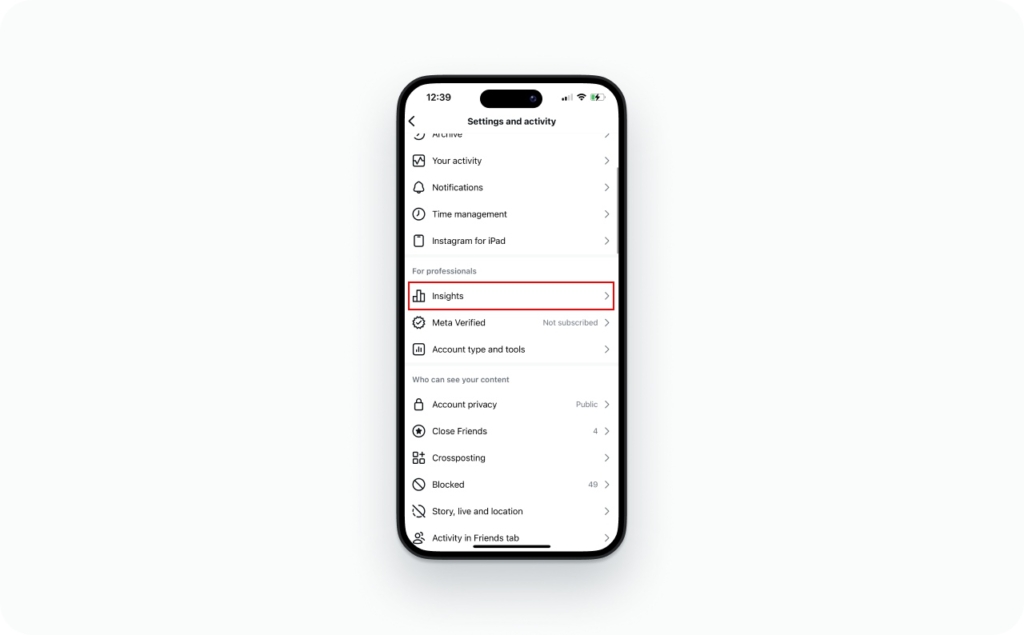
- Tap Insights or open Professional dashboard, then Insights
3. Under Content you shared, tap Stories
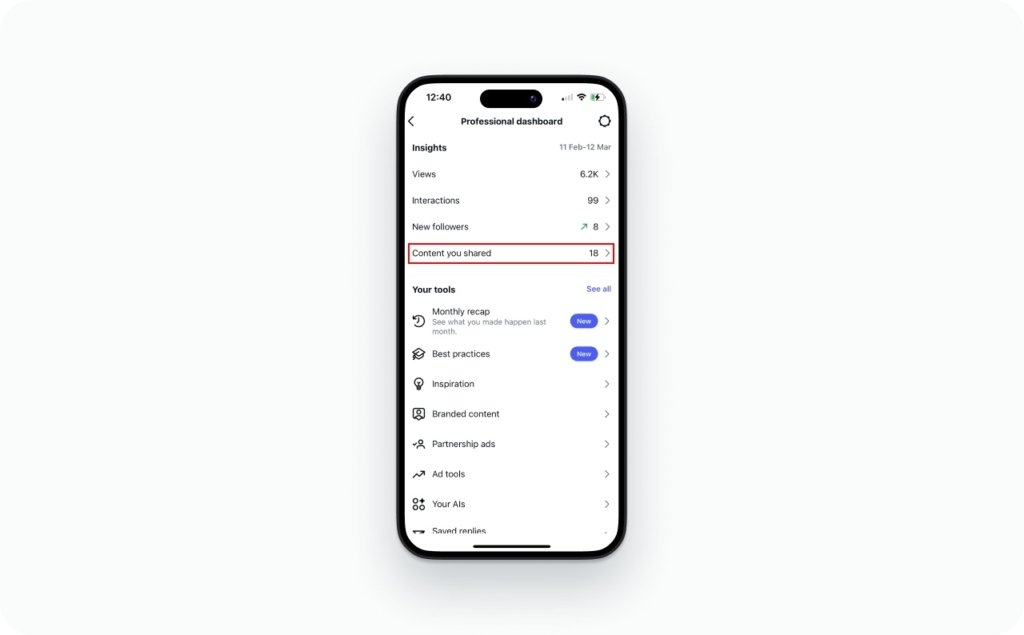
- Open a Story, then look under Navigation for Forward
All four navigation metrics live under the same Navigation heading: Forward, Back, Next Story, Exited.
If older guides mention “Impressions,” that metric is now called “Views.” Instagram deprecated Impressions in its API on April 21, 2025. Same number, new label. Views count every time your Story is played or displayed, including repeats. The navigation metrics did not change.
Why Forward might not show in your insights
Story Insights require a professional account, either creator or business. If you already have one and Forward still does not show up:
- The Story is too old. Stories disappear after 24 hours, and the Instagram Help Center states you can view insights on past Stories for a limited window after they expire. Meta’s API documentation notes that Story metrics are only available for 24 hours via the API, though general metrics data is stored for up to two years and webhooks can capture Story data before it expires
- Not enough data. Low-reach Stories can suppress navigation metrics
- You are viewing from the archive instead of the live Story. Some archive views show activity and sticker results, not full navigation
- Close Friends Stories and reshared content may not always populate navigation metrics
Forward vs Next Story vs Exit vs Back
| Metric | What the viewer did | What it usually means | What to check |
| Forward | Tapped to your next Story frame | Moving fast, scanning, or not fully hooked | Compare to Back, Next Story, and Exits |
| Back | Tapped to a previous frame | Interest, re-checking, or confusion | Was the frame text-heavy or unclear? |
| Next Story | Left your Story for another account | Chose different content, not just a faster pace | Where does it spike? Usually the hook frame |
| Exit | Left Stories entirely | Attention dropped or got interrupted | Which frame do exits jump on? |
Forward vs Next Story
Forward keeps the viewer inside your Story. They move from one of your frames to the next.
Next Story means they left your sequence and jumped into another account’s Stories. One is faster pacing. The other is walking away.
Meta’s API tracks them separately: TAP_FORWARD for the right-side tap, SWIPE_FORWARD for the left swipe. Different finger movement, different diagnosis.
Forward vs Exit
Exit means the viewer left Stories. Went back to the feed, opened a profile, switched apps, or closed Instagram.
Pacing versus stopping. Forward means they kept moving through your frames. Exit means they closed the Stories viewer entirely.
Forward vs Back
Back is a rewind. Usually it means one of two things:
- They cared and wanted to re-check something
- They missed the point because the frame was dense or unclear
High Forward says skimmed. High Back says re-read.
Last-slide edge case
On your last slide, a habitual tap forward can get recorded as Next Story or Exit, depending on where Instagram sends the viewer next. I never diagnose the last frame in isolation. I look at the pattern across several Stories.
How to interpret Forward taps
Forward by itself tells you very little. The number only means something once you compare it to what happened on the same frame across Exits, Next Story, and Back.
Is a high Forward count bad?
Depends. A pile of Forward taps could mean boredom, or it could mean people are scanning fast and sticking around. You cannot tell the difference without checking Exits, Next Story, and Back alongside it.
When Forward is high but viewers are staying
Some slides are meant to be tapped through quickly: before/after reveals, link sticker frames, sound-off intros. If Exits stay low while Forwards climb, people want the point sooner. Lead with the payoff.
Fix the pacing. The content is probably fine.
When Forward means something is wrong
- Low Forward, high Back. Check which slide they rewound to. Back is high on a punchy visual or a clear promise? Interest. Back is high on a wall of text or a vague opener? Confusion. The tiebreaker is what happens next. If Exits stay low, they were re-reading because they wanted to. If Exits spike right after, they were stuck
- Forward spike on one slide. Almost always a readability problem on that one slide: too much text, a weak opening line, a payoff buried halfway through, or visual clutter. Redesign that frame before touching anything else
Forward rate on Instagram Stories
You can calculate Forward rate two ways. Pick one and stay consistent.
Forward rate = Forwards / Views
Forward rate, unique = Forwards / Reach
Worked example:
- Views: 2,000
- Forwards: 600
- Forward rate = 600 / 2,000 = 0.30, or 30%
Use Reach if you care about unique viewer behavior. Use Views if you report consistently every week. Do not switch mid-analysis.
Build your real baseline from your last 10 to 20 Stories. Only flag a number as “good” or “bad” when it breaks your normal pattern. I do not trust universal Forward rate benchmarks. Every niche has different browse behavior.
Practical notes
You cannot stop people from tapping forward, but you can remove the reasons they do it on slide one.
What slides earn the most forward taps?
- Text-heavy slides with no visual anchor
- Slow talking-head intros that delay the point
- Unclear CTA like “wait for it” with no reason to wait
- Context before value, where the payoff arrives too late
Notifications and privacy
- Instagram does not notify you when someone taps Forward
- You cannot see who tapped Forward. You only see totals in Insights
- “Forward” in Stories has nothing to do with forwarding a DM. Separate feature, separate label
FAQ
Not by itself. Someone tapping through a 10-slide Story may just be looking for the frame that matters to them, and they have not left. Check Next Story and Exits. If both stay low, the audience is still with you. If Forward and Exits spike on the same frame, that frame is the problem.
Forward advances to your next frame. The viewer is still watching you. Next Story means they swiped left into another account’s Stories. Instagram’s API tracks them as separate actions: TAP_FORWARD and SWIPE_FORWARD. One tells you the pace is fast. The other tells you the viewer chose something else.

Emma blends product marketing and content to turn complex tools into simple, sales-driven playbooks for AI ad creatives and Facebook/Instagram campaigns. You’ll get checklists, bite-size guides, and real results, pulled from thousands of Zeely entrepreneurs, so you can run AI-powered ads confidently, even as a beginner.
Written by: Emma, AI Growth Adviser, Zeely
Reviewed on: September 30, 2026