Zeely vs Creatify: Which AI ad tool fits your business?
Is Zeely or Creatify a better fit for the ads you need to make and run? I compare their creative tools, costs, campaign workflows, and support to help you choose.

I checked current product materials and pricing for this comparison. The quality and speed sections explain what to assess.
Key takeaways
- Zeely vs Creatify comes down to your working process: guided creative and Meta campaign tasks, or broader production and team requirements
- Zeely combines image and video creation with direct Meta campaign launch, including a managed-account option
- Creatify offers multilingual avatar production, collaborative plans, and campaign tools of its own
- Compare the cost of usable ads, including revisions and additional credits, before choosing by subscription price
- Check the workflow on your preferred device, then use the same product and script to assess both tools
Zeely vs Creatify at a glance
The clearest difference sits after the ad is made. Zeely guides you through launching a Meta campaign on every paid plan, even if you don’t have your own Meta Ads account. Creatify connects to ad accounts you already own and keeps its AI media buyer for the Pro plan.
| What you’re comparing | Zeely | Creatify |
| Best for | Solo entrepreneurs, small businesses, enterprises that want ads and Meta campaigns in one place | Brands and teams that need a high volume of UGC-style video ads |
| Core workflow | Create, Launch, Scale: ads, campaign launch and results in one app | Product URL to video ads, then batch variations and optional launch |
| Product import | Paste a link from Shopify (several products at once), Etsy, Amazon, Instagram, Facebook or any public product page | Paste a product, Shopify, Amazon, App Store or Google Play link, or upload your own media |
| Image ads | Yes: Image ad and Playground, up to 10 references per batch | Yes: Image Ad tool |
| Video ads | Video ad (full ad, hook only or body only), viral video, Playground video | URL to Video, AI avatar video, product video, Ad Flow templates |
| AI avatars | 1,200+ avatars, plus custom avatars | 300 actors on Starter, 1,500 on Pro, Aurora avatar model |
| Own voice | Not supported yet | Voice cloning |
| AI models | Nano Banana Pro, Nano Banana 2, GPT Image 2, Kling O3 Pro, Kling 3.0, Seedance 2.0 and 2.5 | 50+ premium models on Starter, 100+ on Pro |
| Languages | Write the script in the language you need | 75+ languages |
| Video length | Up to 30 seconds per generation | Up to 2 minutes on Starter, 10 minutes on Pro |
| Editing after generation | Edit ad copy, change an image ad with a prompt or edit its text in place; regenerate only the hook or body of a video | Free, unlimited manual edits (text, captions, trims, layout); AI reruns cost credits |
| Brand kit | Brand DNA for up to 10 brands, with rules for what AI must avoid (image ads on web) | Brand Spaces: 1 on Starter, 2 to 5 on Pro |
| Competitor research | Competitor spy feed | Competitor Ad Tracker (10M+ Meta ads) on Pro |
| Paid campaign launch | Guided Facebook and Instagram setup on web and mobile, on every paid plan | Ad Launcher for Meta, TikTok and AppLovin; AI Performance Agent on Pro |
| Launch without your own ad account | Yes, through Zeely AI Marketplace | Connects to your own ad accounts |
| Organic posting | Schedules posts to Instagram and TikTok | Not covered in the plan features reviewed |
| Performance tracking | Campaign dashboard with spend, clicks, CTR, CPA and results per ad | Ad Insights and Performance Agent account audits |
| AI assistant | Agent (beta) on web and mobile, plus a Slack agent | Creative Agent, Performance Agent, Slack bot, MCP for Claude and ChatGPT (Pro) |
| Team seats | No seat-based plans listed | 1 seat on Starter, up to 5 on Pro |
| Mobile app | iOS and Android: create ads and launch campaigns | Browser; mobile app not confirmed for this comparison |
| Free plan | No free plan listed | 10 credits a month, watermarked exports, Creatify Agent included |
| Entry price | Starter: $29.95/month, 2,500 credits | Starter: $39/month, 100 credits |
| Higher tiers | Plus: $49.95/month; Growth: $79.95/month | Pro: from $99/month; Enterprise: custom |
| Support channels | Live chat in the app, on the web and in the Help Center, plus email | Email, live chat and help docs; account manager on Enterprise |
| Support speed | 24/7, first reply typically in 1 to 2 minutes | No published response time; SLA on Enterprise |
| Issue resolution | AI assistant first, then a support agent; fix time depends on the issue | No public resolution time for Starter or Pro |
Prices are monthly, in USD, as listed on the Zeely pricing page and the Creatify pricing page on October 13, 2026.
Core focus and workflow: how Zeely and Creatify are built
Zeely is built around the whole paid-ads loop, while Creatify is built around video output. Each has grown into the other’s territory, but the starting point still shapes how the tool feels on a busy Tuesday.
Zeely splits everything into three steps: Create, Launch, and Scale. You make image ads and video ads, launch them as a Meta campaign, and check how they’re doing without leaving the app. Behind all that is what Zeely calls its Performance Intelligence Layer. It combines AI with proven ad frameworks, ad performance data, and your product details to tailor each creative to an actual campaign. The workflow is designed for one person to handle from start to finish, which fits Zeely’s audience. According to its own product data, 64% of users are solo entrepreneurs.
Creatify started as a URL-to-video tool, and that’s still its center of gravity. You paste a product page, and it writes scripts, picks avatars and renders a batch of video ads. Its newer Creative Agent and Performance Agent add planning, launching and AI media buying on top, mostly for marketers who already manage ad accounts.
Here’s how one real task plays out. Say you sell handmade soy candles on Shopify and want three ads running by Friday.
| Step | Zeely | Creatify |
| 1. Add the product | Paste a link from Shopify, Etsy, Amazon, Instagram, Facebook or any public product page, or add the details by hand | Paste the product page URL |
| 2. Make the ads | Image ads from URL, references, plus a video ad with an AI avatar, AI scripts and hooks | Video ads generated from the URL, with AI scripts and avatars |
| 3. Go live | Choose an audience and budget in Zeely, then launch on Facebook and Instagram | Download the files, or connect your Meta account and use Ad Launcher |
| 4. Check results | Campaign dashboard in Zeely, on web or phone | Creatify’s ad analytics, or your own Ads Manager |
If this were my candle shop and I had never run a paid ad, I’d take the Zeely route: fewer tools to learn and one screen that shows what happened. With a media buyer already living in Ads Manager, Creatify’s video volume would matter more to me than the launch step.

Zeely vs Creatify features: what each app adds to the basics
On paper, the two feature lists look closer than they are. Both pull product details from a link, write ad scripts, generate image and video ads with AI avatars, track competitor ads and offer an AI agent. The real split is in what each one builds around that shared core.
What Zeely adds for a one-person marketing team
- Market Intelligence. You can import a product or add it manually, and either way Zeely creates a profile you can edit. It has six sections: Niche, Core value, Target Audience, Pain points, Purchase triggers, and Social proofs. Whatever you change there feeds into how the AI writes your ads.
- Brand DNA with stop rules. Besides your colors and tone, you can tell the AI what to stay away from, like visual don’ts, banned words and claims, or headlines you don’t like. For now, it applies to image ads on the web.
- Organic posting. You can schedule finished ads as Instagram Reels, Stories, and posts, or as TikTok videos, all from inside Zeely.
What Creatify adds for content-heavy teams
- Longer videos, up to 2 minutes on Starter and 10 minutes on Pro
- Support for 75+ languages, plus voice cloning and a talking avatar made from your own photo
- Creatify Agent, which builds ads from a brief you give it in chat and is available even on the free plan
- Ad Flow, a node-based editor with 200+ templates on Starter, plus an API for developers
For most small businesses, counting features won’t tell you which one to pick. Instead, think about which missing feature would actually hold you up this month. If you sell in both Spanish and English, Creatify’s language support is a big deal. If you’ve never set up a Meta campaign, Zeely’s launch flow will matter a lot more to you than a library of avatars.
Zeely vs Creatify pricing: what your monthly plan really buys
Zeely’s entry plan costs $9 less than Creatify’s, but only Creatify offers a free plan. The credit counts look wildly different, and they aren’t the same currency.
| Plan level | Zeely | Creatify |
| Free | No free plan listed | $0: 10 credits a month, up to 2 video ads or 20 image ads, watermarked |
| Entry | Starter: $29.95/month, 2,500 credits | Starter: $39/month, 100 credits, one generation at a time |
| Middle | Plus: $49.95/month, 5,000 credits | Pro: $99/month, 300 credits (expandable up to 5,000) |
| Top | Growth: $79.95/month, 10,000 credits | Enterprise: custom pricing |
Credits usage compared
Zeely’s help center lists the cost of each video model. A Kling O3 Pro video (6 to 20 seconds, 1080p, with sound) costs 500 credits, and a Seedance 2.0 video (8 to 30 seconds) costs 1,500. That puts Starter at about five Kling O3 Pro videos a month, before start images and image ads.
Creatify’s free plan gives you a good sense of the math. You get 10 credits, which is enough for up to 2 video ads, so a standard video ad works out to around 5 credits. That means the 100 credits on Starter will get you about 20 standard video ads. Premium models use more credits, and both tools tell you the credit cost before you confirm a generation.
If your plan is mostly short avatar videos on a tight budget, Creatify’s entry tier likely gives you more clips. Zeely’s subscription covers more of the job, though: image ads, campaign launch and organic posting come with every paid plan, while Creatify’s competitor tracker and AI media buyer start at $99 a month.
Costs that sit outside the plan
- Ad spend. On both tools, your ad budget is paid on top of the subscription.
- Zeely campaign fee. According to Zeely’s pricing FAQ, running ads through the platform can come with an extra charge of up to 12%. Before you settle on a budget, check with support to find out how that applies to your setup.
- Website vs app prices. Zeely’s site shows its plan prices.
- Annual billing. Creatify advertises savings of up to 50% on annual plans, and its unused credits stay valid for two months.
If your budget is tight, I’d pay for one month of the tool that fixes your biggest bottleneck. Then judge it by how many usable ads you got for the money, not by how many credits you had.
Generation quality and realism
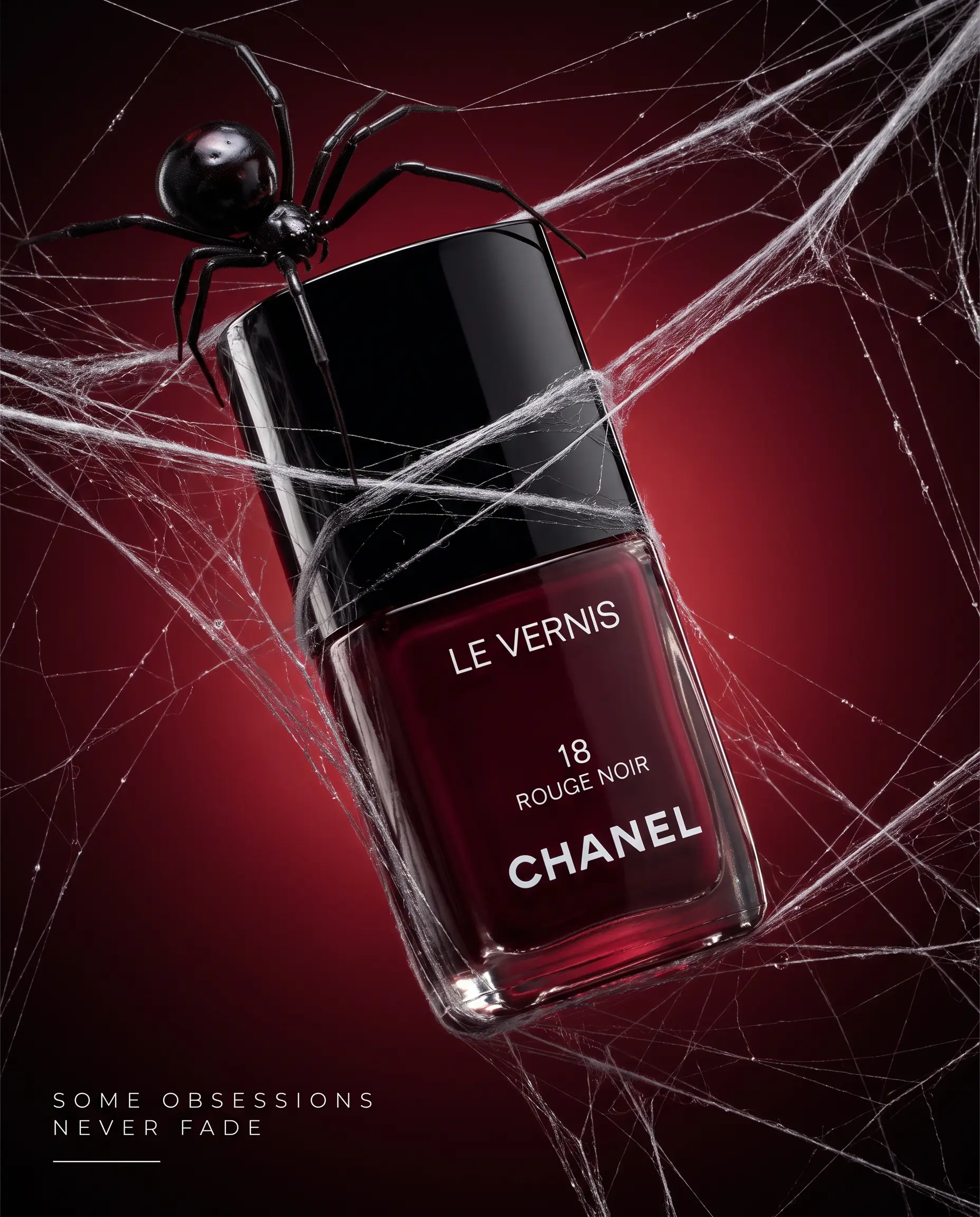
Both tools now use leading AI models from outside providers, so how realistic your ads look depends more on what you feed in and how carefully you review the results than on which brand you pick. Neither company has published a head-to-head test using the same inputs. And the polished samples on their homepages don’t tell you much about what you’ll actually get on your plan.
What drives realism in each tool
Zeely lets you pick the model for each job. Image ads run on Nano Banana Pro (the default), Nano Banana 2 or GPT Image 2. Video ads run on Kling O3 Pro for high-detail motion or Seedance 2.0 for motion guided by a reference video, and both generate sound natively.
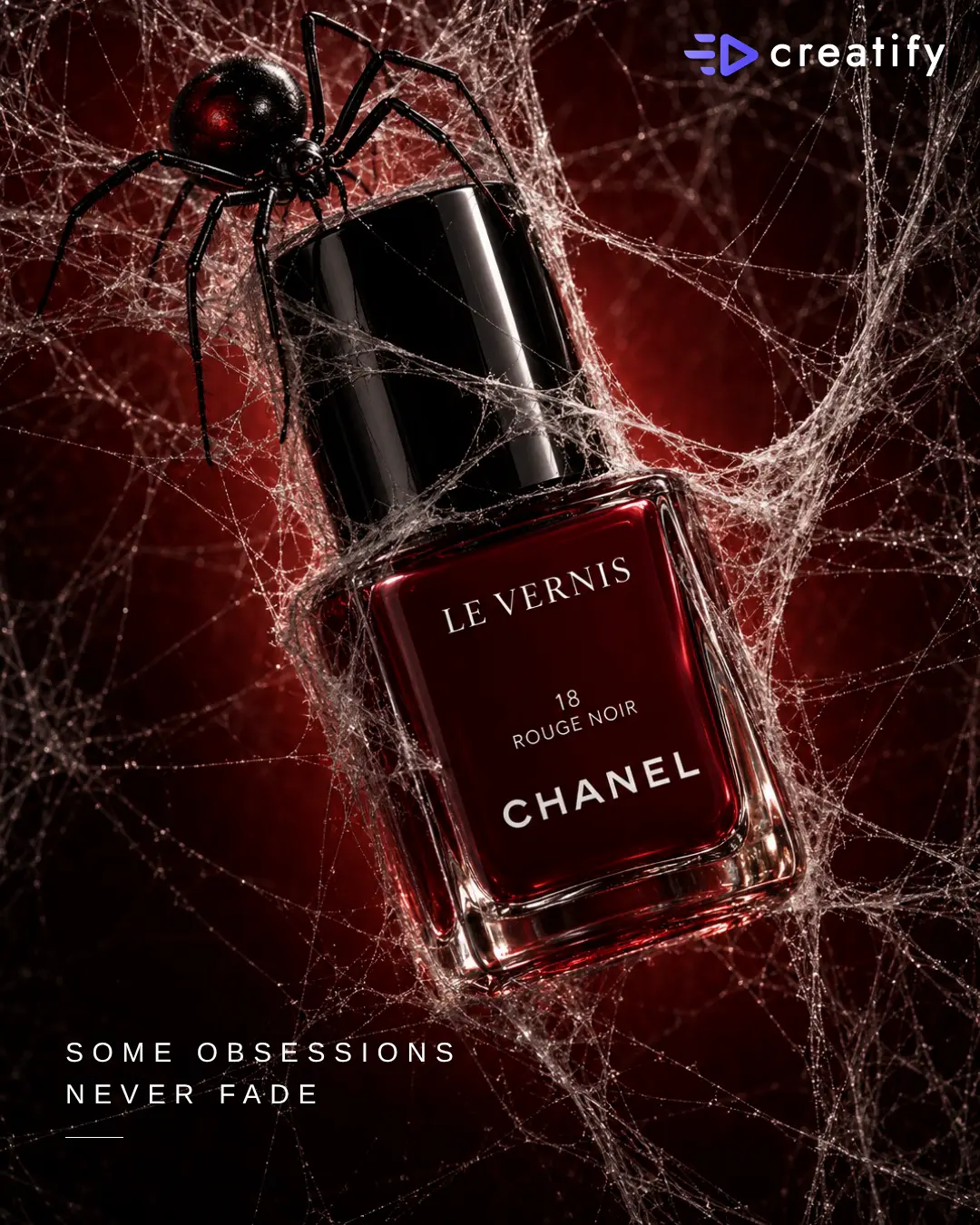
Creatify leans on its avatar side. Its Aurora model turns a still photo into a talking presenter, and Pro unlocks 1,500 AI actors plus over 100 premium models in its Model Playground.
How to run a fair realism test
Give both tools the same product photo, the same 15-second script, and the same placement, like a vertical Reel. Choose a similar presenter style in each one, for example a UGC-style video ad with a single person talking to the camera. Then don’t just compare the best clips. Keep track of how many tries each tool took before it gave you something you’d actually approve.
The step that saves the most bad renders
In Zeely, you have to approve a start image before it renders the video. Say you sell jewelry and the ring comes out with the wrong stone color. You’d spot it on the still frame and fix the prompt right there, instead of spending video credits on a clip you can’t use.
Whichever tool you pick, check these four things before an ad goes live:
- Hands touching the product look natural across every cut
- The avatar’s lips match the product name when it’s spoken
- Labels, colors and packaging match your real product photos
- The product appears within the first three seconds
One honest limit on the Zeely side: you can’t upload or record your own voice for an avatar yet. If your brand is built around your own voice, Creatify’s voice cloning covers that.
Setup process: from product link to first ad in Zeely and Creatify
Neither tool needs design skills or a store integration to get started. The differences show up in what you need ready and how much hand-holding you get on day one.
Getting started in Zeely
Paste a public product link and Zeely grabs the title, description, and images. A Shopify store link goes a step further and loads your product list, so you can bring in several products at once. If you copy a link from the Shopify admin panel, Zeely will try to switch it to the public product page, and it doesn’t install anything in your store.
Etsy and Amazon links work as well, as long as you paste a link to the product page itself and not your shop or seller page. If you don’t have a website, you can add a photo, name, and description yourself. Zeely can’t import private pages, Google Drive files, or Canva documents.
In the mobile app, new users get a Setup Guide on the Home screen that walks them through five milestones: adding a product, creating an image ad, creating a video ad, publishing a social post, and launching a paid campaign. A step only gets checked off once you’ve actually completed it.
Getting started in Creatify
Creatify’s setup is short by design: paste a product URL, pick or create an avatar, adjust the script, then refine the result in its video editor. It reads Shopify, Amazon, App Store and Google Play links, and you can upload images, videos and text instead. The free plan lets you run this whole flow before paying, with a watermark on exports.
The check most people skip
Before you generate anything, look over the details the tool imported. Both apps build your ads from that information, so if your product page still shows an old price, your ad will too. Get the price, product name, and audience right first, and every ad you make afterward will use the corrected details.
Generation speed: how long Zeely and Creatify take to render
Both tools can give you a usable draft within a few minutes, so speed alone probably won’t decide it for you. What makes more of a difference is how many ads you can make at once and how much you get to check before any credits are spent.
In Zeely, the start image for a video ad is usually ready in less than a minute, and an animated image video generally takes under 3 minutes. For other video ads, it depends on the model and length you pick. With image ads, a single batch gives you up to 10 ads (one for each reference) or 5 variations of one idea.
Creatify’s URL to Video page says you’ll get a ready-to-run video ad in under 60 seconds, plus 10+ variations at once for A/B testing. The API section of its pricing FAQ, though, puts a full link-to-video job at about five minutes. So expect the timing to change depending on which tool you use and how long the video is.
Creative controls and settings: how much you steer Zeely vs Creatify
Zeely lets you set more things up before it renders, while Creatify leaves you more room to make changes afterward. Which one suits you depends on how you’d rather fix a draft that’s close but not quite there.
Zeely: control upfront, built for testing
In Image ad, you pick the model and aspect ratio, add up to 10 references, and set up to five variations. You also decide what changes from one variation to the next: the text, visuals, audience, style, or composition. Text is selected by default, since changing one thing at a time is how you figure out which message actually sells.
Video ad breaks each ad into a hook and a body, and you can generate either one separately. This comes in handy for testing. If you already have a body that works, you can try three new openings without paying to render the whole ad again.
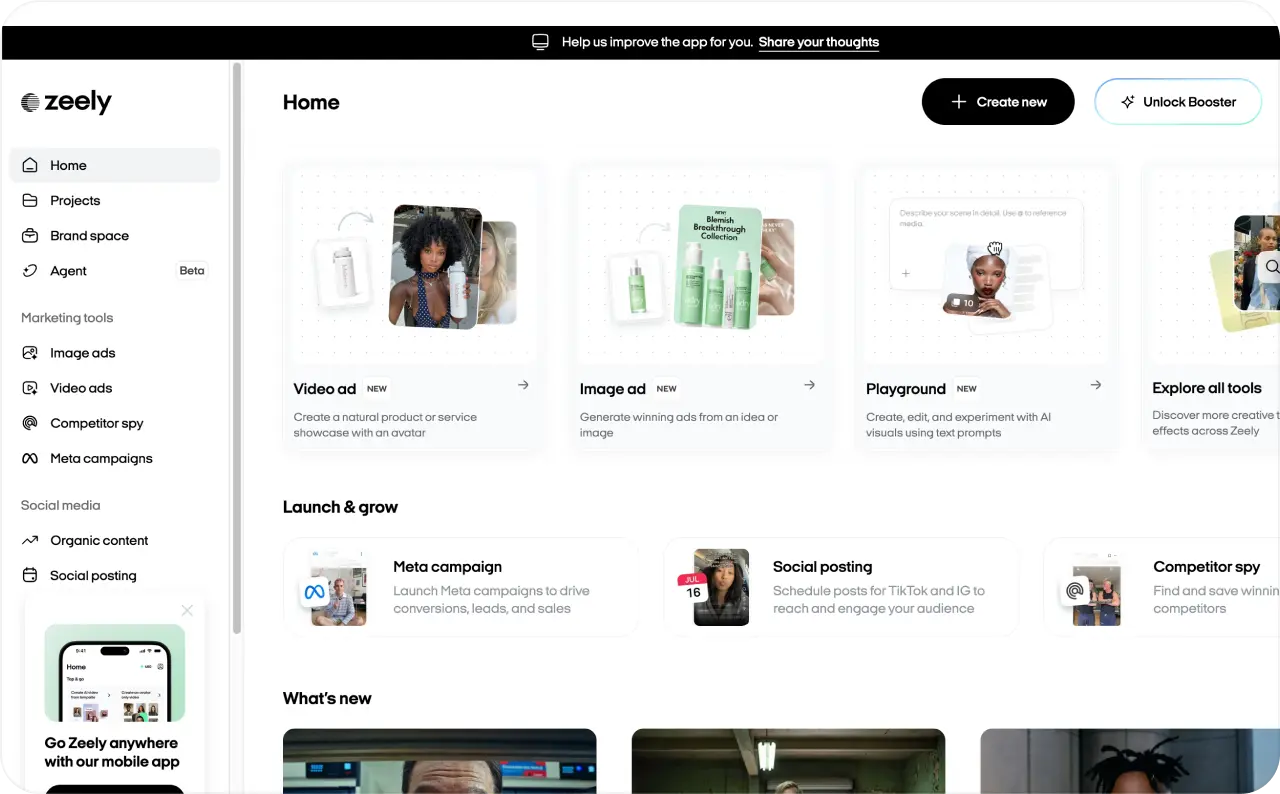
Other settings worth knowing:
- 14 reference concepts, from Product showcase and Street interview to Before & after and ASMR
- Script frameworks such as AIDA, PAS and Before-After-Bridge, or your own script
- Voice, emotion and accent controls, plus caption color and position
- Logo placement on image ads: drag, resize, rotate and set opacity
- Playground video with start and end frames, up to three video references and output up to 4K, depending on the model
Two limits to plan for: Video ad picks the length for you, and text edits on image ads in the mobile app include five free changes before credits apply.
Creatify: lighter setup, free fixes afterward
Where Creatify really gives you control is its editor. You can make as many manual changes to an exported video as you want, for free, whether that’s editing text and captions, trimming, swapping media, or adjusting the layout. Anything that sends the job back to the AI, like a new avatar, voice, or script, uses credits again. There’s also Ad Flow, a node-based editor with templates, if you like putting ads together piece by piece.
Automations and ads management: launching Meta ads from Zeely vs Creatify
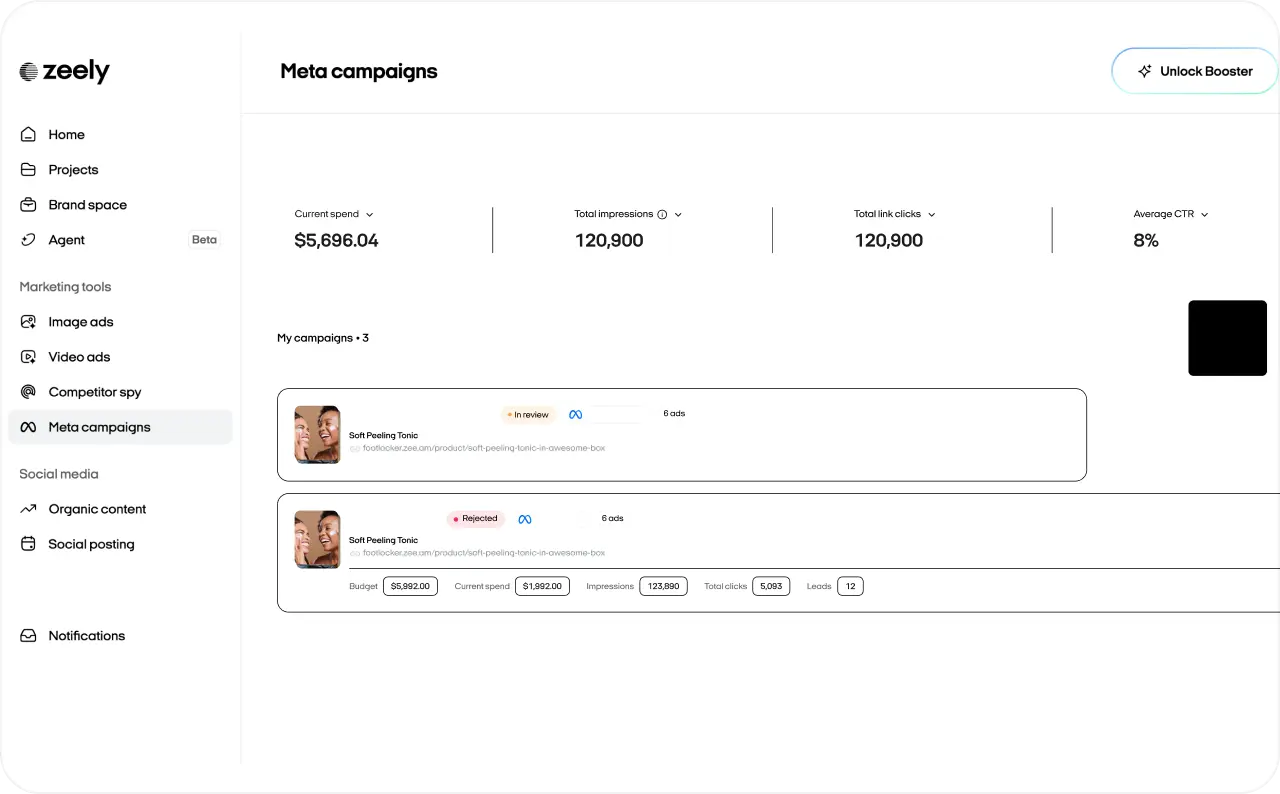
This is where Zeely is strongest for small businesses: the ads you make go straight into a Facebook and Instagram campaign from the same app, on desktop or phone. You never have to open Meta Ads Manager, and you don’t even need your own Meta Ads account.
How a Zeely campaign launch works
- Open Meta campaigns and connect your Meta Ads account, or select Use Zeely AI Marketplace to launch through one of Zeely’s managed Meta accounts
- Add your website link, name the campaign, choose the objective and pick your ads. Zeely recommends 3 to 5 creatives with a mix of image and video.
- Take Zeely’s suggested audience or set age, gender and locations yourself, while the estimated audience size updates live
- Set a daily budget and duration with sliders, and Zeely estimates reach and the total budget before you commit
- Launch, and track Meta’s review in the dashboard, including any rejection feedback
Meta’s review typically takes up to 24 hours. In the mobile app, Zeely’s own expert moderation checks the campaign first, usually within 1 to 12 hours. Once ads go live, the dashboard shows spend, clicks, CTR, CPA and results for each ad. A finished campaign in the mobile app restarts with one tap.
Zeely also covers the unpaid side: schedule the same ads as Instagram Reels, Stories and posts, or as TikTok videos and photos, with a date set for each post.
What Creatify automates
Creatify goes wider across ad networks. Its Ad Launcher pushes ads to Meta, TikTok and AppLovin. The AI Performance Agent, listed on the Pro plan, connects to Meta, Google Ads, TikTok, Snap, AppLovin, Shopify and GA4. It audits your accounts, builds campaigns and shifts budget between platforms within limits you set.
The trade-off is entry level. Creatify’s automation assumes you already run ad accounts and know what budget limits to give it. Zeely’s paid campaigns run on Facebook and Instagram only.
My take for a first campaign
For a bakery owner running her first paid ad, Zeely removes the hardest part: Ads Manager. For a brand already spending on TikTok, Google and Meta at once, Creatify’s Performance Agent manages more of the mix.
App support and team access in Zeely and Creatify
Zeely runs on the web, iOS and Android, so checking a campaign doesn’t have to wait until you’re back at a desk. Creatify works in the browser.
The Zeely app covers the full loop on a phone: add a product, create image and video ads, schedule Instagram and TikTok posts and launch a paid campaign. A few tools still differ by device. Playground and carousel posting are web-only for now, and Brand DNA works best on the web, where each product uses its own brand’s settings.
Brand organization isn’t the same as team seats
Zeely holds up to 10 brands per account, each with its own Brand DNA and products. That helps when one owner runs two shops, say a candle brand and a gift-box line. Zeely’s public plans don’t list extra seats or user roles, although its AI Agent works inside a team’s Slack channels.
Creatify Pro includes two seats and expands to five, with up to five Brand Spaces. Starter is limited to one seat and one brand.
If two people need separate logins with approval steps, ask Zeely support how shared access works before you subscribe. Working alone, a phone app you’ll actually open matters more than seats.
Zeely vs Creatify customer support
Zeely publishes a response time for every plan, while Creatify doesn’t publish one for Starter or Pro. Zeely’s team is available 24/7, and the first reply typically arrives within 1 to 2 minutes.
Zeely support runs through live chat in the mobile app, the chat widget on the web, chat in the Help Center and email at support@zeely.app. An AI assistant answers first, and a support agent takes over when the issue needs a person. Agents handle product questions, errors, billing, cancellations and refunds, plus marketing advice on ads and creatives. They work mainly in English but reply in other languages too. A quick first reply starts the conversation, and a technical fix can take longer.
Creatify lists an email address on its contact page and keeps self-service help docs. Reviewers on Trustpilot and G2 mention a live chat many found fast and helpful, while other Trustpilot reviewers describe chasing fixes that took several rounds. Enterprise customers get a dedicated account manager and an SLA, a contractual service commitment.
Speed matters most at launch. A rejected campaign on a Friday evening can cost you the weekend’s sales if nobody answers until Monday. Before you subscribe to either tool, send support one real question, such as how a revision is charged, and time the reply.
Zeely vs Creatify pros and cons
Each tool’s biggest strength creates its biggest limit. Zeely’s all-in-one design narrows it to Meta for paid ads, and Creatify’s focus on video volume leaves the campaign work to you or to its higher plans.
Zeely pros & cons
- Ads, Meta campaign launch and results in one app, on web and mobile
- Launch on Facebook and Instagram without your own Meta Ads account, through Zeely AI Marketplace
- Lower entry price: $29.95 a month vs $39
- Image ads, video ads, viral videos and organic posting under one subscription
- A start image to approve before you spend video credits
- 24/7 support, with first replies typically in 1 to 2 minutes
- No free plan listed
- Video credits go fast: 500 to 1,500 credits per Video ad render
- Paid campaigns run on Facebook and Instagram only
- Videos top out at 30 seconds per generation, and own-voice upload isn’t available yet
- Brand DNA currently shapes image ads on the web only
Creatify pros & cons
- A free plan to test the output before paying, including Creatify Agent
- A fast path from one product URL to many video variations
- 75+ languages, voice cloning and videos up to 10 minutes on Pro
- Free, unlimited manual edits after export
- Team seats, an API and a multi-platform Performance Agent on Pro
- Free exports carry a watermark, and Starter renders one video at a time
- Competitor tracking, AI media buying and team seats start at $99 a month
- Launching works through ad accounts you connect yourself
- Agent and Ad Flow credits vary, so the cost of a finished ad is harder to predict
- No published support response time outside Enterprise
Which one should you choose: Zeely or Creatify?
Neither tool wins across the board. Pick the one that removes your biggest bottleneck: getting ads live, or making enough of them.
Choose Zeely if
- You want one app from product link to live campaign. Zeely builds the ads and launches them on Facebook and Instagram, so there’s no Ads Manager to learn.
- You don’t have a Meta Ads account yet. Zeely AI Marketplace runs your campaign through Zeely’s managed accounts, and you still pick the audience and budget.
- You run marketing from your phone. The iOS and Android app covers ad creation, paid launches and campaign results.
- You need image ads as much as video. Static ads, video ads and scheduled Instagram and TikTok posts all come with one subscription.
- You want help fast when something goes wrong. Support answers 24/7, typically within 1 to 2 minutes.
Choose Creatify if
- Video volume is your main bottleneck. One product URL turns into a batch of avatar video ads, and you already know how to run them in Ads Manager.
- You want to test before paying. The free plan produces up to two watermarked video ads a month.
- You sell in several languages or need longer videos. Creatify covers 75+ languages and videos up to 10 minutes on Pro.
- You advertise on TikTok, Google or AppLovin as well as Meta. Its Performance Agent on Pro works across all of them.
- A small team shares the work. Pro includes two seats and expands to five.
If the first list sounds like your business, compare Zeely’s plans and pick the one that matches how many ads you make each month.
Zeely vs Creatify FAQ
No. Zeely imports from any public product page, including Etsy, Amazon, Instagram and Facebook links, and accepts details typed in by hand. Creatify reads most product links and also takes uploaded images and videos.
Yes. When you add an offer, Zeely’s AI labels it as a physical product, digital product or service, and its Service showcase concept is built for salons, coaches and home services. Creatify has a services use case for lead generation ads.
Not today. Zeely’s campaign builder picks from ads created in Zeely, so a video made elsewhere would go through Meta Ads Manager instead.
Meta checks every ad against the same policies, whichever tool made it, and the review usually takes up to 24 hours. Zeely shows Meta’s feedback in your dashboard, so you know what to change before resubmitting.
Not automatically. AI ads make it cheap to test many hooks and angles, and real footage still wins when shoppers need proof, like a product demo. Run both, then let your cost per sale decide.
Sources
1. Creatify pricing and plan comparison;
2. Creatify URL to Video;
3. Creatify vs Zeely comparison page;
4. Creatify Performance Agent;
5. Creatify Agent launch announcement, May 18, 2026;
6. Creatify contact page;
7. Creatify reviews on Trustpilot;
8. Creatify reviews on G2;
9. Zeely pricing;
10. Zeely Help Center: How to create Video ad;
11. Zeely Help Center.
Fact checked by Yuliia Pyrch