Best times to post on Instagram in 2026 for every day of the week
When should you post on Instagram to reach followers while they’re actually scrolling? I compared 2026 studies covering millions of posts and built a practical schedule you can refine with your own Instagram Insights.

I reviewed the freshest 2026 posting studies for this guide. I’ll start with the posting times worth testing first. Then I’ll help you compare them with your audience’s actual activity.
Key takeaways
- Start with Tuesday through Thursday. Test Tuesday from 3–7 p.m., Wednesday at noon or 6 p.m., and Thursday at 9 a.m. or noon. Monday evenings are another good window to try
- Treat Friday and Saturday as secondary testing days. Save lower-priority content for these days, then test Sunday from 8–10 p.m.
- Use these times as starting points, not rules. Check Instagram Insights and publish 15–30 minutes before your followers become most active. Test each slot for four weeks before deciding what works
- Check timing before blaming the content. You can spend hours polishing a post, then publish while most of your audience sleeps. A weak result doesn’t always mean the post itself was the problem
What is the best time to post on Instagram?
If you’re asking what is the best time to post on Instagram, start with the middle of the week. Wednesday usually gives posts the strongest start, with Tuesday and Thursday close behind.
Buffer reviewed 9.6 million Instagram posts for its July 2026 update. Its strongest slots were Thursday at 9 a.m., then Wednesday at noon and 6 p.m.
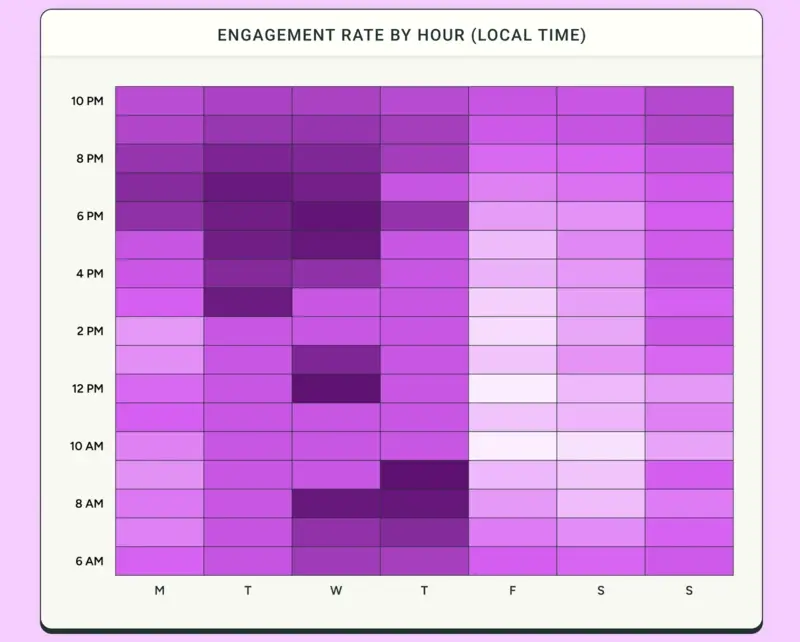
I would begin with three simple tests:
- Tuesday at 3 p.m. or 7 p.m.
- Wednesday at noon or 6 p.m.
- Thursday at 9 a.m. or noon
Use the time zone where your audience lives. If most customers live in New York, use Eastern Time. Your location does not matter unless your followers live nearby.
There is no magic minute that works for every account. Your content format, customer routine, industry, and follower location all change the result. A restaurant may win before lunch. A fitness creator may win before work. A software company may do better during weekday breaks.
Use current benchmarks to avoid guessing from scratch. Then let your own results replace them.
Instagram posting times for every day of the week
Sprout Social studied nearly 2 billion engagements across about 307,000 profiles for its 2026 update. It found the most dependable activity from Monday through Thursday, with weekends weaker overall.
The table below blends the most useful starting windows. Read every time in your audience’s local zone.
| Day | Time to test first | Good content for that window |
| Monday | 2–4 p.m. or 6–8 p.m. | Weekly plans, practical tips, reminders |
| Tuesday | 3–7 p.m. | Tutorials, offers, carousels |
| Wednesday | Noon or 6–8 p.m. | Launches, proof, strongest weekly post |
| Thursday | 9 a.m. or noon–2 p.m. | Products, services, educational posts |
| Friday | Noon or 6–9 p.m. | Lighter posts, recaps, weekend offers |
| Saturday | 8–10 p.m. | Lifestyle, events, leisure content |
| Sunday | 8–10 p.m. | Weekly previews, plans, appointments |
Best time to post on Instagram on Monday
On Monday, test 2–4 p.m. against 6–8 p.m. Work-focused audiences may respond during the afternoon. Consumer audiences often return after work. Use helpful content that makes the week feel easier.
When to post on Instagram on Tuesday
Tuesday gives you a wide 3–7 p.m. testing window. I would publish a useful carousel or product demo here. If you need one starting time, choose 7 p.m. and compare it with 3 p.m. next week.
Best Instagram posting times for Wednesday
Wednesday is your safest day for priority content. Test noon against 6 p.m. Lunch works well for quick education. Evening gives viewers more time for longer captions, carousels, and videos.
When should you post on Thursday?
Thursday needs a clean two-slot test. Try 9 a.m. for two weeks, then noon for two. Current studies disagree on morning versus lunch, so your account should settle the argument.
Best time to post on Instagram on Friday
Friday is less dependable than midweek. Start around noon or between 6–9 p.m. Use recaps, reminders, weekend offers, or reusable posts. Keep your strongest launch for Wednesday unless your data says otherwise.
Best time to post on Saturday
Saturday activity comes in scattered bursts. Begin between 8–10 p.m., when more people settle down. Food, travel, events, and hospitality accounts should also test earlier hours that match real buying decisions.
Ideal time to post on Instagram on Sunday
Sunday evenings often catch people preparing for Monday. Try 8–10 p.m. with weekly previews, appointment reminders, meal plans, checklists, or new-arrival posts. Keep the message useful and easy to save.
The weakest period is usually 2–6 a.m. in your audience’s zone. Weekends also bring less predictable activity. That does not make them useless. It means you should test them with content you can afford to repeat.
Does it matter at what time to post?
Yes, timing still matters, but content matters more. Instagram reached two billion daily active users by Q2 2026. Every post enters a very busy room.
Publishing while followers are active gives your post a cleaner opening. More people can view, save, share, comment, or visit your profile early. That activity may help Instagram understand who finds the post useful.
Still, timing cannot repair a dull opening or confusing offer. A valuable carousel published one hour outside a peak can beat filler posted at the “perfect” minute.
I treat timing as a helpful push. The content still has to carry the bag.
Early activity can support reach, but Instagram does not use one ranking system everywhere. Feed, Stories, Reels, and Explore each consider different behavior. That is another reason no universal posting time exists.
Here is a simple example. A local bakery posts tomorrow’s menu at 2 a.m. Most customers see it after breakfast, when the buying moment has passed. The same menu at 7 p.m. reaches people planning the next morning.
Nothing about the photo changed. The timing matched the decision.
This matters most for posts tied to a short window. Launches, appointment openings, events, and daily offers need people to act quickly. Evergreen tutorials have more room because followers can discover and save them later.
Best posting times for Reels, Stories, and Posts
Your format changes how people watch and respond. Emplifi’s 2026 benchmark included more than 200,000 brand accounts and found 44% higher median engagement for Reels and carousels than image posts.
Instagram Reels
Reels can reach people who do not follow you. Test weekday mornings and lunch alongside your evening slots. Track views, watch time, shares, non-follower reach, and follows.
I keep the full day-by-day Reel data in Zeely’s guide to the best time to post Reels in 2026. That page covers Reel timing.
If uploading still feels messy, follow my steps for posting a video on Instagram in 2026.
Instagram Stories
Stories reach people who already know you. Spread them across natural check-in periods: 7–9 a.m., noon–2 p.m., and 6–9 p.m.
Do not publish eight frames at breakfast, then disappear. Save your offer, link, or question for a time when you can answer replies.
Carousels and photos
Carousels often earn saves and shares over several hours. Give them your strongest Tuesday-through-Thursday feed windows. Track saves and shares per account reached.
Photos can use the same times, but the image must explain itself quickly. Strong product details, proof, before-and-after visuals, and clear captions do more than timing alone.
Choose times for your audience, location, and niche
Open Instagram Insights and check your followers’ top countries and cities. If one time zone contains most buyers, use that as your main clock.
When followers are split between two regions, alternate two schedules. A U.S. and European audience might use these slots:
- Monday and Wednesday for North American hours
- Tuesday and Thursday for European hours
Do not publish the identical post twice. Change the opening, example, format, or offer so each version earns a fair test.
Your niche also changes the answer. Restaurants should post before meal decisions. Fitness businesses can test early morning and after work. B2B companies often get steadier weekday activity. Creators may find that evenings bring longer viewing sessions.
Age and daily routine matter as well. Parents may scroll after bedtime. Students often return in late afternoon. Retired audiences may create stronger daytime windows. Do not guess from stereotypes, though. Use these routines as test ideas, then check the numbers.
For several time zones, compare results by region when your tools allow it. If one post reaches the East Coast but misses California, alternate publishing hours instead of forcing one compromise forever.
For a small business, start with three or four feed posts weekly. Post daily only when you can keep the content useful. A full calendar is not a business result.
Find when your Instagram followers are most active
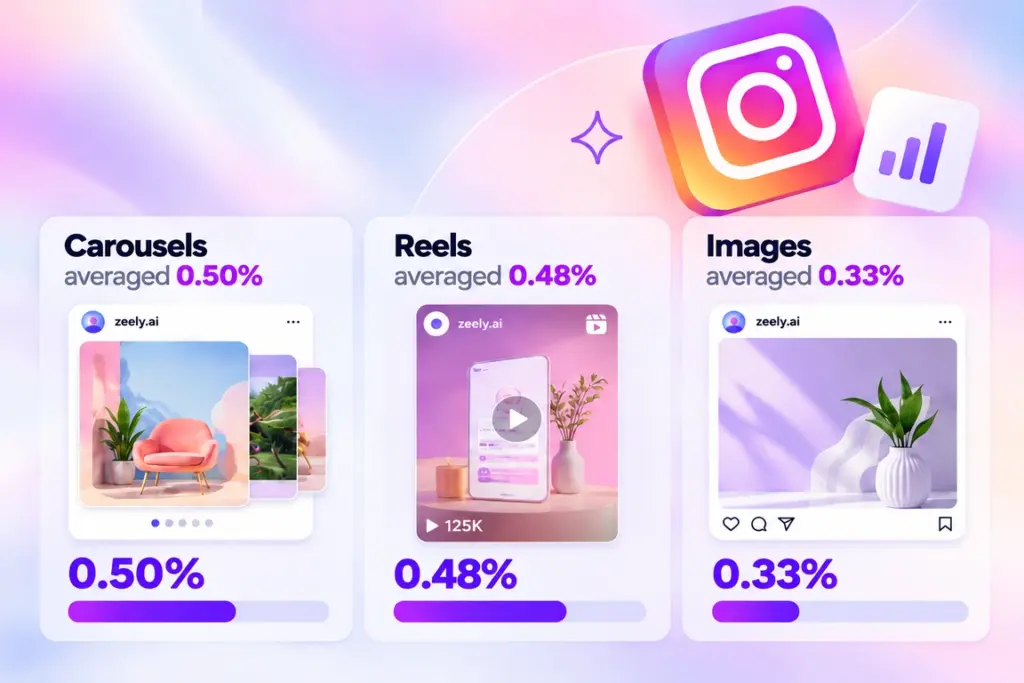
Large studies give you a starting line. Your Instagram data gives you the answer. Socialinsider analyzed 35 million Instagram posts and found average engagement at 0.45% in Q2 2026. Carousels averaged 0.50%, Reels 0.48%, and images 0.33%.
You need a Business or Creator account to view follower activity. Instagram sometimes changes the labels, but the path usually looks like this:
- Open your profile
- Tap Professional dashboard, then Instagram Insights
- Open Total followers or Audience
- Find Most active times
- Record your two strongest days and hourly peaks
Instagram’s official Insights guide explains which data professional accounts can access. If activity does not appear, expand the date range and collect more account data.
Publish 15–30 minutes before a peak, then track the result. Choose the metric that matches the post’s job:
- Reach and views for discovery
- Saves and shares for useful content
- Comments and DMs for community
- Clicks, leads, bookings, or sales for revenue
Your optimal Instagram posting time is the slot that repeatedly moves the right metric. Likes may feel nice, but they cannot book an appointment.
Test posting times for four weeks
One good post does not prove a time slot. Socialinsider’s 2026 benchmark covered 70 million social posts. Instagram comments fell 16% year over year, while shares rose 12% and video views rose 29%. A winner can change depending on what you measure.
Here is the four-week test I use:
- Choose three promising time slots
- Publish comparable formats and topics in each slot
- Record results after two hours, 24 hours, and seven days
- Compare results per account reached
- Keep the winner and move the weakest slot by 30–60 minutes
Aim for at least three comparable posts per slot. Mark collaborations, paid boosts, holidays, and launches because they can bend the numbers.
The best time to post for engagement should win repeatedly, not once. Update your schedule every quarter. Check it monthly when your audience or seasonal demand changes quickly.
Different studies recommend different hours because they use different accounts, locations, periods, and engagement formulas. That is normal. The studies provide test ideas, not house rules.
For example, imagine you test noon, 3 p.m., and 7 p.m. Noon earns 4,000 views but only ten saves. The 7 p.m. post earns 3,100 views, 40 saves, and eight website clicks.
If your goal is useful content or sales, 7 p.m. wins. If your goal is broad awareness, noon may still deserve another test. One number cannot answer every business question.
Keep a basic spreadsheet with the date, time, format, topic, reach, and chosen result. You do not need a dramatic dashboard. You need enough clean evidence to stop publishing by mood.
If results remain poor, inspect the opening frame, topic, offer, and format. The clock gets blamed for many weak hooks. Sometimes unfairly, sometimes with excellent PR.
Create and schedule Instagram content with Zeely AI
AI already helps small businesses produce more creative options. During Meta’s Q2 2026 call, the company said 9 million small businesses used at least one AI ad creative tool.
I would use Zeely in a simple loop:
- Find two follower peaks inside Instagram Insights
- Build two creative variations with the Zeely Instagram ad creator
- Give each variation one clear job
- Schedule them in comparable time windows
- Keep the creative and time that moves your chosen metric
Zeely can create UGC-style videos, static ads, scripts, and layouts. You can test different openings without filming every version yourself.

The official Zeely Instagram campaign guide explains how to choose a Reel or image post, set the date and time, edit captions and tags, and review everything in a content calendar. Instagram Business or Creator accounts are required.
Zeely does not guess when your followers are active. Instagram Insights gives you that information. Zeely helps you create, schedule, and test the content without turning Tuesday night into an editing marathon.

Best posting times FAQ
No. Instagram Insights can reveal active follower periods. Meta Business Suite also provides native planning and publishing tools for connected professional accounts.
Native scheduling can cost $0. Paid tools become useful when you manage several accounts, need approvals, compare time zones, or want deeper reporting. Paid prices vary by users, channels, and features, so check current plan pages before buying.
Look for recommendations based on your followers, not global averages. The tool should support Reels and feed posts separately, multiple time zones, automatic publishing, manual changes, and post-level reporting.
The useful question is not, “Does it recommend a time?” Ask, “Which account data created that recommendation?”
They can be better when they use your follower activity and past results. An AI recommendation built only from global averages is still a generic benchmark. It simply arrived wearing a cleaner jacket.
Keep manual control. You know about launches, holidays, staffing, and customer routines that software may miss.
Usually, yes. Brands often need clicks, leads, bookings, or purchases. Creators may care more about watch time, shares, and follower growth. Choose times using the action you want, not the account label alone.