How to add a link to an Instagram Story
How do you add a clickable link to your Instagram Story in 2026? I'll walk you through the Link sticker setup, show you where to find it, and cover the fixes when it goes missing or your URL gets blocked.

Here’s the short version: open the sticker tray, tap Link, paste your URL, write sticker text worth tapping, drop it above the reply bar, post. Done. Works on personal, creator, and business accounts. No follower minimum.
Key takeaways
- The Link sticker replaced Swipe Up back in 2021. It’s the only way to put a tappable link on a Story now
- Personal, creator, and business accounts can use the Link sticker. No follower requirement
- You can place one Link sticker per Story slide. For multiple links, use separate frames
- Customize the sticker text to a real CTA. Nobody reads a raw URL on a sticker
- Link sticker gone? Update the Instagram app before trying anything else
Sticker missing? Link not opening? Nine times out of ten it’s an old app version, an account restriction, or a URL Instagram has flagged. I walk through the fixes after the walkthrough.
How to add a link to an Instagram Story
Swipe Up? Gone. Instagram killed it in 2021 and moved everything to the Link sticker. The whole thing takes 30 seconds, maybe less. Instagram’s own Link sticker announcement walks through the same steps I’m covering here.
Fast path
- Open Instagram and start a Story
- Add your photo or video
- Tap the Sticker icon, the square smiley
- Tap Link
- Paste your URL
- Edit sticker text. Optional but recommended
- Place it above the reply bar and post
Step-by-step walkthrough
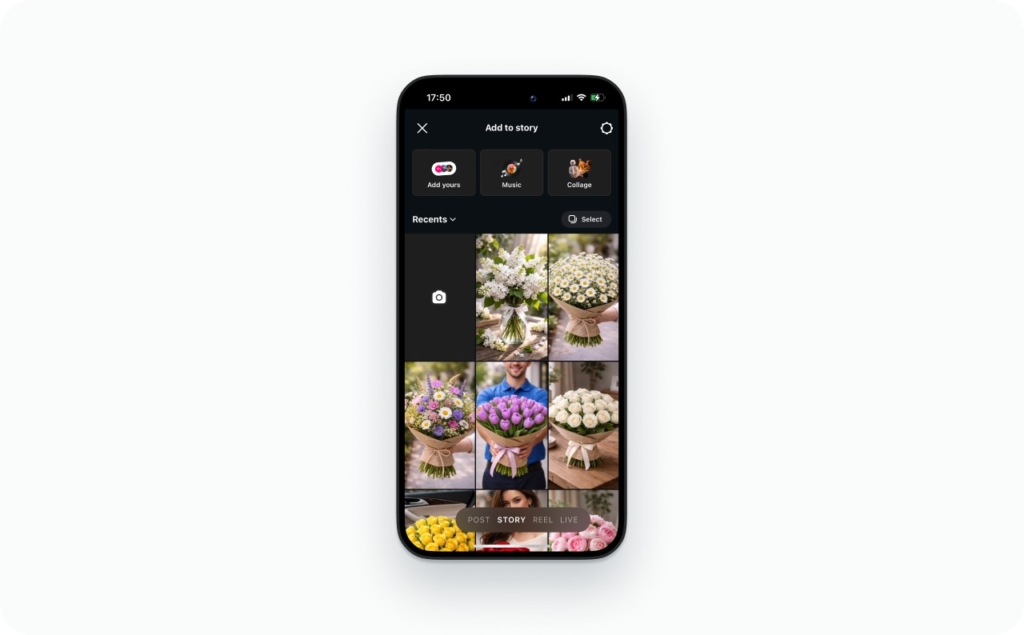
Step 1: Open the Story editor
- Open Instagram
- From the Home feed, swipe right to open Stories
- Or tap your profile photo with the +
For a fuller walkthrough of Story creation itself, start with my guide on how to post a story on Instagram.
Step 2: Create your Story content
- Take a photo or video, or tap the gallery thumbnail at the bottom left to upload
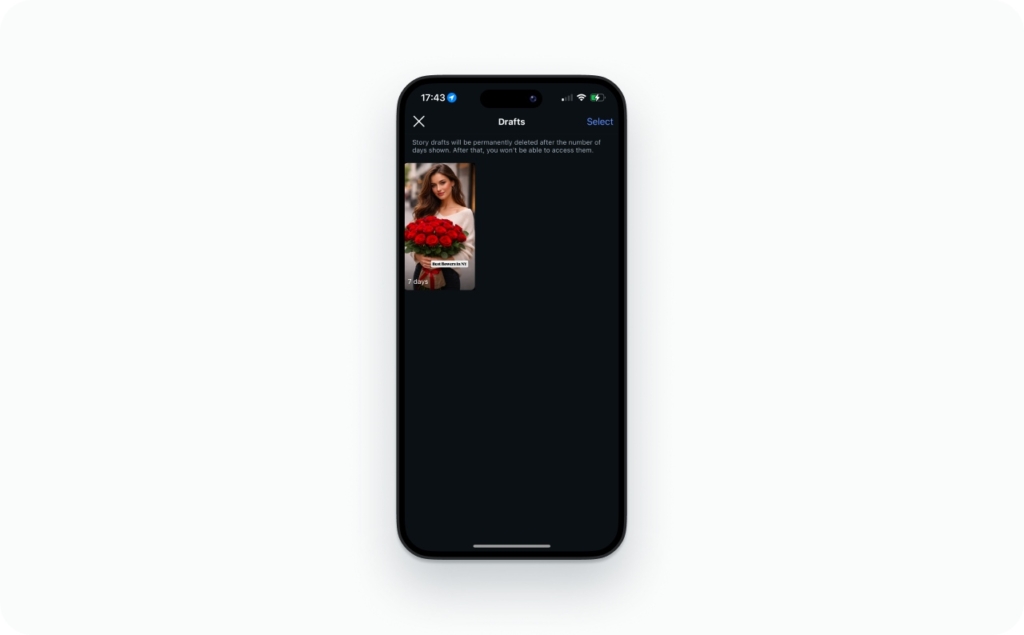
- If you’re using a saved draft, swipe up to select it
- For best results, use a 1080 x 1920 vertical frame. My Instagram Story size guide covers the full specs
Step 3: Open the sticker tray
- Look at the top row of icons
- Tap the Sticker icon, the square smiley face
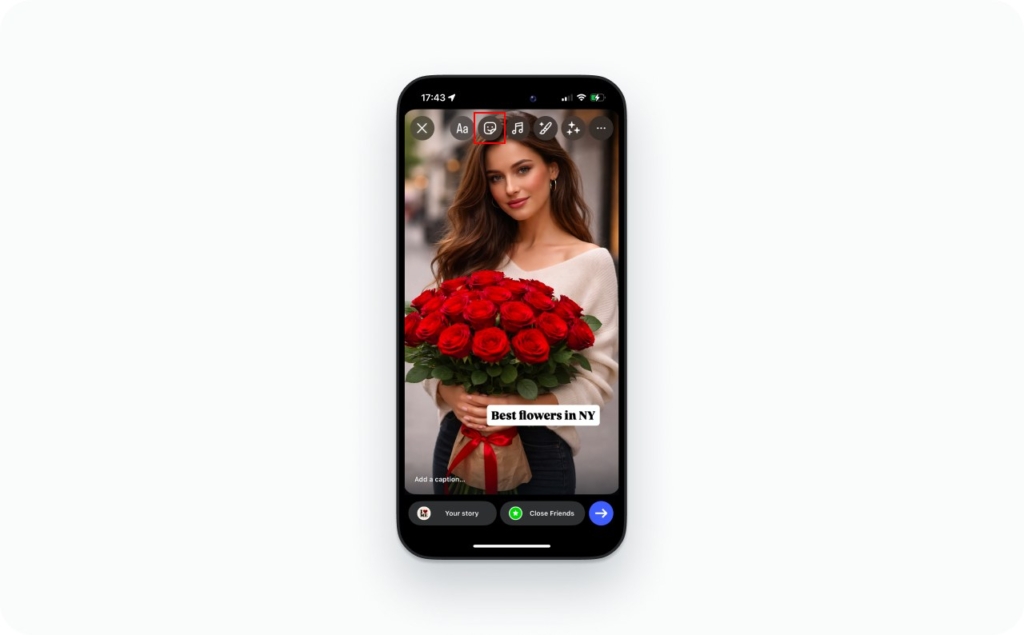
That square smiley is the sticker tray. If you don’t see it, you’re not inside the Story editor yet.
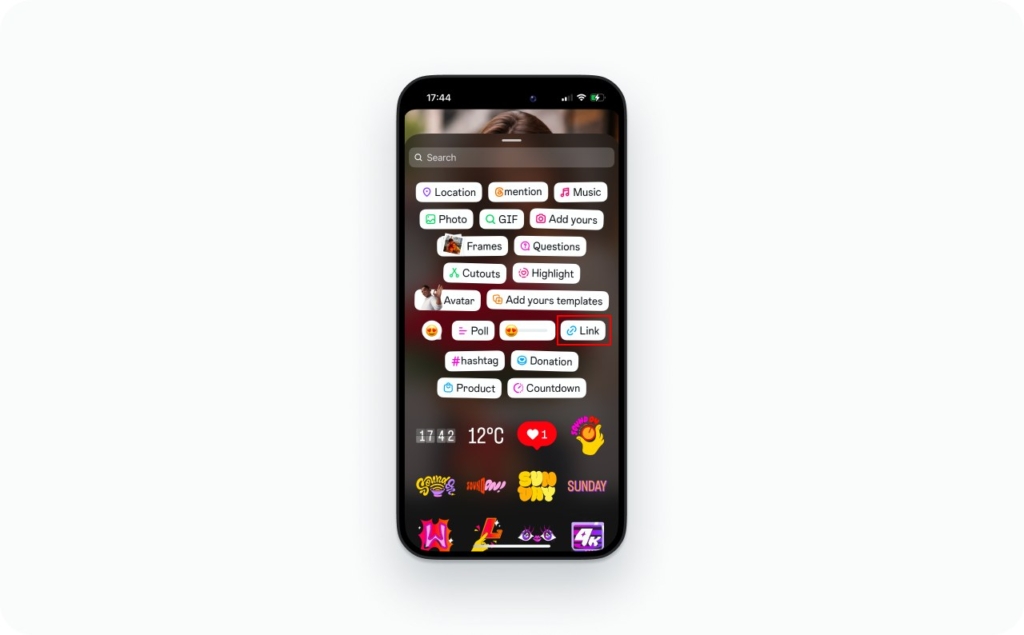
Step 4: Tap the Link sticker
- In the sticker tray, tap Link
- If it’s not there, try typing “link” in the search bar at the top. Still nothing? Skip to the troubleshooting section below
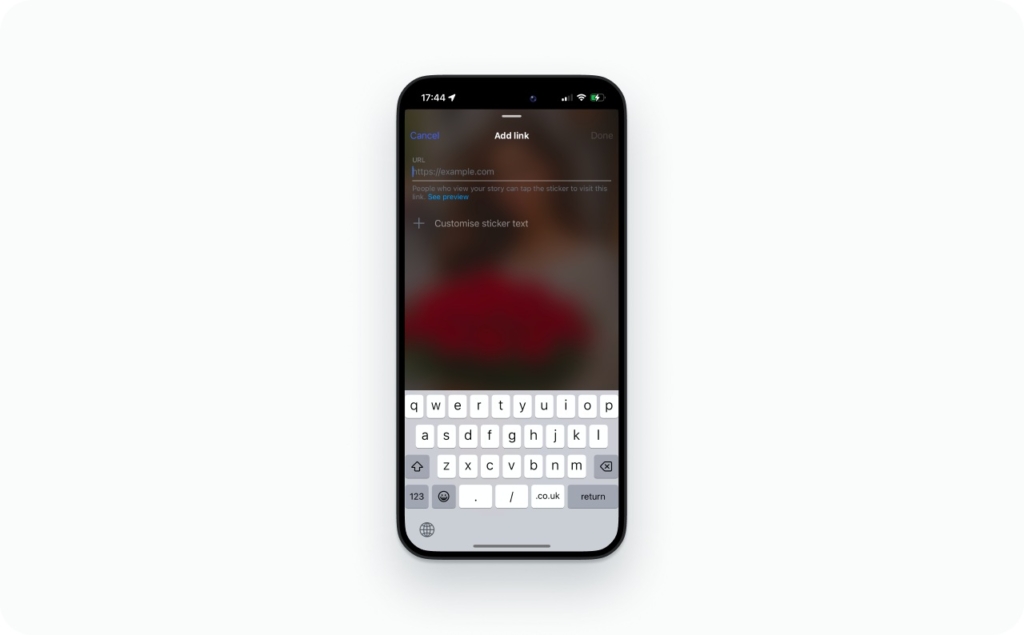
Step 5: Paste your URL
- Paste the full URL you want viewers to visit
- Use a clean https link
- Tap Done
Step 6: Set the sticker text
- Tap Customize sticker text
- Swap the domain for something tappable: “Shop now,” “Book,” “Get the guide”
- Tap Done
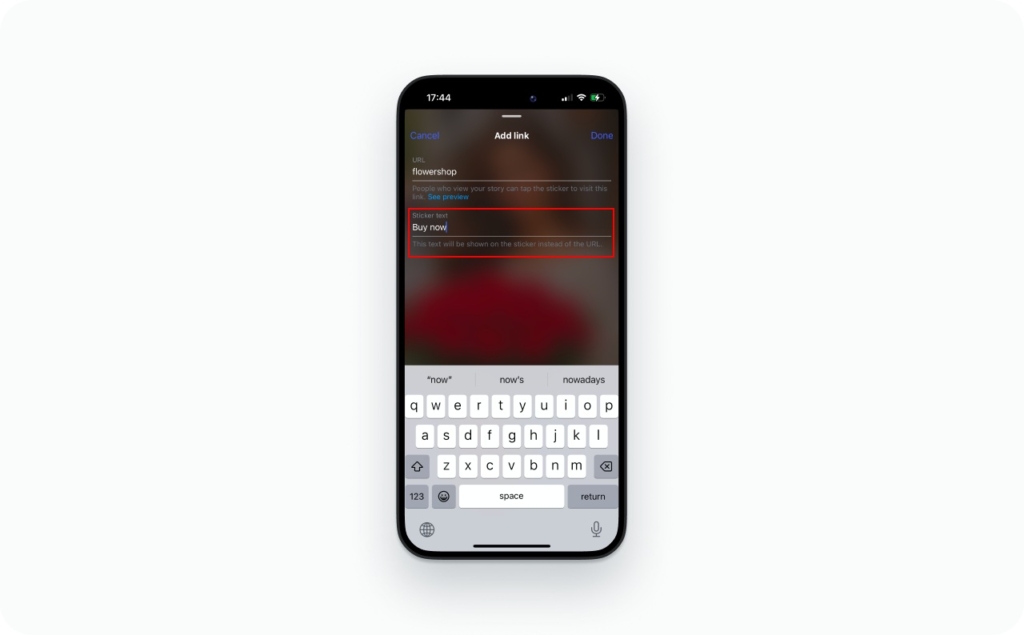
A sticker showing “myshop.com” gets scrolled past. “Shop now” or “Get the guide” actually gets tapped.
Step 7: Place, resize, and post
- Drag it somewhere clean where a thumb can reach it easily
- Above the reply bar, always. Below it and taps won’t register
- Pinch to resize if needed
- Tap the sticker once to flip through the style options. Light background? Go dark. Dark background? Go light
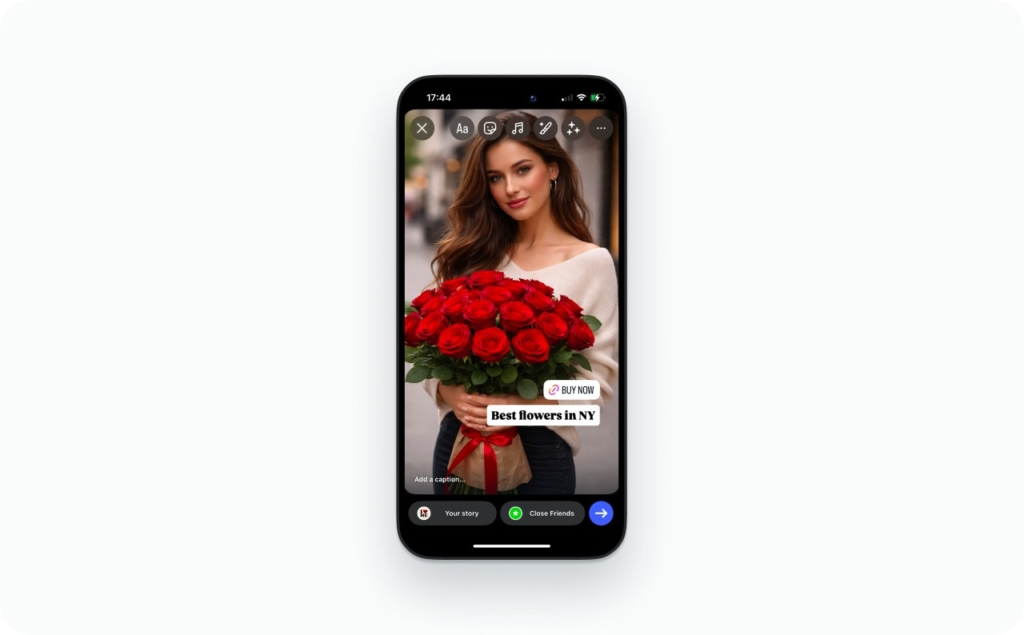
One more thing before posting: pull up that URL in a private browser tab on your phone. If it loads broken or slow, your viewers will see the same thing. Also, send people to the right page. If your Story is about a product, link to that product. Not your homepage.

Who can add links to Instagram Stories
The old Swipe Up feature had a 10,000 follower gate and a verified badge requirement. Instagram removed both when the Link sticker rolled out in October 2021. Now it works on personal accounts, creator accounts, business accounts. Doesn’t matter which one you have.
The real split between account types is data. With a creator or business account you get Story numbers: how many people tapped the sticker, how many saw the frame, how many left. Personal accounts can post links fine but Instagram won’t show you any of that.
Limitations worth knowing:
- One Link sticker per slide. You can still throw on polls, questions, music stickers. Just one link though
- Link stickers only work in organic Stories, not in Story ads. Instagram’s help page on the Link sticker confirms this. Story ads use a separate call-to-action sticker placed by Meta Ads Manager
- Links don’t open in Safari or Chrome. Instagram has its own built-in browser and it can mess with your page layout. Open your link from a test Story at least once to see how it looks
- Guideline violations can cost you the Link sticker without warning. Go to Settings and check your account status if it drops off one day
- Stories go away after 24 hours. Want the link to last longer? Save that frame to a Highlight and the sticker keeps working
What happened to Swipe Up
Swipe Up stopped working in August 2021 and the Link sticker replaced it. They’re nothing alike. A Link sticker sits right on screen where you put it. You write your own label. You choose how it looks. Swipe Up was a tiny arrow at the bottom that most people missed, and you couldn’t even use it without 10,000 followers or a blue checkmark. If you’re reading a guide that still brings it up, that guide is years out of date.
When the Link sticker is not working
Most Link sticker problems fall into one of four buckets. Find the one that matches what you’re seeing and start there.
Link sticker missing
If the sticker doesn’t show up, run through this:
- Update the Instagram app
- Close the app, reopen it, and search “link” in the sticker tray instead of scrolling
- Log out, then log back in
- On Android, clear the app cache or reinstall
- Check Account Status in Settings for restrictions
- If everything looks clean, wait. Some features roll out gradually
Link sticker not clickable
Sticker is there but nothing happens when you tap it? That’s a placement problem. Instagram’s reply bar and the edges of the screen cover whatever sits underneath them.
- Move the sticker above the reply bar
- Don’t stack other stickers on top of it
- Make it bigger and higher-contrast
Link blocked or not allowed
Instagram runs every link through a filter. Redirect chains, sketchy shorteners, missing HTTPS, domains with spam reports. If yours gets caught, you’ll see a “link not allowed” message or a warning screen.
The fix every time: use a normal HTTPS URL, preferably on your own domain. Kill extra redirects. And if the page itself loads slowly or throws errors, sort that out too.
Link opens the wrong page
Usually redirects or tracking parameters. Instagram’s in-app browser may also cache pages.
- Test the link in a private browser tab on your phone
- Temporarily strip out UTMs to isolate the issue
- Check for device-based or location-based redirect rules you forgot about
Get the destination stable first. Add tracking back after.
Track Story link clicks
Got a creator or business account? Swipe up on your live Story. Instagram shows you tap counts, reach, and exits right there. Those stats hang around in your archive for about two weeks after the Story expires.
That tells you what happened inside Instagram. To see what happened on your site after the tap, add UTM tags to the URL before you paste it into the sticker. Google’s UTM documentation has the setup. Even something basic like ?utm_source=instagram&utm_medium=story&utm_campaign=your_campaign makes Story clicks show up separately in GA4.
No Link sticker? Here’s what still works
Two options that still send people to your site.
DM for the link. Tell viewers to reply with a keyword and you’ll send it over. I’ve seen this work especially well for services where people want a quick back and forth before they click through.
Link in bio. Add a text line to your Story saying “Link’s in my bio” and point at your profile photo. Not elegant, but it works.
FAQ
Yes. Any account type can use it and there’s no follower minimum to worry about. The one catch is that Instagram will take it away from accounts with active guideline violations.
Absolutely. That was a Swipe Up restriction and it’s been gone since 2021. The Link sticker doesn’t care how many followers you have.
Instagram got rid of it in August 2021. The Link sticker is the replacement. Doesn’t need 10K followers or verification, and unlike Swipe Up you can drag it around, resize it, and write your own label on it.
Most likely your app needs an update. If that doesn’t do it, force close Instagram, reopen, and type “link” into the sticker tray search bar. Still nothing? Check your account status for restrictions. There’s a longer checklist in the troubleshooting section above.
Nope. Once the Story is live, the URL and sticker text are locked. Only fix is to delete that frame and post it again.
You get one Link sticker per slide. If you need to link to several things, post multiple Story frames with a different link on each, or send everyone to one landing page that lists all the options.
It means Instagram’s filters think the link looks risky. Using a clean HTTPS URL, cutting extra redirects, and linking from a reputable domain all help get rid of those warnings.
You can’t. Instagram gives you total sticker taps, reach, and exits in Story Insights. But it won’t tell you which specific person tapped. Just the totals.