How to recover your Instagram account when you’re locked out
Locked out of Instagram and the standard reset isn't working? I'll help you figure out which type of lockout you're dealing with, walk you through the recovery path that actually applies, and explain what to do when you've lost access to your email, phone, or authenticator app.

Key takeaways
- Get help logging in in the app and instagram.com/hacked in a browser are the only two starting points worth your time
- Hacker changed your email? Search your inbox for Instagram’s “revert this change” email. That link expires fast, so use it before anything else
- No email, no phone? Instagram falls back to identity verification: a video selfie in most cases, a government ID when the selfie isn’t enough. Submit once, then wait
- Deleted accounts get a 30-day grace period. Log in, tap “Keep Account,” and everything comes back. Miss that window and Meta wipes the account for good
- Once you’re back in, set up 2FA with an authenticator app instead of SMS. Print your backup codes or stash them in a password manager
Searching how to recover an Instagram account because you’re locked out and nothing works? I’m Emma from Zeely, and I’ll walk you through the same recovery checks we use when Instagram lockouts pause ads and sales.
First, name the lockout:
- forgot password,
- hacked,
- disabled or suspended,
- no access to email, phone, or 2FA.
Start inside Instagram with Get help logging in. It’s the fastest path. Can’t reach your contact info? Move to identity checks like video selfie or ID. App won’t cooperate? Open instagram.com/hacked in a browser.
Hacked? Secure your email first, reset your Instagram password, sign out unknown devices. Disabled? Submit one appeal, then stop re-submitting. Once you’re back in, turn on 2FA so you’re not doing this again.
Diagnose your Instagram lockout in 60 seconds
Do not start with random fixes. Name the lock type first. Instagram sends you down a different recovery path depending on what went wrong.
1. Do you see “Account disabled” or “suspended”?
- Yes → Jump to Disabled/Suspended
- No → Keep going
2. Do you see “Suspicious Login Attempt,” a login alert you didn’t trigger, or a new email/phone you don’t recognize?
- Yes → Jump to Hacked
- No → Keep going
3. Can you receive a code to your email or phone right now?
- Yes → Jump to Password reset and use Get help logging in
- No → Keep going
4. Are you blocked because of 2FA you can’t access, like a lost authenticator or missing backup codes?
- Yes → Jump to 2FA recovery
- No → Keep going
5. Do you have zero access to both email and phone on the account?
- Yes → Jump to Identity verification
- No → Go back to Password reset and re-run the in-app flow carefully
6. Did you delete the account yourself?
- Yes → Jump to Deleted accounts. You have 30 days. After that, it’s gone
- No → You’re most likely in Password or Hacked. Start there
Recovery is automated. Meta runs this at a scale where human review can’t be the first step. Always try the in-app flow before you escalate to identity checks.
Do not do this:
- Do not pay “unban” or “recovery” services. Most are scams
- Do not spam appeals or forms. Duplicate submissions slow your case
- Do not trust DMs offering “support” or “special access”
| Problem | Best recovery path | What you need | Typical next step |
| Forgot password | In-app login help or instagram.com/hacked | Username + access to email/phone | Reset link or code |
| Hacked | Secure email → IG recovery | Email control + device access | Reset password, log out devices |
| 2FA stuck | instagram.com/hacked → identity checks | Video selfie or ID | Identity verification |
| No email/phone access | Identity verification | Proof of ownership | Update contact info |
| Suspended/disabled | One appeal | Clear appeal, plus ID if asked | Wait for review |
| Deleted by you | Log back in within 30 days | Your credentials | Tap “Keep Account” |
Evidence checklist before you start
Before you tap anything, collect proof. Every screenshot you grab now is one fewer round trip with Instagram later.
Screenshot these:
- The exact error message on the login screen
- Your username and profile URL
- Your email inbox search results for “Instagram security”
- The phone number on file, even if you only remember the last two digits
- Your device and session list if you can still reach Accounts Center
How long does recovery take? A password reset can finish in minutes. A hacked account might take days. Identity verification can stretch longer. The more evidence you bring, the fewer retries you’ll need.

Forgot password or got reset-email spam? Recover safely
Use Instagram’s login link first, then reset the password inside the app. Do not panic if you got a reset email you didn’t request. In early 2026, Instagram said it fixed an issue behind waves of unexpected password reset emails and told people to ignore resets they didn’t ask for.
How to recover Instagram with email or phone
- Open the Instagram app. Tap Forgot password? if you’re on iPhone, or Get help logging in on Android
- Type in whatever you have: email, phone number, or username
- Hit Send login link. Instagram fires off a one-time link to your inbox or a code to your phone
- Find that email or text, tap the link, or punch in the code
- You’re in. Now go straight to Accounts Center → Password and security → Change password and pick something new before you do anything else
Facebook linked? You can also tap Log in with Facebook on the login screen, then change your Instagram password through Accounts Center once you’re inside.
If everything goes right, this takes one session. One link, one login, one new password.
Fake reset emails: phishing kits clone real Instagram emails convincingly. If you didn’t request the reset, don’t click. Open the Instagram app yourself and start Get help logging in from there.
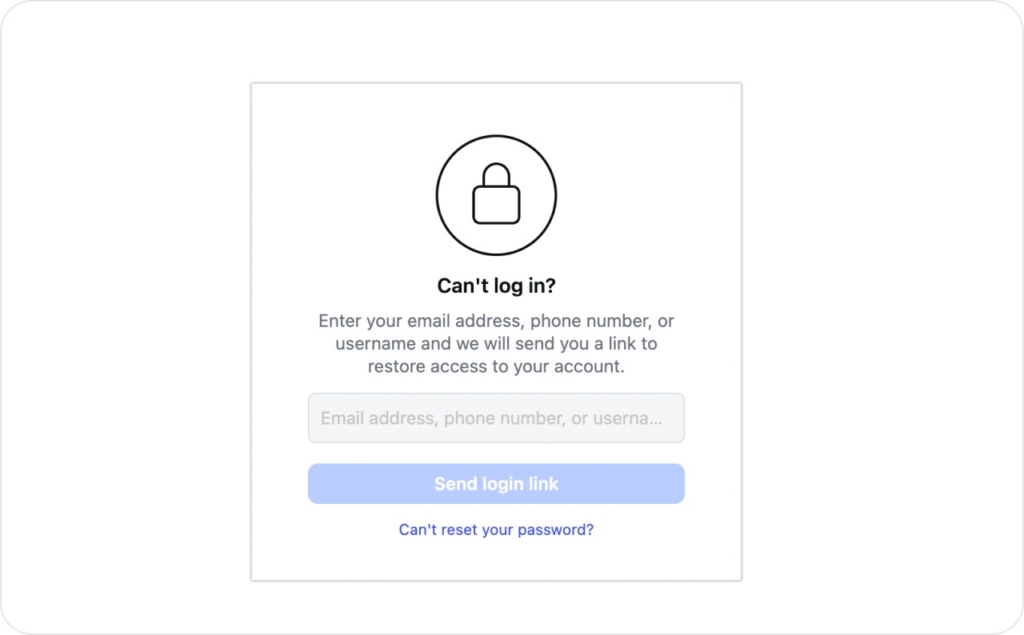
Can you recover using your username?
Yes. Type your username into the Get help logging in screen and keep going. Instagram sends the recovery link to whatever email or phone is already tied to that account.
Two conditions make this work: the username hasn’t changed and the account is still live. It breaks when a hacker renamed the account or when Instagram disabled it. “No users found” usually means a typo, a disabled account, or a username the hacker already swapped out.
Try your phone number or Facebook login if email isn’t working. If you have neither, you need identity verification, covered below.
Why Instagram isn’t sending the recovery code
If the code never arrives, check these causes:
- Carrier delay. Wait 10 minutes, then resend once
- SMS short codes blocked. Call your carrier and ask them to unblock
- Email spam filters. Search your entire inbox for “Instagram” or “security,” including spam and trash
- Rate limits. Stop retrying for an hour, then try again
- Time mismatch. Set your device clock to automatic and retry
- Old contact info. The email or phone on the account may no longer be yours. Switch to username or Facebook login
Do not brute-force it. If the in-app flow can’t reach any of your contact methods, identity verification is the next step, not more form submissions.
Use instagram.com/hacked when the app isn’t enough
When the in-app flow hits a wall, open instagram.com/hacked in any browser. The page asks a few quick questions about what went wrong, then routes you to the recovery path that actually fits your situation.
I’d use this page when:
- The app’s login help screen won’t load or respond
- You can’t install or open the Instagram app
- You need the hacked-account path, which offers identity verification steps the standard password reset skips
Instagram account hacked, how to recover and lock it down
Most takeovers start with phishing: fake login pages or “support” links in DMs. Microsoft reported Defender blocked more than 13 million malicious emails linked to the Tycoon2FA phishing kit in a single month in late 2025. If you didn’t ask for a login prompt, don’t trust it.
Fast recovery when the hacker changed your email
First 10 minutes:
- Secure your email first. Change your email password and turn on 2FA for your email, preferably with an authenticator app. If the hacker owns your inbox, you lose every recovery link Instagram sends
- Dig through your inbox for anything from Instagram. You’re looking for subject lines like “Your email was changed” or “Your password was changed”
- Found a “revert this change” link? Click it right now. Not later, not after lunch. That link has an expiration and it’s the quickest path back in once a hacker swaps your email
- If you can’t access the old email or the link is gone, go to instagram.com/hacked, select the hacked-account option, and follow the identity verification prompts
What usually goes wrong:
- The recovery email is missing. Check spam, promotions, and trash
- You can’t reverse the email change because the hacker rotated contact info too fast. At that point, a reset link won’t help. You’re into identity verification
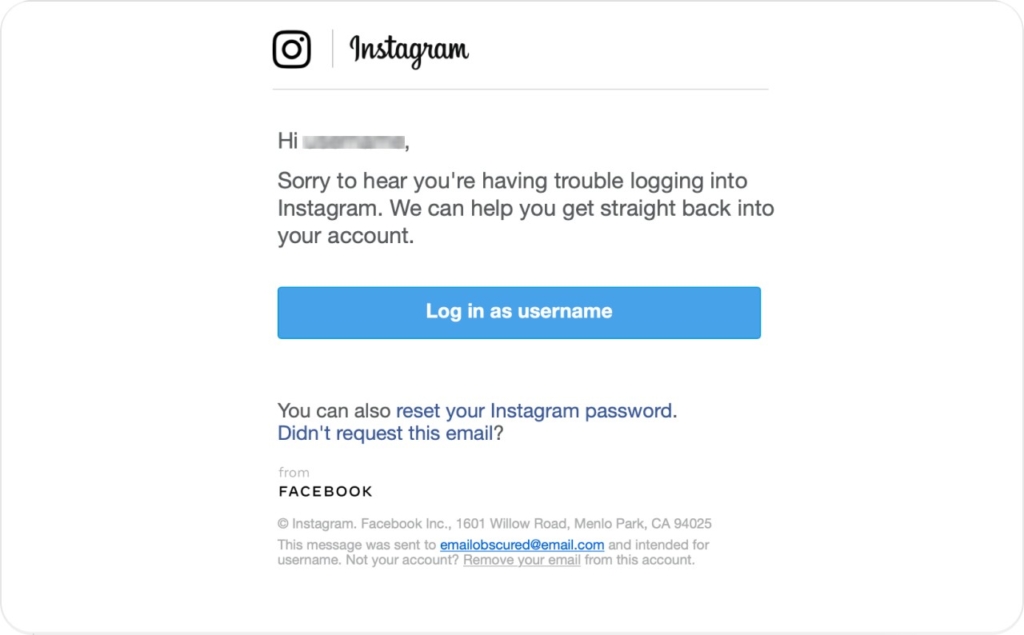
Lock the hacker out: sessions, devices, and linked apps
First hour, once you regain access:
- Reset your Instagram password immediately
- Go to Accounts Center → Password and security → Where you’re logged in
- Log out of all devices. Sign back in only on your main phone
- Review active sessions and remove anything you don’t recognize
- Confirm your linked email and phone are yours. Replace anything the hacker added
- Turn on 2FA with an authenticator app and save backup codes
- Check Settings → Apps and websites and remove anything you didn’t authorize. Third-party tools can keep access even after a password reset
- If the hacker sent DMs, post a Story warning followers: “My account was hacked. Ignore recent DMs.” If your Instagram ad campaigns were running, check their status in Meta Ads Manager after you regain access
People skip this part, then get stolen again. Cleaning out sessions and connected apps is non-negotiable.
If your Instagram is linked to Facebook
Facebook-connected login can save you, but only in the right order.
It works when your Instagram is still linked to Facebook and you can log into Facebook safely, especially if Instagram’s own login links keep failing.
Safe order:
- Secure your email first
- Secure Facebook next with a new password, 2FA, and log out unknown sessions
- Use Log in with Facebook on Instagram’s login screen
- After you’re in, update Instagram password and confirm contact info in Accounts Center
It won’t help if the hacker already removed the Facebook link, if your Facebook is also compromised, or if the hacker turned on 2FA that you can’t pass. In any of those cases, you’re back to identity verification.recover stolen instagram account” when both accounts were tied together.
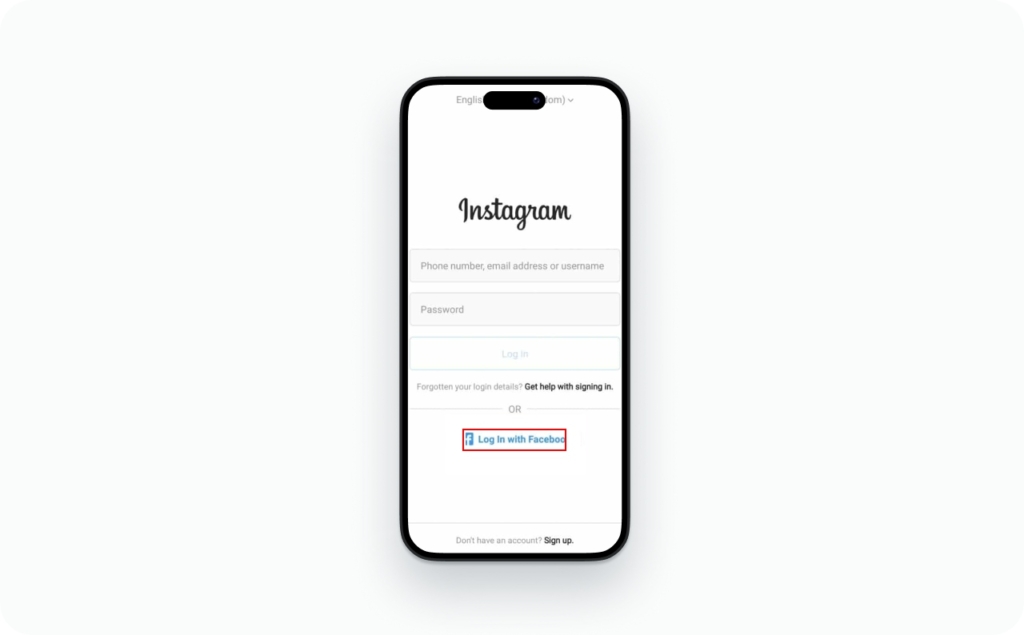
No email, no phone, no 2FA? Use identity verification
The hardest lockout, but not a dead end.
What Instagram may ask for:
- Video Selfie Verification: record your face while following on-screen prompts
- Government ID in some cases
- Previous passwords you used on the account
- Device and location signals like a phone you used before or a familiar network
Submit the best proof you have once, then wait. Re-submitting creates duplicate cases and can actually push you further back in line.
What to submit:
- The clearest video selfie you can record, no filters
- Any prior passwords you remember
- The original email or phone you think was on the account
- A short note matching the facts: “lost email and phone, cannot access authentication code”
Can you recover without an ID? Sometimes. If Video Selfie Verification passes, you may never need a government ID. If the system can’t match your face confidently, it requests ID as a next step.
How video selfie verification works
Instagram compares your live video to photos on the account. It’s checking whether you’re real and whether you match, not whether the video looks good.
- Record in bright, even lighting. Face a window if needed
- Remove hats, sunglasses, heavy makeup, and beauty filters
- Hold the phone steady with your full face in frame
- Match your usual look from profile photos when possible
- Use the same device you used for Instagram before
Common rejection reasons: low light, blur, active filters, few photos of you on the account, or the hacker replaced your profile content.
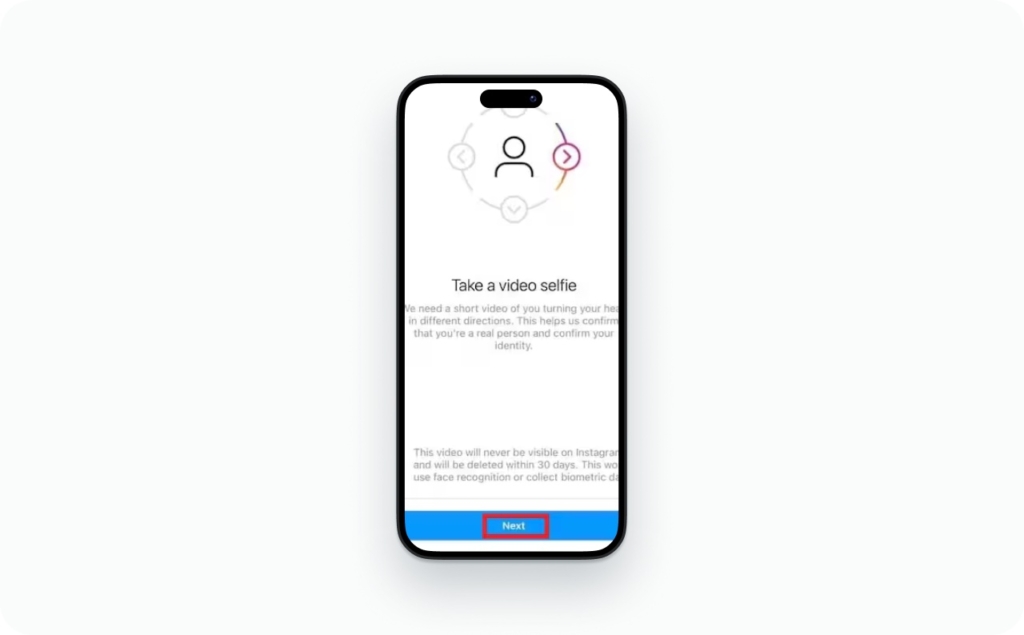
If Instagram rejects your verification
Five common reasons, each with a fix:
- Video was unclear. Re-record in bright light, steady hands
- Face doesn’t match account photos. Try from a familiar device, or prepare government ID
- Too many submissions. Stop. Wait a few days. Submit once with stronger proof
- Wrong account selected. Double-check the username and profile link
- New device or location. Try from a phone and network you previously used with Instagram
What to do if you can’t access your authentication app
- Check for backup codes you saved when you enabled 2FA
- Sync your phone time to automatic. Time drift breaks authenticator codes. This fixes it more often than people expect
- Switched phones recently? Some authenticator apps back up to the cloud. Check whether yours did, and restore it on the new device
- Still locked out after all of that? Head to instagram.com/hacked, pick the 2FA option, and go through identity verification from there
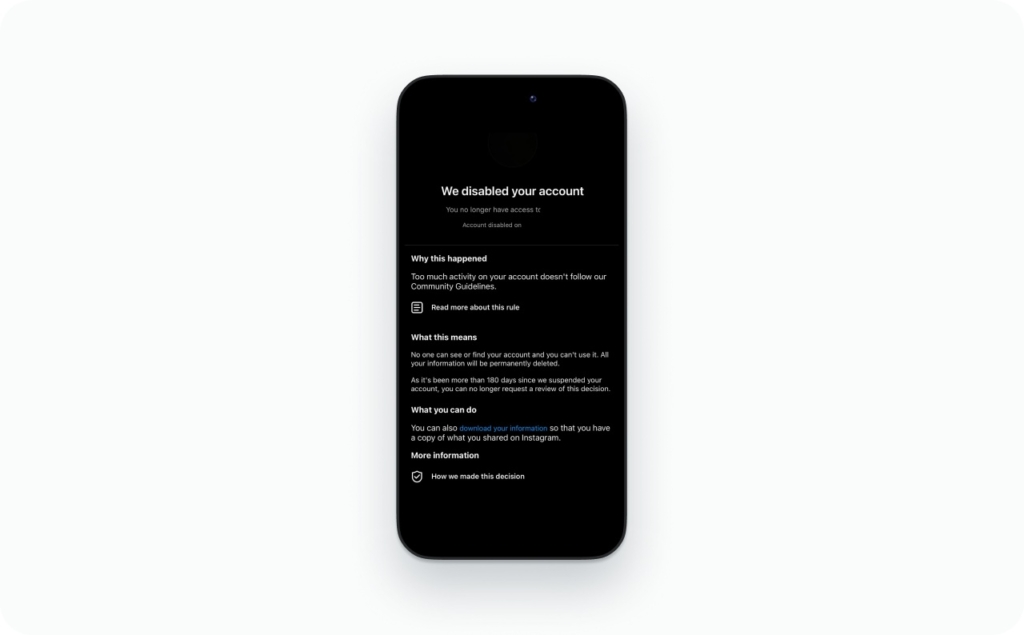
How to recover disabled or suspended Instagram account
People mix these labels up constantly. Here’s what each one actually means:
- Temporarily locked: a security hold after unusual activity
- Restricted: you can log in, but some actions are limited
- Suspended: your account is blocked pending review
- Disabled: access is removed, usually with an appeal option
Meta says enforcement accuracy improved in the US, with about a 50% reduction in enforcement mistakes from Q4 2024 to Q1 2025 while the low prevalence of violating content stayed largely unchanged. Not perfect, but mistakes do get reversed.
Clean appeal workflow:
- Open Instagram and try to log in. When you see the notice, tap “Learn More” or “Appeal” if shown
- If no in-app appeal appears, visit the Instagram Help Center and look for the disabled accounts form
- Submit once with a short, factual statement: your full name, username, and email
- Complete any identity prompt such as a selfie or ID if asked
- Stop risky behavior while you wait: no automation tools, no mass follow/unfollow, no repeated login attempts
Why Instagram disables accounts
Most disabled accounts I see fall into one of four buckets:
- Automation tools that mimic bots
- Impersonation reports or suspicious name changes
- Repeated Community Guidelines violations
- Security signals that look like account compromise
Write the appeal like you’d explain it to a person, not a form:
- “I was using a third-party scheduling tool. I’ve removed it and I’m logging in normally”
- “I think my account was compromised. I’ve already reset my password”
- “I’m the real owner. Happy to verify identity”
What happens after an appeal
Sometimes you hear back the same day. Other times it takes a week or more, especially when Meta is processing a backlog. Silence doesn’t mean rejection. It almost always means the case hasn’t been picked up yet. Filing a second appeal just creates a duplicate and won’t move you up.
Can a permanently disabled account be recovered?
Seeing “permanently disabled” doesn’t completely shut the door, but the odds aren’t in your favor. You can file an appeal. Just don’t rearrange your week around hearing good news.
- Deactivated: that was your choice. Log back in and the account comes right back
- Permanently disabled: an enforcement action by Instagram. Appeal is the only option
- Deleted: you removed it yourself. See the next section for the 30-day window
Deleted Instagram account: the 30-day window
If you deleted your own Instagram account, Meta gives you 30 days to change your mind
To recover within 30 days:
- Pull up Instagram on your phone or type instagram.com into a browser
- Sign in with the same username and password you had before deletion
- Instagram displays the exact date your account is scheduled for permanent deletion
- Tap “Keep Account”
- Your account, posts, followers, and DMs are fully restored
After 30 days: everything is permanently deleted. Posts, followers, DMs, all of it. You’re welcome to sign up again with the same email, but that old account and everything in it won’t be coming back.
Policy violations are a different story. If Instagram disabled your account before deleting it, the appeal window can stretch to 180 days. Follow the disabled account appeal process for those cases.
If a hacker deleted your account: recover access through the hacked account flow first. Got in before 30 days passed? You should see the “Keep Account” prompt when you log in. Took longer than that? There’s probably nothing left to recover.
The 30-day clock doesn’t bend. Regret the deletion? Stop reading and go log in.
Instagram support, scam traps, and realistic timelines
Every legit recovery path runs through Meta’s own systems. Not a third party, not a DM, not a paid service.
Legit support paths:
- In-app recovery: Get help logging in
- instagram.com/hacked: for compromised and inaccessible accounts
- Instagram Help Center: official forms at help.instagram.com
- Meta AI support assistant: Meta rolled this out in March 2026 inside the Help Center for logged-in users. One catch: a flaw in the tool exposed 20,000+ accounts to takeover before Meta shut it down and patched it mid-2026. Use the assistant only through official in-app channels, and watch out for any step that tries to attach an email address you never added
- Meta Verified support: if available for your account type
Scam filter. These are always red flags:
- Up-front fees for recovery
- Agents on WhatsApp or Telegram
- Anyone asking for your login code, authentication code, or password
- Claims that buying ads will “unlock” your account
Meta has issued cease and desist letters to parties offering fake “un-ban” services. These scams don’t only target celebrities. Regular business accounts get hit constantly.
Notify your followers after recovery:
- “My Instagram was compromised. Ignore recent DMs and links”
- “If you got a payment request from me, it wasn’t me”
How long recovery takes by scenario
| Scenario | Typical range |
| Password reset with email or phone | Minutes |
| Hacked account | Hours to days |
| Identity verification | Days |
| Disabled/suspended appeal | Days to weeks |
| Deleted account within 30 days | Instant on login |
Same rule as everywhere else in this guide: one clean submission beats five panicked ones.
Protect your Instagram account after recovery
Turn on 2FA with an authenticator app. SMS-based 2FA works, but SIM-swap attacks make it the weaker option.
Do this now:
- Go to Accounts Center → Password and security → Two-factor authentication
- Pick an authenticator app. Google Authenticator and Authy both work. Link it to your Instagram account
- Save your backup codes somewhere you won’t lose them. A printed sheet in a drawer works. So does a password manager. Just not your email inbox, because if someone gets into that, your codes go with it
- Confirm your recovery email and phone are current and under your control
- Review connected apps and remove anything you didn’t add
- Turn on login alerts
Hacked a second time? Same drill: lock down your email, change the Instagram password, boot every session, scrub connected apps, set 2FA up fresh. Then ask yourself what you left undone after the first time. Nine times out of ten it’s backup codes nobody saved or a password recycled from another site.
FAQ
The article covers these scenarios separately across three sections. Nobody stitches them into one worst-case answer. This FAQ does, and confirms that identity verification plus device recognition is the only path when all contact info has been swapped.
The scam section lists red flags but never states the positive case plainly. This FAQ gives a one-line rule people can memorize: Instagram emails you from @mail.instagram.com, period. Everything else is a scam.
Common question for business owners who want an agency or employee to handle it. The article never addresses it. Answer: no, the selfie and ID submission have to come from you.