How to increase Shopify store conversion rate
You’ve got Shopify traffic yet no sales? I’ll show how to read your store’s data, be close to your shoppers and make reasonable changes.

Before you change anything to increase conversion rate on Shopify, find the exact step where shoppers give up. Start with where your traffic comes from, then follow those visitors from the product page all the way to payment.
A low Shopify conversion rate often comes down to something small on the way to checkout. Maybe the size chart sits three scrolls down, or a $12 shipping fee shows up only on the final screen.
Key takeaways
- Shopify conversion rate is the share of online store sessions that end in an order.
- There’s no single good conversion rate. A candle shop and a sofa brand land in very different places, so compare yourself with stores in your category and with your own past months.
- Shopify Analytics shows how many sessions reached the cart and how many got through checkout. The bigger drop tells you where to look first.
- I’ll show you visual examples of extravagantly bad Shopify ads Vs. how to improve them with Zeely.
What is Shopify’s conversion rate?
Shopify measures conversion rate by determining what percentage of site visitors complete a purchase. Conversion rate assists you in measuring how effectively your site turns visits into buys. To calculate Shopify conversion rate use the following formula:
Conversion rate = (Sessions that completed checkout / Total online store sessions) x 100
Let’s say your store has a total of 10,000 sessions in a given month. Of those sessions, 180 resulted in a purchase. Your conversion rate for the month would be:
(180 / 10,000) x 100 = 1.8%
From this example, we can say that your store converted purchases for 1.8% of sessions.
Shopify defines a session as a visit, not necessarily a unique person. A single customer can come to your site multiple times before making a purchase. A single session can also contain multiple purchases.
For this reason, I use Shopify’s reported online store conversion rate to determine total orders divided by total unique visitors.
You’ll commonly see this metric represented as Shopify CR. CR is measured by the total number of completed purchases. Other metrics are more general and refer to earlier buying signals or actions.
Purchasing or adding an item to your store’s shopping cart signifies greater intent than just viewing a product. Reaching the checkout page is an even stronger intent to purchase, but still does not count as a completed purchase.
What is a good conversion rate on Shopify in 2026?
An ideal Shopify conversion rate is one that performs well relatively to your product category and improves without compromising profitability.
The November 2026 Littledata Shopify benchmarks show that, of the 450 Shopify stores in their sample, the median conversion rate was 1.3%. The mean rate was 1.9%, and the stores in the top 20% converted at rates of 2.8% and above.
Here is the average conversion rate on Shopify accordingly:
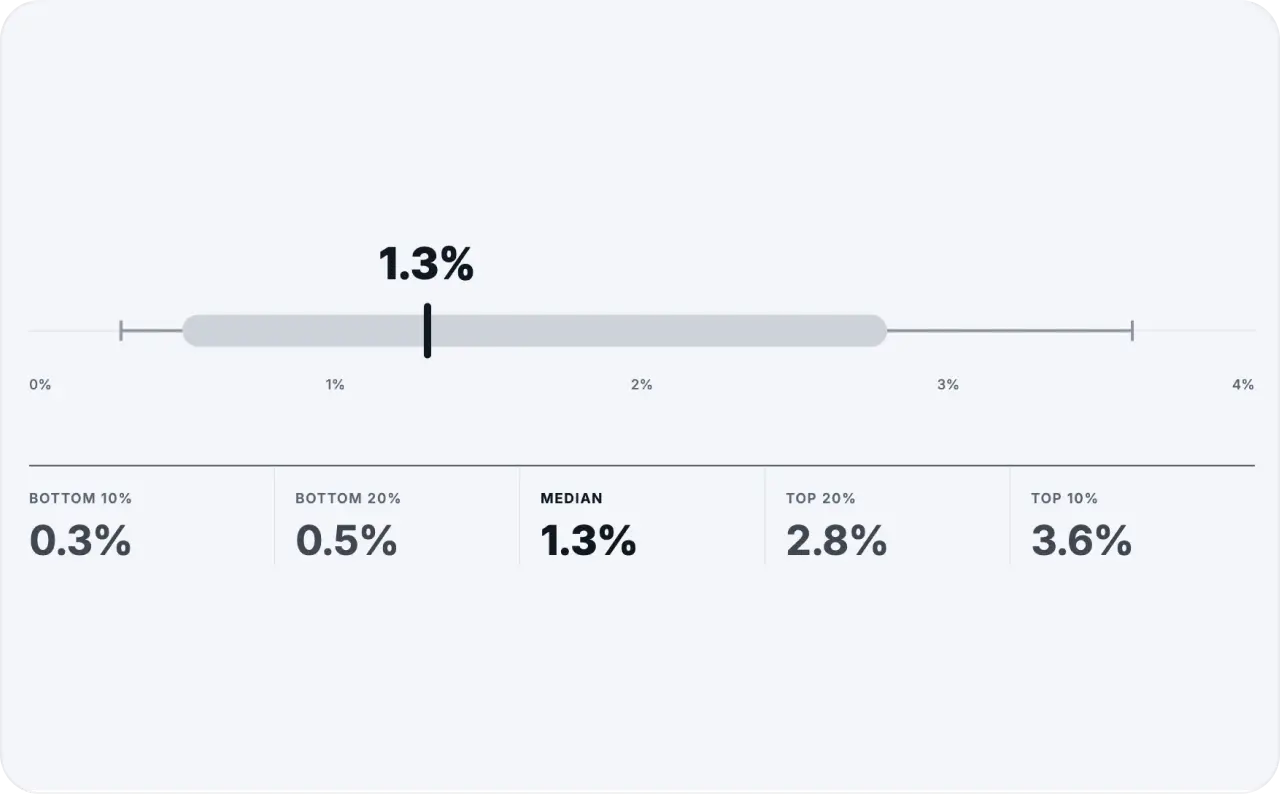
The conversion data was collected from August 10 to November 7, 2026. The sample covers qualifying Shopify stores using Littledata and Google Analytics 4, and thus doesn’t necessarily reflect every Shopify merchant.
I prefer the median rate, when possible, to describe what is average for a store, because there are a handful of outliers that skew the mean conversion rate upward.
Median conversion rate on Shopify by industry
Product categories are more helpful in explaining these numbers. Different types of shoppers lead to different purchasing behavior. For example, shoppers looking for skincare products may shop differently from shoppers researching high-end furniture.
Here is the variation in the median conversion rate across different industries in Littledata’s sample for November 2026.
| Shopify store category | Median conversion rate |
| All Shopify stores | 1.3% |
| Beauty and skincare | 2.8% |
| Health and supplements | 2.6% |
| Food and beverage | 2.1% |
| Fashion and apparel | 1.1% |
| Home and furniture | 1.1% |
These may be helpful points of comparison, but your numbers are more important. Look at your competitors and how they are ranked across different marketplaces, devices, and traffic sources to get a better idea of your performance.
Is a 2% conversion rate on Shopify good?
A 2% conversion rate is better than the overall median for this benchmark, however, that doesn’t make it a strong result for every store. A home decor store may find a 2% conversion rate good. A skincare store with the same conversion rate may need to improve to remain competitive.
I’d take average order value and customer acquisition costs into account as well. Sometimes, a store can convert fewer visitors at a higher order value and earn more than a store converting more visitors at a lower order value and use discounts to drive the traffic.
Why is your Shopify conversion rate low?
In most cases, a dip in conversion rate means there’s a snag in your buyer’s journey. This could happen at any point from recognizing the need to making the payment. I’d want to figure out first, at what point do we lose the most shoppers?
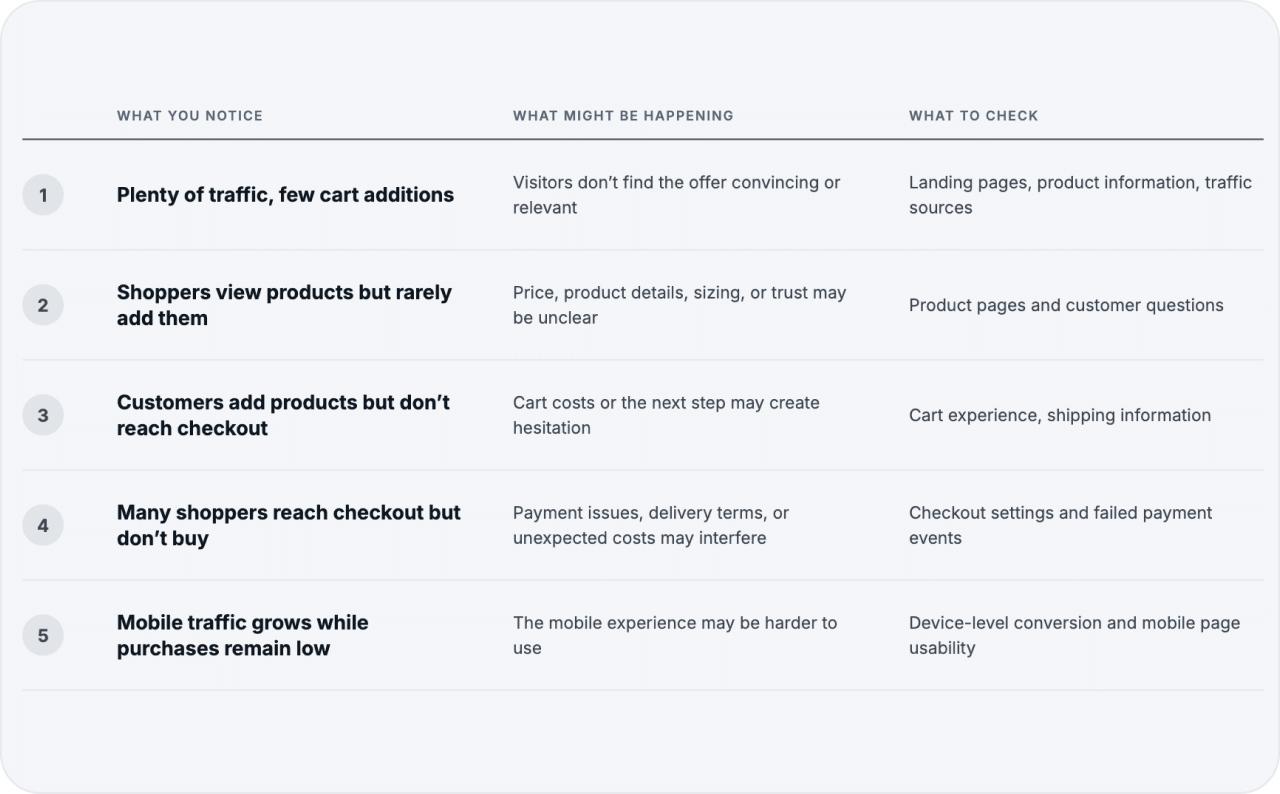
The data suggests possible areas to look at. It may not necessarily be the cause. Traffic quality deserves special attention. Imagine a Shopify store selling high-end leather bags. An ad for a 30 dollar ‘everyday’ bag may be very attractive, but the traffic may not convert if they see the higher price on the bag store product page.
In that case, modifying checkouts wouldn’t fix that problem. There are other factors that may impact a store’s conversion rate. If a store is attracting more new visitors vs. returning visitors, that may also drive down the conversion rate. Look at audiences separately before looking at overall numbers.
I’ve talked about the different traffic acquisition channels in my ecommerce advertising guide, so I won’t go over that again. I’ll go over what happens after the visitors get to the site.
How to find your Shopify conversion rate in Analytics
Shopify Analytics is a starting point for conversion rate optimization. Shopify lets merchants analyze purchase and checkout behavior without the need for additional apps.
Here’s where I’d begin.
- Log in to Shopify Admin and select Analytics. Open Reports.
- Find Conversion rate over time. Use the Behavior category filter to retrieve the report. Choose a date range with enough sessions and purchases for comparison.
- Open Conversion rate breakdown. Analyze all sessions and sessions with a cart addition. See the behavior of customers who reached checkout and those who completed a checkout.
- Check the device reports. See how customers on mobile and desktop behave, and identify differences worth looking into.
- See how different landing pages perform. Analyze the pages with lots of traffic and check if they perform well.
If you see a page that receives a lot of traffic and has a low conversion rate, play around with the report dimensions to see if you can narrow down the reason for the low rate. Sometimes a low conversion rate isn’t always a bad thing.
Read Shopify conversion funnel before making any change to your store
Look closely at cart additions and completed checkouts. If there are 500 sessions with cart additions and only 100 reaching checkout, I would look into cart experience before modifying product descriptions. If 400 sessions reach checkout and only 120 sessions resulted in purchases, then I would look into payment and delivery details.
Shopify’s conversion rate breakdown report has open and closed funnels. An open funnel allows visitors to skip some of the earlier steps, while closed funnel strictly follows the steps defined.
Use same definition of funnel when doing comparison over a period of time.
In 2026, Shopify also changed how it measures a session during 21-23rd of September. Any sudden changes in conversion rate or session during the time period should be interpreted with caution as it may be a measurement change rather than change in customer behavior.
Shopify’s analytics measurement change should be seen in their documentation.
15 Conversion Rate Optimization tests for Shopify
An effective conversion rate optimization strategy removes specific hurdles between a shopper discovering a product and completing an order. I wouldn’t suggest applying all 15 changes to your Shopify site. Start with the part of your buying funnel that shows the largest unexplained drop-off.
Align Shopify landing pages with visitor intent
For click-through ads, visitors should land on the product page and not a category page that requires additional searching. Check your landing page for any discrepancies with the messaging that brought the visitor there.
Ensure the product page is stock, and the offer is consistent with the ad. For instance, if a visitor clicks an ad for a waterproof hiking backpack, they should be taken to a page that shows that product and has that feature verified.
Ensure first screen answers buying questions
Don’t make shoppers scroll through a large amount of text to determine what the product is. They should be able to see the product price and image, and an easy way to purchase it. For more expensive products, give a short paragraph explaining the main benefit.
Increase your Shopify site loading speed
Site speed is especially important if you have products that require shoppers to move through a number of different pages. Check Shopify’s web performance reports, and test important pages on mobile. Oversized images, unnecessary page animations, and unneeded apps that are loading scripts should be removed.
I would begin with your highest traffic product pages. From there, compress your images and remove unused storefront widgets. Always measure performance before and after each change.
Make your Shopify store easier to use on mobile
Adobe’s 2025 US holiday ecommerce report states that 56.4% of all holiday shopping online was done using a smartphone. This data is generally reflective of the broader US market, not the Shopify market.
I encourage you to open your Shopify store on your phone and try to buy something. Get a feel for the shopping experience. When doing this I look for small buttons, long forms, and overlapping pop-ups and modals.
Help shoppers find product without guessing
Your catalog may have dozens or hundreds of products. Customers may become frustrated if they can not easily sort your catalog to their preferences. Use collection names and tags to help customers filter your product catalog based on size, color, price, availability, and product type. Look at your Shopify search terms report to see why customers are not finding your products.
A shopper should be able to find the medium size jackets without having to look at every product page. Fix product names and other product filters and then add additional product navigation elements.
Answer shoppers’ questions with product photos
Product pictures help shoppers understand what they are actually buying. There is a reason why no one buys golf balls the way they buy a home gym. A floating golf ball is not telling me much about the product. Whereas, a picture of the home gym in use and/or a picture of the product in its overall scale, helps a shopper understand what they are buying.
When taking pictures for your shop, think outside the box. Get a picture of your product in use, or take a close up picture of your product. Think about how you can show your product in a different way.
Productions should be as realistic as possible. AI should not be used to create scenes to make a product appear to include features or contents it does not.
Write Shopify product descriptions people can trust
Product descriptions should include information that will help shoppers make a purchasing decision. Some of the most important information to include are materials, dimensions, contents, compatibility, care instructions, benefits and drawbacks.
You should include information about what the product can do, as well as what it can’t do. It’s also very helpful to include product dimensions.
Make size, color, and availability easy to check
Product variants should be easily identifiable. If your storefront allows it, you should change the image of a product to the selected variant. This is particularly important for product sizing. Model measurements and size guides should be included if possible. If your product contains an electronic component, include a description about what it is compatible with.
Use genuine customer reviews to answer doubts
Reviews can help shoppers make a decision by giving them additional information about a product. Negative reviews should be kept if they describe an accurate limitation of the product. Useful reviews can help answer specific questions about the product.
If you need software for collecting feedbacks or improving cart functionality, Zeely’s guide to Shopify apps to increase sales compares available options. Address tools associated with concrete issues. Don’t address too many issues at the same time.
Be transparent about shipping & return policies
Transparent shipping costs may determine whether a shopper makes a purchase. Explain shipping and return policies at the product, cart, and checkout pages. Be sure to review these policies whenever they change.
Easy to understand shopping cart
Your shopping cart should help a customer complete and confirm a purchase. The cart should show the total and summary of the order and next step in the checkout process.
Payment and checkout options
Identify payment methods supported by Shopify and used by your customers. Besides payment options, Shop Pay and other eligible accelerated checkout options may help reduce repeated data entry for returning shoppers.
I don’t think every option for express checkout is beneficial for every store. Test the payment methods you want to offer. Check whether payments work on mobile devices. Do customers receive clear confirmation?
Explore checkout errors before offering discounts
Customers may leave because the payment fails, not because they dislike the price. Investigate issues with checkout payment events. Look for recurring problems with card verification, address completion, inventory, and payment processing.
Be sure that the reported problem occurs with an appropriate test transaction. Why would giving a bigger discount help customers pay if they can’t pay at all? Solve the issue the test is intended for.
Recover abandoned Shopify checkouts thoughtfully
The average documented abandonment rate reported by the Baymard Institute is 70.22%. Keep in mind that this rate is not restricted to Shopify, and may include shoppers who were just browsing.
Shopify has a feature, Shopify Messaging, that automates recovery of abandoned checkouts for selected customers. Consider who gets these messages, when they are sent, and what is included in them.
I suggest starting messages with a link to the incomplete checkout. For products that raise a lot of questions, provide support material. Keep in mind applicable laws on consent. Avoid nagging customers to buy.
Increase sales by testing product bundles and offers
There are times where an offer needs improvement despite a great product. For example, handmade silver earrings make a great gift. The customer buying the earrings may want to buy a necklace to go with them, or gift packaging. I’d try a bundle offer before a price reduction on the earrings.
Also, consider offering free shipping over a certain threshold or discounts on products that are bought and used together. Make the numbers work first. What is remaining after you subtract the costs of the product, packaging, and shipping? What about payment and/or processing fees, and discounts?
Check your conversion rate and average order value. Profit is also important, but if you are getting more sales, and a lower average order value and profit per sale that isn’t good either. A good bundle offers a reason for the customer to purchase more without making the base product in the bundle seem overpriced.

How to make your ads feel more like your brand and increase Shopify conversions
People love to point out how ineffective different forms of advertising are, but the truth is, they work. Facebook and Instagram are some of the easiest ways to discover a new product or brand, especially in the skincare, jewelry, and clothing industries. Ads can help generate awareness, but the harder part is helping people develop a desire to purchase the product.
The advertising world is full of inequalities, and a small Shopify store probably can’t compete against a global jewelry brand that spends over $100k on a campaign. However, that’s not always a bad thing. A small business has worthwhile assets, like a meaningful product and brand story.
I’m always scratching my head as to why there is so much “BEST JEWELRY! SHOP NOW!” copy in Ads because there’s zero way to tell what makes that product special or why it deserves to be in my feed. Tens of thousands of dollars are spent on those campaigns, so people better appreciate the thoughtful ad placements.
I’d include Zeely here. With Zeely, you can build image and video ads using your existing product cards, all within brand identity. Once you’re satisfied with the ads, you can run paid campaigns within Zeely for Facebook and Instagram.
Additionally, the creatives made through it needn’t be mothballed between campaigns. The static ads can be posted organically to Instagram, and the videos can be used to create Reels. Zeely helps you post for free to Instagram, but paid campaigns to Meta are not free.
Similarly, your ads should also offer a product experience. If there is a detail in an ad that catches someone’s eye, that element should be highlighted in the Shopify product page as well.
Same earrings, different ads
Pretend a small Shopify jewelry brand hand makes hoop earrings. Their customers like little details, design, and pieces they can wear everyday. Now let’s see what happens when I give Zeely the same product shot, but two different ads.
Ad A: Pretty enough, but talking to the wrong people
The earrings are shown on a bold pink background with a decorative border. The headline reads, “YOUR PARTY LOOK STARTS HERE!” A small “SHOP ALL ACCESSORIES” button in the upper corner essentially disappears in the background.
At first glance this ad seems OK. However, I’d challenge three things. For one, the focus of this ad is people shopping for party accessories. This brand creates understated, handcrafted jewelry. Second, the earrings are too small to help appreciate the hammered texture, a feature that differentiates them from other hoops. And last, the call to action is to “Shop All Accessories” before I can appreciate the details of the product.
This ad might work for a different jewelry brand, but for this brand, this ad doesn’t serve up a reason for people to even click, let alone buy.

Ad B: Now the earrings have something to say
I use the same earrings and basically change everything else. The warm light catches the texture of the hammered metal of the earrings. The model wears a simple, breathable linen shirt. The craftsmanship of the earrings is reflected in the close up. Leaving plenty of negative space in the background gives the earrings the focus they deserve. The headline reads, “Made by hand. Worn your way.”
The earrings speak for themselves, and the ad copy gives a message reflective of the customer’s real life style. The CTA is a natural extension of the earrings, and draws the shoppers attention to the product.

Both ads are demonstration creatives for a Shopify product. I want to show that you don’t need a larger budget to create better ads. Sometimes all you need is a better idea of your target audience to discover what makes your product special and newsworthy.
I can go a step further and create a video ad using Zeely. It can give me another way to show the earrings, this time through movement, close-ups, and a little desert romance.
I can also use the finished video to make Reels or Stories. Since I already paid to make the video, I wouldn’t need to pay for additional advertising to get the video in front of potential customers, giving the jewelry a second moment.
To sum up
I wouldn’t rebuild a Shopify store just because one number looks bad. I’d look for a stop in the process and see what data I can scrape from it. If people are abandoning checkout, I’d look at shipping costs and available payment methods. If shoppers aren’t engaging with product pages, I’d look at the offer and how the product is presented.
FAQ
You can use the tools Shopify provides and look at your own storefront. See which pages are getting the most views, and make product info easier to understand. You could test checkout to see if there’s a better way to present shipping costs. You may find that adding a better product photo or stating shipping costs on the product page solves your conversion issue.
I’d look at where the visitors are coming from before I’d change anything in the store. A well designed ad could bring traffic that’s interested in the creative, but not the product. If visitors are coming from a relevant source, look at product page engagement, see if the product is being added to cart, and see where people are leaving during the checkout process.
Product bundles work best if the products are complementary. Bundling products can increase the average order value but may not improve conversion rates.
Conversion rates should be assessed frequently, but decisions should be made based on meaningful periods with sufficient traffic and purchases. Daily fluctuations may not be significant for larger stores. Draw conclusions based on similar conditions (promotional periods, advertising, etc.).
An overall conversion rate measures the percentage of sessions that results in a purchase. The checkout conversion rate measures the percentage of sessions that reached the checkout page and resulted in a purchase. Generally speaking, looking at both will identify problems during the shopping process and the checkout process.
Sources
Shopify,
Littledata,
Adobe,
Baymard Institute,
Yotpo,
Cirkle Studio,
Bloomreach.
Fact checked by Anastasiia Stovpova