How to create an AI influencer for your brand in 2026
An AI influencer can star in your product videos and ads without a photo shoot, as long as it looks like the same person every time. I’ll walk through building one for a skincare brand, from choosing its role to putting it in an ad.
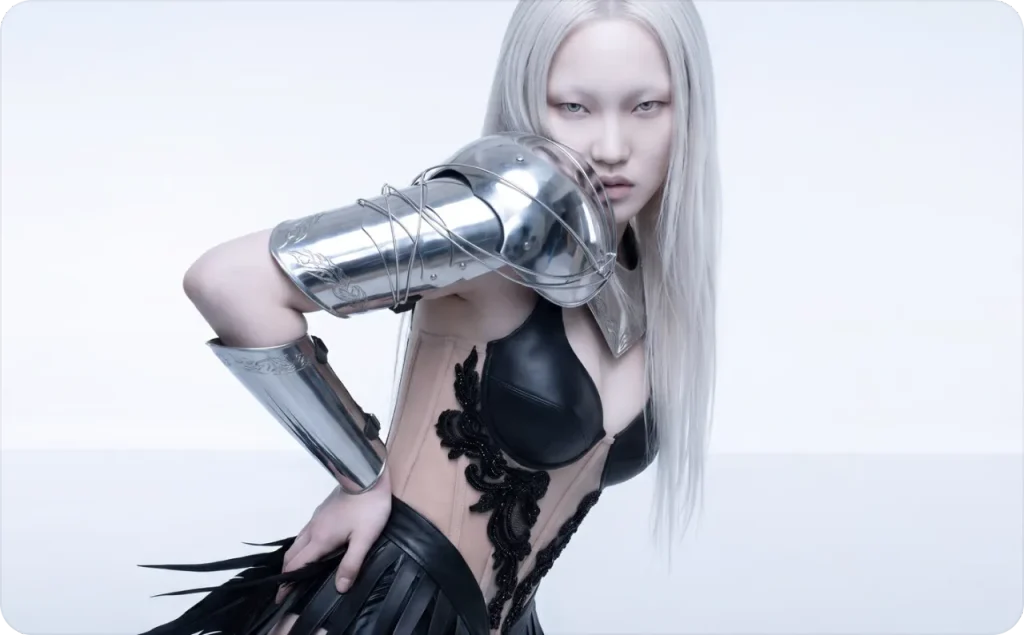
There are three ways to get an AI influencer: pick a ready-made character, customize an avatar from a photo, or build one from scratch. I’ll walk through all three, then build Mara, a fictional spokesperson for a skincare brand, step by step. My examples use Zeely, but you can follow the same process in other AI tools.
Key takeaways
- Give your influencer a clear role. Think about who they’ll speak to, what they’ll talk about, and how their personality fits your brand
- Generate a first portrait and judge it by whether your customer would take advice from this person
- Save a few approved images and reuse them as references so the face doesn’t drift from post to post
- Add a voice and test one short video before you plan a whole series
- Use the character in social posts and ads. Before anything goes live, confirm your commercial-use rights and add an AI label, even on platforms that don’t require one.
What is an AI influencer, and how does it work?
An AI influencer is an invented character who shows up in social posts and ads the way a human creator would. AI tools generate all of its photos and videos, voice included. You still write the script and decide what gets published, so it only says what your brand wants said.
Some AI influencers could pass for real people. Others are cartoonish or stylized on purpose. For products people judge by how they look on a real body, like skincare or clothing, I’d go realistic. A stylized character fits better when your brand already uses illustration or humor.
AI influencer vs. AI avatar vs. virtual influencer
These terms overlap, but they describe different ways of creating and using digital characters.
| Type | What it means | Example |
| AI influencer | An AI-generated character with a recurring identity and public-facing content | Mara appearing regularly in branded posts and videos |
| AI avatar | A digital representation or presenter used in images and videos | A talking avatar explaining a skincare product |
| Virtual influencer | A broader term for fictional online personalities created with AI, computer graphics, or both | An animated fashion personality running a social media account |
I’d also consider AI UGC content, which focuses on creator-style ads rather than building an ongoing fictional personality.
What are the three ways to create an AI influencer?
The right one depends on how long the character will stick around. A presenter for one product launch can come from a library in minutes. A face that represents your brand for a year is worth a few extra hours of work.
1. Pick a ready-made AI avatar
This is the fastest route when you need someone on camera this week and don’t want to design anyone. You open the avatar library in an AI influencer generator and choose a presenter close to your buyer. If you sell anti-aging serum to women over 40, pick someone in that age range rather than a 22-year-old model.
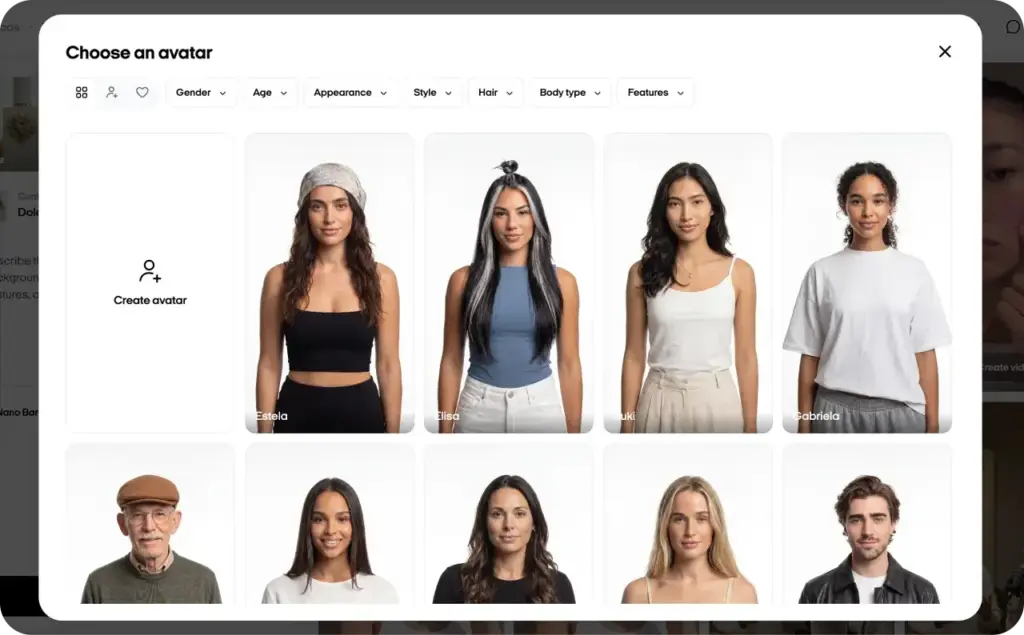
Zeely’s library has 1,200+ AI avatars, with filters for age and gender. After you pick a presenter, Zeely builds a talking-head video from your product images and a script, which you can write yourself or let AI draft.
I’d use a library avatar for a product launch or to test whether your customers respond to a presenter at all. The catch is that every other user of the same library can pick that face too, so I wouldn’t build a long-term brand character on it.
2. Turn a photo into a custom AI avatar
This middle route fits when you already know whose face you want. That might be you, if you’d like an AI version of yourself that records videos while you pack orders. A character already on your packaging works too.
In Zeely’s custom AI avatar tool, you upload a reference photo and fill in a short form covering age, clothing style, hair, and distinctive features like freckles. A prompt field handles the scene, such as the setting and the avatar’s pose. The avatar is ready in under a minute and stays saved for future videos.
Your reference photo sets the ceiling here. A dim or angled shot gives you an avatar that looks slightly off, so pick a sharp, well-lit photo where the whole face is visible.
3. Create your own AI influencer from scratch
This route takes the most time and gives you the most control. You write the character first: her name, age, personality, and the way she talks to customers. Then you turn that profile into a detailed visual description and generate portraits until one fits.
That’s how I’m building Mara. Her first portrait comes from Zeely’s Playground, where you describe the image in your own words and choose a model such as Nano Banana Pro. Plan for several rounds before one feels right. I’d set aside an afternoon for this step, not five minutes.
If you’re still comparing tools, we’ve also covered the best AI talking head video generators and their differences.
How to make an AI influencer for your brand in 7 steps
I’ll build Mara for Cedar & Coast Skin, a fictional skincare brand, and use Zeely for the image and video examples.
Step 1. Decide what your AI influencer will do for your brand
Pick the job before the face. Most brand characters either introduce products or answer the questions customers keep sending you, and some do both.
Mara’s job at Cedar & Coast Skin is explaining skincare basics and introducing new products to people who want straightforward information before they buy. She speaks for the brand openly, so there’s no reason to dress her up as an independent reviewer.
Give the character one small first assignment. Mara’s is a short video introducing the brand’s moisturizer. With a concrete task in front of you, you design for that video instead of spending hours on a face you don’t know how to use yet.
Step 2. Choose a personality and tone of voice for your character
Someone explaining skincare to first-time buyers should sound nothing like a character selling gaming headsets. Match the voice to the people you’re trying to reach.
Mara stays friendly and practical, with real curiosity about the customer’s skin. She uses everyday words and skips big beauty promises. Here’s how a hyped product intro usually sounds:
“This incredible moisturizer will completely transform your skin.”
Mara would say something closer to this:
“This is our Daily Moisture Cream. Let me show you the texture and where it fits in a simple skincare routine.”
The second line sounds like a helpful store assistant. It also stays away from results the brand hasn’t tested.
Settle the basics now, like whether your character speaks casually or formally and whether she uses humor. Save the answers as a short personality note. You’ll reuse it every time you give your AI social media influencer a new script.
Step 3. Give your AI influencer a name and a simple backstory
A consistent name helps people connect separate posts to the same character. The backstory only needs to explain why she’s in your content, so skip the fictional childhood and the invented career.
I’d never give her professional credentials. An AI character introduced as a dermatologist misleads anyone who takes her advice seriously. Introduce her clearly the first time she appears on your account, with something like this:
“Meet Mara, our AI-created skincare guide. She’ll explain our products and share simple skincare tips.”
Your followers know exactly who they’re seeing, and nobody mistakes her for a real employee or customer.
Step 4. Design your AI influencer’s appearance
Pick a handful of visual details that will hold up in every new scene. Settle the face and hair first, and leave backgrounds and poses for later.
Mara gets shoulder-length wavy dark brown hair, warm brown eyes, subtle freckles, and a relaxed expression. Her signature outfit is a sage-green blouse with small gold hoop earrings. A distinctive detail like the freckles also makes it easier for you to spot when a new image has drifted.
For lighting, I’d go with soft daylight over a glossy fashion look. Mara will mostly appear in everyday settings, where studio polish would feel out of place. Keep the first background simple, since changing the setting is easy once you have an approved face.
Her outfit can change from post to post. Her face shouldn’t.
Step 5. Write an AI influencer prompt and generate the first image
Any image generator that accepts text prompts and reference images works for this step. I’m using Zeely’s Playground: open Image ads, select Playground, and choose Image. Zeely’s September 2026 Playground guide covers the settings in more detail.
Here’s Mara’s prompt:
“Create a realistic portrait of Mara, an original fictional 32-year-old female skincare brand spokesperson. She has warm brown eyes, shoulder-length wavy dark brown hair, subtle freckles, and a friendly, relaxed expression. Dress her in a sage-green blouse with small gold hoop earrings. Use soft natural daylight, a warm cream background, realistic skin texture, and professional editorial photography. Frame her from the waist up, facing the camera. Keep natural facial proportions. No text, logos, or product packaging.”
Choose a model and a portrait-friendly aspect ratio. Playground returns up to five results from one prompt, which gives you enough faces to compare side by side.
Zoom in on the eyes and skin before you pick one. If a detail is off, change only that line of the prompt and generate again, so you know which edit fixed it. When a face looks right, save it. This portrait is now Mara’s main reference.
Step 6. Create reference images to keep your AI influencer consistent
Every new scene gives the generator a chance to hand Mara a slightly different face. Feed the approved portrait into each new generation so the model has a face to copy.
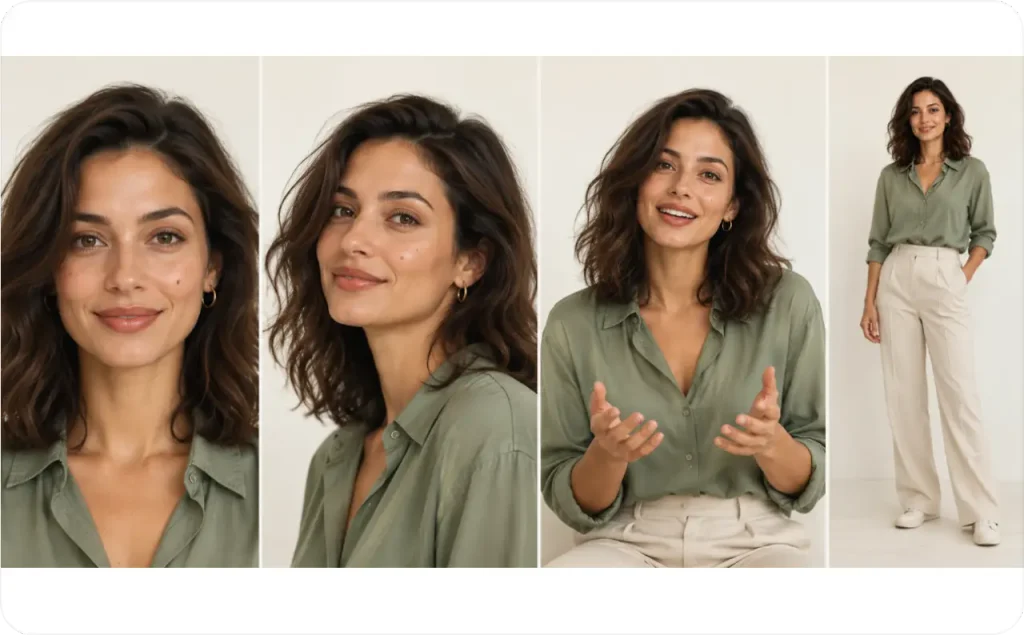
Inside generator, upload or select the portrait, then refer to it in your prompt with a tag like @img1:
“Use @img1 as the reference for Mara’s facial identity. Keep the same face, eye color, freckles, and hairstyle. Show her standing at a bright bathroom counter, wearing a cream blouse. Use natural morning light and realistic photography.”
Build a small reference set from the images you approve: a front-facing portrait, a three-quarter view, a full-body shot, and one mid-conversation pose. Store them with the original prompt, so you can always return to the exact description that produced her.
Step 7. Add a voice and create your first AI influencer video
Go back to the assignment from Step 1: a short moisturizer intro. The line from Step 2 already does most of the work, so the first script only needs a greeting:
“Hi, I’m Mara, the AI-created skincare guide for Cedar & Coast Skin. This is our Daily Moisture Cream. Let me show you the texture and where it fits in a simple routine.”
That’s about ten seconds, which is plenty for a first test.
You’ll need a video tool that works from your character’s image and a written script. In Zeely, the custom avatar method from earlier comes back here: upload Mara’s approved portrait as the reference, and she’s ready for video ads. The video builder’s Audio settings let you pick her voice and accent, and you can switch captions on. Choose a voice that fits the personality note from Step 2. I’ll walk through the full Zeely workflow later in this guide.
Watch the test twice. With the sound off, check that her lips keep pace with the words and her face still matches the approved portrait. With the sound on, listen for a voice that’s too flat or too excited for a friendly, practical guide.
Then look at the product. AI can misspell a brand name or invent details on a jar, so compare every label against the real packaging before you publish.
Create your own AI influencer video with Zeely
You already have Mara’s appearance, personality, and reference images. Now I’ll use Zeely’s AI avatar generator to turn her into a reusable video spokesperson for Cedar & Coast Skin.
How to create a custom AI avatar in Zeely
From Home, open Explore all tools, choose Custom avatars, and select Custom avatar. Upload Mara’s reference portrait and enter her name. Choose the available identity settings, including age group, appearance, style, features, and hair.
Use Prompt to describe her appearance or the scene you want to create. Then click Create avatar. Once generated, Mara will be available in the AI avatars collection for future videos.
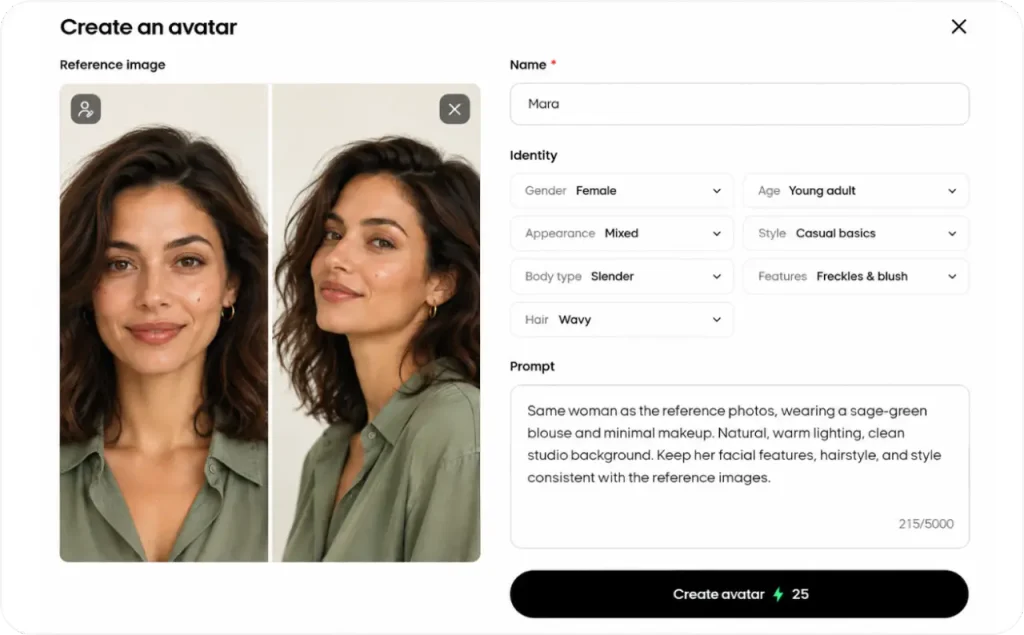
For the complete setup, follow Zeely’s custom AI avatar guide.
Turn your AI avatar into a branded video ad
Open Video ads and select Video ad. Choose your product or enter its details manually, then select a reference and your custom avatar. Add any scene instructions and click Create start image.
After reviewing Mara’s appearance, choose Full video ad and reuse the script from Step 7. Adjust the voice and accent in Audio, check the captions, and click Create video.
You can find the finished creative in Projects and use it in future social media content or Meta campaigns.
The official Zeely video ad guide covers the remaining settings.
How to use an AI social media influencer for brand marketing
Start on the profiles your customers already follow, and move the character into Facebook and Instagram ads once you have a few posts to learn from. That order keeps your first experiments free of ad spend.
Introduce your AI influencer on your brand’s social media
Your character doesn’t need its own Instagram or TikTok account. I’d introduce Mara on Cedar & Coast Skin’s existing profile, where customers already go for product information.
Post the introduction from Step 3 first. Then give her a regular slot, like a skincare question she answers every Thursday, so followers learn when to expect her. A separate account makes sense later, once you can keep it busy without recycling posts from the main one.
If you make the content in Zeely, Social posting publishes it to Instagram and TikTok for free. It only works with content created inside Zeely, so you can’t upload outside photos or videos through it. Posts also can’t include clickable links, so put the product URL in the caption or your bio.
Put your AI influencer in product promotions and social posts
Match each assignment to a question customers already ask. For Mara, that could look like this:
- Product explainers: she holds the moisturizer and talks through its texture and listed ingredients
- How-to posts: she answers one question, such as when moisturizer goes on in a morning routine
- Launch posts: she presents a new product using its approved photos and description
For anything that shows the product, I’d upload real photos of the jar as references. The AI then copies your actual packaging instead of inventing one. Run the label check from Step 7 on every post, and add prices to that check whenever they appear on screen.
Run paid ads with your AI influencer
A few weeks of organic posts show you which topics get comments and DMs. Those topics are your first ad ideas.
My first ad test for Mara would use two versions. One shows the moisturizer and explains its main benefit. The other opens with a buying question customers ask, such as whether it feels heavy under makeup, before the product appears. Her look stays identical in both, so the message is the only thing you’re comparing.
In Zeely, you pick both videos from Projects when you set up a Meta campaign. Setup recommends 3 to 5 creatives with a mix of static and video, so a static product ad can round out the set. After launch, the campaign dashboard shows CTR and CPA for each ad.
I cover the full production process in my guide on how to make AI avatar video ads.
If you want a dedicated character-training tool, Higgsfield’s Soul ID is another option; I tested its pricing and output in a separate review.
FAQ about creating an AI influencer
Yes, creating fictional AI influencers is generally legal in the United States. The FTC confirms that its consumer reviews rule doesn’t prohibit virtual influencers. However, using someone’s likeness without permission or publishing fabricated customer testimonials can violate the law. Check commercial-use rights before publishing.
Yes, Instagram generally allows AI influencers as long as their accounts follow the platform’s rules. According to Instagram’s Community Guidelines, you don’t have to use your real name, but impersonation and misleading accounts are prohibited. Clearly identify your fictional character and follow the platform’s AI content labeling requirements. If copycat accounts start using your character’s name, getting your brand account verified makes the official profile easier to find.
You can start with free AI image-generation tools, although their usage limits and commercial licenses vary. Creating consistent videos and custom avatars may require a paid subscription or generation credits. Zeely uses a credit-based system, so you’ll see the required credits before generating content.
Your rights depend on the AI tool’s licensing terms and your creative contribution. The U.S. Copyright Office explains that AI-generated material requires sufficient human authorship to qualify for copyright protection. Paying for a generator doesn’t automatically make every output copyrightable. I’d save original designs, scripts, and creative edits.
Sources
- Zeely Help Center: How to create an image in Playground
- Zeely Help Center: How to create a custom AI avatar
- Zeely Help Center: How to create a video ad
- Zeely Help Center: What is Social posting?
- Zeely Help Center: All about credits in Zeely
- Federal Trade Commission: The Consumer Reviews and Testimonials Rule, Questions and Answers
- Instagram: Community Guidelines
- U.S. Copyright Office: Copyright Office Releases Part 2 of Artificial Intelligence Report