11 ways to boost your Meta ads hook rate without spending more
Hook rate for Meta ads shows how many impressions turn into 3-second video views. Learn the formula, benchmark ranges, Ads Manager setup, and first 3-second fixes to improve weak video ad openings.
How to improve hook rate in Meta ads with better measurement
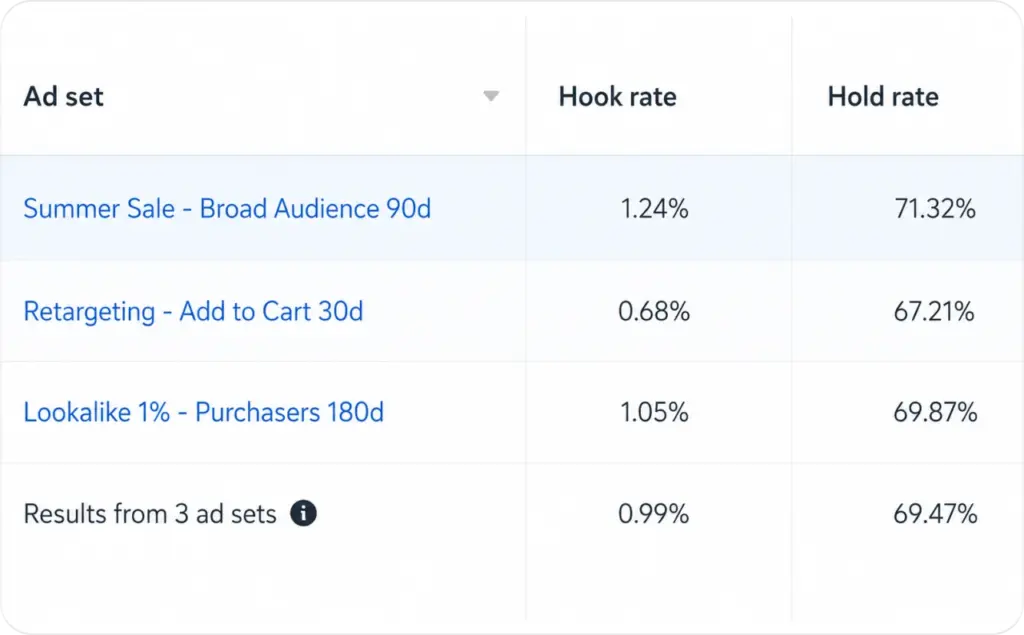
Hook rate in Meta ads is usually calculated as 3-second video views divided by impressions, multiplied by 100. Meta gives you 3-second video plays as a video metric, but hook rate is usually a custom metric in Ads Manager.
A good working range is often around 20% to 25%, while strong ads can reach 30% or higher. Still, judge hook rate with CTR, hold rate, CPC, and CPA. A high hook rate means people paused, not that they bought.
If hook rate is low, fix the first 3 seconds first. Check the first frame, product visibility, on-screen text, motion, placement crop, and audience match before rewriting the whole ad.
Hook rate Meta ads: what it really measures
Hook rate measures the share of impressions that turned into at least 3 seconds of watch time.
That sounds simple, but it answers a very specific question:
Did the opening make people pause long enough to watch?
It does not tell you whether people clicked. It does not tell you whether they bought. It does not tell you whether the offer is strong. It only measures the first attention gate.
Here’s the clean way to think about it:
| Metric | What it tells you | Where it fits |
| Impressions | How many times your ad appeared on screen | Delivery |
| 3-second video views | How many plays reached 3 seconds | Early attention |
| Hook rate | 3-second views divided by impressions | First 3 seconds |
| Hold rate | How many viewers stayed deeper into the video | Retention |
| CTR | How many viewers clicked | Interest |
| CPC | Cost for each click | Traffic cost |
| CPA | Cost for each result | Business result |
Meta defines impressions as the number of times an ad appears on screen for the first time. If the same ad is on screen, then the person scrolls away and back to it, Meta still counts that as one impression.
So hook rate is not a view count. It’s a ratio between exposure and early attention. You may also like to read an article about hook frameworks.
How to calculate hook rate in Meta Ads Manager
Use this formula:
Hook rate = 3-second video plays ÷ impressions × 100
Example:
| Impressions | 3-second video plays | Hook rate |
| 20,000 | 4,800 | 24% |
The math is:
4,800 ÷ 20,000 × 100 = 24%
Meta lets advertisers create custom metrics in Ads Manager and Ads Reporting. You can apply calculations to existing metrics, then save the formula for later reporting.
Set up a custom hook rate metric
In Ads Manager:
- Go to your campaign, ad set, or ad view.
- Click Columns.
- Choose Customize columns.
- Find Custom metrics.
- Click Create custom metric.
- Name it Hook Rate.
- Add this formula: 3-second video plays ÷ impressions.
- Set the format to percentage.
- Save it to your reporting view.
Visual asset note for CMS:
Screenshot brief: Ads Manager custom metric setup
Alt text: Meta Ads Manager custom metric setup for hook rate using 3-second video plays divided by impressions.
Callout text: “Use 3-second video plays, not total video plays.”
3-second video views Meta ads: why this metric matters
Meta’s 3-second video views metric gives you a practical early signal. It shows whether the video made someone stay past the first blink of attention.
This matters because Meta placements behave differently. A Reel, Story, Feed video, and in-stream ad do not get watched in the same setting. Your first frame may work in Feed but fail in Stories because the text is too low, the product is too small, or the opening feels too slow.
I use hook rate as a creative filter, not as a final success metric.
A high hook rate means the open is doing its job. A low hook rate means the ad is getting served, but the first seconds are not earning attention.
Good hook rate Meta ads: working ranges to use
There is no official Meta benchmark for hook rate because hook rate is usually a custom metric. Treat public ranges as a starting point, then build your own account baseline.
I’d use this benchmark table:
| Hook rate | What it usually means | What to do next |
| Under 15% | Weak opening or wrong placement fit | Rebuild first frame and first second |
| 15% to 20% | Needs testing | Try 3 to 5 new openings |
| 20% to 25% | Solid working range | Check hold rate and CTR |
| 25% to 30% | Strong first 3 seconds | Scale carefully or test variations |
| 30%+ | Strong attention signal | Check if clicks and CPA also hold |
Do not judge an ad by hook rate alone.
A 35% hook rate with weak CTR may mean people watched, but the promise was unclear. A 16% hook rate with strong CPA may mean the audience is smaller but highly qualified.
Hook rate benchmark: compare it the right way
The best benchmark is your own account history.
Compare hook rate by:
| Segment | Why it matters |
| Placement | Reels, Stories, Feed, and Audience Network behave differently |
| Audience | Cold, warm, and retargeting groups pause for different reasons |
| Creative format | UGC, product demo, founder video, and motion graphics vary |
| Offer type | Discount, lead magnet, product launch, and demo ads create different intent |
| Video length | A 7-second ad and a 45-second ad should not be judged the same way |
| Campaign goal | Leads, purchases, traffic, and awareness campaigns attract different viewers |
Do this now: create a saved report that shows hook rate by placement.
Check this: if Reels hook rate is low but Feed is healthy, the hook may not fit vertical swipe behavior. If Feed is low but Stories is healthy, your first frame may need stronger context for slower scrolling.
Expected result: you stop rewriting the whole ad when only one placement needs a new cut.
What to watch with hook rate: CTR, hold rate, CPC, CPA
Hook rate tells you whether people paused. It does not tell you whether they cared enough to act.
Pair it with these metrics:
Hook rate plus CTR
CTR tells you whether the ad earned a click. In digital ads, CTR is calculated as clicks divided by impressions, multiplied by 100.
Use this pair first.
| Pattern | Meaning | Fix |
| Low hook rate, low CTR | People do not pause or click | Fix first frame, promise, and audience match |
| Low hook rate, high CTR | Fewer people pause, but the right ones click | Test wider visual open, keep the offer |
| High hook rate, low CTR | People watch, but do not act | Fix offer clarity and CTA |
| High hook rate, high CTR | Strong opening and message | Test scale, new angles, and landing page fit |
Hook rate plus hold rate
Hold rate checks whether people stay after the first 3 seconds.
A simple working formula:
Hold rate = ThruPlays ÷ 3-second video plays × 100
Meta’s video metric rules matter here. For longer watch metrics, rewatched parts do not count as new watch time in the same way. Meta gives an example where a person watches 10 seconds, rewinds 5 seconds, and that replayed segment does not turn it into a 15-second ThruPlay.
Use hook rate to judge the open. Use hold rate to judge the body.
Hook rate plus CPC
Meta defines CPC for link clicks as the average cost for each link click.
If hook rate rises and CPC drops, your first 3 seconds are probably helping traffic efficiency. If hook rate rises but CPC does not move, the opening may be entertaining without creating buying intent.
Hook rate plus CPA
CPA is the truth filter.
A hook that attracts the wrong people can lift hook rate and hurt CPA. This happens when the first frame is shocking, funny, or vague, but the product is not clear.
Expected result: your best ad is not always the one with the highest hook rate. It’s the one with a healthy hook rate, steady CTR, and profitable CPA.
Low hook rate Meta ads: diagnose before you edit
A low hook rate usually comes from one of five places.
1. The first frame is unclear
The viewer should understand the topic before they decide to scroll.
Weak first frame:
“Here’s something I wish I knew sooner.”
Stronger first frame:
“Your Meta ad gets clicks, but no sales? Check the first 3 seconds.”
The second version gives context fast.
2. The product appears too late
If your product is hidden until second 6, Meta may still deliver impressions, but viewers may never reach the explanation.
For ecommerce, show the product in use immediately. For apps, show the screen result first. For service businesses, show the before state right away.
3. The opening is made for sound-on viewing
Many viewers watch without sound at first. If the hook depends on voiceover only, the first 3 seconds may feel empty.
Use readable text on screen. Keep it short enough to read in one glance.
4. The placement crop hurts the message
A square video can lose force in Reels or Stories. A caption can sit under interface elements. A product can look small on a vertical screen.
Check each placement preview before judging the creative.
5. The audience does not recognize the problem
Sometimes the opening is clear, but it speaks to the wrong person.
If cold audiences ignore the hook and warm audiences respond, the issue may not be the first frame. It may be audience education.
How to improve hook rate Meta ads: 8 optimization levers
These are not hook examples. They are editing levers you can test when the number is low. Read now about the best UGC hook examples.
1. Replace the first frame
Your first frame should do one job: make the ad instantly legible.
Test these frame types:
| First-frame type | Best for |
| Product in motion | Ecommerce and apps |
| Before state | Beauty, home, fitness, services |
| Result screen | SaaS, apps, lead gen |
| Pattern break | Broad cold audiences |
| Proof snapshot | Offers with reviews, sales, or results |
Do this now: export five ad thumbnails from your current creatives. Show them without sound or caption. If the product and promise are unclear, rebuild the first frame.
2. Put the main promise on screen by second 1
Do not wait for the narrator to get there.
A good first-second line is specific:
“Turn one product photo into 5 Meta ad videos.”
A weak one is vague:
“Want better content?”
The viewer should know what’s in it for them immediately.
3. Cut the setup
Many low hook rate ads start with brand intro, logo animation, slow walking, or filler motion.
Cut anything that does not sell the next second.
A cleaner opening rhythm:
| Time | Job |
| 0.0 to 0.5 sec | Show product, pain, or result |
| 0.5 to 1.5 sec | Add clear text promise |
| 1.5 to 3.0 sec | Show proof, demo, or contrast |
Visual asset note for CMS:
Graphic brief: Simple hook rate formula
Alt text: Hook rate formula for Meta ads: 3-second video views divided by impressions times 100.
Graphic copy: “Hook Rate = 3-second video views ÷ impressions × 100”
4. Make motion start immediately
A still frame can work, but it needs a strong reason. Most weak first frames feel static.
Try:
| Low-motion open | Better test |
| Person sitting before speaking | Person already showing the result |
| Product on table | Product being used |
| App logo | App screen changing |
| Founder intro | Founder holding the problem object |
Movement helps the eye find the ad faster.
5. Match the hook to the placement
Reels and Stories need vertical-first framing. Feed can handle more context, but the opening still needs a clear visual center.
Create separate first cuts for:
| Placement | First 3 seconds should favor |
| Reels | Fast visual context, tall framing, native feel |
| Stories | Big text, clear product, safe-zone spacing |
| Feed | Strong headline, product clarity, slightly more context |
| In-stream | Faster payoff, no slow build |
6. Test audience warmth separately
A cold audience needs context. A warm audience may respond to product proof faster.
Do not mix both into one hook-rate read.
Example:
| Audience | Better first 3 seconds |
| Cold | Problem, pain, or category education |
| Warm | Product result, proof, comparison |
| Retargeting | Offer, urgency, objection handling |
If retargeting hook rate is high and cold hook rate is low, do not assume the creative is bad. Build a cold-audience version.
7. Change the opening angle, not the whole ad
When hook rate is low but hold rate is decent, keep the body and change only the first 3 seconds.
Test 3 to 5 openers against the same middle and end:
| Test | What changes |
| Product-first | Show the product immediately |
| Problem-first | Show the pain or mistake |
| Proof-first | Show review, result, or metric |
| Demo-first | Show how it works |
| Offer-first | Show discount, bundle, or bonus |
This keeps the test clean.
8. Fix visual readability
Small text, low contrast, cluttered backgrounds, and tiny product shots hurt early attention.
Use this quick audit:
| Element | Check |
| Text | Can I read it in one second? |
| Product | Can I identify it on a phone screen? |
| Face | Is expression visible and relevant? |
| Background | Does it compete with the message? |
| CTA | Is it visible but not too early? |
Visual asset note for CMS:
Checklist card: Audit your first 3 seconds
Alt text: Checklist for auditing the first 3 seconds of a Meta video ad.
Card copy: Product visible, promise clear, text readable, motion starts fast, placement crop checked.
Before and after
Use this as your internal creative review format.
| Element | Before | After |
| First frame | Founder sitting at desk | Founder shows failed ad result on screen |
| Text | “Need better ads?” | “Your Meta ad gets clicks, but no sales?” |
| Product | Appears at second 7 | Appears in first second |
| Motion | Slow camera push | Screen changes immediately |
| Viewer reason | Unclear | Clear pain and payoff |
Expected result: the viewer understands the ad before the voiceover does any work.
Decision tree: what your hook rate pattern means
Use this when a campaign is live and you need to decide what to fix first.
Low hook rate, low CTR
Problem: the open is weak, and the message is not earning clicks.
Fix:
- Replace the first frame.
- Rewrite the first on-screen line.
- Show product or pain earlier.
- Check placement crop.
- Test a new audience angle.
Low hook rate, high CTR
Problem: the ad attracts fewer viewers, but the viewers who stay are interested.
Fix:
- Keep the offer.
- Make the first frame more legible.
- Test a clearer visual version.
- Avoid changing the whole ad too soon.
High hook rate, low CTR
Problem: people pause, but the ad does not create enough intent.
Fix:
- Clarify the offer by second 5.
- Add proof earlier.
- Strengthen CTA.
- Remove curiosity that does not connect to the product.
High hook rate, high CTR, high CPA
Problem: the ad earns attention and clicks, but the business result is too expensive.
Fix:
- Check landing page message match.
- Compare CPA by placement.
- Review audience quality.
- Test a stronger offer.
- Check checkout or lead form friction.
When the problem is not the hook
Sometimes hook rate becomes the scapegoat.
The hook is not the main issue when:
| Signal | Likely issue |
| Hook rate is healthy, CTR is low | Message or CTA |
| Hook rate and CTR are healthy, CPA is high | Offer, landing page, or checkout |
| Cold hook rate is low, warm hook rate is high | Audience education |
| Reels hook rate is low, Feed is high | Placement fit |
| Hook rate rises, CPA worsens | Curiosity is attracting the wrong people |
This is why I don’t like judging creatives from hook rate alone. The first 3 seconds matter, but they are only the door.
Creative roadmap for Meta hook rate testing
Use a 2-week roadmap if you have enough spend and traffic.
Week 1: Build the baseline
Set up your custom hook rate metric first. Then pull results by ad, placement, and audience.
Track hook rate to judge the first 3 seconds. Track hold rate to see if people keep watching after the hook. Use CTR to measure click intent, CPC to understand traffic cost, and CPA to check business cost. Keep spend in the report too, because it helps you judge whether the data is strong enough.
Do not make decisions from tiny samples. A creative with 300 impressions does not have enough data to judge.
Week 2: Test first 3-second variants
Pick your top two body creatives. Then create three to five new openings for each one.
Keep the body footage, offer, CTA, and landing page the same. Change only the first frame, first line, opening visual, and first 3-second pacing.
This gives you a cleaner test. You’ll see whether the hook is the real lever, instead of guessing from a fully rebuilt ad.
Create hooks with the help of AI
Now that you know how to improve your meta hooks, it’s time to learn how TikTok hooks can make your videos even more attention-grabbing. The first few seconds of any ad decide whether people keep watching or keep scrolling. With Zeely AI, you can instantly generate scroll-stopping hooks designed for short-form video ads and social media content. Zeely helps you create engaging openings, ad scripts, and video concepts in seconds without needing copywriting experience. Try Zeely AI today and create your first high-converting video hook that captures attention fast.

Emma blends product marketing and content to turn complex tools into simple, sales-driven playbooks for AI ad creatives and Facebook/Instagram campaigns. You’ll get checklists, bite-size guides, and real results, pulled from thousands of Zeely entrepreneurs, so you can run AI-powered ads confidently, even as a beginner.
Written by: Emma, AI Growth Adviser, Zeely
Reviewed on: May 15, 2026