How to hide followers on Instagram in 2026
Can you hide followers on Instagram from strangers or one specific person? Instagram has no universal hide switch, but you can limit list access with a private account, remove an approved follower, or block one account.
Key takeaways
- To understand how to hide followers on Instagram, identify the viewer first. A private account limits list access for non-followers, while approved followers keep access.
- Instagram has no universal setting that hides the followers list, following list, and follower count from everyone.
- For one person, keep the account private and remove that follower. Removal alone does not hide information on a public profile.
- Restrict, Mute, Close Friends, and Hide Story From control interactions or content. They do not hide profile lists.
- Business and creator profiles should check account-type requirements before changing settings or separating personal and public activity.
“Hide followers” can mean hiding names, the total count, or both lists. It can also mean hiding them from everyone or one person. Each goal needs a different Instagram privacy control.
I’ll show you what Private, Remove, Block, and Restrict actually change. You can then choose the right option for a personal, creator, or business profile.
Can you hide followers on Instagram?
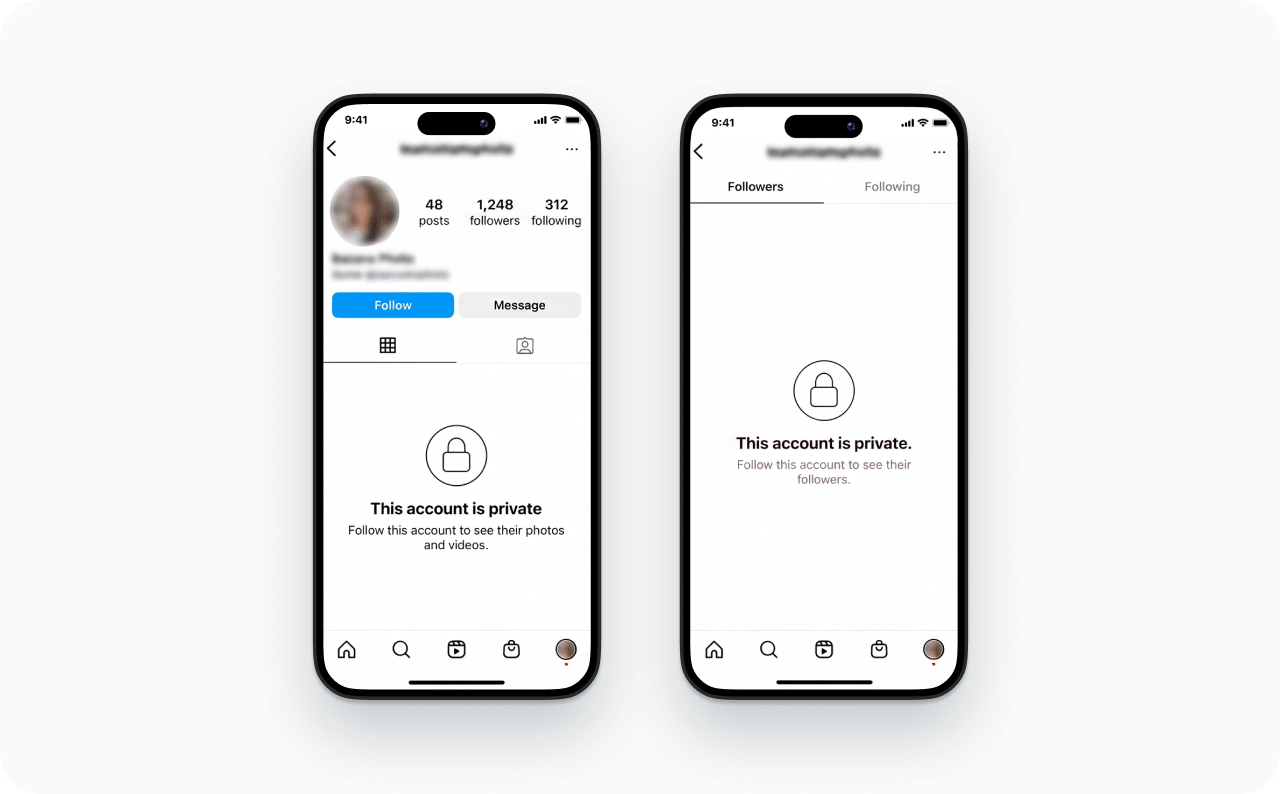
You cannot hide every follower detail from everyone with one Instagram setting. A private account limits who can browse your full followers and following lists. However, people you already approved keep access until you remove or block them. Your follower count is separate and may remain visible.
Followers list vs following list vs follower count
These three profile elements sound similar but behave differently:
| Profile element | What it means | Can you hide it selectively? |
| Followers list | Accounts following you | Only indirectly through Private, Remove, or Block |
| Following list | Accounts you follow | No separate native hide toggle exists |
| Follower count | The total shown on your profile | No native follower-count hide setting exists |
Going private can hide the names inside your lists from non-followers. It does not make your entire profile disappear or remove approved followers.
Which Instagram controls actually hide your lists?
Choose the control based on who should lose access. The wrong setting may quiet an interaction while leaving your lists unchanged.
| Control | What changes | Hides followers or following? | Best use | Main limitation |
| Private account | Non-followers need approval | Yes, from non-followers | Limiting broad public access | Approved followers keep access |
| Remove follower | Removes one approved follower | Yes, when your account stays private | One person without blocking | Public information remains public |
| Block | Limits one account’s profile access | Yes, for that blocked account | A firm account-level boundary | Other accounts may still view a public profile |
| Restrict | Limits comments, DMs, and activity signals | No | Quietly reducing interactions | The person may still access your lists |
| Mute | Changes what you see in your feed | No | Hiding someone’s posts or Stories from yourself | It changes nothing for the other person |
| Close Friends or Hide Story From | Changes the Story audience | No | Sharing Stories with selected people | Profile-list visibility stays unchanged |
How to hide followers with a private Instagram account
A private account is the broadest native option for hiding follower names from strangers. Non-followers cannot browse your full lists, but existing approved followers remain inside the gate. You must remove them separately when needed.
Check your account type before switching
Open your profile and check whether Instagram labels it Personal, Creator, or Business. This matters more than most guides admit. Instagram’s Help Center states that business accounts cannot be set to private, so the toggle will not appear for you at all.
Switching back to a personal account is possible, but it carries a real cost. Instagram erases your insights data every time you switch. If you have been tracking reach and follower demographics for a bakery or a coaching business, that history is gone and does not come back when you switch again.
Creator accounts sit between the two, and availability has shifted with past rollouts. Check your own settings rather than assuming. If the Private account toggle is missing, read Zeely’s complete guide to making your Instagram account private before you change anything, and weigh the professional-tool tradeoffs first.
How to make your follower list private on iPhone or Android
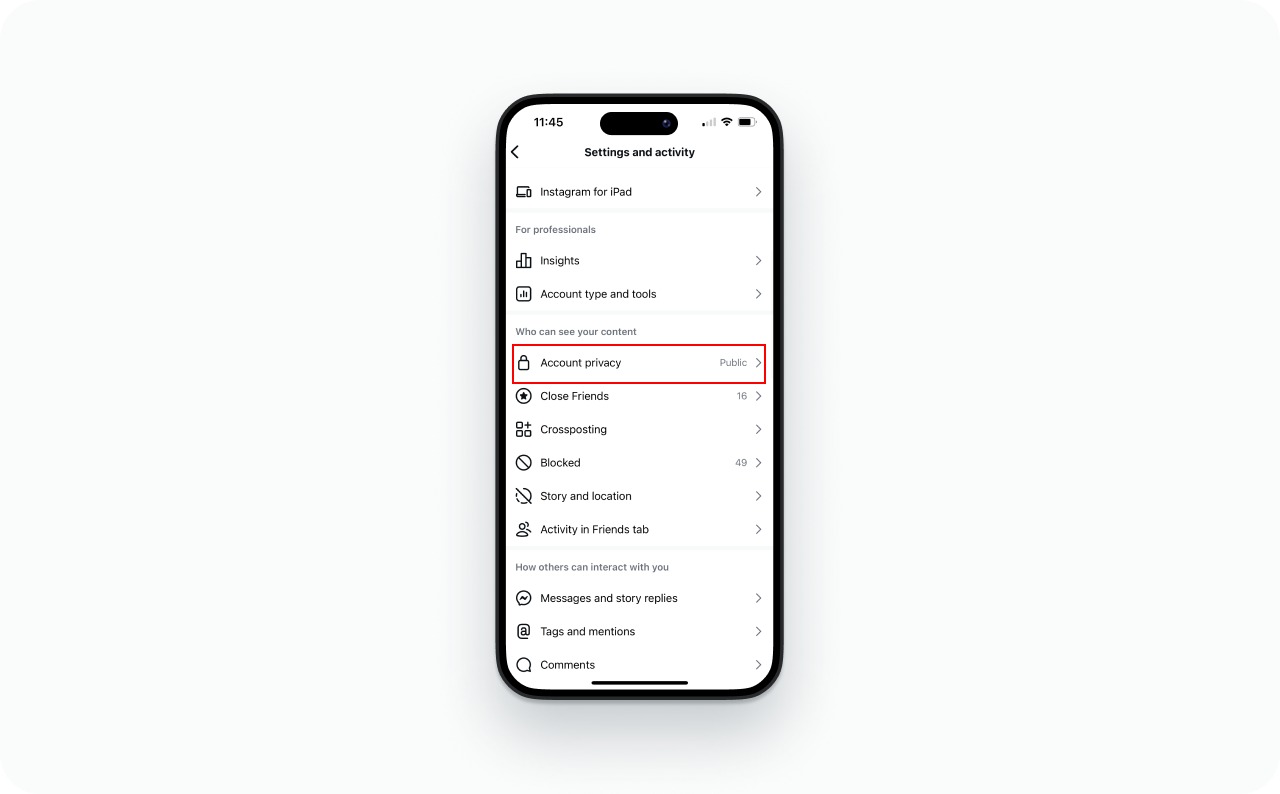
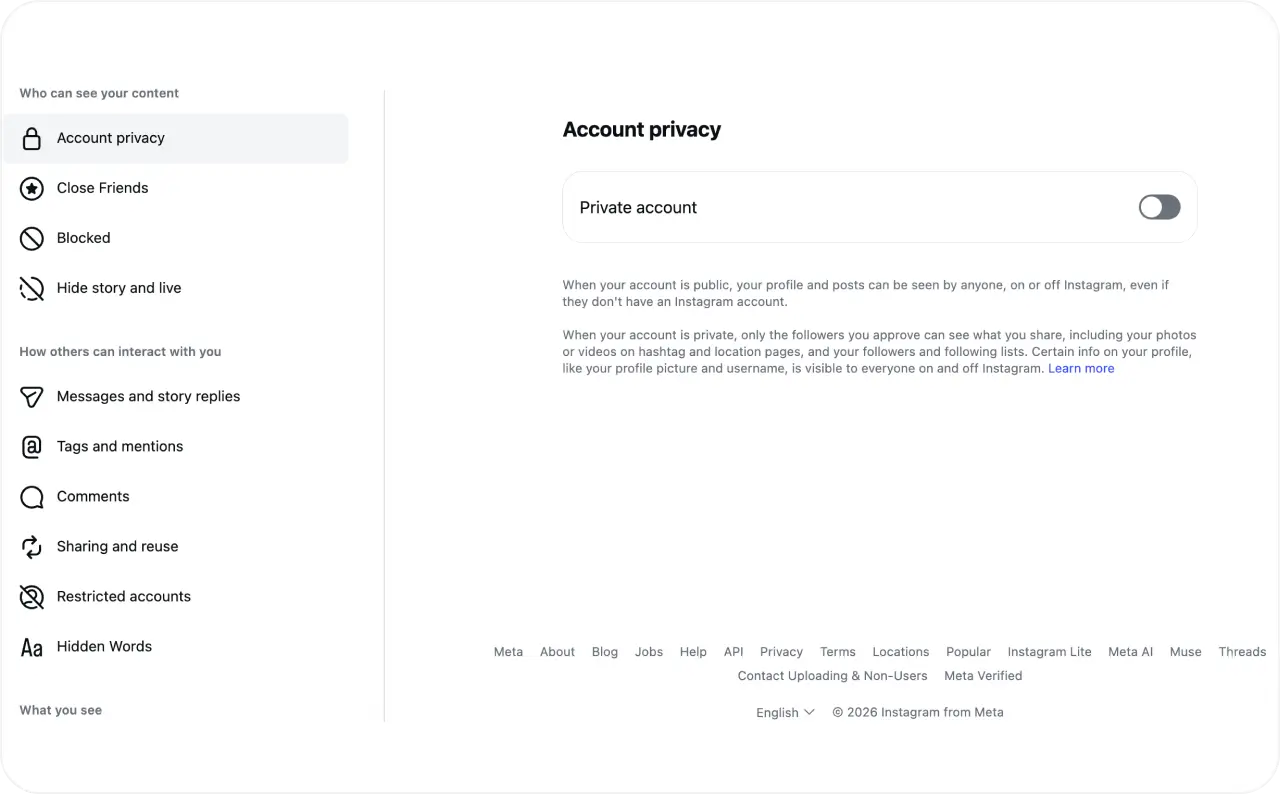
The current mobile path usually places Account privacy under “Who can see your content.” A June 2026 Instagram privacy walkthrough documents the same route on mobile and desktop.
- Open Instagram and go to your profile
- Tap the three-line menu in the top-right corner
- Find Account privacy under Who can see your content
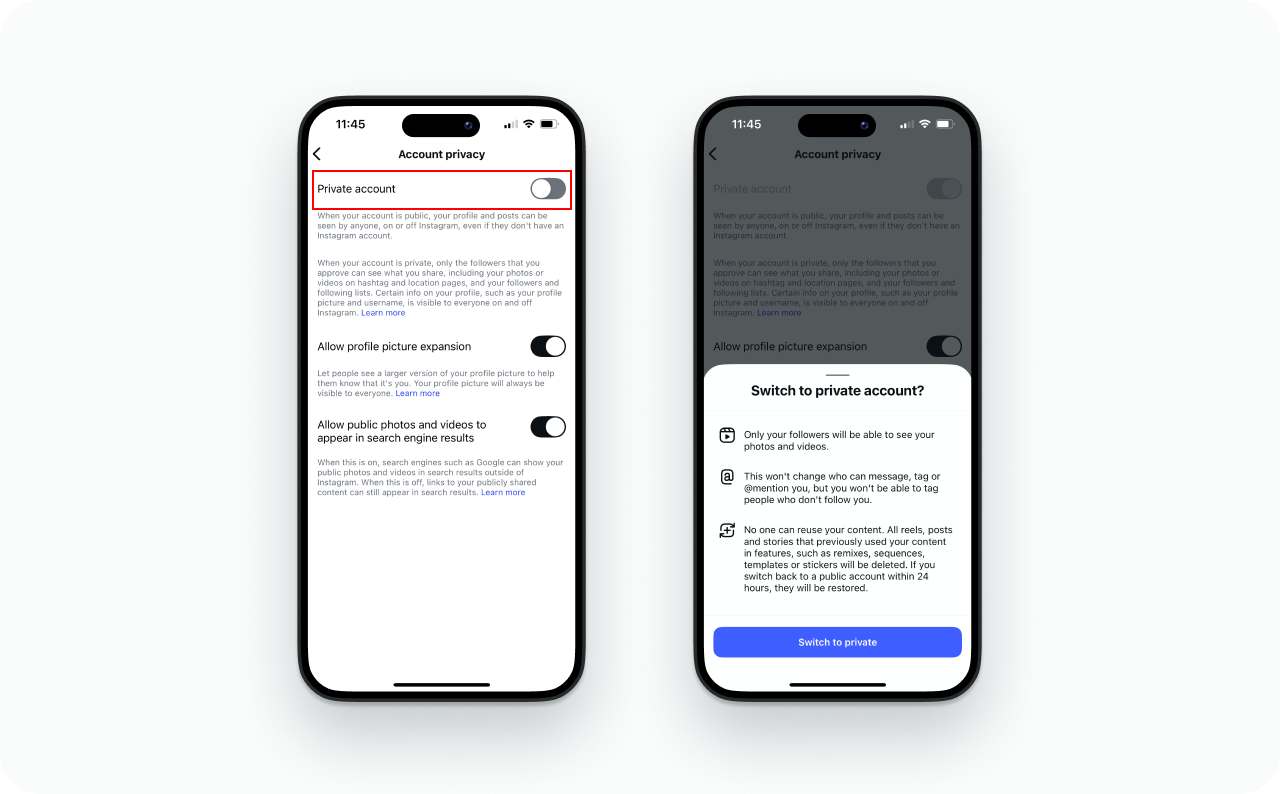
- Turn on Private account
- Tap Switch to private if Instagram asks for confirmation
Menu labels can differ by app version or region. If Account privacy is not visible, use the settings search and type “privacy.”
How to hide followers on Instagram on desktop
On Instagram.com, open More, choose Settings, then open Account privacy. Turn on Private account and confirm the change. If the web menu differs or the option is missing, use the mobile app instead.
How to check whether the change worked
View your profile from a separate account that is not an approved follower. That viewer may still see your username, profile image, bio, and counts. However, they should not be able to browse the full names inside your followers and following lists.
Repeat the check with an approved follower. This comparison confirms whether the privacy boundary matches your goal.
How to hide followers from one person without blocking
You can hide your lists from one person without blocking only when your account is private. Remove that person from your followers, then keep the profile private. They become a non-follower and must request access again.
If your account is private, remove the follower
Use this route when you want to revoke access without blocking:
- Open your Instagram profile
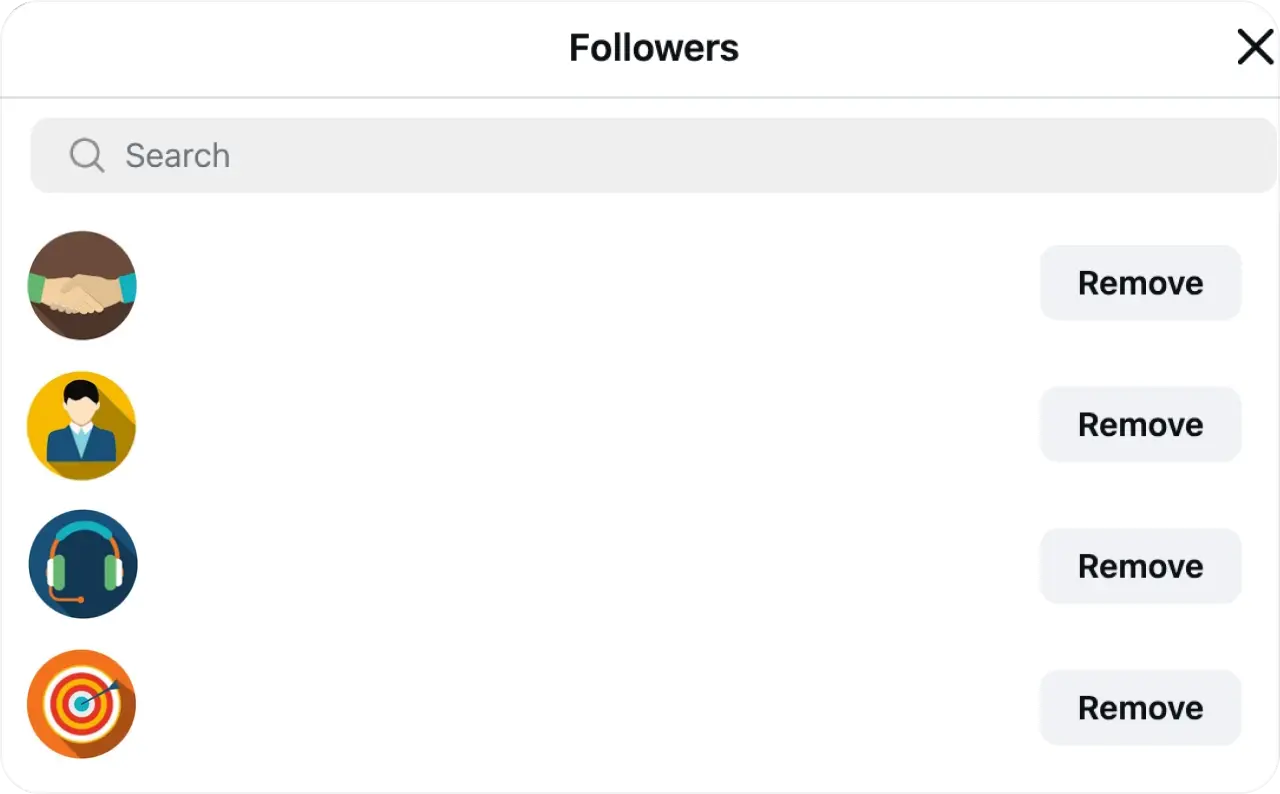
- Tap Followers
- Search for the account you want to remove
- Tap Remove, then confirm
The person no longer counts as an approved follower. If your account remains private, they cannot restore access without sending another follow request.
If your account is public, removal does not hide the lists
Removing someone changes their follower status, not your profile’s public visibility. They can still visit your public profile and see anything available to everyone.
If you must remain public and deny one account normal access, use Block instead. Do not treat removal as a privacy wall for a public account.
Will Instagram notify someone when you remove them?
A July 2026 walkthrough of Instagram’s removal flow confirms that Instagram does not notify the removed account. That does not make the change impossible to notice. They may see a Follow button, stop receiving your posts, or discover that a new request is required.
How to hide followers on Instagram without a private account
You cannot globally hide your followers and following lists while keeping the same profile public. Instagram does not offer that combination. You can block one account or separate public business activity from private personal connections.
Block one account when you need a hard boundary
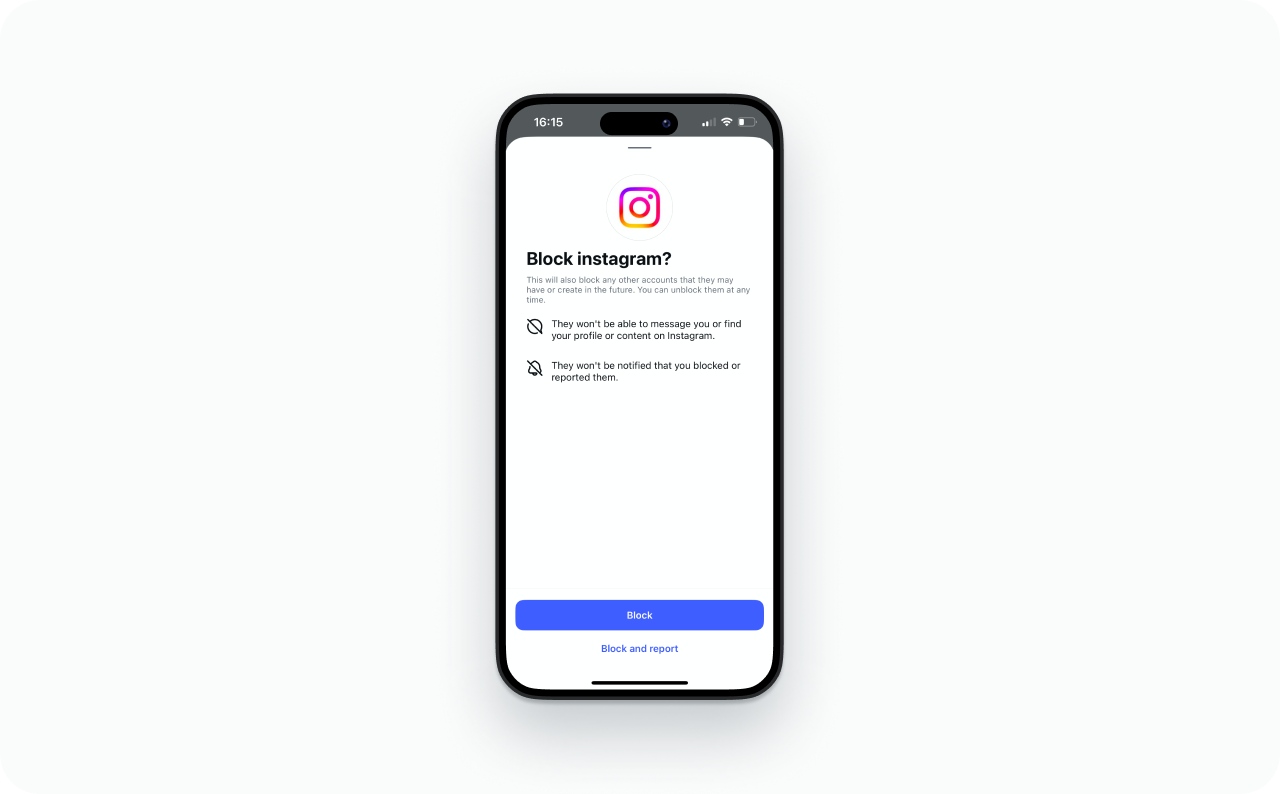
I would use Block when access matters more than keeping the interaction subtle. Open the person’s profile, tap the three-dot menu, choose Block, and confirm. Meta’s updated blocking guidance explains that Instagram may also offer options covering other accounts the person has or creates.
Blocking applies to the account covered by your selected option. It cannot guarantee that the same person will never see public information through another account or logged-out view.
Separate your public business profile and private personal account
Account separation often gives small businesses a cleaner boundary. Keep products, campaigns, and customer discovery on the public business profile. Keep family, friends, and personal connections on a private personal profile.
This does not hide the business profile’s lists. It separates two audiences with different privacy needs. Zeely’s guide explains how to create a separate Instagram account without mixing login details or content plans.

Restrict, Mute, and Close Friends do not hide follower lists
Restrict is an interaction control, not a list-privacy control. Meta explains that Restrict changes comment visibility, moves messages to requests, and hides read or activity signals. It does not hide your followers or following lists.
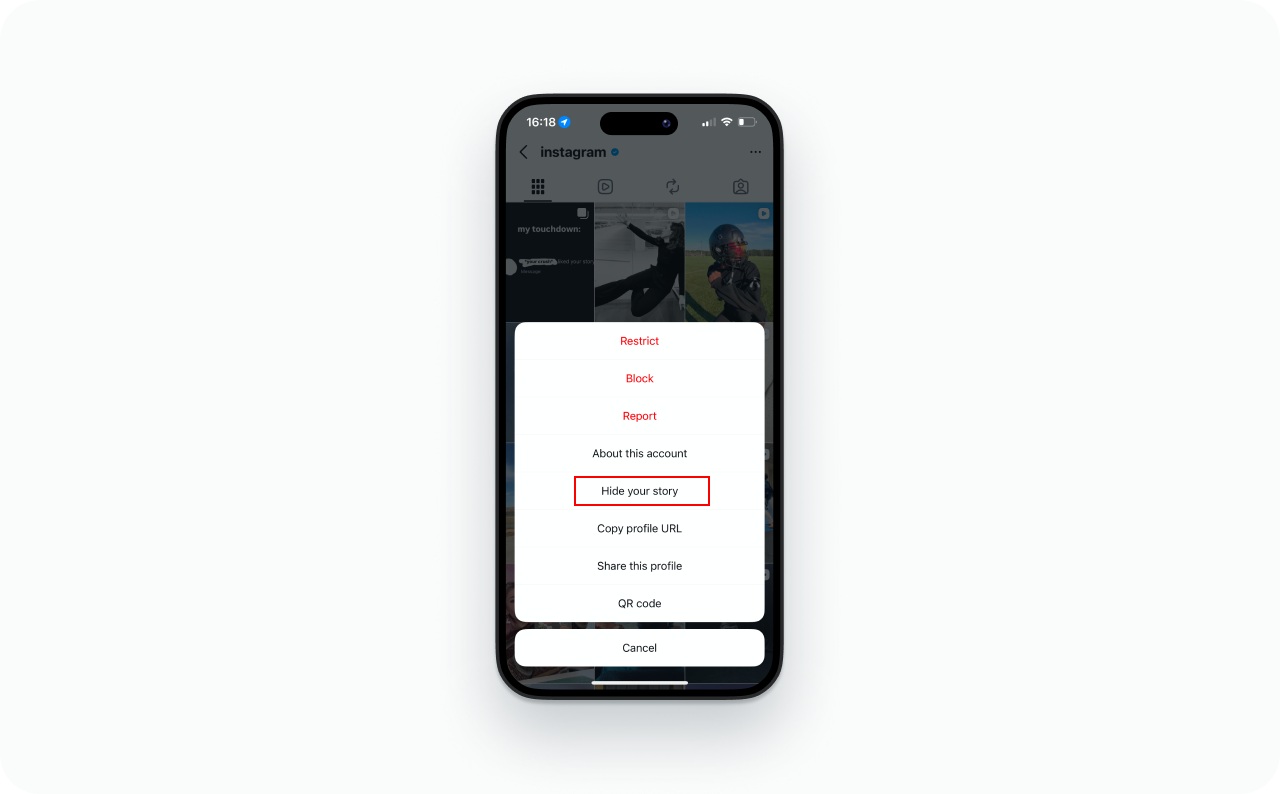
Mute changes what you see from another account. Close Friends and Hide Story From control Story audiences. You can control which Instagram Stories you see, but that setting does not change what someone sees on your profile.
Can you hide your following list or follower count?
You cannot hide your following list with a separate toggle. Private, Remove, and Block affect who can access it. Instagram also provides no native setting that hides your profile’s follower count from everyone.
Can you hide your following list on Instagram?
Your followers and following lists follow the same broad access logic. A private account limits full list access for non-followers. Approved followers can still browse them, unless you remove or block that account.
Unfollowing someone changes which account appears inside your following list. It does not change who can view the remaining list.
Can you hide your follower count on Instagram?
No native setting hides your follower count from everyone. The number can remain visible on a private profile even when non-followers cannot open the full list of names.
Do not confuse this with Instagram’s controls for like or view counts. Those settings apply to engagement on posts, not the follower total displayed on your profile.
Why can someone still see your Instagram followers?
Start with their relationship to your account. Most failed privacy attempts come from an approved follower, a public profile, or the wrong control.
They are still an approved follower
Going private does not remove people you approved earlier. They keep access until you remove or block them. Open Followers, find the account, and choose Remove if you want to revoke that access.
Your account is still public or uses a different account type
Reopen Account privacy and confirm that Private account stayed enabled. If the toggle is missing, check whether the profile is Professional. Use the private-account guide for the complete account-type process instead of guessing through menus.
Restrict or Mute changed interactions, not access
Restrict can quiet comments and messages. Mute can clean up your own feed. Neither setting changes who can browse your followers or following lists. Return to the decision table and choose Private, Remove, or Block.
The list is not loading, which is a different problem
A blank, partial, or endlessly loading list does not prove someone hid it. Update Instagram, compare the mobile and web versions, then try again later. If the problem continues, use Instagram’s official support route.
Avoid explanations about cache, legal limits, scraping detection, or sudden follower growth unless Instagram shows a message confirming that exact cause.
Choose the right Instagram privacy action
Match the action to the person who should lose access:
- Hide lists from strangers: make the account private
- Remove one approved follower without blocking: stay private and remove them
- Limit one account while remaining public: block that account, while remembering the alternate-account limitation
- Separate customer discovery from personal connections: use public business and private personal profiles
No native setting hides every list and count from everyone. If business discovery matters, keep the public profile focused on customers and use a separate private space. You can then work on ways to reach people who do not follow you without mixing personal connections into the same account.
FAQ
It usually means one of three things, and they need different settings. Hiding the names inside your followers or following list. Hiding the total follower count on your profile. Or keeping one specific person out of those lists. Instagram has no single control that covers all three. A private account limits list access for non-followers, Remove revokes one approved follower, and Block cuts off one account. The follower count stays visible either way.
No. Restrict changes how their comments, messages, and activity signals work. It does not hide your followers list, following list, or follower count. If the restricted person remains an approved follower, they may retain the same list access as before.
Instagram does not send a direct removal notification. However, the person can notice that they no longer follow you. They may also see a Follow button or discover that your private content now requires another request.
Yes. Approved followers can usually access the followers and following lists on a private account. Switching to Private does not remove existing followers. Remove or block the account if you need to revoke its access.
A business account cannot be set to private, so the usual route is closed. You would need to switch to a personal account first, and that erases your insights data each time you do it. Creator accounts vary, so check your own Account privacy settings. If you need public discovery and private personal connections at the same time, running two separate accounts is usually the better answer than switching types back and forth.
No third-party app can add a native list-privacy setting that Instagram does not provide. Do not share your password or follow a suspicious login link. Meta’s 2026 anti-scam update explains how deceptive links and impersonation sites are used to capture people’s trust and information.

Emma blends product marketing and content to turn complex tools into simple, sales-driven playbooks for AI ad creatives and Facebook/Instagram campaigns. You’ll get checklists, bite-size guides, and real results, pulled from thousands of Zeely entrepreneurs, so you can run AI-powered ads confidently, even as a beginner.
Written by: Emma, AI Growth Adviser, Zeely
Reviewed on: September 30, 2026