Kling 4.0 review: Is Kling AI’s update worth the hype?
Does Kling 4.0 make video ads easier to create? I compare it with Kling 3.0, test it on a 10-second ad in Zeely Playground, and show where the upgrade pays off.
Kling 4.0 is worth a look if you need more say over how an ad unfolds. Its expanded reference and keyframe controls let you specify important visual moments before generating the footage. I’d judge the upgrade by how closely the result follows those decisions.
Key takeaways
- Kling 4.0 pays off when one ad needs 15–30 seconds or several planned story beats; for a single 5–10-second shot, Kling 3.0 already handles multi-shot and native audio for less
- The real upgrades are 30-second generation, up to 10 keyframes, and up to 15 references; stereo audio and extra voice languages are smaller wins
- 4K and 10-bit HDR are on the spec sheet, but Kling’s API and fal.ai currently output 720p and 1080p, and two-minute video extension is still “coming soon”
- In Zeely Playground, Kling 4.0 works with a prompt plus start and end frames, runs 3 to 30 seconds, and costs 20 credits per second
The example in this review is a fictional trip to Jupiter, sold through a panoramic cabin view.
Specs and pricing checked October 30, 2026.
What is Kling 4.0?
Kling 4.0 is Kuaishou’s AI video generation model, launched on October 15, 2026. It creates footage from text prompts and reference images. The model supports up to 30 seconds of video in a single generation. A faster version, Kling 4.0 Flash, generates up to 20 seconds at 720p but doesn’t support start and end frames or keyframes.
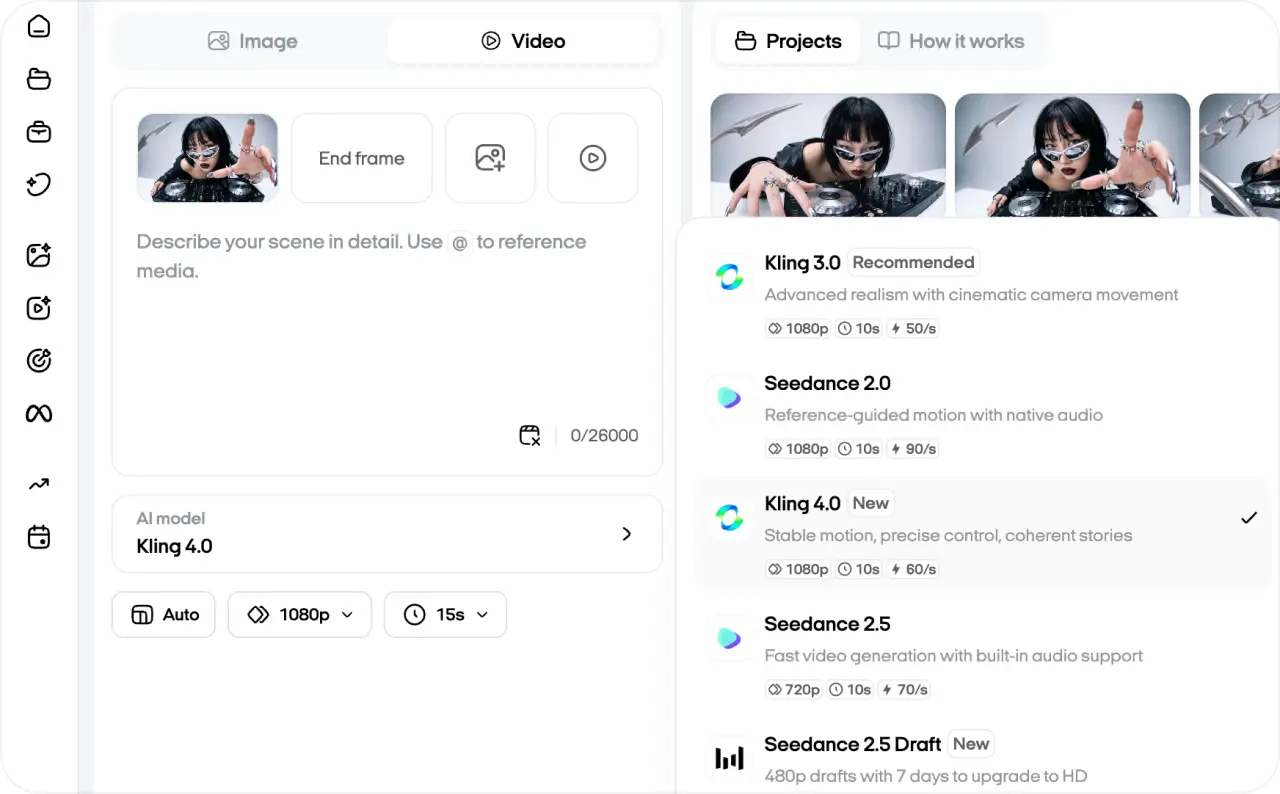
You can access it through Kling AI or select it in Zeely’s Playground. In Zeely, you can start with a prompt alone or add images to guide the opening and ending. I’m focusing on that setup here, where you can compare models while working on the same ad concept.
Kling 4.0 key features
I’d pay closest attention to reference controls and keyframes. They give you more ways to specify what belongs in a shot in advance.
Longer scenes with room for a reveal
The extra running time lets an action finish before your offer appears. I’d use that space for a reveal or a scene change, while keeping a single product close-up short. Choose the duration around what needs to happen on screen.
More references to guide the scene
Omni Reference accepts up to 15 reference assets in one task, including images, videos, and voice styles. Images can establish a subject’s appearance, while a video can show the intended pacing. For an ad, I’d choose each reference to answer a specific question, such as what the product looks like from the side.
Keyframes for specific visual moments
The model supports up to 10 keyframe images placed along the timeline. That’s useful when you need a particular composition at a chosen moment, such as a final frame with space for your offer. Kling treats Omni Reference and Keyframes as separate creation modes whose capabilities can’t be combined in one generation.
Creative Recreation for trending ad formats
Creative Recreation rebuilds a trending video around your own product. For ads, it may be the most practical new feature: you start from a format that already works on social media and swap in your product and brand.
Stereo audio, more voice languages, and HDR on the way
Kling’s specification table lists two-channel stereo audio, and 4.0 adds Portuguese, German, French, and Hindi voice options. 4K is listed too, but 3.0 already supports it, and Kling’s API currently outputs 720p and 1080p. Its guide still marks 10-bit HDR and video extension up to two minutes as “coming soon.” For social ads, I’d check fine details at the intended viewing size before choosing the largest export.
In Zeely, available controls depend on the selected model. In Playground, Kling 4.0 works with a prompt plus start and end frames, runs 3 to 30 seconds, and lets you set resolution, aspect ratio, and sound. There is no multi-keyframe timeline or separate mode for Omni Reference.

Kling 4 motion control: What can you direct?
You can describe camera movement in your prompt, including push-ins, tracking shots, and orbits. Specify the subject’s movement separately. A camera moving past a stationary spacecraft should produce a different shot from a spacecraft flying past a stationary camera.
Kling’s dedicated Motion Control tool doesn’t support 4.0 yet: as of October 2026, it runs only on Kling 3.0 and 2.6. In Kling 4.0, the closest equivalent is a reference video in Omni Reference, which can guide performance, camera movement, and pacing.
Kling 4.0 vs Kling 3.0 comparison
Both generations can make cinematic footage. The meaningful difference is how much timing and reference control the newer model provides. Kling’s official 4.0 vs 3.0 comparison outlines these changes.
| Feature | Kling 3.0 series | Kling 4.0 |
| Clip duration | 3 to 15 seconds | 3 to 30 seconds |
| Keyframes | Start and end frames | Up to 10 keyframes |
| Combined references | Up to 7 without video; smaller combinations with video | Up to 15, within asset-type limits |
| Resolution | Up to 4K | Up to 4K on paper; 720p and 1080p in the API for now |
| Audio output | Single-channel | Two-channel stereo |
| Editing | Available through 3.0 Omni workflows | Edit finished clips with text and images (background, objects, camera, style) |
| Native audio | Yes | Yes |
| Multi-shot storytelling | Yes | Yes |
| Voice languages | Base set | Adds Portuguese, German, French, and Hindi |
| 10-bit HDR | Not listed | Coming soon |
| Motion Control tool | Yes | No |
| API price per second | Lower: 4.0 costs 25–40% more than 3.0 with audio | $0.157 at 720p, $0.235 at 1080p |
If this were my ad account, I would stay with 3.0 for a simple five-second product movement that already looks right. I’d move to 4.0 when I need a longer scene or several visual checkpoints. Zeely’s Kling 2.5 vs 2.6 vs 3.0 comparison offers more context on those earlier versions.

Testing Kling 4.0 in Zeely Playground
I ran this test in Zeely Playground myself. The brief was a fictional luxury trip to Jupiter. A silver shuttle with purple wings, green trim, and a blue window sits against a giant planet.
My settings were Kling 4.0, Auto aspect ratio, 720p, and 10 seconds, with a start image and no end frame. Auto produced a vertical video close to 9:16. You can also select the format directly: 9:16 for Stories or Reels, 16:9 for landscape videos, or 1:1 for square posts or ads.
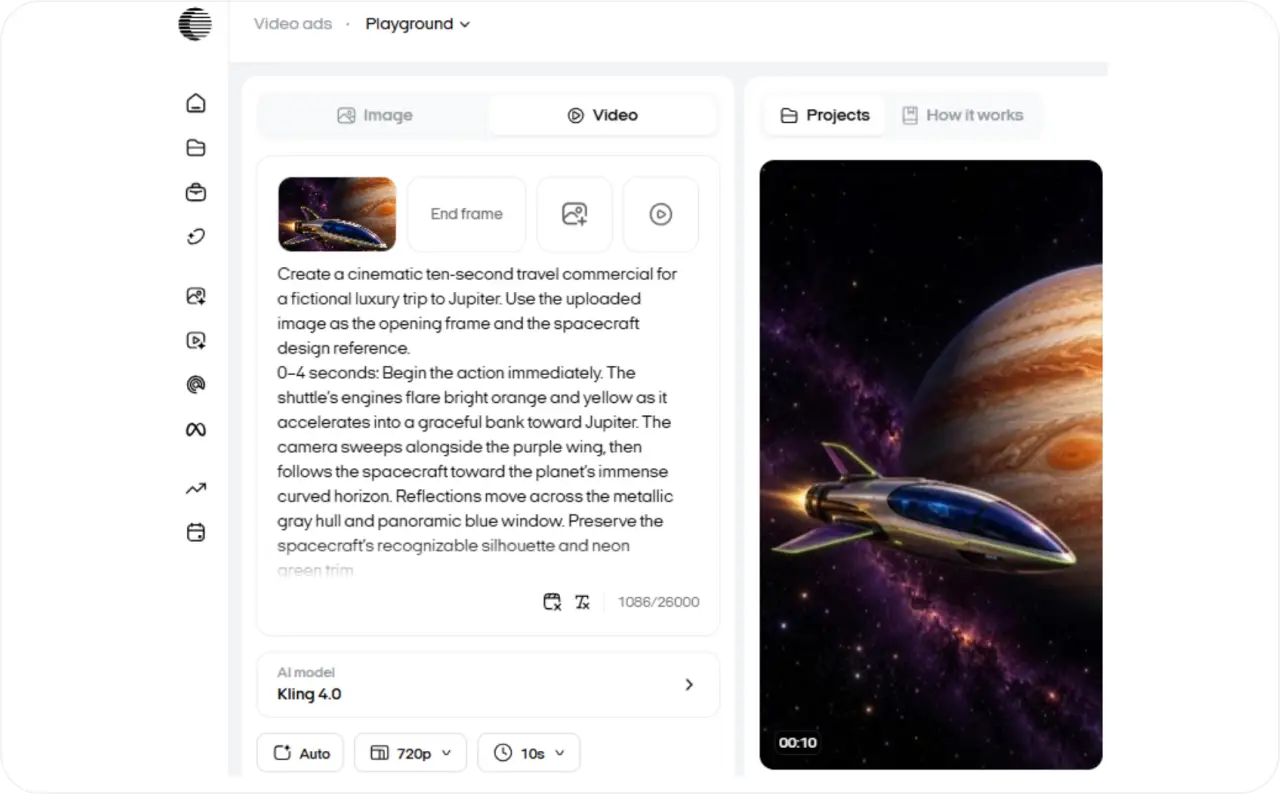
“Create a cinematic ten-second travel commercial for a fictional luxury trip to Jupiter. Use the uploaded image as the opening frame and the spacecraft design reference.
0–4 seconds: Begin the action immediately. The shuttle’s engines flare bright orange and yellow as it accelerates into a graceful bank toward Jupiter. The camera sweeps alongside the purple wing, then follows the spacecraft toward the planet’s immense curved horizon. Reflections move across the metallic gray hull and panoramic blue window. Preserve the spacecraft’s recognizable silhouette and neon green trim.
4–8 seconds: Cut inside the same shuttle, to eye level beside a luxury passenger seat. A panoramic window reveals Jupiter filling almost the entire view. The camera glides past the seat toward the glass, revealing the Great Red Spot. Soft purple cabin lighting contrasts with the planet’s orange and golden cloud bands.
8–10 seconds: Settle beside the window. Keep the seat edge visible in the foreground so the viewer can imagine sitting there. Hold this composition for the closing offer.
No subtitles.”
I ended the prompt with “No subtitles.” Kling’s guide to negative instructions suggests only two short exclusions: “no subtitles” and “no background music.”
And here is the video result, though it is not an ad yet.
What worked and what didn’t in Video 1
What worked: The exterior-to-cabin cut lands at 4.0 seconds, matching the prompt. The shuttle’s overall silhouette and neon green trim remain recognizable during the flyby, with no major shape distortion standing out. Inside the cabin, the Great Red Spot is clearly visible through the panoramic window. The passenger seat in the foreground makes the fictional travel experience easy to picture.
What didn’t: A second cut at 8.0 seconds resets the cabin framing and brings the seat back into the foreground. This interrupts the gradual settle-and-hold ending I requested. The final frame also offers limited clear space for copy: Jupiter fills the center, and the seat occupies the left side. I’d place a short offer over a dark cabin panel or add a separate end card for a longer message and CTA.
Kling 4.0 vs Kling 3.0: The same prompt in our Playground
In Playground, you can choose 720p or 1080p with Kling 4.0 and generate 3–30-second videos. The cost is 40 credits per second at 720p or 60 at 1080p. With Kling 3.0, you get 1080p, 2–15-second videos, and a separate Sound toggle, at 50 credits per second. You also have more room for instructions with 4.0: 26,000 characters, compared with 2,500 for 3.0.
Check the result:
Kling 4.0 followed the requested sequence more closely in this comparison. I used the same Jupiter prompt and start image in our Playground. Both runs used Auto aspect ratio, a 10-second duration, and no end frame.
| Test detail | Kling 3.0 | Kling 4.0 |
| Selected resolution | 1080p | 720p |
| Displayed generation cost | 500 credits | 400 credits |
| Camera movement | Pulls back from the shuttle to reveal a cabin | Sweeps alongside the shuttle and follows it from behind |
| Cabin transition | A continuous reveal, with the shuttle still outside the window | A cut into the cabin at 4.0 seconds |
| Closing sequence | Continues moving across the cabin and window | Adds another cut at 8.0 seconds, resetting the framing |
Both versions retained the spacecraft’s recognizable purple surfaces and green trim. Both also showed Jupiter’s Great Red Spot through a cabin window.
The important difference was the viewpoint. In the 3.0 version, the original shuttle remains outside as the cabin appears. That makes it look as though you’re watching the spacecraft from another vehicle. My prompt asked for the interior of the same shuttle. The separate interior shot in 4.0 communicated that sequence more clearly.
I’d choose the 4.0 result for this ad, with an edit to its closing cut. This comparison covers one output per model at different resolutions.
Is Kling 4.0 good for product or service video ads?
I’d use Kling 4.0 for a service ad when the experience needs to be shown before it can be explained. My Jupiter test is a good example. The spacecraft introduces the destination, while the panoramic cabin window gives viewers something to imagine buying.
For product ads, Kling says 4.0 renders text and logos on packaging more accurately. You can also place a keyframe on the final packshot, so the clip ends on the product with room for your offer.
For the next version, I’d add a passenger, a cinematic voiceover, and sharper high-tech colors. The passenger makes the luxury travel concept feel more personal. I’d let the narration deliver the advertising message instead of covering Jupiter with captions.
Here’s the plan for Video 2:
| Timing | Visual | Voiceover |
| 0–4 seconds | The shuttle accelerates toward Jupiter, with electric-blue engine light reflecting across its metallic body | “Your next destination? Jupiter.” |
| 4–8 seconds | A passenger relaxes inside a futuristic luxury cabin, looking through a panoramic window | “A private view beyond Earth.” |
| 8–10 seconds | The camera settles beside the window, framing Jupiter and the passenger | “Explore the experience.” |
I chose an elegant female narrator with a calm American accent. She doesn’t appear on screen. The passenger stays silent, so the camera can focus on the passenger’s reaction to the view.
Deep violet cabin lighting, cyan displays, and reflective chrome surfaces gave the second version a more futuristic look. I preserved the spacecraft’s original shape and neon-green trim so it still matches the opening reference.
This gave me a stronger service-ad concept to test. The voiceover introduces the destination and experience, while the closing line invites viewers to learn more. I judged the result by narration timing, character consistency, and whether the final shot stays clear enough to sell the view.
How to create video ads using Kling 4.0 in Zeely
I created a second version of the Jupiter video with narration, then prepared it as a Meta ad. That keeps the cinematic footage while giving the viewer a spoken hook and a clear next step.
First, I opened Projects, found Video 1, and selected Reuse context. Zeely took me back to Playground with the previous prompt, model, and generation settings.
I kept Kling 4.0, the original start image, and the 10-second duration. Then I replaced the prompt with the new version, adding a passenger, three voiceover lines, and more futuristic lighting.
Check the result:
What worked in Video 2
The passenger appears after the exterior-to-interior transition at approximately 4.0 seconds. Her short dark hair and gray suit with turquoise piping remain recognizable as the camera changes position. Her profile also stays consistent while her face is visible. The camera then moves behind her shoulder, directing your attention toward Jupiter.
The lighting instructions produced a visible change. Purple ceiling lights and a cyan console give the cabin a more futuristic appearance than Video 1. The passenger also gives the window view a clearer purpose: you can see someone experiencing the trip.
I’d keep this cabin sequence as the main selling shot. The person beside the window makes the fictional offer easier to picture.
What needed more work
The visual details weren’t equally consistent throughout. The engine glow shifts from yellow-orange to blue-white during the flyby. Jupiter’s orange storm also changes appearance between the exterior and interior shots, becoming a pronounced circular vortex through the window. That makes the cabin sequence look more stylized than the opening.
At 8.0 seconds, another cut moves the camera into a tighter view behind the passenger. I’d review that transition before placing the closing offer, because the framing changes just as the final message would appear.
The final composition also needs deliberate text placement. Jupiter occupies most of the window, while the passenger fills the left foreground. A short headline could work over a dark cabin panel; a longer offer would need a separate end card.
Adding the ad copy and CTA in Meta
- Open Meta campaigns and select Create campaign.
- Choose the new video from Projects and continue to the ad review.
- Under Review ads, select Edit and add the ad copy:
- Primary text: What if your next window seat overlooked Jupiter? Discover our luxury space travel experience.
- Headline: Your private view of Jupiter
- CTA: Learn More
The voiceover delivers the message inside the video. Meta displays the headline and clickable CTA around it.
I’d preview the complete ad in the available Facebook and Instagram placements before approving it. Because this is a fictional travel service, I’d stop before launch. A real service would need an actual booking page and verified offer.
Kling 4.0 pros and cons
Pros:
- Up to 30 seconds in a single generation, double the Kling 3.0 limit
- Up to 10 keyframes and 15 references for planning a scene in detail
- Two-channel stereo audio and new voice languages
- Available in Zeely Playground next to other video models
Cons:
- Omni Reference and Keyframes can’t be combined in one generation
- 4K and 10-bit HDR aren’t in the API yet, which outputs 720p and 1080p
- The Motion Control tool doesn’t support Kling 4.0
- Costs 25–40% more per second than Kling 3.0 with audio, based on Kling’s API pricing
Final verdict: Is Kling 4.0 worth the hype?
Yes, especially if you’re creating video ads that need more than one strong shot. In my Zeely test, Kling 4.0 turned a single spacecraft image into a 10-second sequence with a cinematic departure, a luxury cabin reveal, and a closing view of Jupiter. That’s a promising starting point for a service ad.
I’d stick with Kling 3.0 for simple product clips that already work. Kling 4.0 makes more sense when you need longer scenes, stronger reference control, or more room to tell a story.
FAQ
Each video maxes out at 30 seconds. You can’t mix Omni Reference and Keyframes in one task. Settings like resolution depend on the platform. Before using a clip in an ad, I’d zoom in on small product details and any text the AI added, then check that scenes stay consistent.
The full Kling 4.0 launched on October 15, 2026, Kuaishou says. A faster version, Kling 4.0 Flash, went out to a small group of users first, on September 28, 2026. You can now use the full model on Kling AI and on supported platforms, including Zeely’s Playground.
Yes, on paper. Kling lists 4K for the full model, but it depends on where you generate. I ran my Jupiter test in Zeely’s Playground at 720p. Kling’s API and fal.ai currently offer 720p and 1080p. Check the resolution menu before you generate, especially if you’ll edit the footage later.
Yes. Kling’s official Kling 4.0 API became fully available on October 28, 2026. It covers text-to-video, image-to-video with up to 10 keyframes, and Omni reference-to-video, at 720p and 1080p for now. Pricing is per second: $0.157 at 720p and $0.235 at 1080p without input video. fal.ai also offers Kling 4.0 endpoints, so compare limits and pricing before building it into your workflow.
Through Kling’s official API, Kling 4.0 costs $0.157 per second at 720p and $0.235 per second at 1080p without input video. That’s 25% more than Kling 3.0 with audio at 720p and 40% more at 1080p. In Zeely Playground, you pay in credits: Kling 4.0 costs 20 credits per second, and you can see the price in the model dropdown and on the Generate button before you generate.