Nano Banana vs Nano Banana 2 vs Pro
I get this question a lot: Nano Banana 2 vs Nano Banana Pro, which is better for ad creatives in 2026? I compare Nano Banana vs Nano Banana Pro with Nano Banana 2 in the middle, so you can choose faster drafts, better finals, or cheaper tests.
Use Nano Banana 2 AI model for most SMB ad creatives in 2026: it gives stronger production features than original Nano Banana and better cost control than Pro. Pick Nano Banana Pro for premium hero ads, complex scenes, detailed text, and fewer high-stakes outputs. Keep original Nano Banana only for simple edits or legacy workflows.
What are Nano Banana, Nano Banana 2, and Nano Banana Pro?
Let’s remove the banana fog first. Nano Banana, Nano Banana 2, and Nano Banana Pro are not three random AI tools from different companies. They are public names for Google Gemini image-generation and image-editing models.
Here is the simple map:
Nano Banana = Gemini 2.5 Flash Image
Nano Banana 2 = Gemini 3.1 Flash Image
Nano Banana Pro = Gemini 3 Pro Image
Google DeepMind’s Nano Banana model-family page maps Nano Banana Pro to Gemini 3 Pro Image and Nano Banana 2 to Gemini 3.1 Flash Image.
Here, we are comparing five practical things: speed, cost, output quality, editing control, and final-use risk. Nano Banana 2 Lite also exists in the wider family, but I am not turning this into a fourth-column maze. The search intent here is Nano Banana vs Nano Banana Pro, with Nano Banana 2 vs Pro as the decision in the middle.
Nano Banana
Nano Banana, officially Gemini 2.5 Flash Image, is the original fast image model for simple generation and edits. It can still be useful for legacy workflows, quick cleanup, or basic creative edits, but I would not make it the default choice for new 2026 ad production.
Nano Banana 2
Nano Banana 2, officially Gemini 3.1 Flash Image, is the best default for small business creative production. It is fast enough for iteration, strong enough for usable product and social ads, and usually easier to justify than Pro when you need many ad variations.
Nano Banana Pro
Nano Banana Pro, officially Gemini 3 Pro Image, is the premium option for final creatives, complex prompts, realistic polish, image text, and high-stakes brand visuals. Use it when one image needs to carry the campaign, not when you are still exploring 40 rough ideas.
Nano Banana vs Nano Banana Pro: comparison table
Here is the clean version before we get into the details.
| Model | Official model name | Best for SMB ads | Use when | Avoid when |
| Nano Banana | Gemini 2.5 Flash Image | Simple edits, legacy flows | You already use it and need basic image edits | You are planning a new 2026 production workflow |
| Nano Banana 2 | Gemini 3.1 Flash Image | Daily ad variations, product creatives, social creatives | You need volume, testing, and solid quality | One final image must be perfect |
| Nano Banana Pro | Gemini 3 Pro Image | Hero ads, complex scenes, text-heavy creatives | Quality matters more than cost | You need lots of low-risk drafts |
The official model IDs matter if your team is connecting this into a workflow or checking platform settings. Google Cloud lists Nano Banana as gemini-2.5-flash-image, Nano Banana 2 as gemini-3.1-flash-image, and Nano Banana Pro as gemini-3-pro-image, with those model docs updated on July 6, 2026.
For SMB marketers, the specs only matter when they change the creative decision. Nano Banana’s big warning is timing: Google Cloud currently lists its retirement date as October 2, 2026. That does not mean every existing workflow breaks today, but it does mean you should not build a fresh 2026 creative process around it.
Nano Banana 2 has the strongest daily-production profile. It supports image generation, image editing, multi-turn image editing, and output resolutions up to 4K in preview. It also has a larger context window than Pro, which can help when your prompt includes more campaign detail, product notes, or creative constraints.
Nano Banana Pro is the better quality bet when the prompt is complex and the final output needs more accuracy and polish. Google Cloud describes Gemini 3 Pro Image as designed for challenging image generation, complex multi-turn editing, improved accuracy, and enhanced image quality. That is the “landing page hero” lane, not the “let’s make 80 product backgrounds” lane.
Best choice by ad creative job
Use Nano Banana 2 when you need 30 product ad angles, five seasonal backgrounds, or a set of Meta ad concepts to test this week. Use Nano Banana Pro when one image goes on a landing page hero, an important promo graphic, or a brand campaign asset. Use original Nano Banana only when the job is simple and already fits your existing workflow.
Nano Banana 2 vs Pro: which is better in 2026?
For most SMB ad workflows, Nano Banana 2 is better. Not because Pro is weak. Pro is stronger where it should be stronger: final polish, detailed scenes, harder prompts, and high-value assets. But most small business creative work is not one perfect masterpiece. It is iteration.
You need product angles. You need social versions. You need background swaps. You need three hooks, four layouts, and a few “maybe this will work” concepts before you find the one worth polishing. That is where Nano Banana 2 vs Nano Banana Pro becomes a budget decision as much as a quality decision.
Google Cloud pricing shows why Nano Banana 2 is the safer default for volume: Gemini 3.1 Flash Image is listed at $0.067 for a 1K image output and $0.15 for 4K, while Gemini 3 Pro Image is listed at $0.134 for 1K/2K and $0.24 for 4K on the pricing page.
So the rule is simple: draft with Nano Banana 2. Upgrade to Pro only when the image earns it.
That gives you a smarter creative funnel. Nano Banana 2 handles the messy middle: ideas, variants, tests, and direction finding. Nano Banana Pro handles the assets where mistakes are more expensive: your hero visual, premium product scene, detailed offer graphic, or final campaign image.
Original Nano Banana is the odd one out for new planning. It can still be useful for simple edits, but it is not the model I would choose if you are building a 2026 workflow from scratch.
Pick Nano Banana 2 when you need volume
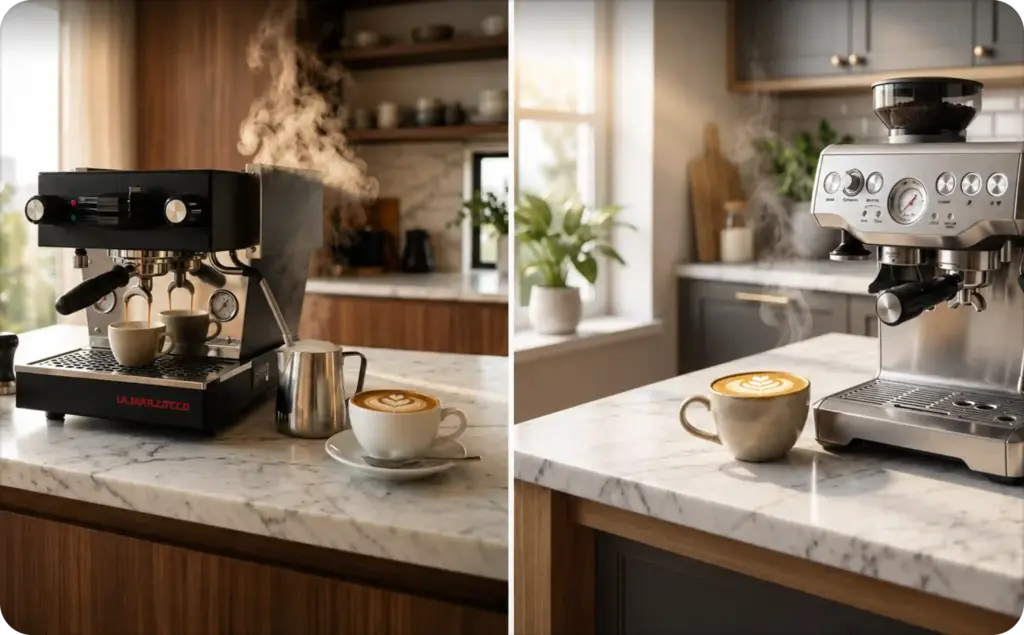
Choose Nano Banana 2 for ecommerce catalog variations, Meta ad concepts, product backgrounds, seasonal promos, localized social creatives, and test batches. Early ad testing rewards speed and quantity. You do not need every draft to be perfect. You need enough strong options to learn what your audience actually clicks.
Pick Nano Banana Pro when one image carries the campaign
Choose Nano Banana Pro for landing page hero visuals, billboard-style images, detailed offer graphics, realistic product scenes, and brand campaign assets. This is where polish matters more than output count. When the creative sits above the fold or represents your brand at first glance, Pro is easier to justify.
Keep original Nano Banana for simple or legacy work
Original Nano Banana can still make sense for simple edits or workflows your team already has in place. But for Nano Banana vs Nano Banana Pro planning in 2026, it should not be the default recommendation. If you are starting fresh, look at Nano Banana 2 first and Pro for high-value finals.
Ad creative use cases: match the model to the asset
This is where the comparison gets real. SMBs do not choose models in a vacuum. They choose them because the product photo looks flat, the ad account needs new creative, the sale starts Friday, or the founder wants the landing page to stop looking like a placeholder.
Here is the practical asset-to-model match:
- Product background refresh: Nano Banana 2
- Social ad variations: Nano Banana 2
- Text-heavy offer graphic: Nano Banana Pro
- Premium campaign hero: Nano Banana Pro
- Quick lifestyle mockup: Nano Banana 2
- Simple image cleanup: Nano Banana, only if already in use
For a broader view of where these models sit in the creative stack, see Zeely’s guide to AI models for ad creative generation. The useful question is not only “which Gemini image model is best?” It is “which model should handle which part of my ad workflow?”
For A/B testing, Nano Banana 2 should usually come first. Google Cloud’s 2026 announcement for Nano Banana 2 Lite says the model is suited to rapid ideation and A/B testing ad variations, which supports the broader Nano Banana family angle for SMB creative testing.
Think of Nano Banana 2 as your creative workbench. Think of Nano Banana Pro as your finishing room.
Product photos and catalog ads
For product photos and catalog ads, Nano Banana 2 is the default. Use it for background swaps, lifestyle contexts, seasonal versions, and fast concept testing. A candle can move from bathroom shelf to holiday gift table. A skincare bottle can move from plain studio shot to spa-style scene without starting from zero.
Social variations and A/B tests
For social variations, volume matters more than perfection. Facebook, Instagram, and TikTok ads burn through creative fast, and one perfect image is rarely enough. Start with Nano Banana 2 for hooks, backgrounds, product angles, and layout ideas. Then move the winning concept to Pro only if it needs premium polish.
Hero creatives and text-heavy promos
For hero creatives and text-heavy promos, Nano Banana Pro is the better bet. Use it when layout, text clarity, realism, or brand trust matter more than producing many versions. If the image carries a launch, discount, landing page, or premium offer, spend the extra review attention where it will actually be seen.
Editing workflow: prompt, review, refine, then route
Do not turn this comparison into a 47-step tutorial. The workflow is simpler than that.
Start with a clear ad goal. What is the asset supposed to do: sell a product, explain an offer, refresh a catalog image, or stop scroll on social? A vague “make it look better” prompt usually creates vague output. A specific ad goal gives the model a job.
Next, generate rough variants with Nano Banana 2. This is where you explore angles: different backgrounds, product placements, lighting styles, lifestyle settings, and seasonal hooks. If you are making social creatives, ask for several versions before judging too hard. The first batch is not the final ad. It is your creative map.
Then review like a marketer, not like a model fan. Check product accuracy, text, offer clarity, brand fit, and whether the image actually supports the campaign message. A beautiful image that confuses the offer is not a good ad.
Google Cloud’s Gemini editing documentation says Gemini supports improved image editing and multi-turn editing, so the comparison should include refinement workflow, not only one-shot generation. That matters because most ad creatives get better through edits: change the background, adjust the crop, simplify the scene, make the product larger, remove visual clutter, or try a cleaner callout.
Finally, route the top creative to Nano Banana Pro only if it needs premium polish. Keep prompt notes so future campaigns are faster. For a more hands-on workflow, use Zeely’s guide to Nano Banana 2 for ad creatives.
Limits, safety, and brand checks before publishing
AI image output is not automatically ad-ready. That is true for Nano Banana, Nano Banana 2, and Nano Banana Pro. Better models reduce some friction, but they do not remove the need for human review.
Start with product accuracy. Check size, color, packaging, labels, materials, and any visible product details. If your moisturizer bottle has the wrong cap, your shoe has an impossible sole, or your food packaging changes ingredients, fix it before publishing.
Then check text in the image. Even strong image models can make mistakes with small text, costoffer details, pricing, or layout. If the ad says “30% off,” make sure the discount is real, current, and allowed in your market. If the image includes a product claim, do not let the model invent a benefit your business cannot support.
Look closely at faces, hands, logos, and packaging. These are small areas where creative quality can fall apart. For brand assets, also check whether the style matches your normal visual identity. A polished image that looks nothing like your brand can still hurt performance.
Content provenance helps, but it is not a truth machine. Google Cloud explains in its Content Credentials documentation that Content Credentials can show whether media was AI-generated, but C2PA does not classify media as real or fake and does not guarantee the truthfulness of credential claims.
So keep a human in the loop. Treat AI as your creative accelerator, not your legal, product, and brand review team.
FAQ
Nano Banana 2 is better for most ad testing and production volume. It is the practical default when you need many product, social, or catalog variations. Nano Banana Pro is better for premium final assets where polish, text clarity, realism, and creative control matter more than cost.
Nano Banana 2 is the public name for Google’s Gemini 3.1 Flash Image model. Nano Banana Pro is the public name for Gemini 3 Pro Image. Both are Gemini image-generation and image-editing models, but Nano Banana 2 is better for volume while Pro is better for high-value finals.
Yes, but not for every image. Nano Banana Pro is worth it when the creative is important enough to justify the extra cost: landing page heroes, premium product scenes, detailed promo graphics, and campaign assets. For everyday testing, Nano Banana 2 is usually the smarter first step.
Use original Nano Banana only for simple edits or existing workflows that already depend on it. For new 2026 planning, Nano Banana 2 and Nano Banana Pro are the better comparison. Nano Banana 2 should handle most production work, while Pro should handle polished final creative.
Use Zeely AI to turn the model choice into faster ads
Now that you know how Nano Banana vs Nano Banana Pro really works, the next step is turning that choice into usable ads. Zeely AI helps SMBs move from model selection to actual campaign assets: fast concepts, product creatives, social variants, and polished ads ready for review. Use Zeely instead, where multiple leading AI models work in one workflow, so you don’t have to compare versions or pay for several separate tools

Emma blends product marketing and content to turn complex tools into simple, sales-driven playbooks for AI ad creatives and Facebook/Instagram campaigns. You’ll get checklists, bite-size guides, and real results, pulled from thousands of Zeely entrepreneurs, so you can run AI-powered ads confidently, even as a beginner.
Written by: Emma, AI Growth Adviser, Zeely
Reviewed on: July 23, 2026