What does forward mean on Instagram Stories?
What does Forward mean on Instagram Stories, and did people just skip you? I wrote this using real Instagram navigation patterns so you can read Story insights like a marketer, not a mind reader.
On Instagram Stories, Forward means someone tapped to move to your next Story slide. Most of the time, it signals they wanted to move faster, not that they left Instagram or went to someone else. That behavior shows up more in Next Story or Exits, depending on what they did next.
Instagram won’t notify you, and you can’t see who tapped Forward, only the total count in Story insights. The most useful way to read it is a Forward rate, then compare it to Back, Next Story, and Exits.
When you see a big Forward number in Story insights, it’s easy to assume people are bored. Forward is really a navigation signal, not a verdict on your content. In this guide, I’ll define what it means, show where it fits inside Instagram navigation metrics, compare it to the other taps, and turn it into a simple score you can actually improve.

What Forward means on Instagram Stories
Forward means a viewer tapped to advance to your next Story slide. Same Story. Next frame. Think of it like flipping to the next card in your own deck of Story frames.
You’re not crazy. Some people tap fast on purpose.
Stories on Instagram are built for thumb-led browsing. DataReportal’s Digital 2026 United States report lists 417 million cellular mobile connections (about 120% of the population), which is a nice reminder that “fast taps” are normal behavior on mobile.
What is a forward tap in Instagram Story insights?
In Instagram Story Insights, a forward tap is a navigation action. Instagram records it under Navigation as taps forward. It’s one of the core IG navigation signals, alongside Back, Next Story, and Exits.
So when you see Forwards, you’re not looking at a review of your personality. You’re looking at how viewers on Instagram moved through your Story frames.
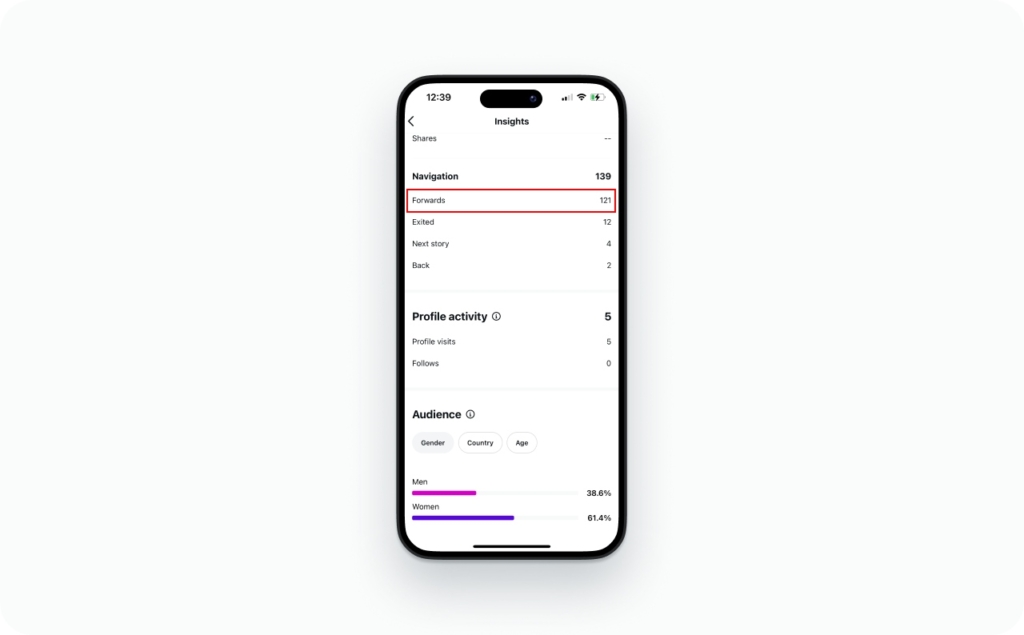
Does Forward mean someone skipped my Story?
Sometimes, yes. Forward can mean skipped ahead. But it doesn’t always mean skipped you entirely.
Two real-world examples I see all the time:
- Busy but still interested: They tap forward because they want the key point fast, then they keep watching later frames
- Not hooked yet: They tap forward because the first frame didn’t earn attention
That’s why I treat Forward as a speed signal first, and a boring signal only after I compare it to other navigation metrics.
Does Forward mean they went to someone else’s Story or my next slide?
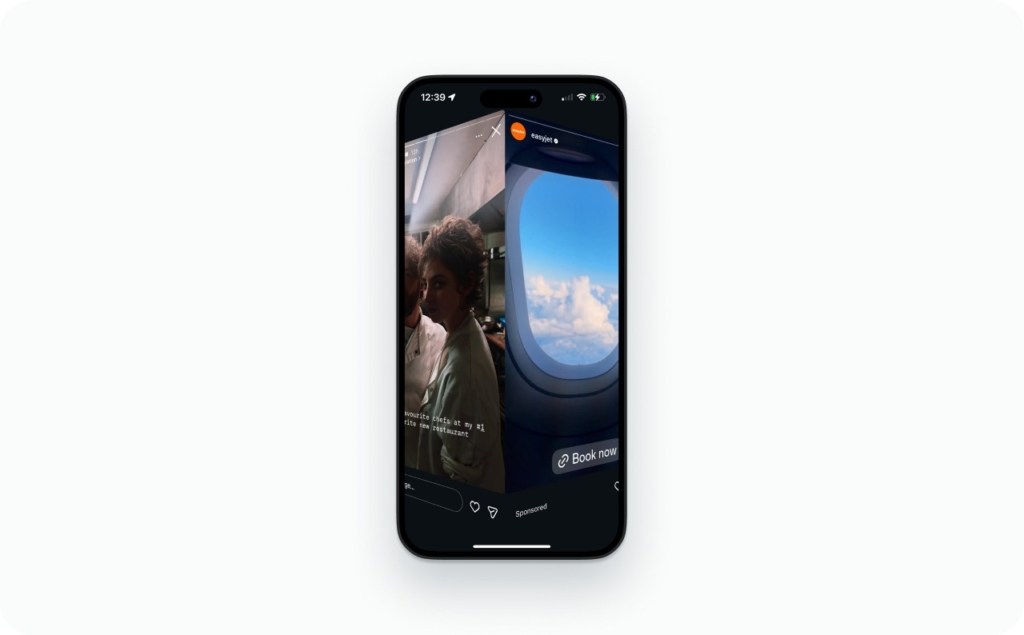
Forward stays inside your Story sequence. It moves a viewer from one of your frames to the next one you posted.
If they leave your Story to someone else, you’ll usually see that as Next Story (they jumped to another account’s Stories) or an Exit (they left Stories). I’ll break those down in the comparison section.
What counts as Forward vs a view on Stories?
To keep the rest of this article consistent, here’s how I’ll use the terms:
- Impressions: total times your Story frames were shown (repeat views count)
- Reach (accounts reached): unique accounts that saw your Story
- Views (story views on Instagram): I’ll use this as the everyday word for impressions
Forward is not a view by itself. It’s a navigation tap that happens after or during viewing, and it affects your retention and completion rate across Story frames/cards.
Where to find Forward in Instagram Story Insights navigation
I usually pull forward taps from the same place I check reach and impressions.
Tap path for iPhone or Android:
- Open Instagram and go to your profile
- Tap Insights (or open Professional dashboard, then tap Insights)
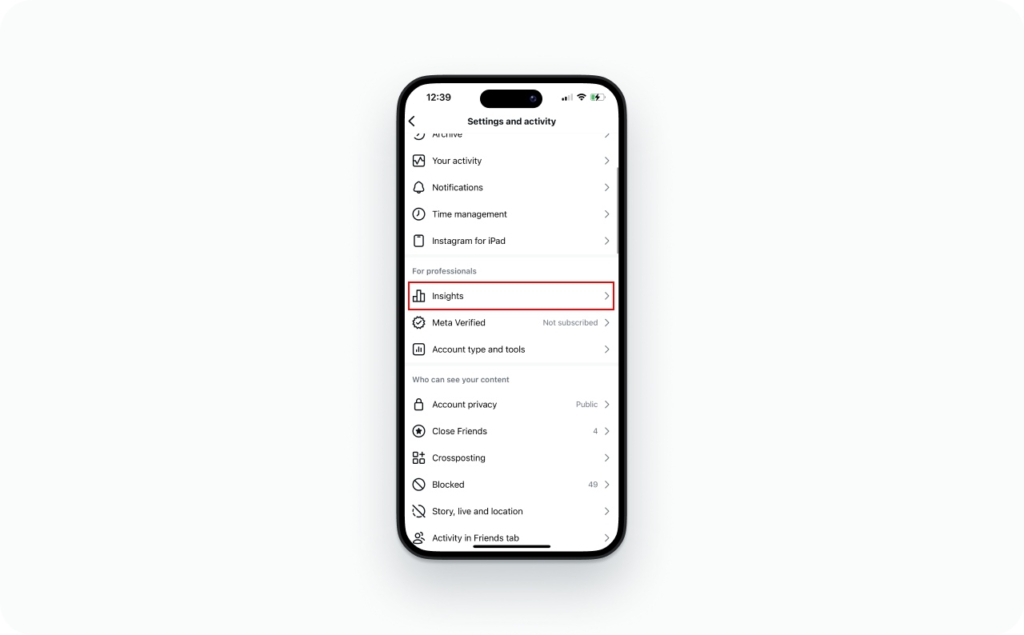
3. Under Content you shared, tap Stories
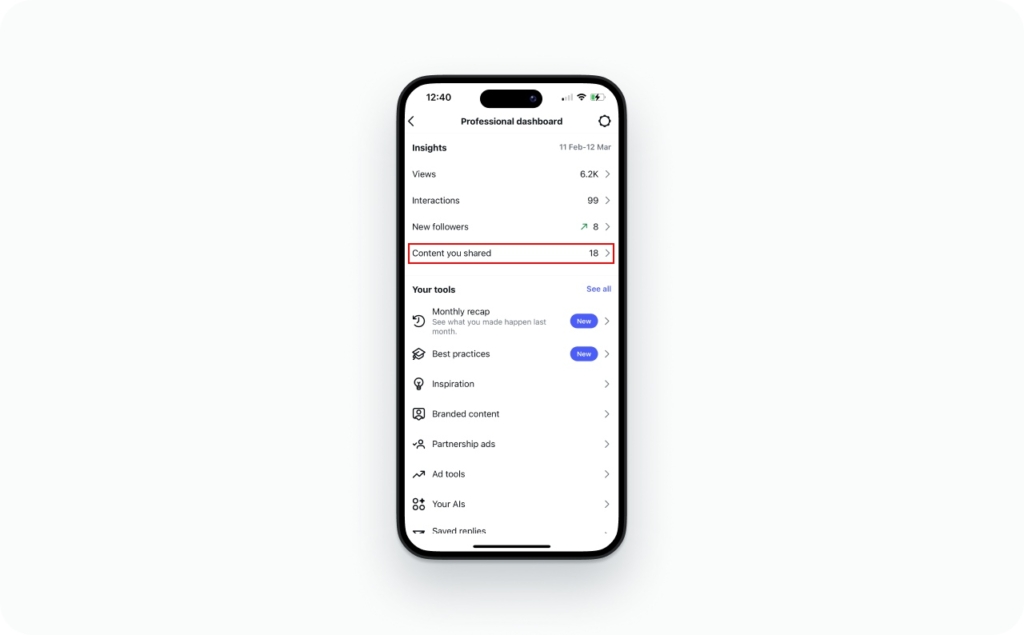
4. Open a Story, then switch the metric to Forward (it may also show as Forward taps)
Instagram groups this under Navigation, along with Back, Next Story, and Exited.
If you don’t see it, check these 4 things:
- You’re on a creator account or business account, not personal
- The Story still has enough data to report (very low impressions can hide metrics)
- You’re checking from the latest app version (old UI can hide filters)
- You’re looking at the right place (live Story insights vs Story archive screens)
Why don’t I see Navigation / Forward in my insights?
When Forward disappears, it’s usually one of these:
- The Story is too old or expired and you’re outside the metrics availability window
- Not enough data yet, especially on low-reach Story frames/cards
- Account type is personal, so Story analytics are limited
- You’re viewing from archive vs live Story, and you’re on a screen that only shows certain actions and some archive views lean toward activity and sticker results, not full navigation
Do I need a creator/business account to see Forward?
Yes. Forward lives inside Instagram Story Insights, and you need a professional account to access those analytics.
- Go to your profile
- Open Settings and privacy
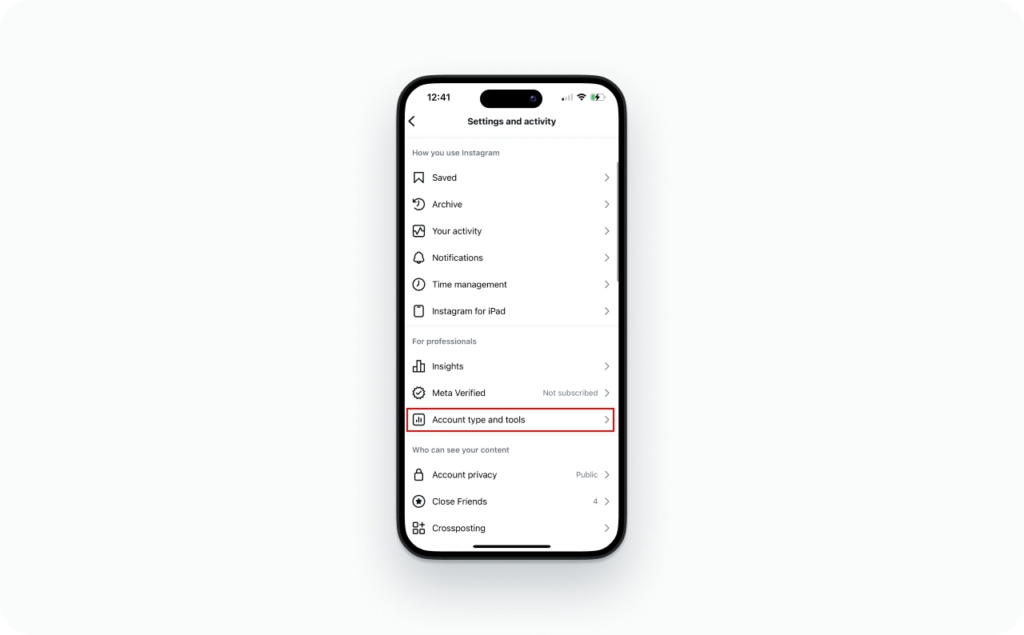
3. Find Account type and tools
4. Switch to a creator or business account
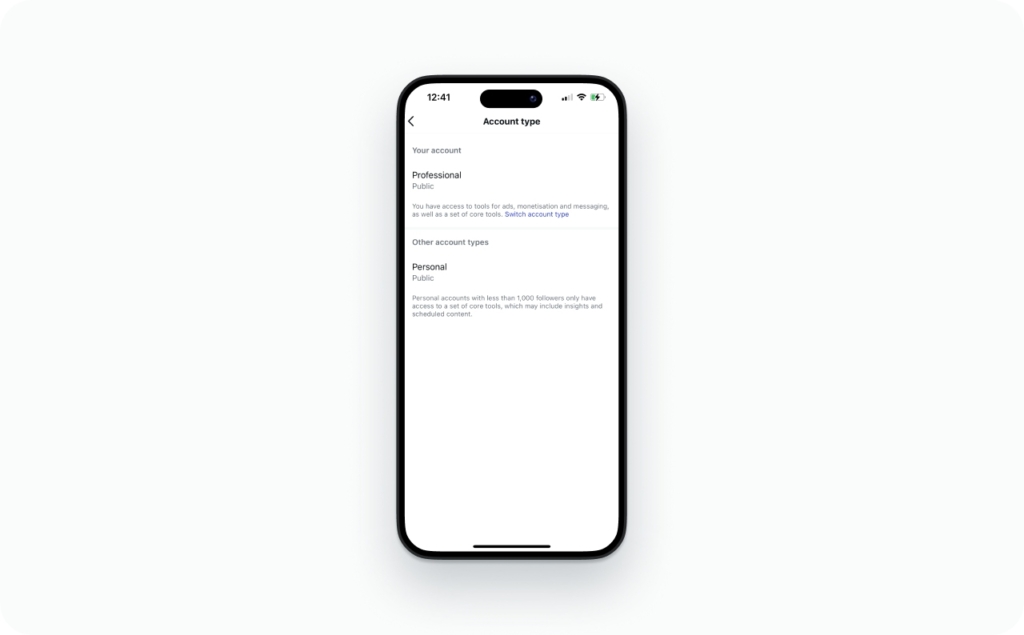
Is Forward available for every Story or only some?
Not always every Story. I see gaps most often with:
- Close Friends Stories (smaller audience, weaker data)
- Reshared content (some metrics can be inconsistent)
- Stories with very low impressions, where navigation metrics may not populate
How long do Story insights stay available?
Think of Story insights as a measurement window, not a permanent record. Many analytics views are time-limited in the app, and tools like Meta Business Suite can extend what you can review.
My rule: verify the current window in-app every time you do reporting, because Instagram and archives change UI and retention over time.
Meta keeps tuning ranking systems to grow views, including reporting a 7% lift in views from feed/video ranking improvements in Q4 2025, with US video time spent growing double-digits year over year. That’s why navigation metrics like Forward matter as real attention signals.
Forward vs Next Story vs Exit vs Back
| Metric | What they did | What it often means | What to check next |
| Forward | Tapped forward to your next Story frame | They’re moving fast, scanning, or not fully hooked yet | Compare to Back, Next Story, Exit, and whether the first frame is clear |
| Back | Tapped back to a previous frame | Interest, re-checking details, or confusion | Look at the frame they returned to. Was it text-heavy or unclear? |
| Next Story | Left your Story to watch the next account’s Stories | They chose different content, not just a faster pace | Check where it spikes. Usually the hook frame or a slow slide |
| Exit | Left Stories entirely (back to feed, profile, or out of the app) | Attention dropped or they got interrupted | Check the exact frame where exits jump and what you asked them to do |
What’s the difference between Forward and Next Story?
This is the big one: Forward stays inside your Stories on Instagram. It moves someone from one of your Story frames/cards to the next frame you posted.
Next Story means they left your sequence and moved into the next account’s story sequence. When you see “forward vs next story,” read it like this: Forward is faster pacing inside your content, Next Story is a content switch away from your account.
What’s the difference between Forward and Exit?
Exit is leaving the Stories experience. That can mean they went back to the feed, opened a profile, switched apps, or closed Instagram.
So “forward vs exit” is a pacing signal versus a stop signal. Forward means they kept moving. Exit means they stopped watching Stories at that moment.
What’s the difference between Forward and Back?
Back is the opposite of “skip.” It’s a rewind. Most of the time it means one of two things:
- They cared and wanted to re-check something
- They missed the point because the frame was dense or unclear
So “forward vs back” often tells you whether you’re being skimmed or re-read.
Forward taps vs swipes
In day-to-day behavior, people mix taps and swipes and call it all “skipping.” In Insights, Instagram separates the outcome:
- Tap forward advances within your Story frames
- Next Story is the jump to another account’s Stories
- Exit is leaving Stories altogether
Treat these as story navigation metrics, not a personality test.
Last-slide edge case
On your last slide, a viewer can still tap forward out of habit. What happens next depends on where Instagram sends them. In practice, the platform may record that movement as leaving your sequence, which can show up as Next Story or Exit depending on what they did next. I don’t assume perfect attribution here, so I judge the last slide using the pattern across multiple Stories, not one frame.
Three quick scenarios I use when I audit Stories:
- High Forward, low Exit: pacing is fast, but they’re still with you. Tighten copy and lead with the point sooner
- High Next Story early: hook issue. First frame needs a clearer promise or visual payoff
- High Back on one frame: it’s either your strongest frame or your most confusing one. Make it simpler and see if Back stays high
How to interpret Forward taps without overthinking
Is a high number of Forward taps bad?
Not automatically. A high count of Forward taps can mean viewers on Instagram are bored, or it can mean they’re moving fast and still watching. You only know which one it is after you compare it to Exits, Next Story, and Back, plus what that slide was trying to do.
Here’s the simple rule I use: Forward is a pacing signal, not a verdict. Your diagnosis comes from the pattern.
When Forward taps are a good sign
Forward can be a good sign when the slide type invites fast consumption, like:
- They’re scanning to get to the result (before/after, reveal, takeaway)
- They’re looking for a link sticker, product tag, or price
- They’re watching with sound off and skipping talking-head setup
- They already trust you and just want the key detail
In those cases, a high Forward count is more about retention pacing than low interest.
What it means if Forward is high but Exits are low
This is my favorite pattern because it’s fixable.
Pattern: “Still with you, just pacing fast.”
If Exits stay low while Forwards climb, your Story views on Instagram are likely coming from people who want the point sooner. Lead with the payoff earlier, then add support after.
What it means if Forward is low but Back is high
This can be great or messy. You decide by looking at the slide they rewound to.
Pattern A: “You earned a rewatch.”
Back is high on a slide with a clear promise, a strong visual, or a punchy line. That’s interest.
Pattern B: “You confused them.”
Back is high on a slide with dense text, tiny captions, or a vague first line. That’s clarity trouble.
The difference shows up in the next step. If Back is high and Next Story and Exits stay low, it’s usually positive. If Back is high and Exits jump right after, they probably got stuck.
What it means if Forward spikes on a specific slide
A single-slide spike is almost always a slide design problem:
- Text wall
- Weak first line
- Unclear payoff
- Slow reveal that makes people impatient
- Awkward layout that’s hard to read fast
Treat that slide like a broken link. Fix the readability first, then test again.
Slide audit mini template:
- Slide goal (one sentence):
- First line (10 words max):
- Visual proof (what do they see instantly?):
- One action (tap, reply, click, vote):
- What might cause taps forward here (pick one): too much text / unclear payoff / slow reveal / clutter
And a sanity check on sample size: WordStream notes you need at least 100 users in a source audience, and recommends 1,000 to 5,000 for meaningful patterns. I use that as a mental model for Stories too. Don’t judge Forward off tiny reach.
Good Forward rate on Instagram Stories
You can calculate a good forward rate two ways. Pick one and stay consistent.
Forward rate = Forwards / Impressions
Forward rate (unique) = Forwards / Reach
Worked example (round numbers):
- Impressions: 2,000
- Forwards: 600
- Forward rate = 600 / 2,000 = 0.30 (30%)
Should you judge Forward using Reach or Impressions?
Here’s the tradeoff:
- Impressions include replays, so your rate can look lower if people rewatch
- Reach is unique accounts reached, so it’s cleaner for “how many people moved forward”
My rule of thumb: use Reach if you care about unique viewer behavior, and use Impressions if you report story views on Instagram the same way every week. Pick one primary number and don’t switch mid-analysis.
What’s a healthy ratio of Forward vs Next Story vs Exit?
I don’t trust universal benchmarks here, because every niche has different browse intent. I do use starting ratios as internal guardrails:
- If Forwards are high but Next Story + Exit stay low, pacing is the main issue
- If Next Story rises early, your hook and first frame clarity need work
- If Exits spike mid-Story, the payoff timing or slide length is off
Build your real baseline from your last 10 to 20 Stories. Write down your usual ratios, then only treat something as “good” or “bad” when it breaks your normal pattern.
Measurement discipline matters more now because competition inside Stories keeps rising. Adweek notes 61% of marketers plan to increase creator investment, which means more content fighting for the same thumb. Tracking a clean KPI like Forward rate beats gut feel.
Does Story length change what “good” Forward looks like?
Yes. A 3-slide Story behaves differently than a 10-slide series.
- 3 slides: people tap forward to get the point quickly. Completion is easier
- 10 slides: people tap forward because they’re browsing, or because the series is too slow
I separate Stories into two modes:
- Completion intent: viewers want the full sequence (tutorial, before/after, storytime)
- Browse intent: viewers want highlights (announcements, quick updates, reposts)
Longer Stories need stronger mini-payoffs every 1 to 2 slides, or Forward will climb.
How to reduce Forward taps and keep people watching
What types of slides get the most forward taps
These frames almost always earn more tap forward behavior:
- Text-heavy slides with no visual anchor
- Slow talking-head intros that delay the point
- Unclear CTA, like “wait for it” with no reason
- Context before value, where the payoff arrives too late
If you want to reduce forward taps, lead with clarity first.
Should you shorten clips to reduce forwards?
Shorter helps, but only if the structure is cleaner.
My pacing rule is simple:
- One idea per frame
- Result early
- Support after
If the first frame can stand alone, Forward usually drops.
Story structure that earns Back taps
Here’s the 5-frame formula I use when I want retention without begging for it:
- Hook (what this is)
- Promise (what they’ll get)
- Proof (why it’s true)
- Offer (what to do next)
- CTA (one action)
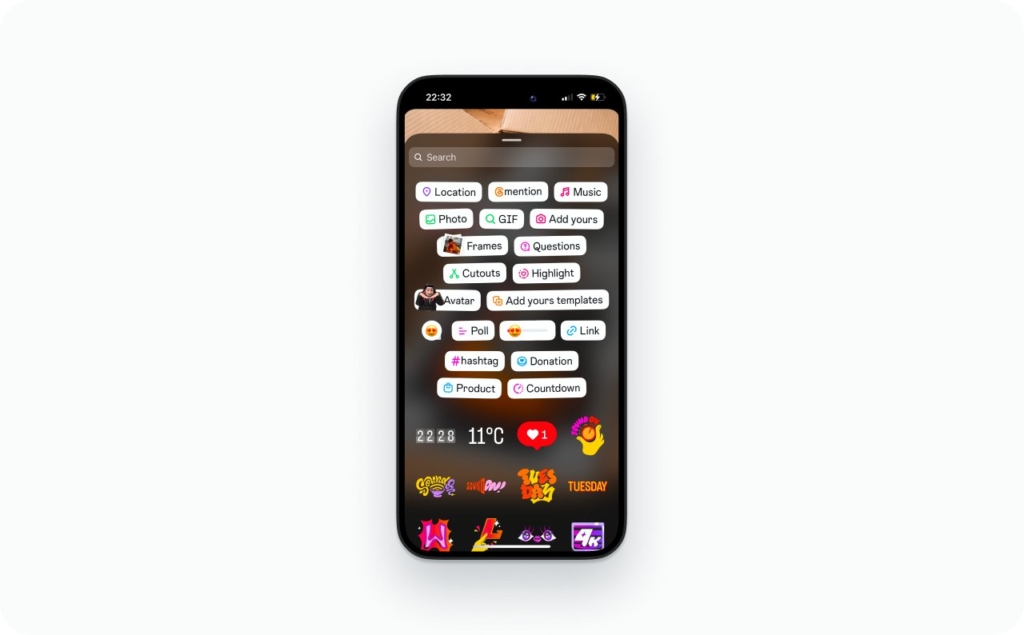
Sticker placement to slow taps:
- Put a poll or quiz on frame 2 or 3, after the promise
- Put the link sticker near the bottom safe zone, once the viewer knows why
Do stickers reduce Forward taps?
Yes, when they function like a deliberate speed bump.
- Polls, questions, and quizzes can slow viewers and raise completion
They backfire when:
- You use them too early, before the viewer understands the topic
- You stack too many, so the slide feels messy
- The sticker has no clear reason to tap
Notifications and privacy
- Instagram does not notify you when someone taps Forward
- You can’t see who tapped Forward, only totals in Instagram Story Insights
- Viewers can’t see their Forward taps on your Story
- You can’t turn off navigation tracking, but you can ignore it if it makes you spiral
Forward vs sharing and DMs
The Forward metric is not “shared” and it is not “sent in DMs.” It is a navigation tap inside Stories.
“Forwarded” in messaging is a separate label that can appear when someone forwards a message. Different feature, different meaning.
Private account note: people can still tap forward and navigate the same way. Privacy settings change who can view, not how navigation gets counted.
Edge cases and troubleshooting
A few reasons Forward looks high even on engaging Stories:
- Sound off viewers skip talking frames
- Rapid tappers inflate counts (especially on short slides)
- Different tap habits on iPhone vs Android can change pacing feel
- Story ads vs organic can behave differently because the viewer mindset is different
AppsFlyer reports $78B spent on user acquisition in 2025, up 13% year over year, and frames 2026 as a measurement-heavy year. That’s why I treat Story frames like testable creative. You change one slide, then you re-check the tap patterns.
What else should you know about Instagram Stories?
Now when you know what does forward on your Instagram Stories mean, you might want to explore a few more tips that can help you use Stories more effectively. Below are some helpful articles that explain common questions, features, and tricks. They will help you better understand how Instagram Stories work and how to use them like a pro.
- How to edit Instagram stories. Learn simple ways to edit Instagram Stories with text, stickers, music, and other built-in tools.
- Instagram stories not working. Discover the most common reasons why Instagram Stories stop working and how to fix them quickly.
- How to mute stories on Instagram. Find out how to mute Instagram Stories from specific accounts without unfollowing them.
- Instagram stories ideas & templates. Explore creative Instagram Stories ideas and ready-to-use templates to make your content more engaging.
- Does Instagram show screenshots of stories. Learn whether Instagram notifies users when someone screenshots their Stories.
- How long do Instagram stories last. Understand how long Instagram Stories stay visible and how highlights can extend their life.
- How to add a link to an Instagram story. See how to add clickable links to your Instagram Stories to drive traffic to your content or website.

Emma blends product marketing and content to turn complex tools into simple, sales-driven playbooks for AI ad creatives and Facebook/Instagram campaigns. You’ll get checklists, bite-size guides, and real results, pulled from thousands of Zeely entrepreneurs, so you can run AI-powered ads confidently, even as a beginner.
Written by: Emma, AI Growth Adviser, Zeely
Reviewed on: March 13, 2026