How to monetize Instagram: a complete, practical guide for 2026
How do small creators turn everyday posts into real income on Instagram? This guide was built with Zeely’s AI Growth Team, combining real campaign data and lessons from thousands of entrepreneurs using Zeely AI.
Most “how to monetize Instagram” guides repeat the same surface tips. This one is different. You will set up eligibility the right way, map 15 revenue channels to a real funnel, price brand deals using usage and exclusivity, and avoid the silent blockers that stall most small businesses.
What “monetizing Instagram” means and who qualifies
You want Instagram to start paying you back. That happens only when your account passes eligibility and you use the right tools, the ones Meta designed for professional creators and business owners.
Monetizing Instagram means turning your content, audience, and catalog into revenue streams: Reels ads, paid partnerships, affiliate links, or in-app checkout. But follower count alone doesn’t unlock any of them. Eligibility depends on your account type, region, and compliance with Meta’s Partner Monetization Policies.
You’ll find your actual status under Professional Dashboard → Monetization → Status — that’s where approval begins or ends. Read more about how to make money on Instagram.
Creator vs. business workflows
Both creators and businesses make money here, just in different ways.
Creators get paid for attention. They earn from:
- Reels ads where Meta shares revenue from in-stream placements
- Bonuses and challenges that reward creators for hitting short-term targets
- Paid partnerships tagged with #PaidPartnership
- Subscriptions or badges that bring recurring tips from followers
- UGC licensing when brands pay to use your content in their ads
Businesses get paid for action. They use Instagram to:
- Tag and sell products through Shops or checkout
- Run ads using Meta Ads Manager or boost top-performing posts
- Drive traffic to a site, booking page, or DM funnel
- License UGC from creators for campaigns
Both rely on the same foundation: a clean account status and strict policy compliance. Their metrics differ — creators measure revenue per 1,000 views, while businesses track cost per acquisition.
Eligibility checklist
Before you turn on monetization, confirm these basics. Missing just one can block your payout.
| Requirement | Why it matters | Where to check |
| 18+ years old | Meta requires legal age for payouts and contracts | Profile settings |
| Professional account | Unlocks monetization tools and analytics | Settings → Account Type |
| Compliant content | Violations can pause or remove eligibility | Professional Dashboard → Account Status |
| Supported country | Monetization tools are region-locked | Meta Help Center list |
| Valid payout setup | Stripe or PayPal depending on your country | Settings → Payouts |
| Original content | Reused or AI-generated content without disclosure may trigger demonetization | Keep proof of ownership |
Even high-performing creators fail here. You can have strong engagement and still be ineligible if your region or catalog isn’t supported. Always verify your Monetization Status before promising new perks to partners or customers.
Quick start: Turn on monetization tools
You unlock revenue only after your profile uses Instagram’s professional features and passes eligibility checks. Those switches live in the Professional Dashboard, which is where Instagram exposes your tools, education, and status.
Professional account + account status
Switch to a Professional account to access monetization tools and insights. Choose Creator if you publish original content and manage partnerships. Choose Business if you sell products or services directly. The Professional Dashboard then becomes your hub for performance, tools, and eligibility.
Open the Professional Dashboard and review Account Status. Policy issues can restrict monetization across features, since Meta requires compliance with Partner Monetization Policies and Content Monetization Policies. Fix flags before applying for tools.
Set up payouts once eligible. Meta routes earnings through a payout account you configure in settings, with availability varying by region.
Do this now
- Switch to a Professional account in Settings
- Open Professional Dashboard, then check Account Status
- Resolve any violations, then add your payout account
Check this
- Monetization or branded content tools appear in your dashboard
- No active policy flags remain on Account Status
Expected result
A compliant, professional profile with access to monetization features as they roll out in your region.
Переглянути цей допис в Instagram
Creator Marketplace onboarding
Creator Marketplace is Instagram’s built-in place for brands to discover and brief creators, and it ties directly to branded content and partnership ads workflows. You need a Professional profile to access it from the Professional Dashboard and you must accept eligibility terms.
Complete your Marketplace profile with niche, categories, past work, and communication preferences. Brands can then contact you through Partnership Messages, and your branded content can use the official tag and approval flow that Meta documents for paid partnerships and disclosures. For paid collaborations, also follow the FTC’s clear and conspicuous disclosure rules.
Do this now
- Open Professional Dashboard and tap Creator Marketplace to get started
- Fill in niche, audience, and collaboration categories
- Use the branded content tag on your next sponsored post and keep disclosures clear
Check this
- Marketplace status shows as active in your dashboard
- Partnership Messages are enabled so brands can reach you
Expected result
Brands can find you in Marketplace, your paid posts use the correct tag and approvals, and your disclosures meet legal standards.
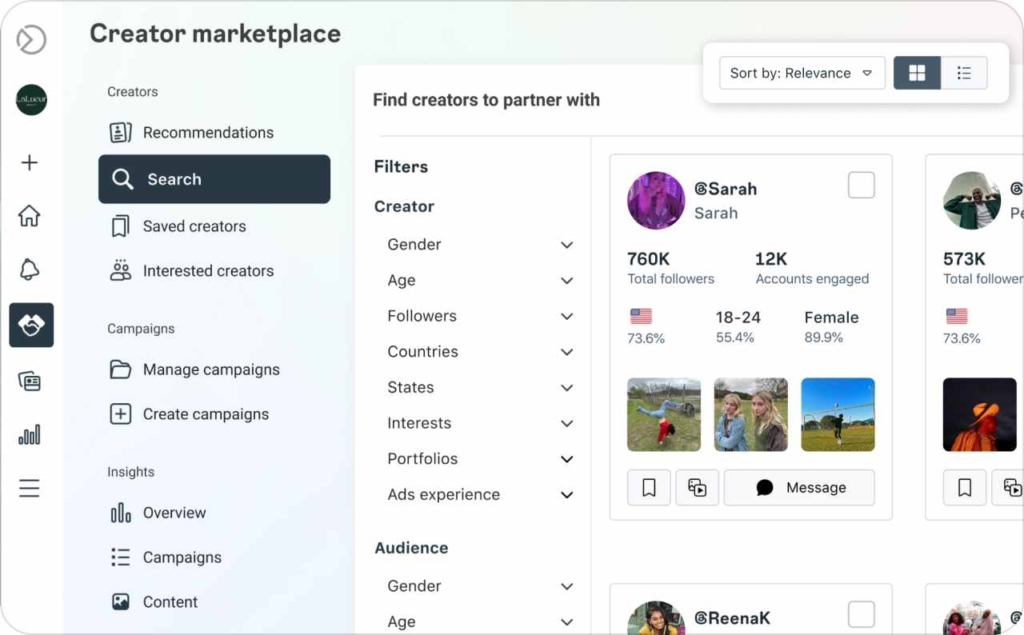
Photo source: Meta
15 proven Instagram monetization channels
I use fifteen channels across three stages: Discovery for reach, Consideration for education, and Conversion for sales. I assign each channel one job and one KPI. I test for two cycles, then I kill or scale based on numbers, not vibes. For creators, I watch RPM which means revenue per thousand views. For businesses, I watch CPA, ROAS, and revenue per session.
Discovery aims for reach rate, hook rate, average watch time, and saves to follows. Consideration aims for profile visits to follows, link click through, save rate, and reply rate. Conversion aims for click to checkout, checkout completion, blended CPA at target, and payback within thirty days.
Brand deals include usage rights, allowlisting, and exclusivity in writing. Shops run only after catalog and domain verification. I track everything with UTM links and a short post-purchase survey to catch dark social lift.
Instagram ads on Reels
Problem
I need predictable reach I can compare in dollars.
Mechanism
Eligible Reels can serve in-stream ads and pay on views. I judge with three signals: RPM, revenue per thousand views; hook rate, how many stay past two seconds; average watch time, how long the story holds. When those align, the Reel earns and tells me what to scale.
Move
- Show the result first, teach one tiny step in 15–30 seconds
- Post the strongest cut with captions; keep it only if hook rate is 30%+ and watch time is 3s+
- Reshoot the same idea tighter the next day; publish while memory is fresh
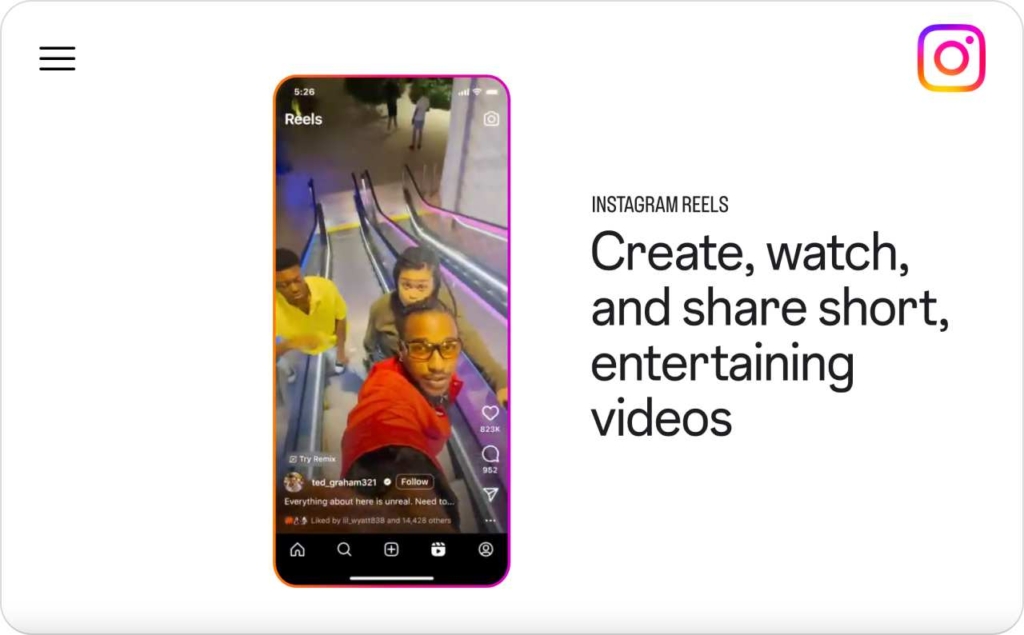
Photo source: Instagram
Bonuses and Challenges
Problem
I want quick payouts without rebuilding my whole content plan.
Mechanism
Time-bound programs pay for output during short windows. They surface hooks worth reusing, but terms change often, so I treat payouts as windfalls while I build stable revenue.
Move
- Run a 30-day sprint around one storyline with three angles
- Post daily, track hook rate and watch time; archive only the top two clips
- Bank the bonus, then turn the winning clip into a Zeely AI ad to read CPA on a small budget
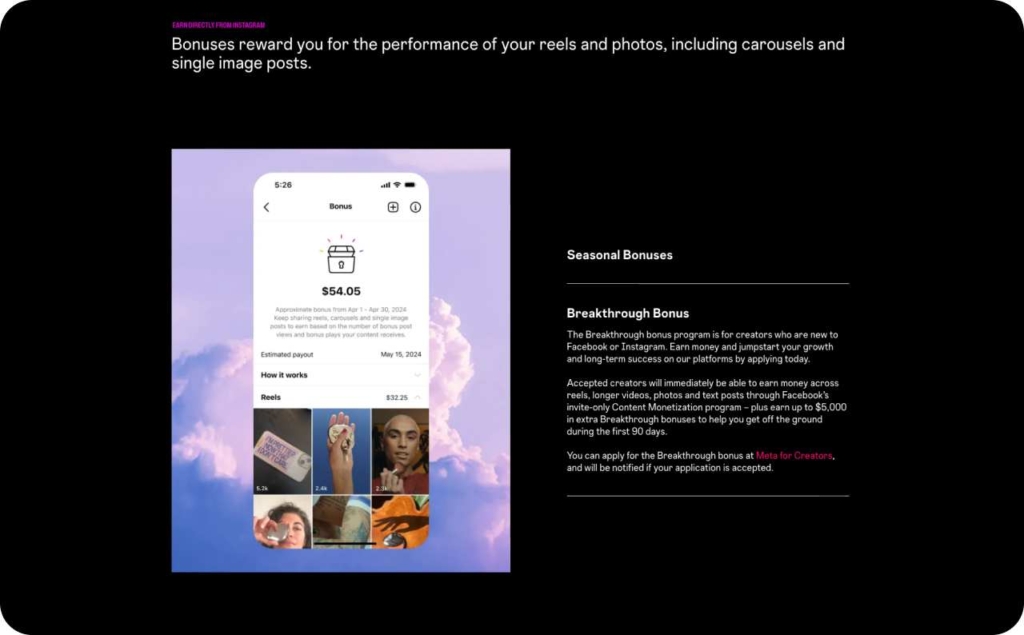
Photo source: Creators
Branded content
Problem
I need sponsor revenue that scales without guessing.
Mechanism
Paid partnerships pay for two things: the content itself and the rights to use it. I price the asset, the usage window, allowlisting rights to run Partnership Ads from my handle, and category exclusivity. Clear terms protect my account and lift fees when media spend is involved.
Move
- Pitch one Reel and three stories with a ninety-day usage window
- Quote the content fee, add a line item for allowlisting, and set category exclusivity with a renewal price
- Deliver with the branded content tag and clear disclosure, then upsell cutdowns if saves and click-through hold
AR effects and filters licensing
Problem
I need awareness for a launch without heavy production.
Mechanism
Simple effects tied to a release trigger shares and user clips. I deliver a tiny visual gimmick, measure opens and uses, then recycle the best clips into a recap Reel the brand can promote under a short license.
Move
- Tease the effect with a 15–20 second demo and a clear callout to try it
- Launch the effect for a limited window and track opens, uses, and saves
- Post a recap Reel using community clips. Offer the brand a 30–90 day license and a small amplification plan
- If usage fades, ship a variant that keeps the same story but a simpler interaction
Allowlisting or whitelisting
Problem
My organic post works, but the brand wants more scale and trust.
Mechanism
Partnership Ads use my post as the ad under my profile. The brand pays for media. I charge for the content and the right to run ads from my handle. Clear dates, spend caps, and approvals protect my likeness and keep CPA on target.
Move
- Deliver one hero Reel and one carousel for testing
- Grant allowlisting for thirty days with a spend cap, an approval flow, and a renewal fee
- Review CPM, click through, and cost per acquisition weekly
- Keep scaling only if CPA holds across new audiences; otherwise refresh the hook and first frame
Affiliate marketing
Problem
I want to make money on recommendations without holding inventory.
Mechanism
Affiliate programs pay on clicks and sales. I group products into a clear use case, disclose plainly, and send traffic through a link hub so I can track earnings per click and cut anything that wastes attention.
Move
- Publish one use-case guide and a short demo Reel with a link sticker
- Tag every link with UTMs; keep only items with earnings per click above your floor
- Refresh the guide monthly with the top sellers and fold those into Zeely AI ads for a small CPA test
Shoppable guides
Problem
People browse my posts but still don’t know what to buy.
Mechanism
A guide groups products by job to be done, trims choices, and lifts average order value with simple bundles. Saved guides live in Highlights, so they keep pulling warm traffic without fresh posts every time.
Move
- Build one guide per problem, then pin it in Highlights with a plain title like “Starter kit”
- Publish a before–after carousel that teaches the steps and links to the guide; follow with a story demo
- Watch link click-through at 1.5 percent or higher and reorder the guide so the top seller sits first
UGC licensing
Problem
Brands want my look and credibility, but not a post on my feed.
Mechanism
I produce assets the brand can run in ads or place on product pages. I license usage for a set window and channels, price renewals, and keep posting control. Performance lives on the brand’s spend, not my organic reach.
Move
- Offer a content pack: three short vertical videos and two photos built around one outcome
- License for 90 days to paid social and product pages with clear channel list, territory, and renewal price
- Deliver editable files plus one cutdown; include an optional allowlisting add-on
- Review creative pass rate, click-through, and cost per add-to-cart weekly; renew winners or shoot new variants if CTR slips
Case studies and before-after carousels
Problem
People do not trust claims without evidence they can scan in seconds.
Mechanism
A simple story with a start, steps, and result lowers risk. Carousels earn saves and dwell time, which pushes profile visits and link clicks. One hard number anchors credibility and makes the post easy to retell.
Move
- Pick one result with a clear number and break it into five slides
- Slide one shows the outcome, slides two to four show the steps, slide five links to the guide or shop
- Add a caption that defines the key term in one line and answers one objection
Broadcast and subscriber channels
Problem
Warm followers stall in DMs and never reach the buy button.
Mechanism
A broadcast or subscriber channel gives me a focused lane to teach, handle objections, and make time-bound offers. Messages land where attention is highest, so sticker taps and replies turn into measured intent.
Move
- Set a weekly drop inside the channel with one promise and one small offer
- Share a short lesson, then a proof screenshot and a single link sticker
- Recap outcomes the next day and invite replies for objections
- Tag links with UTMs and track sticker click-through, reply rate, and sell-through
Shops and product tagging
Problem
People tap your content, then disappear before checkout.
Mechanism
Product tags shorten the path to buy. Native checkout or a clean product page removes extra steps, so more people finish the purchase. When the catalog and domain are verified, tags surface inside Reels, posts, and stories where intent is fresh.
Move
- Tag one hero product in a Reel and a carousel, each showing the result first
- Test native checkout against your product page. Keep the path that hits click to checkout at ten percent or higher and checkout completion at forty percent or higher
- Fix blockers early by verifying catalog, products, and domain, then retest with a tighter first frame and shorter captions
Preorder funnels from Reels
Problem
You have demand now, but inventory lands later.
Mechanism
A preorder lets people reserve with a small deposit and a clear delivery date. Reels create the spark, weekly updates keep trust high, and deposits turn attention into cash you can plan around.
Move
- Post a reveal Reel that shows the final result first, then open preorders with a simple deposit and a delivery window under sixty days
- Share weekly progress clips, confirm timelines, and answer one objection in each post
- Close the preorder with a countdown, then switch to waitlist. Keep refund rate under five percent and carry the best creatives into always-on Zeely AI ads to read CPA at low spend
Paid DMs or micro-consults
Problem
Followers want direct help, not a long course.
Mechanism
Short audits deliver quick wins and trust. A simple booking path inside DMs converts warm intent. Clear scope and price keep delivery tight and repeatable.
Move
- Pin a story highlight that explains the offer, the price, and the response time
- Post one weekly Reel with a quick fix and a booking prompt. Reply fast and confirm scope in one message
- Deliver a 15 to 30 minute async audit with one diagnosis and three steps
- Send a tidy recap the client can share. Track time to first response, completion time, and satisfaction
Live badges and gifts
Problem
Your live sessions get attention, but they do not translate into revenue.
Mechanism
Badges and gifts let viewers tip in real time while you deliver value. A tight live format with one promise and one bundle channels attention into micro-payments and quick sales. The replay becomes a week of clips that keep earning.
Move
- Schedule a weekly live with one clear promise and a pinned bundle link
- Teach for ten minutes, answer three questions, then present the bundle and invite gifts
- Save the live, cut two highlights into Reels, and tag links with UTMs to track clicks and sales
- Review gifts per viewer, click-through, and bundle CPA. If clicks slow, tighten the promise and shorten the lesson
Digital products
Problem
You need revenue that doesn’t depend on bookings or inventory.
Mechanism
Downloads and mini lessons sell one to many with almost zero marginal cost. Specific outcomes and simple setup keep refunds low and reviews strong, which drives repeat sales and upsells.
Move
- Package one clear result into a short template or mini course and price it to feel obvious
- Launch with a before–after carousel and a 15–30 second demo Reel; add a simple guarantee and a post-purchase request for a one-line review
- Tag links with UTMs and track refund rate under two percent, completion rate above fifty percent, and LTV to CAC above three to one
- Turn top reviews into proof clips, then upsell a bundle or a live workshop to raise average order value
Pricing frameworks for brand deals
Every brand deal has two parts: what you make and how the brand can use it. Keeping those separate protects your time and lets you charge for real value instead of “influence.”
Rate card templates (post, Reel, story, whitelist)
Start with a simple rate card. It’s not fancy, just transparent. I use four lines:
- Reel asset: base price for one 15–30 second creative
- Story set: priced per frame or as a bundle
- Usage license: defines where and how long a brand can use my content
- Allowlisting: gives brands permission to run ads from my handle, usually for 30 days
- Exclusivity: covers category lockouts — like “no skincare brands” for 60 days
Add renewal fees for usage and allowlisting, usually 50–70% of the original rate. That keeps revenue steady and contracts clean. Draft one page with four clear rows: asset, usage, allowlisting, exclusivity. Add renewal prices. Your invoice matches your contract. Nothing about rights or time limits is hidden in “deliverables.” Read also about story templates.
Usage, exclusivity, and creator licensing
Usage means permission for a brand to use your content outside your feed. Define the channel, the territory, and the time window. Example: “Paid social + PDPs, U.S. and Canada, 90 days.”
Exclusivity blocks you from working with similar brands for a set period. Write it in plain words — “hair care,” “finance apps,” “fitness gear.” Never let it live in fine print without a fee.
Creator licensing means selling non-posted assets. You shoot, they use. Keep the rights window short and renewable.
I keep these default rules:
- Windows: 30–90 days max
- Channels: paid social, PDPs, email
- Renewal fee: 50–70% of the usage fee
- Add 10–20% when new geos or placements appear
Add standard usage windows and renewal math to your rate card. Contracts mention “license” and “exclusivity” as their own lines. Dates, territories, and renewals are clear. No unpaid amplification, easier renewals, and full control over how your work lives online. Read more about how to get pain on Instagram.
Instagram monetization policies & disclosures
Keeping monetization open means staying transparent. A single missed tag or reused sound can block payouts. Use this table as your quick reference before you post or partner.
| Topic | What it means | What to do | Check this |
| Branded content tag | Links a paid post to your partner inside Instagram’s system. | Turn on branded content tools. Tag the brand in paid posts. | The partner appears under “Paid partnership.” |
| Affiliate disclosure | Makes it clear you earn from product links. | Add “affiliate link” or “I may earn from this link” near the sticker or caption. | Disclosure is visible without tapping “more.” |
| Allowlisting / Partnership Ads | Lets brands run ads from your handle. | Approve requests inside the branded content tool. Set dates and spend caps in writing. | Campaign appears under “Partnership Ads” with your handle. |
| Music & media rights | Using unlicensed sounds or clips can block bonuses. | Use Instagram’s commercial music library. Avoid viral audio marked “for personal use.” | All clips show “Licensed audio” or original sound. |
| Restricted content | Certain topics can’t be monetized. | Avoid misleading, unsafe, or restricted industries (finance, health claims, alcohol). | No “policy violation” notice in Account Status. |
Toolkit: rate card, pitch email, track KPI, use AI ad maker
You don’t need a big stack. You need four simple tools that move work forward today.
Rate card
Keep pricing on one page. Separate the content from the rights. List the Reel, the story set, the usage window, and the allowlisting window. Add exclusivity as its own line. Renew usage and allowlisting at half to seventy percent of the original rights fee. This keeps money tied to use, not guesswork.
Pitch email
Subject: Idea for your next launch
Hi [Name], I help [audience] decide faster with short Reels and simple carousels. I can deliver one Reel and three stories around [clear outcome]. You get a ninety-day usage license for paid social and product pages, plus optional allowlisting for thirty days with a spend cap. I measure saves, click-through, and cost per acquisition, then send a tidy recap. Want a quick look at concepts tomorrow?
Track KPI
Use a three-tab sheet: Discovery, Consideration, Conversion.
Define each term once. RPM means revenue per thousand views. Hook rate means the share who stay past two seconds. Average watch time means seconds watched on a Reel. CTR means clicks divided by impressions. CPA means cost per acquisition. ROAS means revenue divided by ad spend. Set one green threshold per metric so you know when to scale or stop.
Automate ad production with AI ad maker
I use Zeely to generate ad creatives with AI. No filming. No editor. I feed it a product image and a short script. It returns videos and static creatives I can test the same day. On mobile, I open AI Videos, tap New video, and pick Create AI video ad. I choose an avatar, a script style, and my product images. Then I publish.
On web, I open Video Studio and choose Marketing video ad or Text to speech to turn a script into a speaking video. I can also convert a single image into a motion video or generate static ads from a prompt, then duplicate variations in Batch mode.
When the creative is ready, I launch a paid campaign from the web or the app. If I need flexibility, I promote a custom link instead of a single product.
Wrap it up
You’ve got everything you need to make Instagram start paying you back — clean setup, smart pricing, and fifteen clear ways to earn. Start with one channel, test, and learn from your numbers. Then automate what works.
Zeely can take over the hard part — building and launching ads fast, without a team or studio. Try it once. You’ll see the difference.

Emma blends product marketing and content to turn complex tools into simple, sales-driven playbooks for AI ad creatives and Facebook/Instagram campaigns. You’ll get checklists, bite-size guides, and real results, pulled from thousands of Zeely entrepreneurs, so you can run AI-powered ads confidently, even as a beginner.
Written by: Emma, AI Growth Adviser, Zeely
Reviewed on: December 25, 2026