How to spy on competitors ads in 2026
Your competitors’ ads are public on Meta, Google, TikTok, and LinkedIn. I’ll show you how to find them for free, read what each ad is testing, and turn one into your own creative.

Key takeaways
- Find your competitors’ ads for free with Meta Ad Library (Facebook and Instagram), Google Ads, Transparency Center (Google and YouTube), and TikTok Creative Center
- Look at the first line, image, offer, and link to see how other brands try to sell
- Don’t assume a long-running ad makes money since most public libraries don’t show sales or exact ad costs
- Search, save and use ideas with Zeely’s Competitor spy by filtering ads by brand, industry, status, and format
- Turn an image-ad reference into an original ad for your product in Zeely, then test it in your own campaign.
How to find competitor ads for free
The fastest way to find competitor ads is to start with the platform where you already advertise. Search the brand name first and then try to use a buyer phrase, for example such as “linen duvet set” to discover unfamiliar advertisers. Keep the country set to the United States when researching US campaigns.
These public libraries cover the main platforms:
- Facebook and Instagram: Search Meta Ad Library for current commercial creatives, copy, and start dates
- Google Search, Display, and YouTube: Check Google Ads Transparency Center for ads from verified advertisers, filtered by region and date
- TikTok: Browse Creative Center Top Ads for selected, advertiser-authorised creatives and performance indicators
- LinkedIn: Search LinkedIn Ad Library by advertiser or keyword, then check ad format and dates
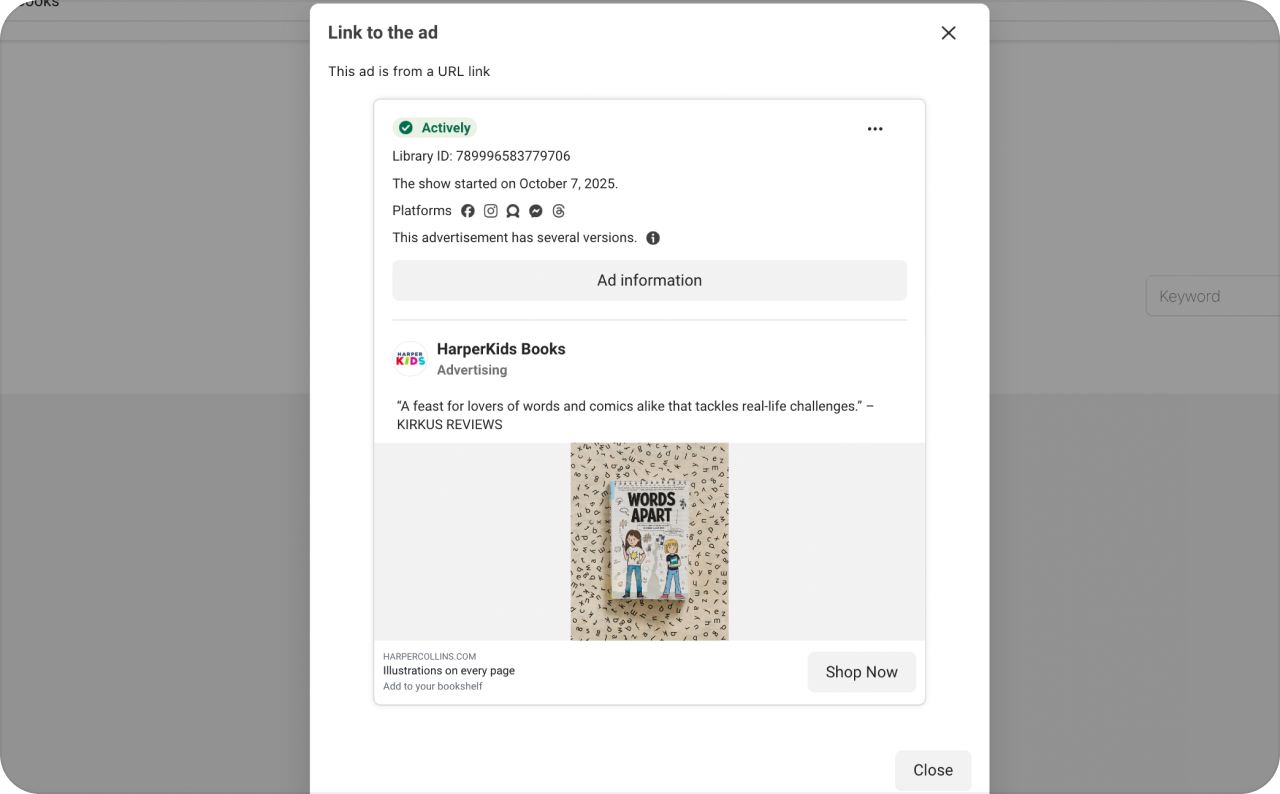
You can see competitor’s public ads without any access to their account. Each platform shows a different slice, so zero results for a brand only tells you what that library can see. Before you switch platforms, try saving three ads that fit what you sell, or the tabs pile up fast.
How to spy on Facebook and Instagram ads
If I could check only one place for a competitor’s Facebook and Instagram ads, it would be Meta Ad Library. There you can see each active ad’s copy and creative, plus the date it started running. It also lists the Meta platforms an ad runs on, which is as close to targeting data as you’ll get for US ads.
- Open Meta Ad Library and set the country to United States
- Choose All ads, search the competitor’s business name and pick the matching advertiser page
- Open Filters to narrow results by active status, platform, media type or dates
- Select See ad details and write down the hook, offer, CTA, landing page and start date
- Run the search again with a product phrase to find brands you hadn’t shortlisted
Say a candle brand runs three versions of the same product photo. One leads with free shipping, one pushes a two-candle bundle and one uses a customers quote. You can see every message it is trying, but nothing on the page tells you which one is selling.
Meta says a new ad usually shows up in the library within 24 hours of its first impression. How long it stays depends on the ad. Political and social issue ads, along with ads delivered in the EU, remain searchable after they stop, while regular US commercial ads disappear once they’re inactive. Check the start date before you treat an old screenshot as a live offer.
With that candle brand, the first thing I’d write down is its exact promise, word for word. Then I’d test a gift offer against free shipping in my own account, which tells me more than borrowing its headline would.

How to find Google and YouTube competitor ads
Use Google’s Ads Transparence Center when you need to compare search messages with display and video creatives. Google supports advertiser-name and website searches, with region and date filters. Its transparency records cover ads from verified advertisers across Google services.
- Visit Google Ads Transparency Center
- Enter the competitor’s brand or website and select the matching advertiser
- Choose United States as the serving region and set a date range
- Review available ad formats, then record the repeated offer or claim
Say a cleaning company uses “Book your first clean this week” in search advertising. Its YouTube creative might open with a messy kitchen and end on the same booking promise. That gives you a practical message to compare with your own offer, without guessing its cost per lead.
Google earns a place in my research when buyers actively search for the service or compare brands on YouTube. You won’t see the advertiser’s exact bids, conversion rate, or profit from the transparency center.
How to research TikTok competitor ads in the US
TikTok has two research products with different coverage. Top Ads in TikTok Creative Center features selected ads authorized by advertisers, with filters and relative performance indicators. TikTok’s separate Commercial Content Library archives ads served in the EEA, Switzerland, and the UK. It doesn’t provide equivalent coverage of US campaigns.
For US creative research, use Top Ads:
- Open TikTok Creative Center and sign in for broader browsing
- Select Inspiration, then Top Ads
- Filter by Region: United States, industry, campaign objective, and time frame
- Sort by a metric such as CTR or 2-second view rate, then open See Analytics for the selected ad
- Watch the opening seconds and save the hook you’d like to test in an original video
TikTok says the logged-out Top Ads view shows only five ads. Its graph highlights relative performance moments within a selected video; it doesn’t give you another advertiser’s complete sales report. My first pass focuses on what happens before the product appears, especially in UGC-style ads.
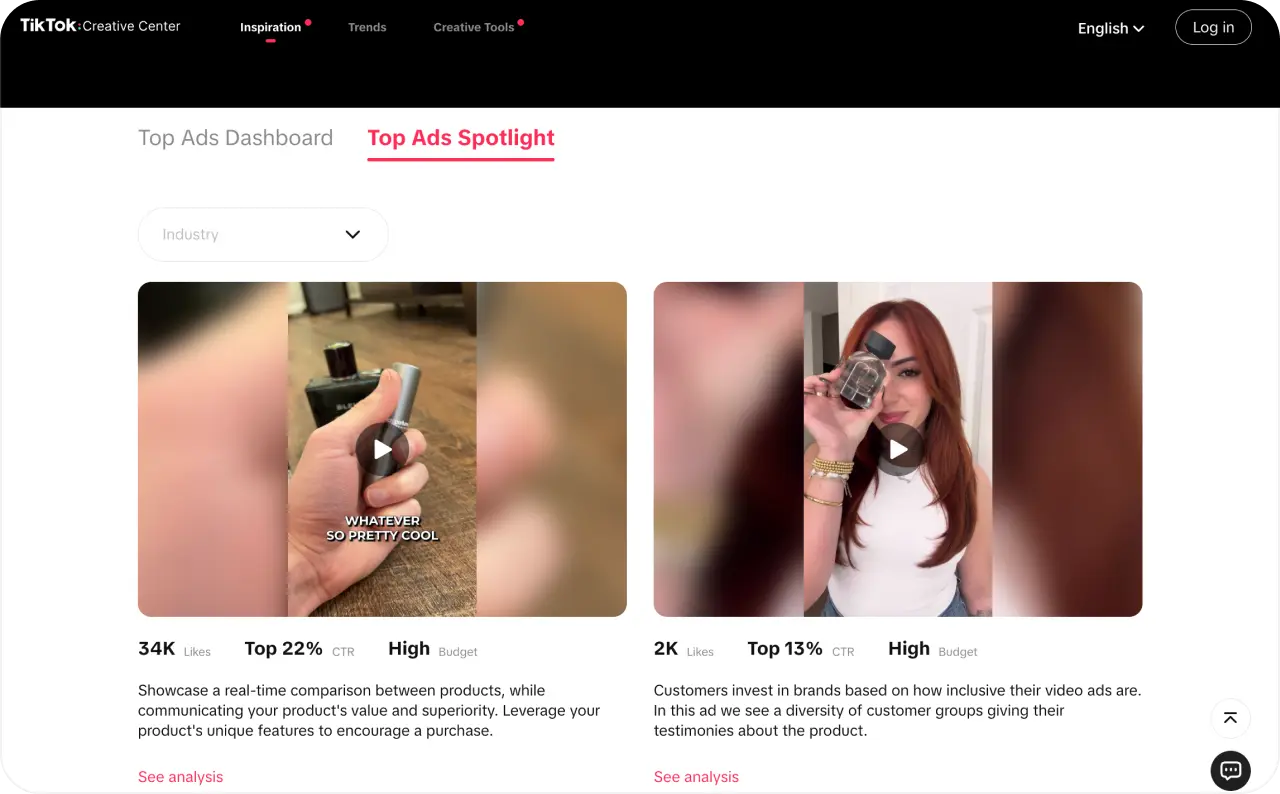
For example, compare a skincare video that opens with a close-up of the bottle against one that begins with a customer question. Test that opening structure with your own product, script, and footage. Don’t treat a Top Ads label as proof that the same video will produce your ROAS.
Where to find LinkedIn competitor ads
LinkedIn Ad Library is useful when you’re selling to business owners or teams. Search by company, payer, keyword, country, or date range, then open the available creative preview. The listing includes the ad format and payer, except where restrictions limit those details.
A bookkeeping software brand might promote a tax checklist, while a competing service asks readers to book a call. My question is which buyer is ready for each other. Someone looking for a checklist may still be researching, while a demo CTA asks for more commitment.
LinkedIn says its library includes ads served after June 1, 2023, and keeps them for one year after their last impression. Ads targeting the EU may show extra impression and targeting details. That added information isn’t generally available for ordinary US targeting research.
How to analyze competitor ads without guessing ROAS
An ad that’s been live for four months deserves a closer look, but check its delivery first. Since December 2025, Meta Ad Library has marked ads with fewer than 100 impressions with a “Low impression count” label. A four-month-old ad with that label is more likely a test nobody switched off than a winner. No label only means the ad has passed 100 impressions, so treat a long run as a reason to study the ad, not proof that it works. The brand may keep it running for reasons you’ll never see, and the library shows neither sales nor spend, so nobody outside can check its CPA or ROAS.
For each saved ad, I write one short hook, visual, offer, CTA and landing page. Then I click through. If the ad says “Ships tomorrow” and the product page quotes 5 to 7 business days, that’s a gap I’d never let into my own ads.
Patterns teach more than one-off designs. When three ads repeat the same bundle price, the brand is betting on that bundle, whether or not it sells. Several hooks on one offer usually mean the team is still testing ways to phrase the same promise.
What I’m after is a message that answers a question real customers ask. If buyers keep asking whether a yoga mat slides on tile, film someone holding a lunge on a tile floor. Use your own footage and your own words when you test it.
During a promotion, I check saved brands once a week. Once the offer settles, monthly is plenty. Each review should hand me one new question to test, which a folder of daily screenshots rarely does.
How to spy on your competitor social media ads with Zeely
Zeely is the agentic AI platform for creating, launching, and scaling ads. Its Competitor spy lets you browse real ad examples, filter them by industry or brand, and save ideas for your own campaigns.
Open Competitor spy under Marketing tools in the Zeely sidebar. The Feed displays image, video, and carousel ads from different brands. Use Industry, Brand, Status, and Format to narrow your search. You can also sort by Newest, follow brands, or save individual ads for later.
I picked Burrow, a furniture brand with two image ads in the feed.
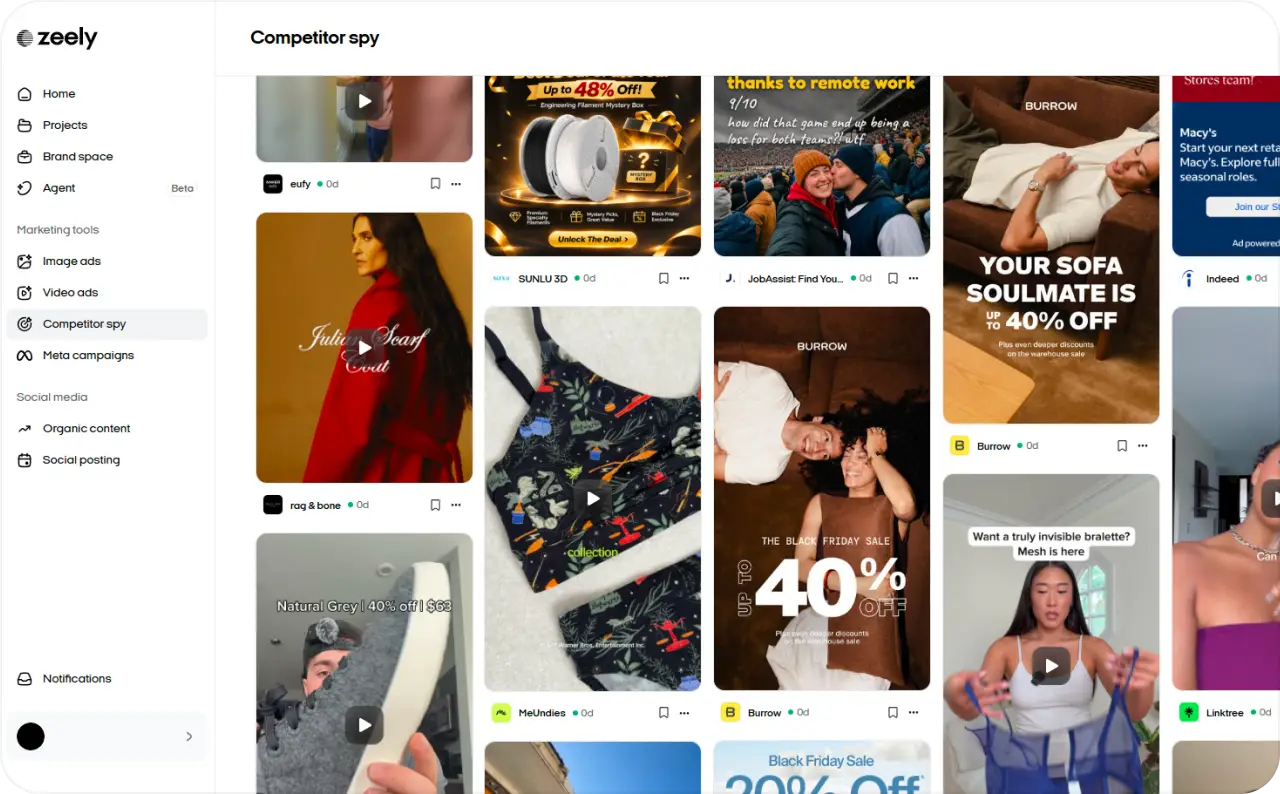
The ad makes the sofa part of a real living-room moment. The product is easy to recognize, and the headline catches your eye. I’d borrow that lifestyle concept for another furniture brand without copying Burrow’s discount or wording.
To use an image ad as inspiration, hover over it and select Recreate. Zeely opens a flow where you can choose your own product and build a new creative from the reference. You can also browse video and carousel ads for ideas, although Recreate currently supports image references only.
How to recreate a competitor image ad with Zeely
I used the Burrow ad to create a new image ad for Cedar Nest, a fictional furniture brand. Its product is the Milo 3-Seater Sofa, with oatmeal-colored fabric, rounded arms, and natural wooden legs. I created a product image in Zeely’s Playground before starting the recreation.
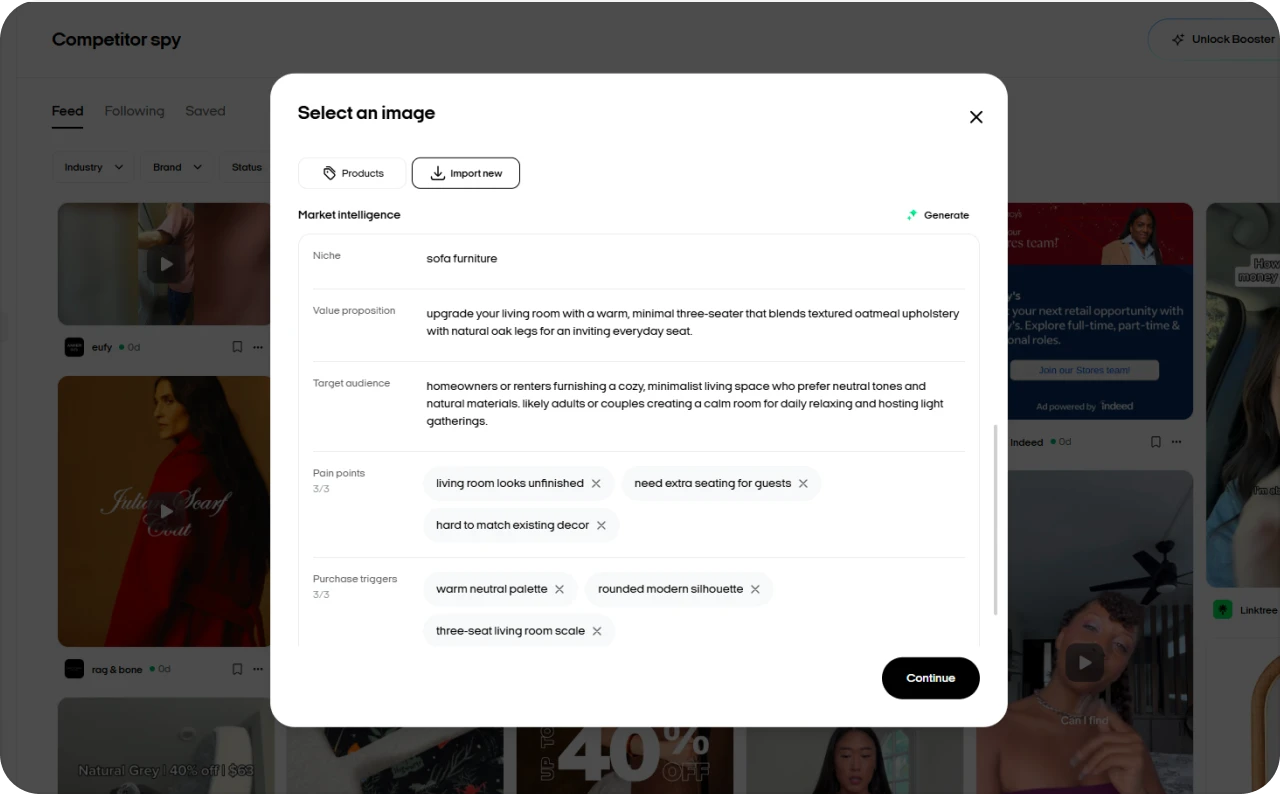
Here’s the exact process I followed:
- In Competitor spy, find Burrow’s image ad with the “Your sofa soulmate” headline and click Recreate
- In the Select an image window, choose Products to select your product image, or Import new to add another product. Review the available Market Intelligence details, then click Continue
- Zeely opens the Image ad builder. Check that Context shows Cedar Nest’s Milo 3-Seater Sofa and Assets contains your product image alongside the Burrow reference
- In Prompt [optional], describe the scene, headline, supporting text, and CTA you want
- Review Brand DNA, AI model, aspect ratio, and number of variations at the bottom of the builder. For this example, I selected GPT Image 2, a 1:1 format, and three variations
- Click Generate, then review the results and open your preferred creative in Projects
For the Milo Sofa, this is the prompt I used:
“Create a premium static Facebook and Instagram image ad for Cedar Nest’s Milo 3-Seater Sofa.
Use the uploaded product image to preserve the sofa’s shape, oatmeal upholstery, cushions, and oak legs. Show a relaxed adult sitting comfortably on the sofa with a book in a warm living room with soft afternoon sunlight.
Headline: “Make room to unwind.”
Supporting text: “Meet the Milo 3-Seater Sofa.”
CTA: “Explore Milo””
Make the headline large, clear, and easy to read on mobile. Keep the sofa as the main focus.
Use the selected competitor ad only as inspiration for the cozy lifestyle concept and bold headline. Create an original composition with Cedar Nest branding. Don’t copy Burrow’s text, logo, discount, colors, or distinctive layout. Don’t invent prices, discounts, or product claims.
Brand DNA was switched off in the builder. If your product belongs to a brand with Brand DNA configured, you can turn it on to guide the image generation.
What Zeely generated from the competitor ad
Zeely created two square image ads featuring the Milo Sofa in a bright living room. All two show a woman reading on the sofa, with the Cedar Nest name, product description, and “Explore Milo” CTA.
The main difference is the headline:
Variation 1: “Make room to unwind.”
Variation 2: “Seating for every guest”
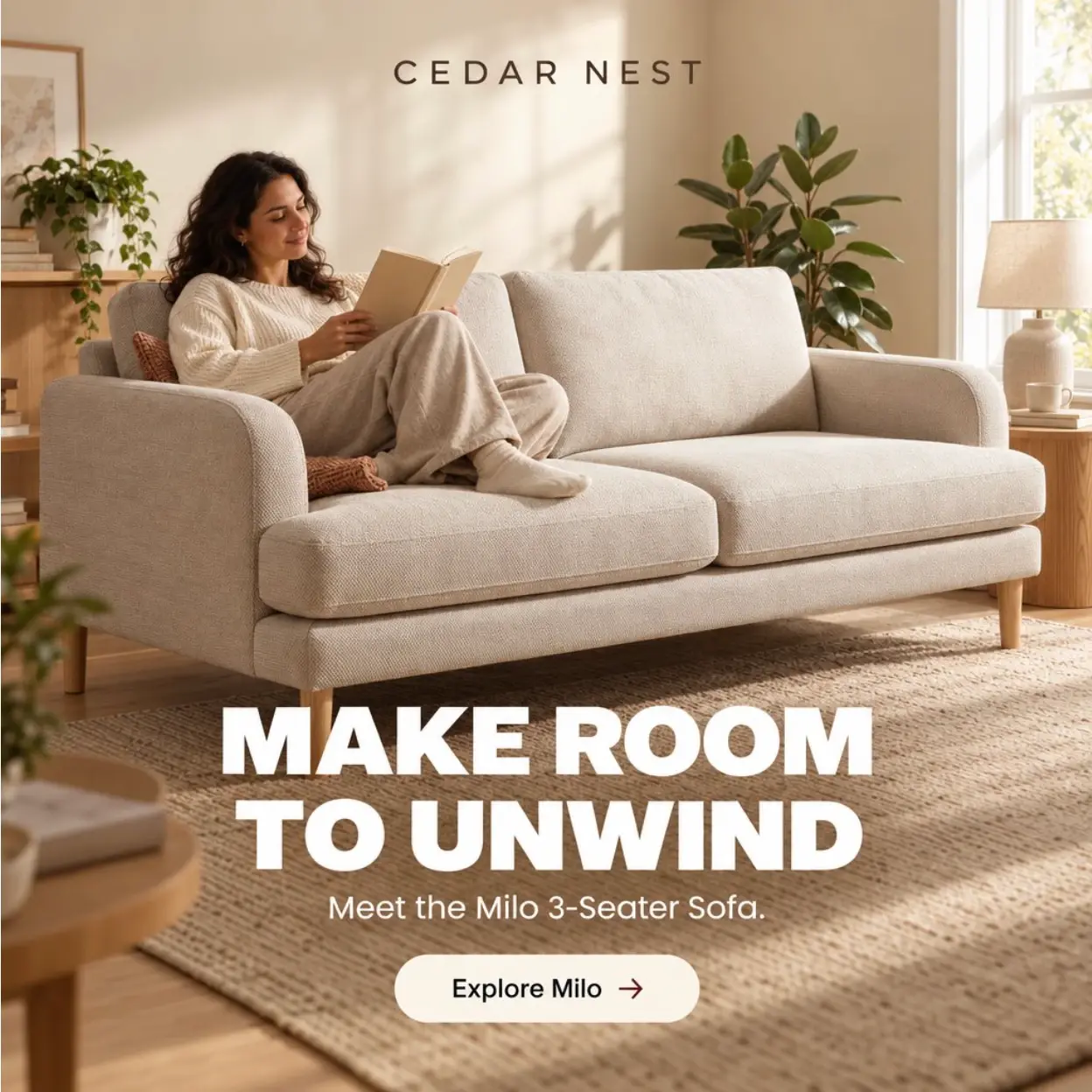
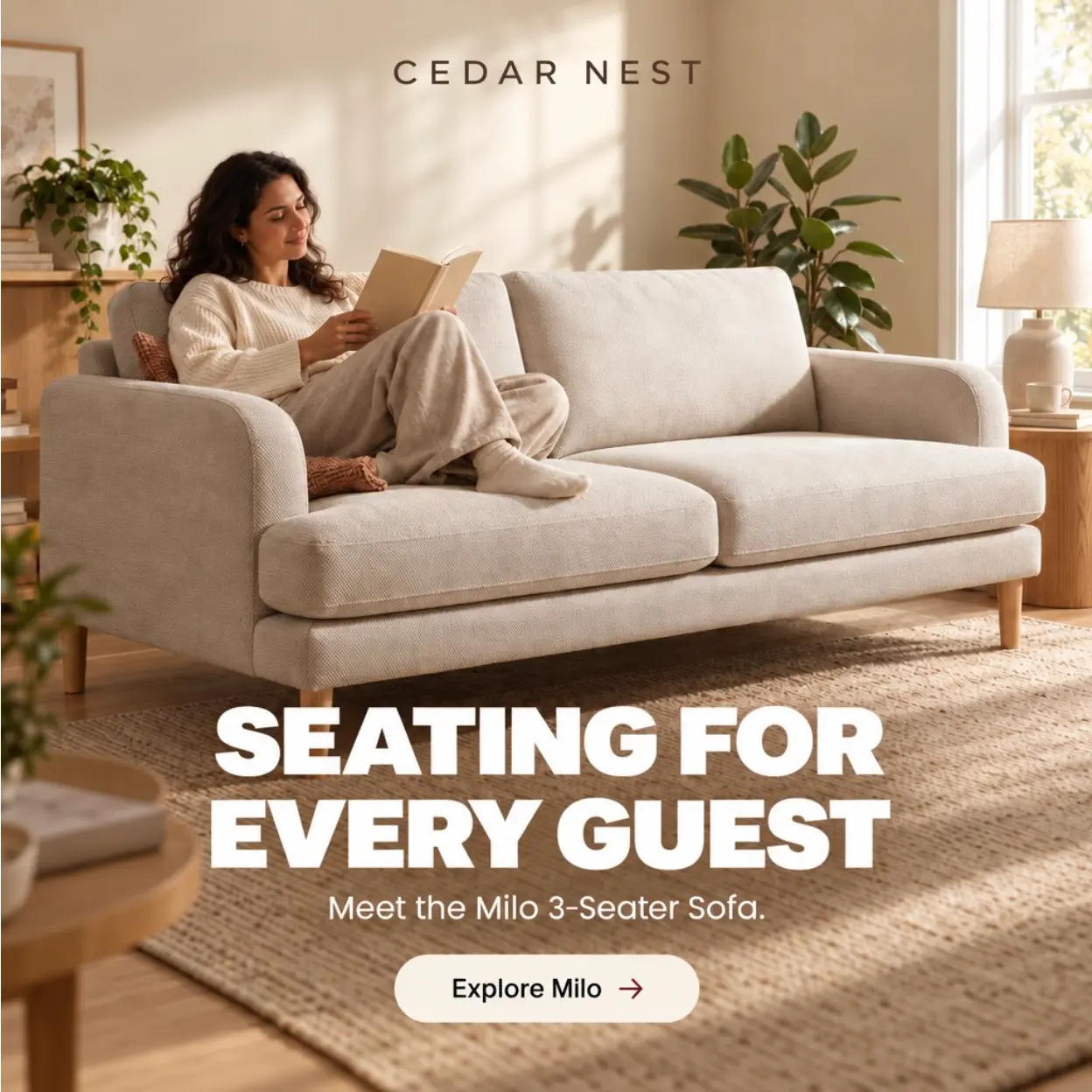
I’d choose the first version for an initial test. Its headline matches the relaxed reading scene, while the other introduces different reasons to consider the sofa.
Before launching, I’d check that the product details and wording match the actual offer. These creatives give me options to test, but their appearance alone doesn’t tell me which will bring the lowest CPA.
How to test a competitor-inspired ad in your campaign
Pick one thing competitors keep doing and test only that. Say every other ad in your niche opens on a bundle price. Make a version of your ad that opens the same way, and keep the product, offer, landing page and audience as untouched as your setup allows.
Your own numbers make the call. One version spends $300 and gets 10 purchases, which is a $30 CPA. The other spends the same $300 and gets 12, so its CPA is $25. That’s better. But two sales is a tiny gap, and I’d run another round before calling a winner.
Keep whichever message reads clearest and swap the visual next. I log every result in the same doc as the research note behind it, which saves a lot of guessing three months later about where an idea came from.
FAQ
Studying public ads is generally lawful. Copying the creative itself is riskier. The US Copyright Office says ideas aren’t protected by copyright, so “big price in the first frame” is yours to use. A competitor’s photo or exact headline can be protected, so make your own. Logos and brand marks are a separate problem, and the USPTO explains when a confusing use of someone’s mark counts as infringement. If yours lands close to theirs, or a letter shows up, talk to an attorney.
The library won’t tell them. Clicking through to their site is another story, since your visit can show up in their analytics like anyone else’s. You also don’t need any access to their ad account to do this research.
That depends on the library. On Meta, regular US commercial ads drop out once they stop, though political ads and some regional ones stay. LinkedIn holds eligible ads for one year after their last impression. When you find a good one, save it right away, because next week it may be gone.
No. Meta Ad Library and Google Ads Transparency Center are open to anyone, with or without an ad account. TikTok Top Ads lets you browse a little while logged out, then asks you to sign in. You’ll only need an ad account once you run campaigns yourself.
You can’t, at least for regular US ads. Their public records leave out saved audiences and targeting choices. Ads served in the EU and some regulated categories show a bit more, like age ranges or locations. Even that is a fragment of someone else’s setup, so read it as a hint.
Before you decide a brand doesn’t advertise, check the boring stuff: spelling, the advertiser page, the country and the date filters. Some brands run ads from a page with a slightly different name, and some platforms keep thinner public records. A product search can turn them up, along with a few brands you hadn’t heard of.
Sources
Meta Ad Library;
Google Ads Transparency Center documentation;
TikTok Top Ads guide;
TikTok Commercial Content Library guide;
LinkedIn Ad Library guide;
Zeely Competitor spy guide;
Zeely Image ad guide;
US Copyright Office;
USPTO.
Fact checked by Anastasiia Stovpova