Kling AI for video ads
Kling can turn a prompt or product image into polished short-form video with realistic motion, camera control, and native audio. This guide compares the Kling model family, explains current pricing and licensing, and shows how Zeely routes the best version.
- Kling AI video ads work well for product reveals, lifestyle scenes, creator-style clips, and short cinematic stories.
- Kling 3.0 adds multi-shot generation, stronger references, native audio, and clips up to 15 seconds.
- Kling 2.5 Turbo Pro suits efficient, clean motion, while
- Kling 2.6 Pro adds realistic movement and tighter camera direction.
Kling is powerful, but packaging, text, people, claims, and licensing still need human review.
The Kling video generator closes that gap by turning a prompt or still image into short video. The result can look expensive without a full shoot. It can also alter a label, hand, or face, so this guide separates polished demos from production reality.
What Is Kling?
Kling is an AI creative studio and video model family that generates video from text, images, and reference assets. Its current public family includes VIDEO 3.0 and VIDEO 3.0 Omni. VIDEO 2.6 and older routes still matter in production stacks that value speed, cost, or a particular motion style.
The Kling VIDEO 3.0 guide lists text-to-video, image-to-video, start and end frames, native audio, multi-shot stories, element references, multilingual speech, and clips up to 15 seconds. Kling says VIDEO 3.0 evolved from 2.6, while VIDEO 3.0 Omni evolved from O1.
For advertisers, Kling is the engine, not the complete ad. A finished creative still needs a hook, offer, captions, CTA, correct format, and review. Our guide to AI models for ad creative generation explains where video engines fit. You may also like to read the Kling 2.5 vs 2.6 vs 3.0 detailed comparison guide.
Key features and capabilities
Kling’s most useful ad features are:
- Text-to-video and image-to-video for new scenes or animated product photos
- Native audio for dialogue, ambience, sound effects, and lip movement
- Multi-shot generation for connected angles inside one output
- Element references to anchor a person, product, object, or setting
- Start and end frames for a more directed beginning and finish
- Flexible 3-to-15-second clips in VIDEO 3.0
- Native 4K output for eligible 3.0 workflows and plans
VIDEO 3.0 also supports Chinese, English, Japanese, Korean, and Spanish speech. Its guide highlights improved lettering for ecommerce scenes, but keep critical prices, claims, logos, and CTAs as editable overlays. “Improved” is not the same as “proofread.”
The Kling model family at a glance
| Model route | Best fit for ads | Main reason to use it |
| Kling 2.5 Turbo Pro | Simple product motion and lifestyle hooks | Smooth, efficient movement in clean scenes |
| Kling 2.6 Pro | Demos and camera-led scenes | Realistic motion, native audio, refined camera direction |
| Kling 3.0 Pro | Hero creative and premium stories | Multi-shot output, stronger references, longer duration |
| Kling 3.0 Omni | Voice-led or multi-reference scenes | High-fidelity motion, native audio, reference and voice control |
How Kling works: Text-to-video and image-to-video
Text-to-video starts with a written direction. Kling interprets the scene, subject, action, camera, lighting, style, and audio, then generates a matching sequence.
Use it when exact product geometry is not essential. It suits mood hooks, fictional settings, broad lifestyle scenes, and visual metaphors.
Image-to-video starts with a still image. The reference anchors appearance while the prompt controls motion and camera behavior. For ecommerce ads, this is often safer because Kling sees the real product instead of inventing it.
A practical workflow:
- Upload a sharp image with clean edges and breathing room
- Describe one subject action and one camera move
- State what must remain unchanged
- Select duration, aspect ratio, audio, and model
- Generate variations and inspect the product frame by frame
VIDEO 3.0 can combine start and end frames, images, or reusable elements. Omni can read photos, video references, text, and saved elements together.
Video quality: Strengths and weaknesses
Kling’s best outputs have convincing weight, camera movement, texture, and atmosphere. A serum bottle can catch soft window light during a slow orbit. Fabric, steam, rain, dust, and liquid can make a simple shot feel produced.
The family is strongest when the first frame already looks right. Good references reduce guessing, while VIDEO 3.0’s element controls and multi-shot mode help connect scenes. Native audio also removes part of the editing load. VIDEO 2.6 introduced one-pass voice, effects, and ambience; VIDEO 3.0 expanded languages, references, and storytelling controls.
Common failures include drifting labels, merged fingers, changing faces, shifting product scale, wrong speakers, reversed action order, and overactive camera movement. The same prompt can return a strong clip and one where the bottle cap develops a side career.
Kling’s Terms say outputs may be inaccurate and require human evaluation. Review every frame, verify product claims, and listen with sound on and off before launch.
Pricing and plans
Kling uses subscriptions and credits. Monthly prices vary by region, promotion, platform, and plan, so use live checkout for current dollar costs.
The free tier provides daily credits and 1080p generation with a watermark. Kling says memberships remove watermarks and unlock native 4K export.
| Model and mode | Credit rate |
| VIDEO 3.0, native audio, 1080p | 12 credits/sec |
| VIDEO 3.0, no native audio, 1080p | 8 credits/sec |
| VIDEO 3.0 voice control | +2 credits/sec |
| VIDEO 2.6, native audio, Professional | 10 credits/sec |
| VIDEO 2.6, no audio, Professional | 5 credits/sec |
| VIDEO 2.6, no audio, Standard | 3 credits/sec |
A 10-second VIDEO 3.0 clip at 1080p costs 120 credits with native audio or 80 without it. A 10-second VIDEO 2.6 Professional clip costs 100 credits with audio or 50 without it. Kling publishes these rates, but plan economics can change.
A cheaper render is not cheaper if it needs six retries. Judge cost by usable output, not the first generation.
How Zeely uses Kling in its tech stack
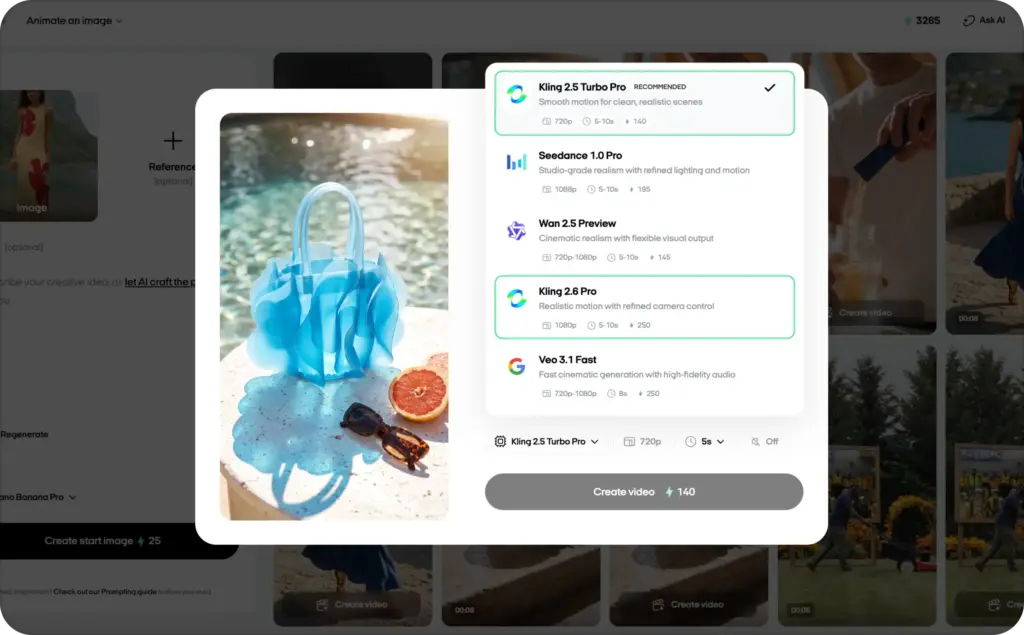
At Zeely, we treat AI models as specialists. The right engine is the one that handles the current ad job well. We use Kling 2.5 Turbo Pro or Kling 2.6 Pro for advanced realism with cinematic camera movement. The model is only one layer. Zeely’s AI video ad generator connects it to product inputs, concepts, scripts, formats, variations, editing, and export.
The machine gets the camera. You keep the final say.
Best prompting practices for Kling AI video ads
Kling’s official formula is practical:
Scene + element + movement + audio + style, emotion, or camera
The VIDEO 2.6 guide also recommends clear character labels, action-linked dialogue, and specific sound cues.
For ads, use this order:
- Format and duration: Vertical 9:16, 8 seconds
- Scene: Setting, light, and background
- Product or person: Exact traits and fixed details
- Action: One ordered movement sequence
- Camera: One main move and framing
- Audio: Dialogue, effects, ambience, or none
- Finish: Final frame and space for editable text
Give each clip one job
A short clip can reveal a product, demonstrate texture, show a reaction, or deliver a spoken hook. Asking for everything at once creates visual soup.
Write the sequence before adding adjectives:
- Product rests on the counter
- A hand enters from the right
- It lifts the product once
- Camera pushes in slowly
- Product holds centered for the final second
Lock product truth early
Place non-negotiable details near the start:
Preserve the exact bottle silhouette, matte white cap, pale blue label, black logo placement, and proportions from the reference.
Add prices, dosage, ingredients, guarantees, and legal copy in editing, not on a moving generated surface.
Keep camera and audio specific
Use one clear camera instruction, such as a static medium shot, slow push-in, gentle track, or top-down view. Five moves in eight seconds is not direction. It is cardio.
For speech, name the speaker, quote the line, and state tone and background sound:
[Creator, warm conversational voice]: “This is the five-minute step I stopped skipping.” Soft bathroom ambience. No music.
VIDEO 3.0 supports more languages. VIDEO 2.6’s documented voice output is limited to Chinese and English, with other languages translated into English.
Use an ad-ready product prompt
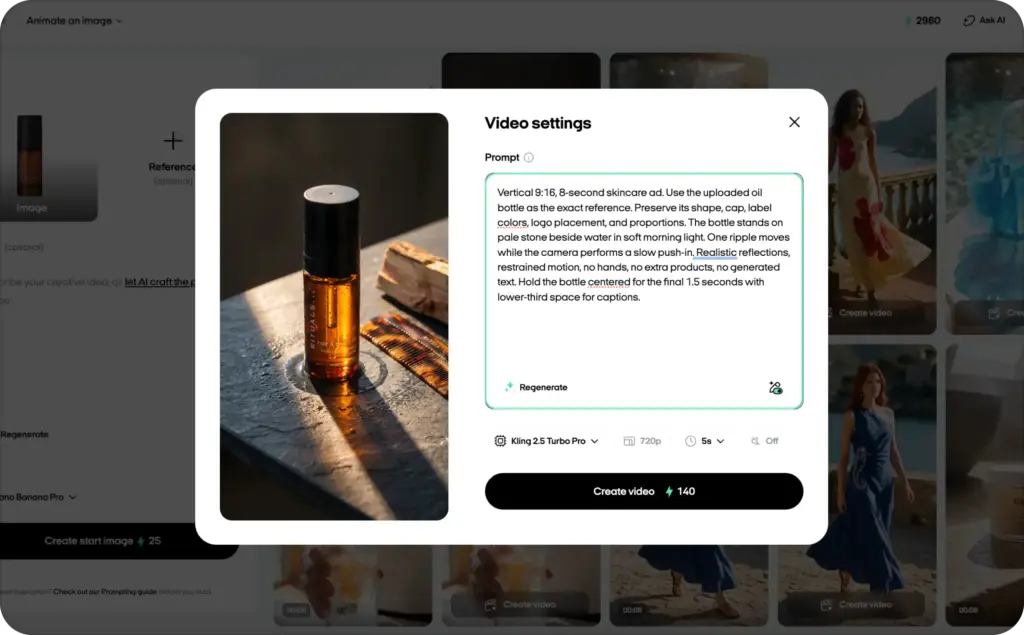
Vertical 9:16, 8-second skincare ad. Use the uploaded oil bottle as the exact reference. Preserve its shape, cap, label colors, logo placement, and proportions. The bottle stands on pale stone beside water in soft morning light. One ripple moves while the camera performs a slow push-in. Realistic reflections, restrained motion, no hands, no extra products, no generated text. Hold the bottle centered for the final 1.5 seconds with lower-third space for captions.
Generate variants by changing one variable at a time: hook, first frame, setting, camera, or audio. You will learn more than you would from four completely different prompts.
Real-world use cases
Kling works best when the visual job is specific:
- Product reveals: Add controlled light, liquid, fabric, particles, or camera motion to a packshot
- Lifestyle scenes: Place products in bathrooms, kitchens, gyms, desks, or travel settings
- Feature demonstrations: Show texture, rotation, opening, or a short use sequence. Keep measurable claims grounded in evidence
- Creator-style hooks: Build face-to-camera openings or routines, but never invent a customer testimonial
- Paid-social variants: Test several first frames and motion concepts for Reels, Stories, Feed, or TikTok-style placements
- Localized scenes: Use VIDEO 3.0 speech options, then review pronunciation with a fluent speaker
For a flow that combines scripts, visuals, voice, and formats, see Zeely’s AI marketing video maker.
Kling vs. leading alternatives
There is no universal best model. Choose by input, control, audio, workflow, budget, and retry rate.
| Model | Best for | Strength | Tradeoff |
| Kling VIDEO 3.0 and Omni | Product animation and reference-led ads | Motion, native audio, multi-shot output, up to 15 seconds | Needs ad assembly, review, and licensing checks |
| Google Veo 3.1 | Premium audiovisual scenes | Native dialogue, effects, ambience, references, realism | Access and cost may not suit frequent testing |
| Runway Gen-4.5 | Generation inside a broad creator workspace | Prompt adherence, motion quality, visual fidelity, controls | Runway notes causal and object-permanence failures |
| LTX-2.3 | Local use and custom technical pipelines | Open weights, local deployment, longer clips, audio controls | More setup and production knowledge |
Kling limitations and common issues
Most failures improve when you reduce uncertainty.
Product drift: Use a sharp reference, simpler motion, shorter clips, and fewer occlusions.
Weak text or logos: Generate the visual first. Add verified copy in editing.
Identity changes: Use element references, fewer characters, and less aggressive camera movement. Choose Omni when multiple references or voice binding matter.
Wrong action order: Write actions as a numbered sequence and remove nonessential detail.
Audio mismatch: Label speakers and separate dialogue, ambience, music, and effects.
Credit waste: Test the core motion before adding high resolution or native audio.
Kling creates footage. It does not prove claims, select the best hook, add platform-safe captions, or decide what deserves media budget. The fix is often a clearer scene, not a longer prompt.
Commercial licensing and ownership
Kling’s current pages are not fully aligned on commercial use.
Its image-to-video page says platform outputs, including free-tier videos, can be used commercially. The Terms say Kling does not claim ownership of your Content under applicable law and require you to hold the necessary rights to every input.
However, the Terms also require Kling branding or a prominent “generated by Kling AI” disclosure without written permission. They further state that commercial use, reproduction, distribution, modification, or derivative works require written permission. A watermark-free export is therefore not automatic commercial clearance.
Before running paid ads:
- Get written confirmation for your plan and intended use
- Clear rights to products, logos, music, voices, and likenesses
- Save the prompt, source files, receipt, Terms version, and edits
- Check local ad, privacy, disclosure, and synthetic-media rules
- Add meaningful human selection, copy, editing, and arrangement
Contractual ownership is also different from copyright protection. The U.S. Copyright Office’s AI initiative says copyrightability of generative output depends on human authorship under applicable law. Rules vary by country.
This is practical publishing guidance, not legal advice.
FAQs
Yes. It is strong for product animation, lifestyle scenes, short cinematic concepts, image-to-video, and native-audio clips. Review packaging, hands, faces, text, claims, and sound before launch.
Use Kling 2.5 Turbo Pro for efficient clean motion, Kling 2.6 Pro for realistic movement and camera control, Kling 3.0 Pro for premium multi-shot work, and VIDEO 3.0 Omni for native audio and complex references.
Yes. Upload a clean product image, describe one action and camera move, state fixed details, choose the format, and generate variations. Image-to-video usually protects product appearance better than text alone.
Yes. VIDEO 2.6 introduced native voice, effects, and ambience. VIDEO 3.0 expands languages, character references, voice control, and multi-shot audio. Lip-sync and speaker assignment still need review.
VIDEO 3.0 and VIDEO 3.0 Omni support up to 15 seconds. Longer ads usually combine several generated clips in an editor.
Kling offers daily free credits. Free outputs include a watermark. Memberships remove watermarks and unlock 4K according to its feature page.
Kling’s feature page says yes, but its Terms contain stricter written-permission and attribution clauses. Obtain written confirmation for paid-ad use and clear all input rights.
Kling is practical for product motion and reference-led short clips. Veo is strong for premium audiovisual realism. Runway offers a broader creator workspace. The best model is the one that produces an accurate, usable ad with fewer retries.
Final verdict
Choose Kling for polished short-form motion from a prompt or product image, especially for ecommerce, paid social, creator-style hooks, and cinematic product scenes.
Use VIDEO 3.0 or Omni when references, native audio, multi-shot direction, or premium camera movement matter. Keep 2.5 Turbo Pro and 2.6 Pro when a simpler route can deliver the scene more efficiently.
Do not rely on Kling alone for exact product documentation, long-form editing, legal clearance, or campaign assembly. Use it as a generation engine inside a reviewed workflow.
Pretty motion earns attention. Accurate, clearly offered, properly licensed creative earns the right to run.

Emma blends product marketing and content to turn complex tools into simple, sales-driven playbooks for AI ad creatives and Facebook/Instagram campaigns. You’ll get checklists, bite-size guides, and real results, pulled from thousands of Zeely entrepreneurs, so you can run AI-powered ads confidently, even as a beginner.
Written by: Emma, AI Growth Adviser, Zeely
Reviewed on: August 6, 2026



