How Veo 3.1 works for video advertising
Can Veo 3.1 for video ads give a small business cinematic quality without a film crew? I’ll show you where this model earns its place, and how to turn strong generations into test-ready ads.
Veo 3.1 works good for short, premium ad shots that need cinematic realism, controlled camera movement, and synchronized dialogue or sound.
It can generate 4, 6, or 8-second clips in portrait or landscape formats, guided by text, images, and first or last frames. Product details, continuity, audio claims, and final ad text still need human review. Judge the model by cost per approved shot, not cost per generation.
Veo 3.1 for video ads is easy to misunderstand. The model can make a gorgeous clip, but a gorgeous clip is not automatically a useful ad.
A useful ad must show the right product, make one clear promise, fit the placement, and survive a product-truth check. That is why I treat Veo 3.1 as a specialist, not a magic button.
What is Veo 3.1, and why does it matter for ads?
Veo 3.1 is Google’s cinematic video generation model. Google’s current Gemini API model directory describes it as a model for advanced creative control and natively synchronized audio. Its dedicated Veo 3.1 model page highlights professional-grade 4K output, complex camera movement, temporal consistency, and artistic control.
Veo 3.1 creates a short video and its sound together. You can request product motion, camera movement, dialogue, ambience, or a transition between two frames. It can work from text, images, or a previous Veo clip.
As of July 2026, Google lists Veo 3.1, Veo 3.1 Fast, and Veo 3.1 Lite as Preview models in the Gemini API. Preview models can change before stable release and may have tighter rate limits.
Google charges for successful generations by video second:
- Veo 3.1 Standard: $0.40 per second at 720p or 1080p, and $0.60 per second at 4K
- Veo 3.1 Fast: $0.10 per second at 720p, $0.12 at 1080p, and $0.30 at 4K
- Veo 3.1 Lite: $0.05 per second at 720p and $0.08 at 1080p; 4K is not supported
That means an eight-second clip costs about $3.20 to $4.80 with Standard, $0.80 to $2.40 with Fast, or $0.40 to $0.64 with Lite. Google only charges when a video is successfully generated. These are direct Gemini API costs. Google also marks the older Veo 3 API models as deprecated, with shutdown scheduled for June 30, 2026.
Teams researching Google video model ads need a business answer, not another feature list: which shot should the model make, and what still needs human review?
For a small business, the useful question is not, “Is this the most advanced video model?” It is, “Will this model make the exact shot my ad needs at a sensible cost?”
What Veo 3.1 does especially well for video ads
Premium cinematic realism
Veo 3.1 is strongest when the creative needs to feel produced rather than templated. Think controlled lighting, believable materials, depth, camera motion, atmosphere, and a clear visual mood.
That makes it useful for hero shots, sensory close-ups, travel scenes, or branded reveals that would normally require a camera crew. Google’s current Veo generation guide supports 720p, 1080p, and 4K output on Veo 3.1, although higher resolutions take longer and cost more. Veo 3.1 Lite does not support 4K.
Most ads do not need 4K. It earns its keep when you need a master for cropping, a premium close-up, or footage for larger screens.
High-fidelity, synchronized audio
Audio is one of Veo 3.1’s most useful differences. The model generates video with audio, and Google lets you prompt dialogue, sound effects, and ambient noise. You can describe a bottle cap clicking shut, coffee pouring into a cup, a quiet store atmosphere, or a short spoken line.
Native audio still needs a separate review lane. Listen for pronunciation, timing, voice changes, accidental claims, awkward pauses, and sound that fights the caption. “Generated together” does not mean “approved together.”
Better control over the beginning, ending, and subject
Veo 3.1 supports portrait 9:16 and landscape 16:9 output. It also supports first-and-last-frame generation, video extension, and up to three reference images for a person, character, or product.
Those controls are useful for ads because they reduce guesswork. You can begin with a clean product frame, define the desired end frame, then ask the model to create the motion between them. You can also provide product references to guide shape, finish, or visual identity.
The key word is “guide.” Reference images raise the odds of consistency, but they do not create a legal lock on every logo, label, color, or face. That distinction saves money and several headaches.
Zeely’s ad-creation stack
Zeely does not treat one model as the answer to every creative job. The useful unit is the finished ad, not the model badge under the hood.
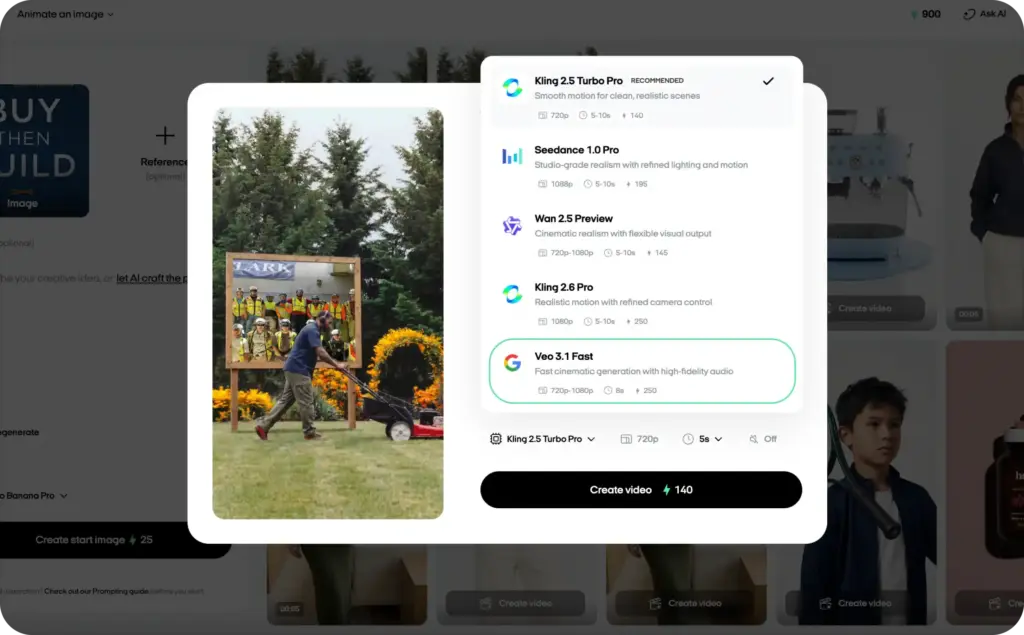
A model stack routes each task to the best engine. One may draft hooks, another may create a stable product image, and Veo 3.1 may generate premium motion and audio. Zeely assembles those parts using different AI models with the offer, captions, CTA, format, and editable business details.
This follows the same principle covered in our guide to how Zeely’s AI model stack works: raw model output still needs a workflow layer before it becomes campaign-ready.
For a broader tool-level decision, you can compare AI product video generators for ads. That page owns the tool comparison. This page owns the question of when Google’s Veo model deserves a role inside an ad workflow.
Best uses for Veo 3.1 marketing videos
The best Veo 3.1 marketing videos give the model one visual job at a time. Short clips become easier to approve, reuse, and combine.
Hero shots that create desire
A hero shot makes the product feel worth noticing. It may show a watch catching light, a skincare bottle emerging from water, or a dessert breaking open in close-up.
These shots work near the opening, after a strong hook, or before the CTA. They do not need to explain the full offer. Their job is to make the viewer want the next two seconds.
Product-world scenes that would be costly to film
A small brand may lack a studio, location budget, weather control, or specialist props. Veo can build those settings digitally.
Keep the actual product truth anchored to real assets. Use the generated scene for atmosphere and movement. Add the verified packshot, price, offer, and CTA in the ad assembly.
Audio-first hooks
A familiar sound can stop the scroll before the viewer understands the image. Think a crisp package tear, a fizzy pour, a satisfying click, or a short line delivered with the right energy.
Prompt audio as deliberately as the camera. Name its source, timing, volume, and environment. Then test the ad muted, because many viewers rely on captions.
Controlled transitions and micro-stories
First-and-last-frame generation is useful when the commercial idea depends on a specific transformation. A messy desk can become organized. A blank wall can become a styled room. A closed case can end on the product reveal.
The AI model can create the bridge, but you should define the commercial meaning. What changes? Why should the customer care? Which final frame carries the offer?
Hidden costs and problems small businesses should know
Google’s demos show capability. Creator forums show where the work gets expensive.
In 2026 Google AI Developers Forum discussions, users reported failed generations, ignored instructions, identity or object drift, mismatched continuations, and unusable outputs after repeated attempts. These are anecdotes, not controlled benchmarks, but they flag real production risks.
Cost per approved shot matters more than API price
Google’s current Gemini API pricing charges per generated second. At the listed rates, a successful eight-second standard clip costs $3.20 at 720p or 1080p and $4.80 at 4K. Fast costs $0.80 at 720p, $0.96 at 1080p, or $2.40 at 4K. Lite costs $0.40 at 720p or $0.64 at 1080p.
Those are raw API prices, not Zeely plan prices, and exclude retries, editing, and review time.
Use this calculation:
Cost per approved shot = generation spend + review time + editing time, divided by approved shots
A $0.80 generation that needs twelve retries is not cheap. It is a slot machine wearing a director’s hat.
Set a stop-loss rule before you begin. My practical rule is three failed rounds. After that, simplify the shot, replace a risky element, use a stronger starting frame, or route the job to another model.
Product and identity drift can break trust
Google says reference images are designed to preserve a subject’s appearance. Forum users still report faces, clothing, objects, environments, and framing changing across generations or extensions.
For an ad, product drift can become a customer-trust problem. A bottle may change shape. A shoe color may shift. A device may gain a port. A human presenter may stop looking like the same person.
Reduce the risk with short shots, few moving parts, clean references, and verified product overlays.
Native audio creates a second source of errors
A silent visual has one main review track. A clip with dialogue, ambience, and effects has several.
Check every spoken claim against the landing page. Confirm names and technical terms. Watch for dialogue leaking into an extension or changing between versions. Keep captions editable rather than baking important copy into the generated scene. Forum users have specifically reported dialogue and continuity problems when extending generated clips.
Preview status changes production planning
Veo 3.1 is currently listed as Preview in the Gemini API. Preview models may change and can have more restrictive rate limits. Keep source assets, prompts, approved exports, and replacement options organized.
Do not build a campaign that can only exist if one exact model behavior stays unchanged forever. Models move fast. Your product truth should move much slower.
FAQ
Yes, when the ad needs cinematic realism, controlled camera movement, a premium product reveal, or synchronized sound. It is less efficient for simple price cards, exact on-screen copy, long tutorials, or high-volume minor variations. Use it for shots where its quality is visible to the customer.
Yes. Google’s current documentation supports native 9:16 portrait output as well as 16:9 landscape output. Still review framing and safe zones before launch. Keep important product details and captions away from interface overlays.
The Gemini API supports 4, 6, and 8-second generations. Reference-image, 1080p, and 4K workflows require eight seconds in the current documentation. Veo 3.1 and Fast can also extend eligible Veo-generated clips in seven-second steps, but extensions add continuity and audio review work.
Yes. Audio is generated with the video. Prompts can include dialogue, sound effects, and ambient noise. Review spoken claims, pronunciation, timing, lip-sync, and the muted version before using the clip in an ad.
Reference images and first-frame controls help, but they do not guarantee exact packaging, labels, colors, scale, or small details. Use clean product references, keep the action simple, compare every output with the product page, and add exact commercial details in editable layers.

Emma blends product marketing and content to turn complex tools into simple, sales-driven playbooks for AI ad creatives and Facebook/Instagram campaigns. You’ll get checklists, bite-size guides, and real results, pulled from thousands of Zeely entrepreneurs, so you can run AI-powered ads confidently, even as a beginner.
Written by: Emma, AI Growth Adviser, Zeely
Reviewed on: August 4, 2026