How to scale TikTok ads using AI tools in 6 steps
Want more TikTok sales without spending too much on ads? Learn how to use AI-made videos, sales data, and smart budget changes to grow your results.

Learning how to scale TikTok ads using AI tools starts with reliable purchase data, a profitable CPA, and controlled creative tests.
Key takeaways
- Set spend limits from contribution margin, then judge growth by the profit left after ad costs
- Use AI for creative ideas that really differ, and fund each test well enough to answer one question
- Raise budgets only once conversion data has matured, and leave time between changes to see what each one did
- Build creatives in Zeely and run delivery in TikTok Ads Manager. Someone on your team should still sign off on every claim and every dollar
To scale TikTok ads, I’d work in this order: fix tracking, find the ads already making money, build variations, test them, raise budgets and replace creatives as they wear out. AI gets you more ads and faster comparisons. Your purchase data still decides which ones get the money.
I’d start by writing down your target CPA and maximum affordable test loss. More sales can still leave you with less money, especially when discounts and returns eat the margin.
This guide focuses on TikTok ads that send shoppers to your website. TikTok Shop campaigns have separate settings and workflows.
Before spending more, confirm that:
- Your checkout works on a phone and matches the advertised offer
- Purchase events report the correct value and currency without double-counting
- Your target CPA includes variable costs and a reserve for overhead and profit
- You have approved replacement creatives and enough stock to fulfill additional orders
Calculate a profitable CPA before scaling TikTok ads
Your allowable acquisition cost comes from what one order leaves you before ad spend. Until repeat purchases show up in your data, I’d plan on the first order alone.
Contribution per order = net order revenue − variable costs (ads excluded)
Contribution margin = contribution per order ÷ net order revenue × 100
Break-even CPA before fixed costs = contribution per order
Target CPA = contribution per order − the contribution you need after ads
Use revenue after discounts and expected refunds, without sales tax. Variable costs include the product, payment fees, fulfillment, shipping you cover and expected returns. Just don’t subtract a refund twice.
Say a $60 order carries $30 in variable costs. That leaves $30, a 50% margin, so ads break even at a $30 CPA. Keep $10 per order for overhead and profit, and the target CPA becomes $20.
As ROAS, that’s 2.0 to break even ($60 ÷ $30) and 3.0 on target ($60 ÷ $20). I made these numbers up, so don’t read them as TikTok benchmarks.
Plan your next TikTok budget increase
Before you touch anything, write down your target CPA, your recent purchase CPA and your daily budget. Then check enough days of data to catch people who buy later.
Next daily budget = current daily budget × (1 + increase percentage)
Say an ad group already hits a $20 target CPA. Raise its $50 daily budget by 20%, and you get $60. The table shows the next steps, as long as CPA stays on target:
| Review point | Current daily budget | Proposed budget if results qualify |
| First approved increase | $50.00 | $60.00 |
| At least two days later | $60.00 | $72.00 |
| At least two more days later | $72.00 | $86.40 |
| At least two more days later | $86.40 | $103.68 |
Raise the budget only when settled purchase data still hits your target and you can afford it. If CPA goes over target, keep the budget where it is and find out why. Step 5 covers the learning stage. If buyers show up late, wait longer between check-ins.
This is for budgets you change by hand. Leave ad production costs out of this math. Check whether TikTok’s automatic budget increases or dynamic daily spending are on.
Why TikTok ad performance drops when you scale
A higher CPA needs a diagnosis before another budget edit. Compare auction costs, clicks, checkout behavior, and confirmed purchases to locate the change.
Tinuiti’s Q3 2026 benchmark report recorded 29% year-over-year growth in TikTok ad spending across its advertiser data. That provides market context, but it cannot explain your account’s CPA by itself.
| Cause | What you might see | Where to fix it |
| Missing or duplicated purchase signals | Ads Manager sales disagree sharply with store orders | Step 1: Tracking |
| Too little evidence or fragmented spending | A supposed winner depends on a handful of purchases | Step 2: Readiness |
| Creative fatigue | Frequency rises while CTR and viewing retention weaken | Step 3: Variations and Step 6: Refreshing |
| Offer or checkout friction | Clicks hold up, but fewer visitors buy | Step 4: Testing |
| Auction pressure or aggressive budget changes | CPM or CPA rises after spending expands | Step 5: Budgets |
Step 1: Fix tracking before increasing TikTok ad spend
Place one real order and follow it from checkout into your reports before trusting the dashboard. TikTok suggests using Pixel and Events API together, checked in Events Manager.
Pixel sends events from the shopper’s browser. Events API sends them from your server. If both report one purchase, use the same event name and unique event_id. TikTok’s event deduplication guidance shows how it then counts that purchase once.
Check the purchase value, currency, event timing and Diagnostics tab. Pick a sales objective and the website purchase event that fits your account. A campaign set up for cheap clicks can’t prove profitable sales.
With one business and one website, I’d keep every campaign in one ad account. Split only for a real reason, like two teams that pay separately. Extra accounts opened to chase results just scatter your reports.
Keep attribution settings the same across tests. Record your click-through and view-through windows, use UTMs and check TikTok’s numbers against store orders. Expect small differences. Dig into any sudden change you can’t explain.
Step 2: Identify TikTok ads ready to scale
Look for repeatable purchases within your target CPA, with enough elapsed time for conversions to appear. One cheap sale is a reason to keep observing.
TikTok says learning-phase volatility typically starts declining after about 25 campaign results or 7 days. This is an initial review checkpoint, not proof that learning has ended or every ad has enough data. For a purchase campaign, examine purchases rather than clicks or video views.
My decision rules would be:
| Decision | Evidence | Next action |
| Promote | CPA meets target across comparable, mature windows; purchases recur; tracking is sound | Consider one controlled increase |
| Hold | Results are sparse, conversions are delayed, or performance is still unstable | Keep settings steady within the test-loss limit |
| Stop or rework | Mature results exceed the loss limit, or the page, tracking, or claims are broken | Pause the affected test and fix the cause |
Never spend through a broken checkout merely to reach a learning threshold. Conversely, seven days with two purchases still leaves substantial uncertainty. Review the ad group and individual ads separately so one winner does not hide expensive weak creatives.
Step 3: Generate TikTok ad variations with AI
Adobe’s 2026 research, including 4,000 consumers surveyed in late 2025, found that 50% give promotional content two to five seconds to earn their attention. This covers several channels, so I’d use it to prioritize opening clarity rather than prescribe a TikTok hook length.
Zeely in action: how to create TikTok ads with AI
Zeely is the agentic AI platform for creating, launching, and scaling ads. For this walkthrough, I’d use its TikTok ad creator to turn one product into three video candidates with different hooks.
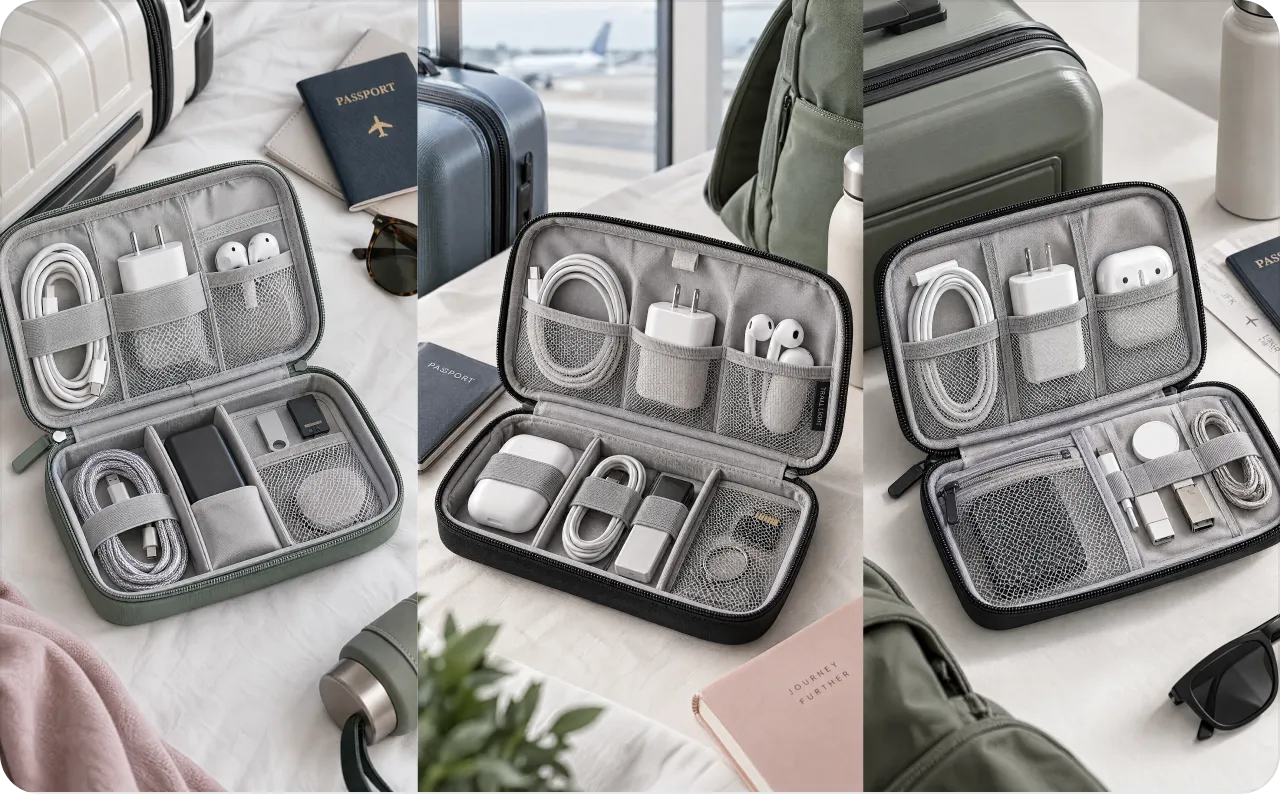
Consider a travel cable organizer as an illustrative product. The test question is simple: which opening gives shoppers the clearest reason to consider it? Keep the product, offer, and body script consistent while changing the opening.
1. Add the product and check the details
Paste a public product URL into Zeely or add the product manually. Check the imported name, description, and photos before creating the ad. URL import extracts available public information without connecting your store.
As I do the descriptive example, there is no product link for me, I’ll create it via Zeely Playground first.
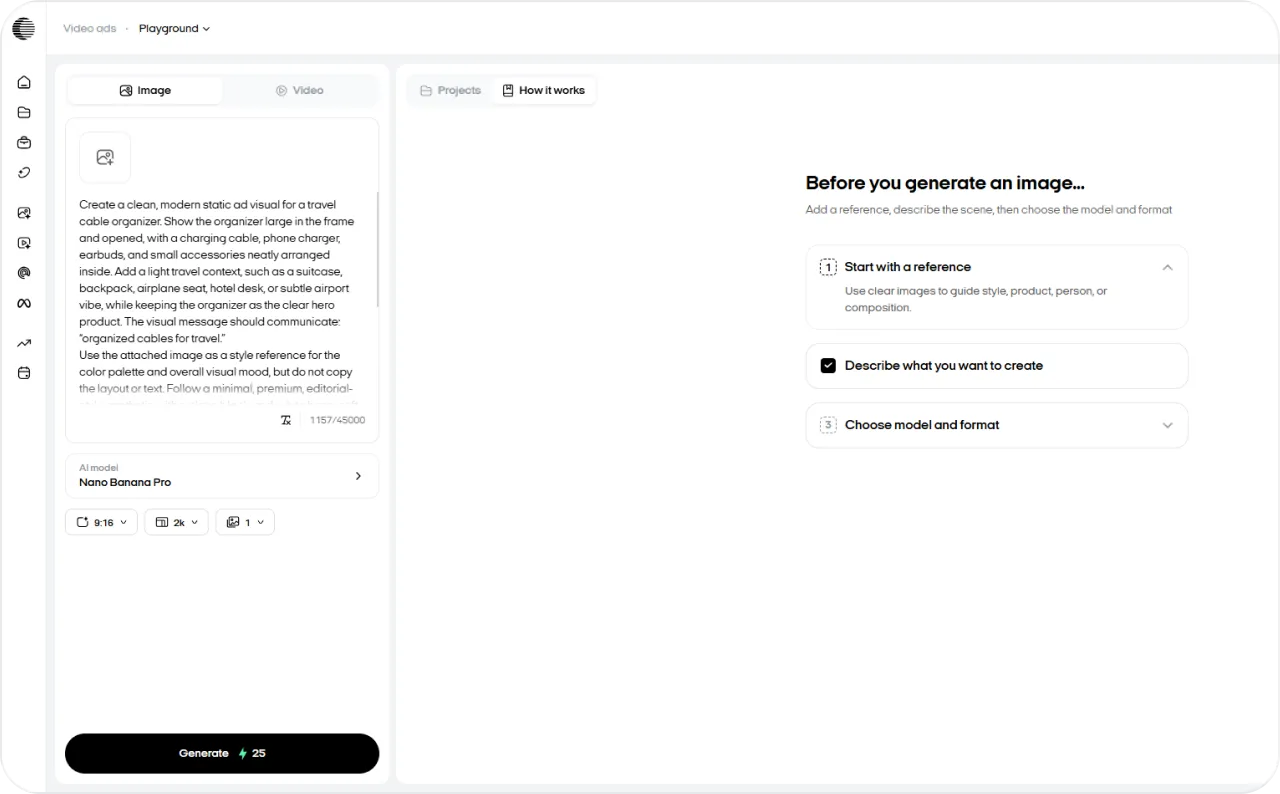
The prompt I used is:
“Create a clean, modern static ad visual for a travel cable organizer. Show the organizer large in the frame and opened, with a charging cable, phone charger, earbuds, and small accessories neatly arranged inside. Add a light travel context, such as a suitcase, backpack, airplane seat, hotel desk, or subtle airport vibe, while keeping the organizer as the clear hero product. The visual message should communicate: “organized cables for travel.”
Follow a minimal, premium, editorial-style aesthetic with a clean black-and-white base, soft neutral tones, and high contrast. Add subtle accent colors, such as cool blue-gray, muted green, and soft pink, while keeping the overall composition bright, elegant, and uncluttered. Use a light off-white or soft gray background.
Make the image realistic, polished, and suitable for a social ad creative. Avoid fake claims, unsupported features, fake reviews, discount messages, or phrases like “best,” “#1,” “save 50%,” or “waterproof” unless they are confirmed.”
2. Draft three hooks around one buying need
Use the AI Agent to draft opening lines, then choose three clearly different angles. Here is a prompt you can adapt:
Write three short TikTok ad hooks for the travel cable organizer in the attached product details. Use a different angle for each: tangled cables, packing for a trip, and finding a charger. Use only confirmed product facts. Avoid invented testimonials, discounts, and performance claims. Keep the same offer and CTA across all three.
Your initial copy could look like this:
| Version | Hook to test | Buyer situation |
| A | “Still untangling cables at the bottom of your bag?” | The shopper wants less clutter |
| B | “Packing for a trip? Give your cables their own place.” | The shopper is preparing luggage |
| C | “Where’s your charger when you actually need it?” | The shopper struggles to find accessories |
These are sample hooks for a demonstration. Choose lines that fit your actual product and audience. For help connecting the opening to the offer, use Zeely’s guide to writing ad scripts.
3. Build and review the video versions
In Zeely’s web Video ad workflow, choose your product image, reference, and avatar. Generate the start image and check that the product still looks accurate. Then choose Full video ad and enter the approved hook and body scripts.
Make one version per hook. Keep the body script, offer, avatar and settings the same where you can. AI visuals change between runs, so watch each one. I’d toss any version that changes your product or adds a claim you never made.
Before exporting, check the voice, captions, CTA and where the headline sits.
4. Export the candidates for a paid test
Download the approved MP4 files and name them clearly, such as cable-organizer-hook-a.mp4. Upload them to TikTok Ads Manager, check AI disclosure, and apply the testing rules in Step 4.
The useful output is a small set of reviewed creatives with a clear testing question. Paid results will tell you which version deserves more budget. Zeely handles creative production in this workflow; paid TikTok targeting, budgets, and launch are managed in TikTok Ads Manager.
How many variants should you make?
Use this planning formula: new creatives per week = concepts × hooks per concept × visual executions.
Two concepts with three hooks and one execution produce six candidates. Test only the candidates your budget can fund properly, keeping the rest queued. Track approved, testable outputs rather than every generated file, and include generation credits and review time in production costs.

Step 4: Test TikTok creatives without scattering your budget
Choose one question per test and keep a control. If the hook, offer, audience, and landing page all change, you lose the explanation for any improvement.
| Test | Change | Keep consistent | Main decision |
| Opening | Hook and opening visual | Body, offer, audience, page | Does purchase CPA improve? |
| Proof | Demonstration or explanation | Winning hook and offer | Do more qualified visitors buy? |
| Offer | Bundle or delivery incentive | Creative concept and audience | Does contribution after ads improve? |
Set the measurement window before launch. For seasonal offer tests such as bundles or a gift with purchase, my Black Friday ad ideas give you ready concepts to compare. Compare equivalent days with the same attribution settings, allowing for your normal purchase delay. The two-day interval between budget edits is not automatically enough time to judge a creative.
For an exploratory screen, you might allow three target CPAs per candidate. At a $20 target, three candidates need up to $180. That is a loss-control example, not a statistically conclusive test budget. A poorly delivered ad should remain inconclusive rather than be labeled a loser.
Keep ads that produce acceptable purchase economics. Pause those that reach the agreed loss limit after reporting matures. Rework creatives that earn clicks but attract the wrong expectations, checking the landing page before blaming the opening.
Use Smart Creative or an organic pre-test where appropriate
TikTok Smart Creative combines supplied assets and refreshes creatives based on fatigue signals. Some advertisers see its newer version, Automate Creative. Automated delivery can help allocate spend, but uneven delivery is not a clean randomized comparison.
For a lightweight pre-test, schedule approved Zeely videos to your connected TikTok account through organic posting. Watch for useful product questions and viewing behavior. Organic popularity alone does not prove purchase intent.
You can then use your post, or a creator’s authorized post, as a Spark Ad. Complete the paid setup in TikTok Ads Manager and assess purchases under paid distribution.
Step 5: Increase TikTok ad budgets within your CPA limit
Increase spending only when the account can absorb it profitably. Keep the creative, audience, and bid stable while evaluating a budget change wherever possible.
Manual budget guidance, last verified October 26, 2026: TikTok’s budget documentation, updated July 2026, recommends these limits:
| Campaign status | Increase per adjustment | Time between adjustments |
| In learning | No more than 40% | At least two days |
| Out of learning | No more than 30% | At least two days |
These are ceilings, not promises of stable CPA. I’d use a smaller increase when cash is tight and hold whenever mature results exceed target.
Scale TikTok ads vertically or horizontally
Vertical scaling puts more money into a campaign or ad group you already run. With horizontal scaling, a new market, audience, offer or creative idea gets its own budget to test.
Choose vertical scaling when the current setup still produces acceptable purchases. Consider horizontal expansion when a specific new buyer group has a credible offer and suitable fulfillment. Duplicating an identical ad group repeatedly adds complexity without proving there is new demand.
Spark Ads are a creative format within either route. Increasing a Spark Ad’s budget still requires the same profitability checks.
Choose TikTok’s budget and bidding automation deliberately
Smart+ automates parts of campaign delivery. Its October 2026 update lets you choose full, partial or manual control in one flow, where available. Automatic campaign budgets spread your money across ad groups. With custom ad group budgets, you set each one yourself.
Cost Cap may appear as Target Cost per Result in current bidding documentation. It aims around your chosen CPA, while Maximum Results prioritizes conversion volume within budget. Neither guarantees your margin. A restrictive target can reduce delivery; raising it is sensible only if your economics permit it. Check TikTok’s current bidding guidance before changing the bid.
Dynamic Daily Budget can spend up to 25% above the daily amount on stronger days, with a Sunday-to-Saturday cap of seven times that budget. Allow cash headroom for this daily variation.
Also inspect Smart+ Goal-Based Budget Increase. For eligible campaigns, it can add 20% of the original budget up to ten times daily when its conditions are met. It may be enabled by default for new campaigns. Switch it off when following a manually approved ramp; it is separate from the 40%/30% guidance.
Scaling TikTok ads on a small budget
Concentrate spending on one offer and a manageable creative queue. TikTok’s general daily-budget thresholds are above $50 at campaign level and above $20 at ad group level. Confirm the applicable requirements in your setup.
Platform minimums do not guarantee enough purchase data. At $50 daily and a $20 CPA, the planning average is only 2.5 purchases per day. TikTok’s bidding guide recommends substantially more headroom, including ten times CPA for certain setups. If you cannot afford that, expect slower learning and fewer simultaneous tests.
Keep production and media budgets separate. A cheaper video helps only if the remaining cash can fund a useful test.
Step 6: Refresh TikTok creatives before CPA rises
Check a few numbers together instead of swapping ads on a set date. Higher frequency with lower CTR and watch time can mean people are tired of it. If clicks hold but purchases drop, I’d look at the offer and checkout, then at who you’re reaching.
Line up your next buyer question, like “Will it fit thick charger cords?”, before today’s winner wears out. Keep one proven ad live as your control and add just a few approved new ones. A new objection or demo teaches you more than a font change.
Run this loop weekly, and hold budget changes until results mature:
The weekly creative and budget loop
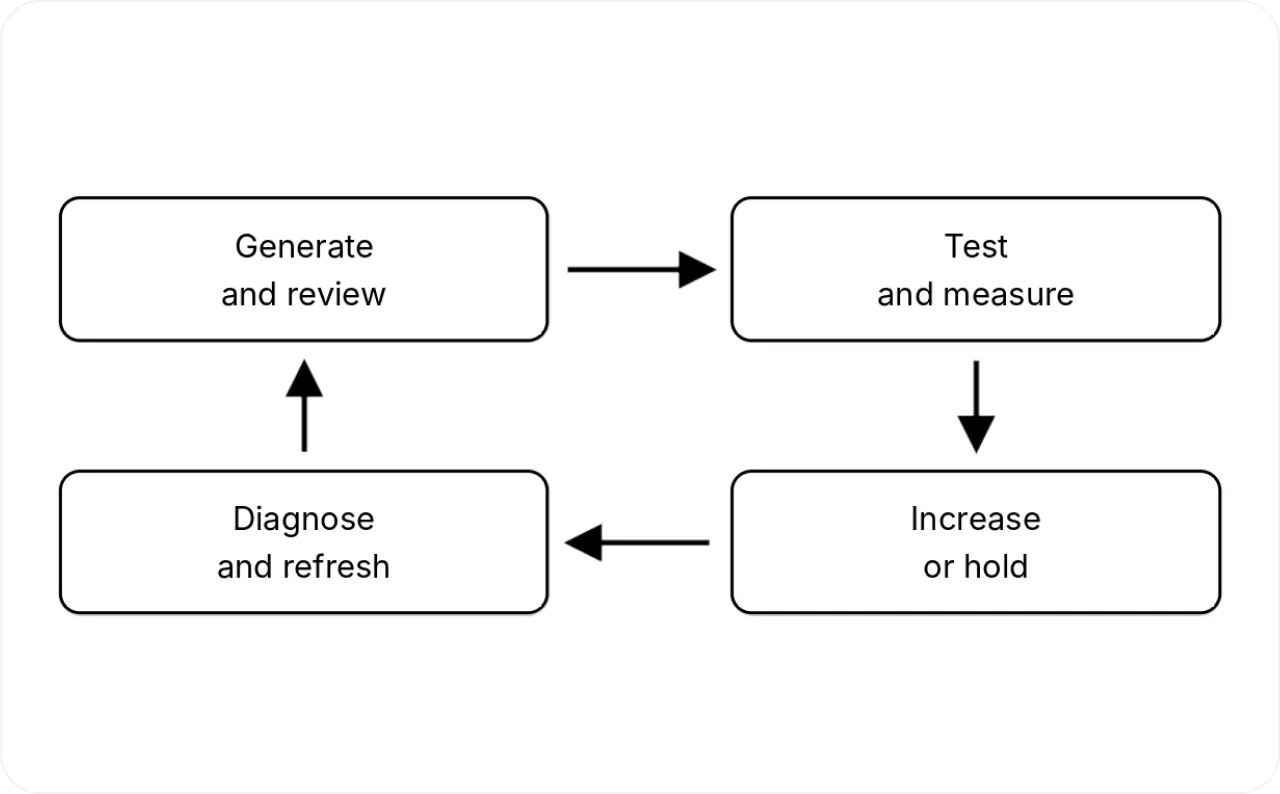
Early in the week, figure out what changed and brief the next idea. Make and review new ads before testing them. At the next check-in, hold the budget, raise it or stop the test that’s slipping. Write down what you decided and why to sharpen the next brief.
Example: Scale TikTok sales without losing the margin
The following is an illustrative model, not a Zeely customer case. It uses the earlier $60 order value and $30 contribution before advertising. Purchases are daily averages, so fractional values represent planning estimates.
| Daily spend | CPA | Purchases per day | Revenue per day | Contribution after ads |
| $50 | $20 | 2.5 | $150 | $25 |
| $500 | $20 | 25 | $1,500 | $250 |
| $500 | $25 | 20 | $1,200 | $100 |
| $500 | $40 | 12.5 | $750 | −$125 |
The $25 CPA scenario produces more total contribution than the baseline, but misses the $20 target and leaves less per order. I’d hold there and investigate instead of automatically chasing the next spending milestone. The final row produces five times the baseline purchases while losing money before fixed costs.
A conditional weekly plan could look like this:
| Period | Work | Budget decision |
| Week 1 | Validate purchases and establish the control | Hold the baseline within the test-loss limit |
| Week 2 | Test the first hook candidates | Increase only after a profitable review |
| Week 3 | Refresh weak angles and review new-spend economics | Continue, hold, or reduce the affected test |
| Week 4 and later | Repeat with sufficient stock and cash | Approach $500 only if evidence supports each step |
Starting from an already stable $50 ad-group budget, a 20% increase every two days reaches $500 after 13 increases, or 26 elapsed days. That assumes every review passes and excludes the initial learning period. It also assumes the campaign-level setup meets TikTok’s applicable minimums.
Cap the final increase at your chosen spending limit. Pause the ramp whenever economics weaken, even if the next scheduled review has arrived.
What AI tools for TikTok ads can and cannot automate
Assign your AI tools for TikTok ads a specific job.
| Zeely | TikTok’s AI | Human responsibility |
| Prepare product context, hooks, scripts, and video assets | Assemble and distribute eligible creative combinations | Verify product facts, rights, and advertising claims |
| Generate additional creative versions for review and export | Adjust eligible targeting, bidding, and budget allocation through Smart+ | Set contribution targets, cash limits, and test design |
| Schedule approved organic TikTok content | Deliver paid campaigns and report attributed results | Review purchases, returns, attribution, and inventory |
Use Zeely for creative production in this TikTok workflow, then use TikTok’s controls for paid delivery. I’d retain human approval for publishing claims and increasing financial exposure. For software selection, compare the separate guide to AI tools for TikTok ads.
Troubleshooting TikTok scaling and common questions
| Problem | Check first | Next action |
| Budget increased but spend did not | Bid target, delivery eligibility, audience restrictions | Fix the constraint before adding budget |
| CPA jumped after an edit | Change history and conversion delay | Stop stacking edits and review mature data |
| Clicks increased but sales did not | Offer consistency, page speed, checkout | Test the broken part of the buying process |
| AI ads were rejected | Claims, product accuracy, disclosure, media rights | Correct the issue before resubmitting |
FAQ
Neither one always wins. Smart+ saves setup work, and manual controls help you answer one specific test question. To compare fairly, keep the objective, offer and attribution settings the same, and wait for mature results. I’d use TikTok’s built-in split test where you have it, since two campaigns running at once can reach the same people.
Look past CPA to contribution and customer quality. More orders only help if you can fill them at a profit.
Regular ads need TikTok’s AI-generated content disclaimer when their images, video or audio are fully AI-made or heavily changed by AI. In ad setup, the toggle reads “This ad contains AI-generated content.” It resets when you duplicate a campaign, so check again.
Spark Ads follow the AI label rules of the post they boost. Commercial content disclosure is a separate step. TikTok’s creator disclosure guidance requires it for posts that promote a brand, product or service. No label makes a fake testimonial okay.
I’d run that as its own test with its own goal. Add-to-cart events give you feedback faster, but they can’t tell you whether purchases make money. Before switching, check tracking, look for checkout snags and ask whether your budget can support a purchase goal.
Redo your net order revenue and contribution with the new return rate. A good-looking CPA can hide buyers who expected something the product isn’t. Compare return reasons by creative, and fix what the ad promises before you spend more.
Reviewed on: October 26, 2026
Sources
TikTok for Business: Budgets;
Learning Phase;
Web Data Connections;
Event Deduplication;
Smart Creative;
Spark Ads;
Smart+ Upgrades;
Bidding Best Practices;
Dynamic Daily Budget;
Smart+ Budget Increases;
AI Disclaimers;
Commercial Content Disclosure;
Tinuiti Q3 2026 Digital Ads Benchmark Report;
Adobe 2026 AI and Digital Trends;
Fact checked by Anastasiia Stovpova