How to increase your Etsy conversion rate with 15 practical tips
Getting Etsy views but few orders? I’ll help you improve your Etsy conversion rate with clearer listings, 15 tips, and a simple testing plan.
Key takeaways
- Calculate conversion using completed orders and visits
- Treat Etsy’s historical benchmark as context, then compare your own shop over time
- Help buyers understand the product, total cost, and delivery before they order
- Use honest reviews and eligible targeted offers to support purchase decisions
- Keep each ad consistent with the listing it opens
- Test one change at a time and track orders, revenue, and profit alongside conversion
Your Etsy conversion rate helps you see how often visits turn into orders. If shoppers arrive and leave, I’d start with the listing they saw. A clearer photo, delivery estimate, or product description can answer the question that holds up a purchase.
There is a large audience to reach. Etsy reported approximately 87 million active buyers over the trailing 12 months in its update for the second quarter of 2026. Your next step is to understand the shoppers already visiting your shop. Here’s how I’d check the numbers, find the friction, and choose a useful first change.
What is conversion rate on Etsy?
Your conversion rate is the percentage of shop visits that end in an order. Etsy’s Shop Stats glossary separates three numbers that are easy to mix up.
A visit is one browsing session in your shop. Etsy counts a listing view each time someone opens one of your listings, so one visit can include several. An order is one completed purchase, even if the buyer checks out with three items.
To calculate your conversion rate on Etsy, divide completed orders by visits, then multiply by 100. Always divide by visits, not listing views. If a shopper opens six of your candle listings in one visit and buys once, that’s one order from one visit, not one order from six views.
Here’s a simple Etsy conversion rate calculator example with made-up numbers. Say your candle shop had 1,200 visits and 30 orders in the last 30 days. Divide 30 by 1,200, then multiply by 100, and you get 2.5%. That’s 25 orders for every 1,000 visits.
Etsy also calculates this number for you, and knowing the formula helps you see what moves it. To find your number, follow Etsy’s instructions for using Shop Stats:
- On Etsy.com, open Shop Manager and choose Stats.
- Pick a time period from the dropdown at the top of the page.
- Read visits, orders, and conversion rate together.
I recommend that last step because rates based on a few visits jump around. With 40 visits, a second order doubles your rate from 2.5% to 5%. When traffic is low, look at a longer period before you change prices or rewrite listings.
CTR, or click-through rate, is the percentage of impressions that turn into clicks. An impression is one time your listing or ad is shown. Conversion rate picks up after the click.
So a strong CTR can still send shoppers to a listing that doesn’t sell. If you get plenty of clicks but few orders, I’d check the listing before spending more on ads. Etsy’s glossary lists photo quality, price, reviews, titles and descriptions, and shipping and return policies among the things that can affect conversion.
What is a good conversion rate on Etsy?
In its Seller Handbook guide to shop stats, Etsy says sellers should generally expect a conversion rate between 1% and 5%. That range is based on Etsy’s internal analysis of 2019 orders, so I’d use it as a rough guide rather than a goal. Etsy also says a low rate shouldn’t worry you while a new shop is getting started.
The most useful Etsy conversion rate benchmarks match what you sell and who visits. A custom dining table and a downloadable invitation come with different budgets, questions, and decision times. Compare similar products and time periods before you set a target.
| Factor | Why it changes your rate | How to compare fairly |
| Price | Pricier items can take more thought before someone buys, even though each order brings in more money | Compare listings in a similar price range |
| Product type | Custom items need clear sizes, materials, and timelines, while digital products need clear file and usage details | Compare custom with custom and digital with digital |
| Traffic source | A shopper searching for a specific item may arrive with a different goal than someone browsing a social post | Check the How shoppers found you section in Stats when your rate shifts |
| Season | Gift deadlines, holidays, and changes in demand can speed up or delay orders | Compare with the same period last year |
A lower rate can also come with a growing business. Say your shop usually gets 1,200 visits and 30 orders a month, a 2.5% rate. Then a popular Instagram post brings 500 extra visits and five extra orders. Your rate dips to about 2.1%, but you made five more sales.
Before you decide your Etsy store conversion needs work, check completed orders, revenue, and profit margin.

Why Etsy conversion rate matters for search
In its guide to creating listings that convert, Etsy says it looks at clicks, favorites, and purchases to measure how engaging a listing is. Listings with stronger engagement may rank higher in search. New listings start with a neutral score and get a small, temporary boost, so Etsy can learn how shoppers respond.
That gives every listing two connected jobs. First, earn a click from the right shopper. Then help that shopper decide.
A clear first photo can win the click. The rest of your photos and details, like size, materials, and shipping time, help turn that click into an order. Each order then adds another engagement signal.
I’d finish your photos, price, and details before you publish a new listing. The boost is when Etsy first learns how shoppers react, so you want the listing ready from day one.
Conversion isn’t the only thing Etsy weighs, though. Its search ranking disclosures also cover how well your keywords match the search, your shop’s customer service record, and your shipping price. So I’d treat conversion work as a way to make buying easier, with a possible search bonus on top. No conversion rate guarantees a ranking spot.
How to improve Etsy conversion rate
To improve your Etsy conversion rate, start by finding the step where shoppers stop. In Stats, scroll down to your listings to see views, favorites, and orders for each one, then compare them with visits to your whole shop.
Keep the labels straight as you compare, because each number counts a different action. The word “views” is easy to misread. In Shop Stats, listing views count how often someone opened a listing. In Etsy Ads, ad views count how often shoppers saw your ad.
| Symptom | Possible cause | First change to test |
| Lots of impressions (ad views in Etsy Ads) but few clicks | Your first photo or title doesn’t clearly show what you sell | Test a first photo that shows only the item, then a title that names it in the first few words |
| Listing views but few favorites or orders | Shoppers can’t quickly judge the item’s fit or value | Put size, materials, intended use, and what’s included near the top of the description |
| Favorites but few orders | Price, delivery timing, or an unanswered question may be holding the purchase back | Make the total cost, including shipping, and the delivery date easy to find |
| A campaign brings visits but few purchases | The ad may reach the wrong people or promise something the listing doesn’t show | Check that the audience, the ad, and the listing it links to all match |
| Conversion rate rises while orders fall | Fewer people are visiting, so each order counts for more | Check visits, revenue, and which traffic source dropped before you call it a win |
I’d treat this table as a starting point, not a final answer. A favorite shows interest, but plenty can still stand between that shopper and an order. Shipping is a good place to look when shoppers favorite but don’t buy. In Etsy’s 2024 survey of US adults, expensive shipping ranked among the top 10 barriers to buying on Etsy.
Change one thing at a time, then compare at least 30 days before and after the change. That way, you’ll know which edit made the difference.
To compare channels, line up both sources. Etsy Stats shows where visits came from, and your campaign tool shows impressions, clicks, spend, and whatever attribution it offers. Expect the numbers to differ. Etsy counts browsing sessions rather than clicks, and its Social Media source mixes several kinds of visits, including organic posts and Etsy’s own Offsite Ads.
Etsy conversion rate optimization tips
I’d work through these 15 tips in the order shoppers experience your shop. Choose the change that answers your clearest diagnosis, then measure it before moving on.
1. Make the first photo explain the product
Show the item clearly, with lighting that preserves its actual color and texture. Use a crop that works as a small search thumbnail. A buyer should understand what you sell before opening the listing.
Etsy recommends listing images at least 2,000 pixels wide and high. Follow its listing image requirements, including the rules for photos of the actual product and exceptions for mockups. For personalized items, show a completed example that helps buyers picture the result.
2. Write a title a buyer can understand
Lead with the product and the details that help someone recognize it. Keep the wording readable. Repeated keywords can crowd out information a shopper needs to judge the item.
Here’s an illustrative rewrite for a fictional mug listing:
Before: “Gift mug, coffee gift, best gift, personalized gift”
After: “Personalized ceramic coffee mug, 12 oz, custom name”
The second version explains the material, capacity, and customization. Use that approach only when every detail matches the actual product. Keep the main photo and title consistent.
3. Align categories, attributes, and tags with the item
Review the category and attributes you selected. Then check whether your tags describe the product, its use, and the shopper’s likely need. Relevant terms help set accurate expectations before a visit.
For a linen apron, useful details might include the material, adult sizing, and intended use. Avoid unrelated trending terms that attract shoppers looking for something else. I’d prioritize buyer fit when deciding which phrases belong in the listing.
4. Use extra photos to answer different questions
Etsy currently allows up to 20 photos and two videos per listing. Give each image a job. More slots let you show details that a single hero photo cannot explain.
Show the item from another angle, beside a familiar object for scale, and in use. Add a close-up of the finish or material. If packaging affects the purchase, show it accurately. Choose images that resolve questions, and remove duplicates that add little information.
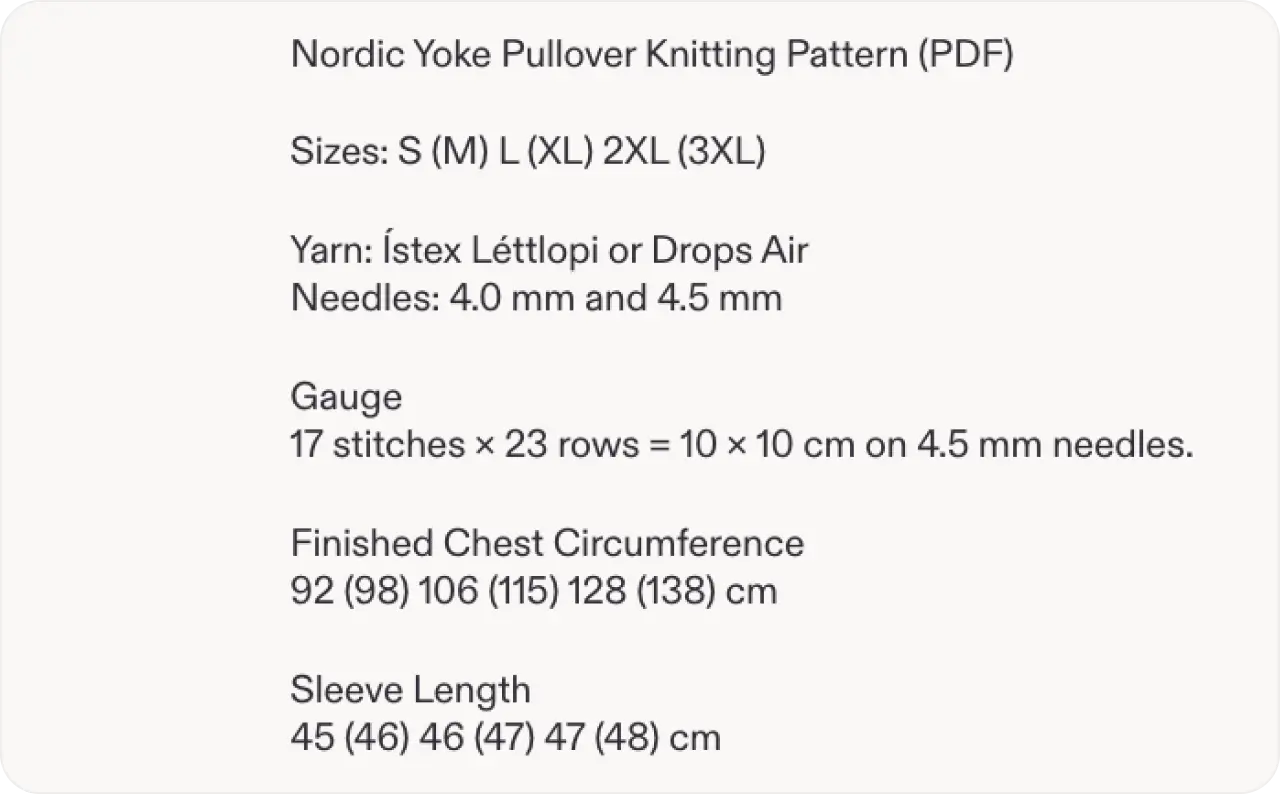
5. Make size and materials hard to miss
Write dimensions in the description and show scale in a photo. Explain the material, finish, and relevant care instructions. For products with several versions, identify what changes between them.
“Small” can mean different things to different shoppers. An exact measurement helps buyers assess fit. For digital products, explain the file types, included sizes, and whether the purchase includes a physical item. Put essential details where someone scanning the listing can find them quickly.
Source: Etsy
6. Build a description that supports a decision
Open with a plain explanation of the product and who it helps. Follow with the details buyers need to choose. Short paragraphs and a compact list make the page easier to scan.
I’d cover these four details:
- What the buyer receives
- Who the item suits
- How to choose an option
- What happens after the order
For a custom item, explain the personalization process and any approval step you actually offer. Keep important limitations close to the relevant benefit. That helps buyers decide with accurate expectations.
7. Show the product working in a short video
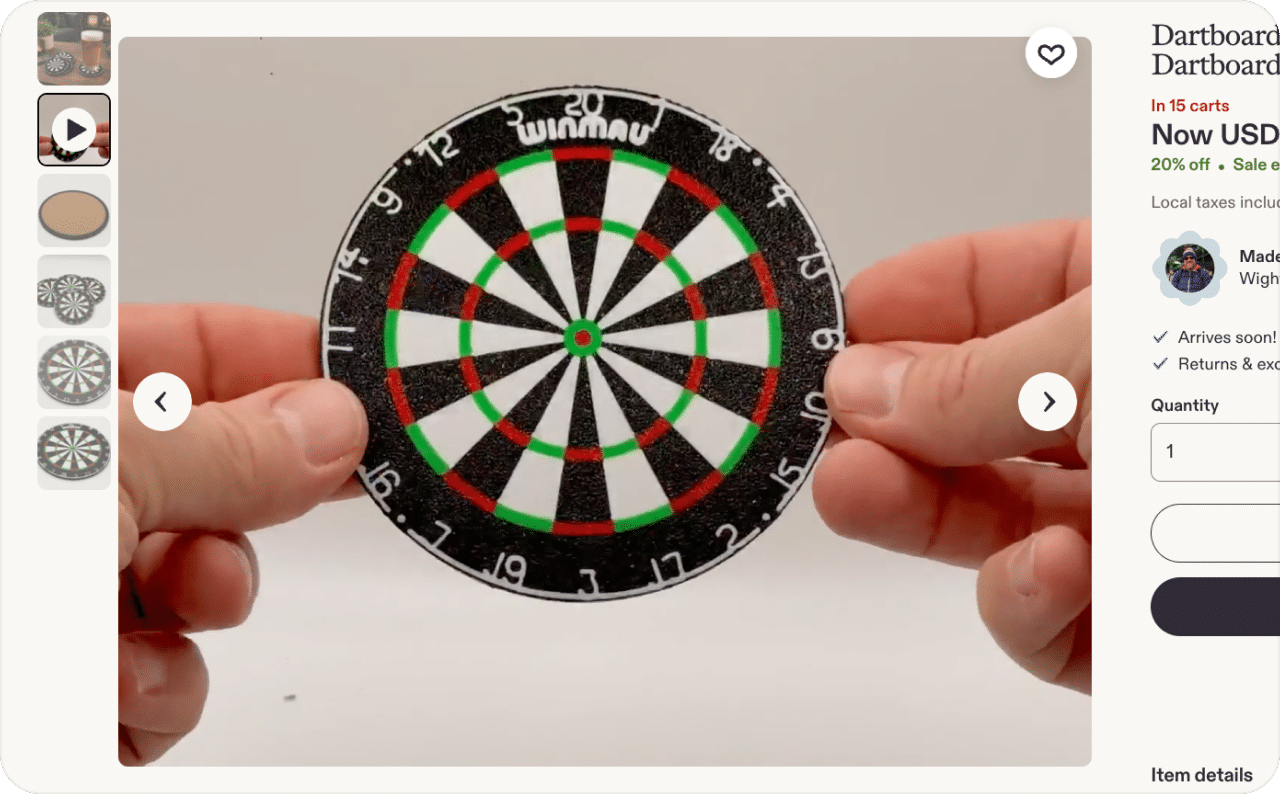
A short video can explain movement, texture, or use. Show a clasp opening, fabric moving, or a product fitting into its intended space. Choose the demonstration that answers a real buyer question.
Etsy’s listing video guidance sets a 100 MB file limit and says uploaded audio is removed. A 5–15-second demonstration fits its current duration guidance. Make the action understandable without sound, and show the actual product buyers will receive.
Source: Etsy
8. Make the total cost easy to assess
Check the item price and shipping together. A buyer comparing similar products needs to understand the delivered cost. If you change shipping prices, calculate the effect on your margin before publishing.
Etsy’s US domestic shipping search criteria prioritize eligible listings with shipping under $6. Exceptions include calculated shipping, digital items, and qualifying listings priced at $35 or more under a free shipping guarantee. A listing priced below $35 can still be affected. Check your eligibility and Search Visibility guidance before choosing a shipping strategy.
9. Set delivery expectations before the purchase
Review processing times against the work you can complete. Explain any customization or production step that affects timing. Keep the description consistent with the listing’s delivery information.
For a gift, the arrival date may determine whether someone buys. If your process needs a proof approval, explain how the buyer’s response affects production. Avoid promising a date you cannot support. A realistic estimate helps shoppers choose an item that fits their deadline.
10. Complete the details buyers check for reassurance
Explain who makes or designs the item and what the buyer can expect. Use your shop information, policies, and listing details to answer questions consistently. Clear terms help someone assess a purchase before contacting you.
Check returns, exchanges, and cancellations against the policies that apply to your products. Explain how to contact you about an order. Keep the language specific to what you offer, and update details when your process changes.
11. Invite honest reviews and respond helpfully
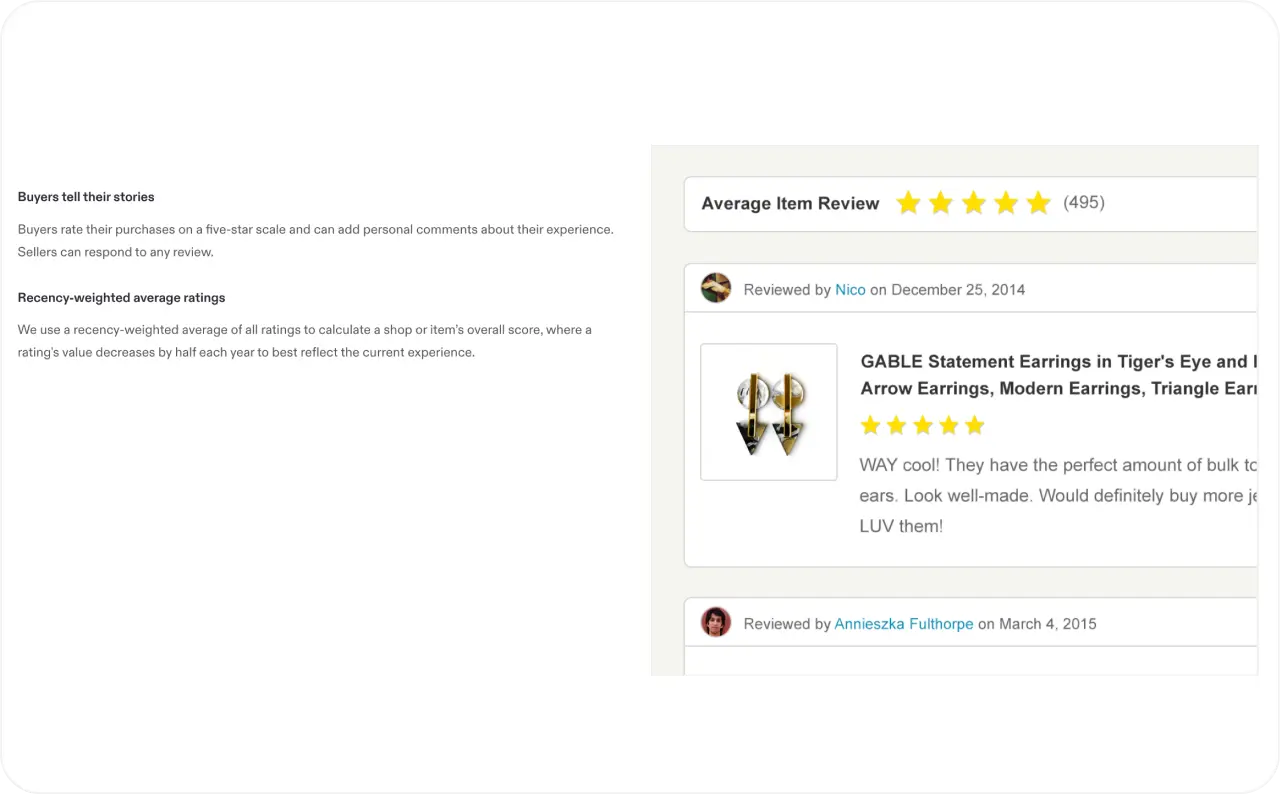
Good service gives buyers something useful to describe. Send the item as represented, address order problems, and invite honest feedback after the purchase. Keep the request short and let the buyer share their experience freely.
Etsy’s January 2026 guidance on reviews and truthful selling prohibits incentives for positive reviews. Avoid offering a gift or discount in exchange for a favorable rating. When responding to feedback, focus on the issue and the help available. A useful response can also answer a future buyer’s concern.
Source: Etsy reviews
12. Check the listing on a phone
Open your listing on a phone and follow the buyer’s decision process. Look at the thumbnail, photo order, first description lines, and variation names. Confirm that essential text is readable at that size.
Make options distinct enough to choose confidently. For personalization, say exactly what information you need and show an accurate example. If two options look similar, explain the difference near the selection details. Focus on the listing information and choices you can control.
13. Use targeted offers with a clear purpose
Leaving a cart is common across online retail. Baymard’s 2026 compilation reports average cart abandonment of 70.22% across studies from different years. The figure describes broad ecommerce behavior across those studies. It can help you put cart activity in context while you assess your own Etsy shop.
Etsy’s targeted offer guidance covers abandoned cart, favorited item, and thank you offers. Cart emails can become eligible after an item remains in the cart for more than two hours. Delivery depends on eligibility and marketing email preferences. Choose a discount your margin supports, and use thank you offers to give customers a reason to return.
14. Bring shoppers who want the product you sell
Look at what brought a visitor to the listing. A post about your creative process may attract curious followers. A product demonstration with clear details may attract people closer to purchasing. Match the message to your goal.
If you use Etsy Ads, keep the promoted listing relevant to the shopper’s search and ready to answer buying questions. For campaign setup and spending decisions, use Zeely’s Etsy Ads costs and campaign planning guide. Review traffic quality alongside orders before increasing promotion.
15. Match each ad to its destination listing
Send people to the item shown in the ad. Match the product, color, price, and offer so shoppers can continue the decision they started. Zeely’s guide to matching each ad to its product page explains this approach for clothing stores.
With Zeely, you can import a public Etsy product URL and use the available product details to create AI image or video ad creatives. Check the output against the actual item, including materials, dimensions, and the offer. Then direct external ad traffic to the matching Etsy listing.


How to test Etsy conversion changes
Increase Etsy conversion rate with one change at a time
Choose a listing with enough activity to reveal a useful pattern. Record the starting period, the change, and its publication date. Keep other major variables steady where practical, including promotion and price.
Etsy recommends reviewing at least 30 days of Stats and comparing the same period last year. Use that as a sensible review window. A shop with few orders may need longer to collect enough data for a useful comparison.
Track these details in a simple sheet:
- Date range and the single change tested
- Shop visits and completed orders
- Listing views and orders for the edited item
- Conversion rate, revenue, and estimated profit
- Changes in promotions, stock, or seasonal demand
Track your Etsy CR, shorthand for conversion rate, alongside the business results. Sequential comparisons can suggest a useful direction, but changing traffic and demand can also affect outcomes. An improvement across the shop is easier to interpret when the edited listing shows improvement too.
Keep the change when it supports your goal across a useful period. If results are unclear, gather more data before making another edit. This discipline can also help you reduce wasted ad spend by sending paid visitors to a clearer buying experience.
Etsy conversion checklist
- Record visits, orders, conversion rate, revenue, and the date range
- Check whether the first photo and title describe the same item
- Show scale, materials, included items, and relevant variations
- Review total cost, processing time, and delivery information
- Make policies and personalization instructions easy to understand
- Invite honest feedback and check targeted offer settings
- Match every external ad to the item and offer on its destination listing
- Choose one change and record when you publish it
FAQs
A 2.5% rate can be a useful result, depending on your product, price, and traffic. Etsy’s historical reference range provides context. Compare the figure with your own baseline, completed orders, and profit before setting a higher target.
A good rate supports the results you need from the visits you receive. Compare similar products, seasons, and traffic sources. Etsy’s historical range provides context, while your shop’s orders, revenue, and margins help you decide whether a change improved performance.
Open Shop Manager, select Stats, and choose a date range. Your shop’s conversion rate appears with visits, orders, and revenue. Use the same period for each metric when comparing results.
Views show that people opened a listing. They may still have questions about size, quality, shipping, price, or customization. Start with those details, then check whether your traffic matches the product. Use visits when calculating conversion, since one visit can include several listing views.
Additional photos can help when they answer a question buyers currently have. Show scale, detail, use, and accurate options. A collection of similar images may add less value. Test a specific improvement and compare the listing’s orders over a useful period.