Which AI video model is best for marketing?
Which AI video model should you trust for product ads, social clips, and campaign testing? I’m Emma from Zeely, and I compared the leading models by the marketing jobs they handle best.
The best AI video models for marketing depend on the asset you need.
- Veo 3.1 fits polished brand videos
- Kling 3.0 handles product consistency and multi-shot scenes
- Seedance 2.0 works well with several reference assets
- Hailuo 2.3 and PixVerse V6 suit faster social testing
- Grok Imagine is strong for image-to-video work, and Wan suits API-led production
- Sora 2 remains useful for ambitious visual concepts
Zeely makes the process simpler by bringing multiple models into one ad workflow.
Choosing an AI video model used to feel like choosing between slightly different generators. That is no longer true.
Some models can build a polished scene with dialogue and environmental sound. Others are better at keeping a product, person, or visual reference stable. Several prioritize fast social clips, while others are built for developers producing video through an API.
This guide compares AI video models for ads, rather than complete video platforms. For the wider picture, start with my guide to AI models for ad creative generation.

Why the best AI video models for marketing matter
Video generation is moving into a much larger advertising market.
The IAB 2026 Digital Video Ad Spend Report projects that U.S. digital video ad spending will reach $81.9 billion in 2026. Social video alone is expected to reach $31.9 billion, overtaking connected TV and other online video formats.
That spending does not mean every business needs cinematic production. It means marketers need more video for more placements, audiences, offers, and testing cycles.
One campaign may need a polished brand scene. Another needs ten quick product variations for Reels. A third needs a stable presenter, accurate packaging, clear dialogue, and three aspect ratios.
No single model leads every one of those jobs.
How I compared AI video models for ads
This is not a laboratory benchmark or a frame-by-frame technical test. I reviewed current official model documentation and translated those capabilities into common marketing uses.
I compared each model across six practical areas:
- Product and subject consistency: Does the product retain its shape, color, and identifying details?
- Motion quality: Do people, objects, clothing, and cameras move naturally?
- Prompt and reference control: Can the model follow visual references and detailed instructions?
- Audio: Can it generate useful dialogue, music, ambience, or effects?
- Multi-shot storytelling: Can it connect several shots without losing the subject?
- Production fit: Is it suited to fast social testing, polished final output, or API-led volume?
Every model still needs human review. A smooth bottle reveal is useless when the bottle cap, label, or product color changes halfway through the video.
Best AI video models for marketing at a glance
| AI video model | Best marketing use | Strongest reason to choose it | Main watch-out |
| Veo 3.1 | Polished brand and campaign videos | Visual control, realism, and native audio | Premium output can be excessive for simple tests |
| Sora 2 | Imaginative campaign concepts | Physical scenes, cinematic ideas, synchronized sound | Access and production workflow require checking |
| Kling 3.0 | Product ads and multi-shot stories | Reference consistency and branded elements | Complex projects still need careful QA |
| Seedance 2.0 | Reference-heavy ecommerce videos | Uses images, video, audio, and text together | Many inputs can make briefs harder to control |
| Hailuo 2.3 | Fast motion and character tests | Dynamic movement and lower-cost Fast model | Product details can still drift |
| PixVerse V6 | Short social videos | Fast multi-shot output and native audio | Less suited to long, tightly controlled campaigns |
| Wan 2.7 or 2.6 | API and production pipelines | Flexible duration, audio, and developer access | Marketers may need technical support |
| Grok Imagine 1.5 | Product image animation | Fast image-to-video and natural-language editing | Image-to-video is stronger than full campaign building |
The table gives you a starting point. Your final choice should follow the creative job, not the loudest model launch.
Sora vs Veo vs Kling for Premium Video Ads
The Sora vs Veo vs Kling comparison attracts attention because all three can create visually ambitious video. Their marketing strengths are still different.
Veo 3.1 is best for polished brand storytelling
Google describes Veo 3.1 as its leading video model for greater realism, prompt adherence, creative control, and audio generation. It can build dialogue, sound effects, ambience, camera movement, and detailed visual scenes together.
For marketers, Veo makes the most sense when presentation quality carries the message. Think luxury product reveals, travel scenes, seasonal brand films, atmospheric landing-page videos, and premium campaign openers.
Its main strength is not simply realism. Veo gives a creative team several layers to direct. You can describe the camera, visual tone, sound, character behavior, environment, and narrative beat within one brief.
That level of control can be unnecessary for a five-second product test. It becomes much more useful when a video needs to feel intentionally directed.
Read the full Veo 3.1 guide for video ads for model-specific uses. The Veo 3.1 vs Veo 3.1 Fast comparison explains when to choose final quality or faster iteration.
Sora 2 is best for ambitious visual concepts
OpenAI introduced Sora 2 with stronger physical accuracy, realism, control, dialogue, and synchronized sound effects. Its most useful marketing role is visual concept generation that would be difficult or expensive to film conventionally.
A sports brand could explore an exaggerated product world. A beverage company could turn ingredients into a visual story. A software brand could represent an abstract problem through a physical scene.
Sora works best when the idea itself needs to stop the scroll. It is less valuable when the ad only needs a clear product demo and readable price.
Access also deserves attention. OpenAI’s product surfaces and availability have changed, while Sora 2 remains documented as a model and API option. Confirm the production channel before building a recurring workflow around it.
My Sora 2 for video ads guide covers its marketing fit without turning this comparison into a prompt tutorial.
Kling 3.0 is best for consistent multi-shot ads
Kuaishou launched Kling 3.0 with text-to-video, image-to-video, reference-to-video, editing, native audio, and multi-shot storytelling inside its model family. The official announcement also highlights better preservation of logos, text, branded clothing, objects, and subjects across scenes.
Those features make Kling especially relevant to ecommerce and product marketing.
A good product ad often requires several connected views: the unopened package, the product in use, a detail close-up, and a final hero shot. The product cannot quietly change between them.
Kling is my stronger choice when reference consistency matters more than unrestricted visual invention. It also makes sense for short narrative ads that need several camera angles or characters.
That does not remove the need for review. Check text, packaging, proportions, hands, product interaction, and scene-to-scene continuity before adding media spend.
See the broader Kling AI video ads guide or compare Kling 2.5 vs 2.6 vs 3.0 before selecting a version.
Sora vs Veo vs Kling: My verdict
Choose Veo 3.1 for a polished final scene with strong audio and directorial control.
Choose Sora 2 for unusual concepts, cinematic experimentation, and visually ambitious campaign ideas.
Choose Kling 3.0 when your product, character, logo, or reference needs to remain recognizable through several shots.
For most ecommerce advertisers, I would begin with Kling. For brand campaigns, I would start with Veo. I would use Sora when the concept would be difficult to produce through a conventional shoot.
Seedance vs Hailuo for ecommerce video ads
The Seedance vs Hailuo decision is less about which model looks more cinematic. It is about how much source material and motion control the ad requires.
Seedance 2.0 handles complex product references
ByteDance’s Seedance 2.0 accepts text, images, video, and audio within one multimodal generation system. Its official documentation says users can supply up to nine images, three video clips, and three audio clips, alongside written instructions.
That gives ecommerce teams more ways to define the result.
You could provide product images from several angles, an example camera movement, brand audio, a visual reference, and a short storyboard. Seedance can use those materials to guide composition, motion, sound, and scene structure.
I would choose it for product stories that depend on several approved assets. It also suits teams that already have strong product photography and want to extend it into motion.
The risk is brief overload. Every reference should have a clear purpose. Conflicting images, movements, and style references can make the output less predictable.
The full Seedance AI ecommerce video guide covers its place in product-led production.
Hailuo 2.3 is better for fast motion exploration
MiniMax says Hailuo 2.3 improves physical movement, body motion, facial expressions, stylization, and responses to motion commands. MiniMax also offers Hailuo 2.3 Fast for quicker, lower-cost batch creation.
That makes Hailuo useful during early creative exploration.
You might test a skincare texture moving across a surface, fabric reacting to wind, a person picking up a product, or a camera passing through a stylized room. Several versions can reveal which visual direction deserves a final production pass.
Hailuo also has a useful range between realistic and stylized output. That helps social advertisers who do not need every video to resemble a conventional commercial.
Choose Seedance when your approved source assets should guide the generation. Choose Hailuo when you need to explore motion ideas quickly.
Read more in the Hailuo AI video ads family guide.
PixVerse, Wan, and Grok Imagine for fast testing
Not every campaign needs a premium cinematic model. Social teams often get more value from faster generation, flexible durations, and simple image animation.
Pixverse V6 fits short social video
PixVerse launched V6 with improved camera execution, character performance, multi-shot generation, native audio, and stronger continuity. The company positions it for both creative and commercial production, including short product advertisements.
For marketers, PixVerse fits short-form output that needs energy rather than a long narrative.
It can help create several visual openers, product transitions, stylized scenes, or character-led clips for TikTok, Reels, and Shorts. Multi-shot generation also makes it easier to move beyond a single looping image.
PixVerse V6 is now the current comparison candidate. The existing PixVerse 5.5 social video guide remains useful for that version’s script-first workflow, but it should be refreshed for V6.
WAN fits api-led video production
Alibaba Cloud’s current Wan documentation lists Wan 2.7 and Wan 2.6 for text-to-video and image-to-video production. Depending on the version, Wan supports clips between two and 15 seconds, resolutions up to 1080p, synchronized audio, and multi-shot storytelling.
Wan makes the most sense for teams building repeatable production pipelines.
A developer could connect product data, creative briefs, source images, audio, generation, and review steps through an API. That is useful for agencies, marketplaces, and brands processing many products.
For a solo marketer, that flexibility may add unnecessary technical work. Wan is an engine rather than a complete ad workflow.
The brief originally proposed a Wan 2.5 preview. I would replace that with a current Wan family section centered on 2.7 and 2.6.
Grok Imagine 1.5 excels at image-to-video
xAI’s Grok Imagine Video 1.5 focuses on animating a starting image with motion, camera direction, sound, ambience, and dialogue. xAI says its Fast version can create a six-second 720p video in roughly 25 seconds.
This is useful when your strongest creative asset already exists.
A marketer can begin with an approved product image, then add a camera push, floating particles, moving fabric, changing light, or environmental sound. Starting with a real visual can also provide a firmer product reference than pure text-to-video generation.
Grok Imagine also offers natural-language video editing and product-placement use cases through its API.
I would use it for rapid visual variations and product-image animation, not as the only system behind a complete campaign.
Which AI video model fits each marketing goal?
The best AI video models for marketing become easier to choose when you begin with the final asset.
For a polished brand campaign: Start with Veo 3.1. Its audio, camera, and narrative controls fit videos where every production detail contributes to brand perception.
For a product that must remain recognizable: Start with Kling 3.0. Reference consistency and multi-shot control matter more than dramatic visual invention.
For an ecommerce story using several existing assets: Choose Seedance 2.0. It can work across product photos, video examples, audio, and written direction.
For quick motion and style tests: Use Hailuo 2.3 or PixVerse V6. Both suit shorter exploration cycles before a final direction is approved.
For animating one strong product image: Try Grok Imagine Video 1.5. It is built around turning a still frame into a moving scene.
For an API production pipeline: Compare Wan 2.7, Wan 2.6, Veo, and Grok Imagine based on volume, access, resolution, audio, and internal development needs.
For an unusual campaign concept: Test Sora 2. It can help visualize scenes that would be costly, impractical, or impossible to film.
Why one AI video model does not make an ad
A video model generates footage. A marketing workflow has to do much more.
Your finished ad still needs:
- A customer problem
- One clear offer
- A hook for the opening seconds
- Product proof
- Accurate claims
- A spoken script or on-screen copy
- Captions and audio
- A suitable aspect ratio
- A CTA
- Several testable variations
- A final compliance review
Even strong native audio does not replace deliberate voice production. The guide to AI voice and transcription models for video ads explains where narration, transcription, captions, and dubbing fit after visual generation.
A model may create the best-looking shot in your campaign and still produce a weak ad. Viewers need to understand what the product is, why it matters, and what they should do next.
That is the difference between an impressive clip and useful creative.
Why Zeely is more practical than managing models separately
Comparing models is useful. Managing several model accounts, credit systems, prompt formats, files, editors, and subscriptions is less useful.
That is why I prefer Zeely for the actual advertising workflow.
Zeely brings multiple AI capabilities into one place, so you can begin with the product and campaign goal rather than a model name. The Zeely AI ad generator connects creative generation with the wider advertising process, like product inputs, scripts, avatars, templates, review, rendering, and campaign-ready video.
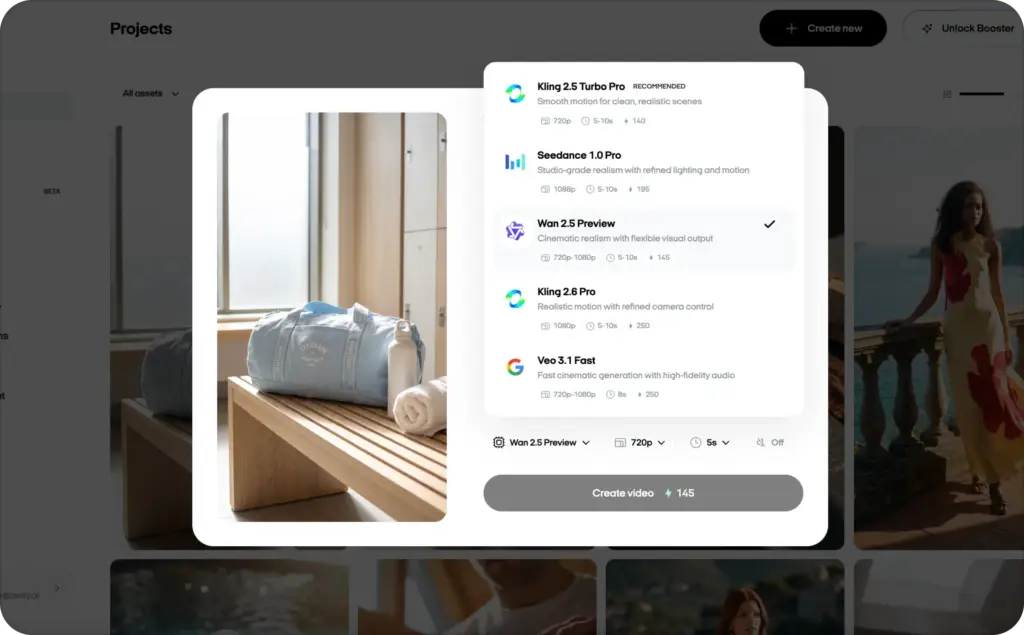
You do not need to decide that every campaign should use Sora, Veo, or Kling before you have even defined the asset.
You might need a cinematic product scene for one campaign, an avatar explanation for another, and several simple social variations for a third. The right engine can change with each job.
Instead of paying for several separate versions and wondering which one to choose, you can keep the process centered on the ad you need to launch. Read also about best AI generators for small business.
How to choose AI video models without wasting budget
Do not judge a model from one showcase video. Test it with your real product, format, and constraints.
Use one simple evaluation sheet:
- Did the product remain accurate?
- Did the model follow the requested movement?
- Did important text stay readable?
- Did the scene support the offer?
- Did the audio match the action?
- How many attempts produced one usable clip?
- How much editing remained?
- Could the result run in the intended placement?
The cheapest generation is not always the cheapest approved asset. Five low-cost failures can cost more than one controlled final attempt.
Begin with lower-cost drafts where available. Move to premium settings after the concept, references, and scene structure are approved.
FAQs
Veo 3.1 is a strong general choice for polished brand video. Kling 3.0 is better when product and subject consistency matter. Seedance 2.0 fits reference-heavy ecommerce production, while PixVerse V6 and Hailuo 2.3 support faster social testing.
Sora is not automatically better. Sora 2 fits imaginative visual concepts. Veo 3.1 offers strong brand storytelling and audio control. Kling 3.0 is often the more practical choice for consistent products and connected shots.
Kling 3.0 and Seedance 2.0 are strong starting points. Kling suits consistent multi-shot product scenes. Seedance suits projects built from several product images, reference clips, audio files, and written instructions.
Not necessarily. An all-in-one platform such as Zeely can bring several AI models and ad-production steps into one workflow. This reduces the need to manage separate subscriptions, files, credits, and generation interfaces.
A model can create footage, but it does not automatically provide a persuasive offer, accurate claims, captions, campaign variants, placement decisions, or performance measurement. Those elements require a broader advertising workflow and human review.

Emma blends product marketing and content to turn complex tools into simple, sales-driven playbooks for AI ad creatives and Facebook/Instagram campaigns. You’ll get checklists, bite-size guides, and real results, pulled from thousands of Zeely entrepreneurs, so you can run AI-powered ads confidently, even as a beginner.
Written by: Emma, AI Growth Adviser, Zeely
Reviewed on: August 20, 2026



